Catherine Hu
Quick Answer
To bypass the PRAGMATA zero-g salvage timer, you must force the RE Engine to dump its level cache.
Salvage nodes do not operate on a real-time clock. You must fast-travel at least two major sectors away via the Mag-Lev transport to trigger a hard memory reset and respawn the loot.
Introduction
You are floating through the hauntingly beautiful, debris-filled ruins of the Sector 4 orbital ring in PRAGMATA. You desperately need 50 pieces of Zero-G Salvage to unlock the Lunar Scavenger suit and upgrade Hugh’s exosuit capacity.
You meticulously clear every floating container in the sector, return to the safe room to upgrade, and realize you are still five pieces short. You step back out into the vacuum of space, expecting the nodes to have respawned. They are completely empty. You stand there for twenty minutes, staring at a destroyed satellite, wondering when the game will finally give you your loot back.
There is nothing more immersion-breaking than hitting a hard resource wall in a single-player narrative game. The progression system in PRAGMATA heavily demands salvage for almost every mid-game upgrade, but the game absolutely refuses to explain how its ecosystem refreshes.
If you treat this game like a standard MMO and wait for a hidden real-time clock to tick down, you are going to waste your entire weekend staring at empty space. This guide breaks down exactly how the RE Engine processes environmental loot and how you can manipulate its memory to farm salvage continuously.
>_ Editor’s Note: The Illusion of the RE Engine Clock
“The biggest misconception players have about the Pragmata zero-g salvage timer is that it is actually a timer. It is not. Because PRAGMATA uses Capcom’s RE Engine, the game relies on aggressive level-streaming to keep load times non-existent.
When you harvest a salvage node, the engine flags that node as ’empty’ and stores that state in your PC’s active VRAM. As long as you remain in or near that sector, the engine will never reload the original, unlooted asset. You have to physically force the game to clear its RAM to reset the environment.”
Why You Keep Waiting for the PRAGMATA Zero-G Salvage Timer
Unlike traditional open-world RPGs that use an internal 24-hour respawn clock, PRAGMATA relies on distance and memory allocation. When you harvest floating wreckage using Hugh’s kinetic tether, the game updates your local autosave and keeps the “harvested” state loaded in your graphics card’s memory pool.
If you simply walk into a safe room, access the stash, and walk back out, the engine considers you to be in the exact same level instance. The salvage will not return, even if you leave your PC running overnight. To make the salvage reappear, you must trigger an environmental memory flush.
If you want to optimize your time and turn this salvage into cold, hard currency, read our full guide on How to Make Lunar Credits Fast in PRAGMATA (Exploits & Routes) to maximize your economic yield per hour.
How to Force a Salvage Respawn (The Mag-Lev Method)
To force the RE Engine to forget that you looted an area, you must put enough digital distance between Hugh and the empty nodes.
- 1.Clear Your Route: Harvest all the Zero-G Salvage in your current area (e.g., the Sector 4 orbital ring).
- 2.Access the Mag-Lev: Do not just run to the next room. You must interact with the primary Mag-Lev transport station.
- 3.Travel Two Sectors Away: Fast-traveling to Sector 5 is not enough, as the engine often keeps adjacent sectors loaded in the background cache to prevent traversal stutter. You must travel at least two major sectors away—for example, jump from Sector 4 back to the Sector 2 Commercial Hub.
- 4.Wait for the Load: Once you arrive in Sector 2, walk around for about ten seconds. This forces the RE Engine to aggressively dump Sector 4 from your RAM and load Sector 2’s assets.
- 5.Return and Harvest: Fast-travel back to Sector 4. The engine is now forced to load Sector 4 from scratch, pulling the default “unlooted” state from your hard drive. Every single piece of Zero-G Salvage will have respawned.
The Reality of Native Console Commands
When a resource grind becomes this tedious, veteran PC gamers instinctively reach for the tilde key (~) to open the developer console. In most classic PC titles, you can simply type a command like reset_nodes or spawn_item salvage 50 to completely bypass the headache.
The Ultimate Shortcut: Infinite Salvage with XMODhub
Let us be completely honest: you are an adult with limited free time. You bought PRAGMATA to experience an emotional, cinematic sci-fi narrative alongside Diana, not to spend your Friday night roleplaying as a cosmic garbage collector. Forcing the game through three different loading screens just to reset a few pieces of scrap metal completely destroys the pacing of a breathtaking adventure.
If you are tired of fighting the game’s artificial resource gates, the XMODhub PC Client is your ultimate quality-of-life upgrade.
Instead of dealing with save corruption risks or tedious Mag-Lev loading loops, XMODhub utilizes a secure, kernel-level memory injector that safely overrides the engine’s limitations without triggering any anti-cheat crashes.
How to Skip the Grind in 3 Simple Steps

- Step 1:Download XMODhub: Navigate to our official website and securely download the optimized PC desktop application.
- Step 2:Auto-Detect Game Path: Launch the software. XMODhub will automatically scan your drives, safely locate your PRAGMATA installation, and seamlessly hook into the engine.
- Step 3:Toggle trainers/cheats: Click Play to launch the game smoothly. Open the sleek in-game overlay to instantly activate Infinite Crafting Materials, Max Zero-G Salvage, or Unlimited Lunar Credits.
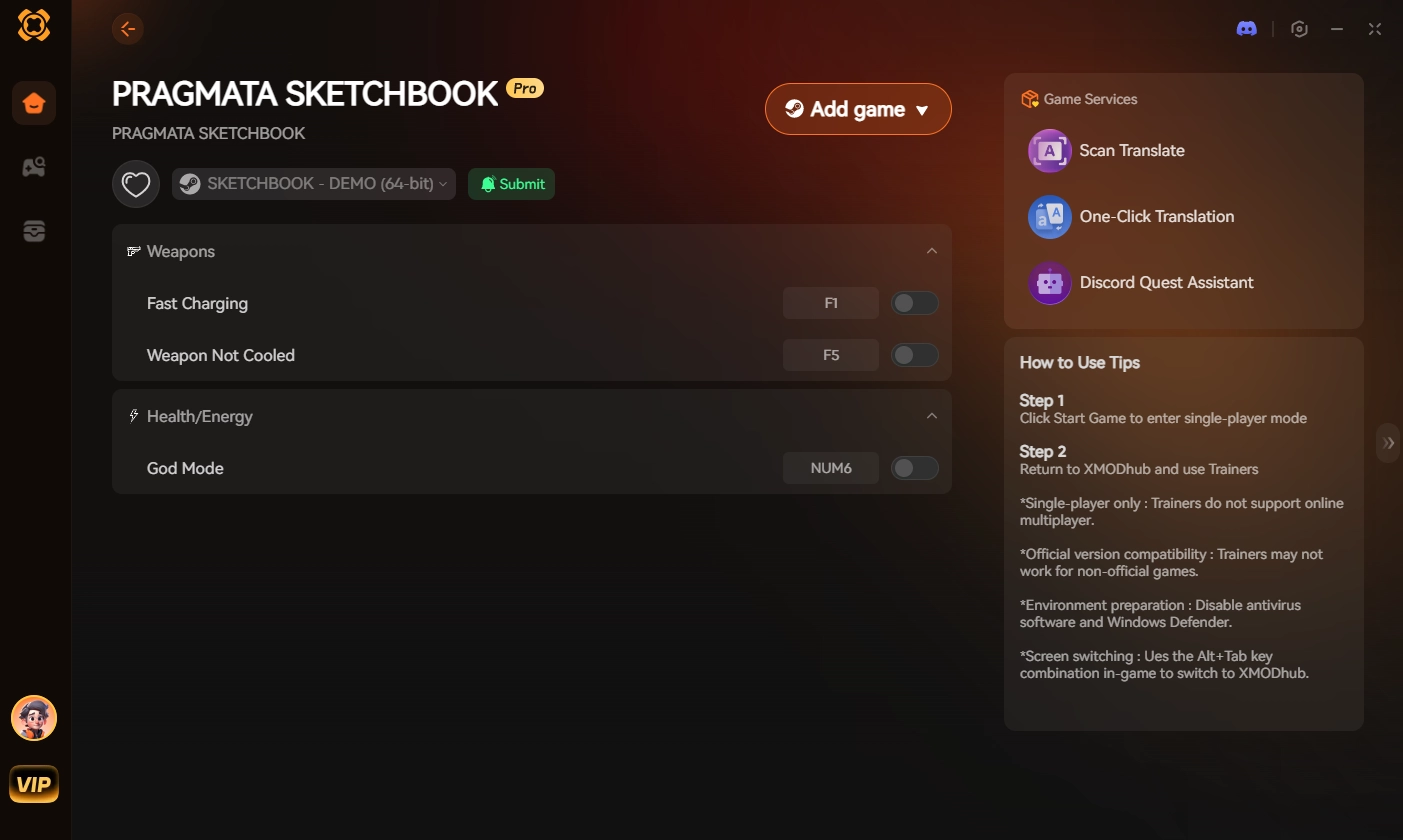
Stop acting as a slave to the game’s economy. Give yourself the resources you need instantly and experience the phenomenal combat of PRAGMATA entirely on your own terms.
Frequently Asked Questions (FAQ)
Q: Can I just save and reload my game to reset the PRAGMATA zero-g salvage timer?
A: No. PRAGMATA utilizes an aggressive autosave system that immediately records the harvested state of environmental nodes. When you reload your save file, the game reads that data and intentionally spawns the sector with the salvage already removed. You must use the Mag-Lev distance method to force a memory reset.
Q: Are there specific sectors with higher concentrations of Zero-G Salvage?
A: Yes. Sector 4 (The Orbital Ring) and Sector 7 (The Outer Hull) have the highest density of floating wreckage. Because these areas are predominantly zero-gravity zones, the developers packed them with significantly more salvage nodes compared to the subterranean laboratory sectors.
Q: Does Diana’s scanner show when salvage nodes have respawned?
A: Yes. If you use Diana’s holographic pulse scanner, active salvage nodes will highlight in bright blue through walls. If you pulse the scanner and do not see any blue highlights, it means the engine has not flushed the memory cache yet, and you must travel further away to trigger the respawn.
Conclusion
Understanding the PRAGMATA zero-g salvage timer is crucial to surviving the mid-game upgrade drought. By recognizing that the RE Engine uses memory caching instead of a real-time clock, you can utilize the Mag-Lev transport to force environmental resets and farm the materials you need to upgrade Hugh’s exosuit.
However, gaming should never feel like a tedious checklist. If repetitive resource farming is ruining your immersion, XMODhub is the definitive solution to reclaim your time.
As the premier PC gaming enhancement platform supporting over 5,000 titles, XMODhub provides the ultimate tools for single-player dominance. Whether you need infinite salvage in PRAGMATA, max sharpness in Monster Hunter Wilds, or infinite health in Devil May Cry 5, XMODhub ensures you play by your own rules.
🚀 Download XMODhub for free today and upgrade your arsenal instantly

I am a passionate gamer and writer at XMODhub, dedicated to bringing you the latest gaming news, tips, and insights.
Connect with me:
LinkedIn Profile ↗

 Nancy Miller