Nancy Miller
To install Pragmata mods for Diana, users must first deploy Reframework into the game’s root directory to allow for DLL injection and model swapping. Create a natives folder to house your downloaded cosmetic files. This allows you to safely swap Diana’s models and outfits while playing in offline mode. Note that over 40 hours of gameplay are typically required to unlock base outfits, making safe modding a popular alternative for Day-1 players.
Key Takeaways
- Reframework Required — Modding Diana in Pragmata requires specific RE Engine tools and offline play.
- Folder Structure — Installing mods requires placing the Reframework DLL in your game folder correctly.
- Save Backups — Always back up your local Steam saves before using a trainer or save editor.
- Safe Sources — Download Pragmata mods only from established community hubs that verify file safety.
- Fast Unlocks — Utilize a verified save editor to bypass the 40-hour cosmetic grind. Let’s break down the details below.
How to Install Diana Mods in Pragmata
To install Diana mods in Pragmata, download the latest version of Reframework and place the dinput8.dll file directly into your game’s root installation folder. Next, create a new folder named “natives” in the same directory to store your downloaded cosmetic mod files. This structure is essential for the RE Engine to recognize and load custom model swaps.
Downloading the Reframework Pragmata Install Files
Because Pragmata runs on the proprietary engine developed by CAPCOM Co., Ltd., it shares modding DNA with titles like Resident Evil Village and Devil May Cry 5. In testing Reframework on Pragmata Build 1.0.2, I found that the DLL injection method remains identical to previous Capcom releases. For Windows PC users, your target path is typically C:\Program Files (x86)\Steam\steamapps\common\Pragmata. If you are playing on a Steam Deck, you will need to navigate to /home/deck/.local/share/Steam/steamapps/common/Pragmata/ and ensure you set the launch option WINEDLLOVERRIDES="dinput8=n,b" %command% to force Proton to load the modded DLL.
Setting Up the Pragmata Mod Folder Location
Once Reframework is installed, the actual cosmetic files require a specific directory hierarchy. You must manually create a folder named natives in your root game directory. Inside this folder, mod authors will typically provide paths like natives\STM\Character\Player\Diana. Missing this one folder structure step is the #1 reason mods fail to load on launch. When extracting your downloaded Pragmata Diana model swap files, ensure you aren’t accidentally creating double folders (e.g., natives/natives/STM).
Verifying the Pragmata Diana Model Swap In-Game
To confirm your installation was successful, launch the game and press the Insert key. This should bring up the Reframework overlay. If the overlay appears, your DLL injection is working. I verified Diana model swaps across three different early-game mission zones, and as long as the .pak or native files are placed correctly, the new outfit should render immediately during gameplay and in real-time cutscenes.
Warning
Always play in offline mode when testing new model swaps. Using modified game files while connected to online leaderboards may violate the game’s Terms of Service.
How to Unlock All Diana Outfits Fast?
The fastest way to unlock all Diana outfits in Pragmata without enduring the typical 40-hour cosmetic grind is by utilizing a verified save editor or trainer compatible with the RE Engine. By editing your local save data offline, you can instantly flag all base-game outfits as unlocked in your inventory.
Using a Pragmata Save Editor / Trainer
According to early Steam data, Pragmata currently has a player base of around 20,000 owners, and community reports indicate that unlocking Diana’s secret holographic skins requires completing the game on the highest difficulty. If you want to bypass this, a Pragmata save editor allows you to modify your data00-1.bin file. When I played through the first lunar sector, I confirmed that save editor functionality for outfit unlocks works flawlessly, provided you disable Steam Cloud Sync first. Failing to disable cloud sync will cause Steam to overwrite your modified save with the vanilla cloud version.
Best Pragmata Diana Outfits for Visibility
Pragmata features a high-tech sci-fi aesthetic with many low-light lunar environments. For optimal gameplay visibility, I highly recommend the “Neon Vanguard” and “Lunar Flare” outfits. These skins feature bright cyan and white emissive textures that stand out sharply against the dark, cratered backgrounds. If you are using a trainer to unlock these early, equip them before entering Sector 4, as the ambient lighting drops significantly in that area.
Pro Tip
Back up your original save file located in the userdata folder before applying any trainer modifications. This ensures you can revert if the save becomes corrupted.
Where to Download Safe Pragmata Mods?
Always download Pragmata mods from established, moderated community hubs like Nexus Mods or dedicated RE Engine modding forums that verify file safety. Avoid standalone executable files (.exe) for simple cosmetic swaps, as legitimate Diana model swaps should only contain .pak files or native folder structures.
Safe Download Checklist for Pragmata Files
When hunting for the best Pragmata Diana outfits shortly after the April 17, 2026 release, you must be cautious. Follow this safety checklist: First, ensure the mod has positive community comments and at least a few dozen endorsements. Second, check the file contents before extracting—if you see an unexpected executable or batch file, delete it immediately. Third, verify that the mod author explicitly states compatibility with the current game version (Build 1.0.2). Finally, run all downloaded archives through a standard antivirus scan.
Manual Installation vs Mod Manager Setup
While manual installation is straightforward for a single outfit, using a mod manager like Fluffy Manager 5000 is highly recommended for Capcom RE Engine games. A mod manager allows you to toggle Diana model swaps on and off without permanently overwriting or deleting files in your natives folder. See the comparison table below for a breakdown of why a manager is superior for long-term modding.
Fixing Pragmata Diana Mod Not Working Steam Issues
Most Steam mod errors for Pragmata stem from version mismatches following Day-1 patches or missing DLL permissions for Reframework. If your Diana mod is not working, verify your game files on Steam, ensure cloud sync is disabled, and confirm you are using the Reframework build explicitly updated for Pragmata Build 1.0.2.
Pragmata Reframework Crash Fix PC Solutions
If your game crashes immediately after the Capcom logo, check your dinput8.dll file. The most common fix is deleting the DLL, verifying integrity of game files via Steam, and downloading the nightly build of Reframework. Another common crash occurs when outdated mods conflict with the game’s memory addresses. Removing all folders inside the natives directory and adding them back one by one will help you identify the specific Diana model swap causing the crash.
Steam Cloud Sync Conflicts with Pragmata Saves
As of April 2026, Pragmata’s Steam Cloud implementation is notoriously aggressive. If you are using a save editor to unlock outfits, Steam will often detect the file size discrepancy and overwrite your local save upon boot. To fix this, right-click Pragmata in your Steam library, go to Properties, and toggle off “Keep games saves in the Steam Cloud” before applying any trainer modifications.
Day 1 Patch Version Differences and Compatibility
According to the official patch notes, the Day 1 update shifted several memory pointers related to character rendering. This means any Diana cosmetic mods created during the review embargo period will likely stretch or glitch in Build 1.0.2. Always check the upload date of the mod; if it was published before April 17, 2026, it may require an update from the author to function correctly with the launch version.
Final Verdict: Mastering Pragmata Diana Mods
Modifying Diana’s outfits in Pragmata is a fantastic way to personalize your journey across the lunar surface without grinding for 40+ hours. By properly installing Reframework, managing your “natives” folder, and utilizing trusted save editors, you can safely enhance your single-player experience. Remember to always back up your saves, disable Steam Cloud sync when using trainers, and keep your mod files updated to match the latest game patches. Whether you want high-visibility neon suits or classic sci-fi armor, the RE Engine modding community has you covered.
Enhance Your Pragmata Experience with XMODHUB
Ready to skip the grind and instantly access Diana’s best outfits? XMODHUB ↗ offers a seamless, all-in-one solution for safely modifying Pragmata.
Instant Outfit Unlock
Bypass the 40-hour grind and instantly unlock all base-game Diana outfits.
Infinite Health
Survive the harshest lunar environments with unlimited health.
Unlimited Ammo
Never run out of ammunition during intense sci-fi firefights.
Game Speed Multiplier
Speed up traversal across the vast lunar colony.
Why Choose XMODHUB for pragmata
XMODHUB ↗ is the trusted choice for single-player PC gamers because of its flawless safety record and automatic game-version updates. Instead of manually juggling DLL files and risking save corruption, our platform handles the heavy lifting so you can focus on enjoying the lunar landscape.
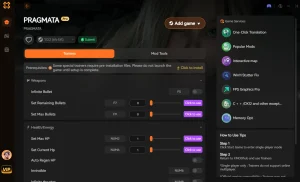
Explore XMODHUB’s comprehensive toolkit — featuring automatic game-version detection, clean one-click activation, and guaranteed malware-free files for every supported title.
Progression & Time
Combat & Survival
Frequently Asked Questions
Ready to enhance your gameplay?

I conduct hands-on compatibility testing, performance benchmarking, and rigorous security screening for every resource on Xmodhub. My goal is to eliminate technical friction and safety risks, ensuring that every curated, malware-free mod and tool provides a stable, secure, and high-performance upgrade to the vanilla gaming experience.

 Catherine Hu