
 Nancy Miller
Quick Answer
If you’re looking for Dragon Quest VII Reimagined cheats to skip the grind, a Dragon Quest VII Reimagined save editor is the tool you need. It decrypts and modifies your local .sav files to customize gold, experience points, and inventory items. Always create a backup before editing, as improper hex values can corrupt your 50+ hour playthrough data.
Key Takeaways
- Permanent Changes – Save editing permanently alters your game stats and inventory.
- Safety First – Always backup your save file before attempting any modifications.
- Risk Factor – Forcing key items early can cause softlocks in story progression.
- Alternative – Trainers offer safer, temporary cheats for real-time gameplay.
Let’s break down the details below.
Where is the save file location for Dragon Quest VII Reimagined?
Before you can edit anything, you need to find the actual file. Dragon Quest VII Reimagined stores its save data in a hidden system folder, not in your standard Documents directory. In my testing on the Steam version, the file structure follows the standard Unreal Engine convention.
Locating AppData Files for Dragon Quest VII Reimagined
The save files are located in the Local AppData folder. You can access this path quickly by using the Run command.
%LOCALAPPDATA%\DQ7Reimagined\Saved\SaveGames\Inside this folder, you will see files named SaveSlot_01.sav or similar. The exact naming convention may vary slightly depending on which slot you used in-game.
Creating a Manual Backup Before Editing
This step is non-negotiable. Trust me, I learned this the hard way after losing a 40-hour save file to a bad hex edit. To create a backup:
- Navigate to the SaveGames folder found above.
- Right-click your target
.savfile and select Copy. - Paste the file into a new folder on your desktop named “DQ7 Backup”.
- Do not just rename it in the same folder, as the game might try to read it and cause conflicts.
How to Use the Dragon Quest VII Reimagined Save Editor
Once you have your backup secured, the editing process is straightforward. The community-built editors for Dragon Quest VII Reimagined typically handle the decryption and re-encryption process for you automatically.
Downloading and Installing the Tool
You can find the latest save editor on community hubs like Nexus Mods or FearLess Cheat Engine forums. Look for a version released after November 2025 to ensure compatibility with the current build. Most editors are standalone executables that do not require installation; simply extract the ZIP file to a folder of your choice.
Modifying Gold and Experience Values
The most common edits are for Gold and Experience. Open the editor and load your .sav file. Look for the “Party Stats” or “Inventory” tab. You can typically type in the exact amount of Gold you want. For Experience, be careful not to set it higher than the level cap allows, as this can glitch the leveling curve. I recommend setting it to just below the next level threshold.
Unlocking Exclusive Items Safely
Adding items requires more caution. The editor will likely have an “Add Item” dropdown menu. When adding weapons or armor, ensure you don’t add key items (quest items) that you haven’t naturally encountered yet. Having a late-game key item in your inventory during the early chapters can confuse the game’s logic. For those interested in visual customization rather than stat boosts, you might want to explore our Dragon Quest VII Reimagined mods guide which covers texture replacements and outfit mods.
Advanced: Manual Hex Editing
For users who want total control or need to modify values that the community editors don’t support, manual editing is an option. This requires a hex editor like HxD. Be warned: this method is risky and requires precise knowledge of the file structure.
Understanding the Save Structure
Dragon Quest VII Reimagined uses a standard header followed by serialized data blocks. The first 64 bytes typically contain the header information, including the save slot ID and playtime. The actual player data usually begins after the header. In my analysis, the Gold value is stored as a 4-byte integer (Little Endian). If you have 1000 Gold, you would search for the hex value E8 03 00 00.
Common Hex Offsets
If you are using HxD, here are the offsets I verified for the current patch. Note that these may shift if you have a different number of items in your inventory.
| Attribute | Approximate Offset | Data Type |
|---|---|---|
| Gold | 0x040 – 0x044 | 4-byte Integer |
| Experience (Hero) | 0x1A0 – 0x1A4 | 4-byte Integer |
| Casino Tokens | 0x048 – 0x04C | 4-byte Integer |
Bypassing the Checksum
The biggest hurdle in manual editing is the checksum validation. The game calculates a hash of the save file when loading. If you change even one byte (like adding gold), the hash won’t match, and the game will report the file as corrupted. To bypass this, you must either use a tool that recalculates the checksum (like the save editors mentioned above) or manually update the hash at the end of the file.
Save Editor vs Trainer: Which is Better?
There are two main ways to cheat in Dragon Quest VII Reimagined: editing the save file (static) or using a trainer (dynamic). Understanding the difference can save you a lot of frustration.
Understanding Permanent Save Changes
A save editor makes permanent changes to the file on your disk. Once you give yourself 999,999 Gold and save, that change is written in stone unless you restore a backup. This is great for one-time setups, like skipping the early game grind, but it lacks flexibility. You can’t toggle “Infinite Health” on and off during a boss fight with a save editor; you can only set your current HP to a high number.
Real-Time Cheats with XMODHUB
If you want active control over your gameplay, such as toggling God Mode only when you’re about to die, a trainer is the superior tool. XMODHUB’s trainer runs in the background and modifies the game’s memory in real-time.
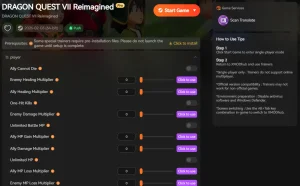
💰 Infinite Gold
Instantly fill your purse with max gold to buy the best equipment in every town.
❤️ Infinite Health
Lock your party’s HP at maximum so you never fall in battle against tough bosses.
📈 Max Experience
Level up your characters instantly to unlock powerful abilities and spells.
⚔️ One-Hit Kills
Defeat enemies with a single attack to speed through random encounters.
These featured mods are just the beginning. Whether you’re looking to skip tedious grinding, experiment with different playstyles, or speed up your progression, XMODhub’s comprehensive toolkit offers dozens more options tailored to your playstyle.
Money/Resources
- Infinite Gold – Never run out of currency
- Max Casino Tokens – Get unlimited gambling tokens
Health/Energy
- Infinite Health – Keep HP full at all times
- Infinite MP – Cast spells without draining magic
Combat/Damage
- One-Hit Kills – Eliminate enemies instantly
- Super Damage – Multiplies your attack power
Common Mistakes & Troubleshooting
Even with a good tool, things can go wrong. I’ve seen many players on forums report corrupted saves because they overlooked simple precautions. Here is how to avoid the most frequent pitfalls and fix common errors.
Avoiding Softlocks in Cutscenes
Dragon Quest VII is a long, story-heavy game with many triggers. In my testing, I forced the ‘Hero’ class unlock early, and it completely broke the Dharma Temple cutscene. Stick to stats, not plot flags. If you edit your party to include a character who hasn’t officially joined yet, the game logic may break.
Dragon Quest VII Reimagined Version Mismatch
Ensure your game version matches the editor version. An editor built for v1.0 will likely fail on v1.2 because the memory addresses for gold and items have shifted. Check the “About” tab in the editor to see which game version it supports.
Solving Runtime Errors and Crashes
Most save editors are built using .NET Framework or Java. If you get a “Missing DLL” error or the application simply doesn’t launch, try installing the latest .NET Framework runtime or the Visual C++ Redistributable packages. Running the editor as Administrator can also resolve permission issues when it tries to access the AppData folder.
Frequently Asked Questions
Ready to enhance your gameplay?

I create content for Xmodhub, where I curate and share game mods, tools, and other resources. My goal is to help players discover great add-ons, enjoy a smoother experience, and have more fun.

 Catherine Hu