Catherine Hu
Surviving the brutal, war-torn continent of Pywel as Macduff is no walk in the park. Because Pearl Abyss built Crimson Desert using the DNA of their notoriously grind-heavy MMOs, the single-player campaign does not hold your hand.
Between massive boss health pools, exhausting stamina drains, and a camp-building economy that demands constant resource gathering, the game can easily eat up hundreds of hours. If you are a working PC gamer who just wants to experience the incredible story without treating resource farming like a second job, you are likely hunting for Crimson Desert console commands or cheat codes.
You may also like: Crimson Desert Cheat Engine Alternative Guide
Editor’s Take: The Console Lockout
“I absolutely love the combat engine here, but by chapter three, I was burned out. I spent an entire evening just chopping trees to upgrade my mercenary tents, only to get one-shot by a Mythical Desert Worm because my sword’s durability broke mid-swing.”
“I immediately tried to pull up the developer console to spawn some repair kits, but Pearl Abyss has it locked down tight. After wasting time on broken Cheat Engine tables that corrupted my auto-save, I finally switched to the XMODhub Trainer. It completely saved my playthrough.”
Are There Console Commands in Crimson Desert?
No. There are no native console commands available in the retail PC release of Crimson Desert. Because the game runs on the proprietary Black Space Engine, the developer debug menu is completely locked. You must use an external memory trainer to enable cheats.
Pressing the Tilde (~) key or adding -console to your Steam Launch Options will do nothing. If you want to enable cheats like Infinite Money or God Mode, you cannot type them in manually.
Crimson Desert Item IDs & Spawning Gear
A massive chunk of players searching for the console are actually looking for Item IDs to quickly spawn legendary weapons, rare ores, or quest items.
In older RPGs, you would hunt down a wiki page for a hex code (like 0001F35A) and type it into the command line. Since the console is locked in Crimson Desert, discovering and injecting these dynamic memory IDs manually is virtually impossible without crashing your game.
The Modern Workaround: Instead of memorizing codes, modern utility tools feature Visual Spawners. You simply open a desktop overlay, type “Legendary Broadsword” into a search bar, and click “Add to Inventory.”
Platform Compatibility: Steam vs. Epic Games
If you are wondering whether cheats work across different PC storefronts, the answer is yes—but it depends on your tool.
Finding standalone cheat scripts that work for both the Steam and Epic Games versions of Crimson Desert is incredibly rare, as the executable files (.exe) differ slightly between storefronts. Fortunately, premium utility platforms like XMODhub automatically detect which storefront you purchased the game from and inject the correct memory bypass automatically.
Leveling Up: Can You Max Skills Instantly?
Leveling up Macduff and unlocking top-tier combat skills requires a massive amount of XP farming. While you cannot “type a command” to reach max level, you can use an external trainer to activate Fast XP Multipliers.
By toggling a 50x XP Gain cheat, a single bandit camp clear will grant you enough skill points to max out Macduff’s entire alchemy and melee skill tree in less than ten minutes.
Why Traditional Cheat Engine Tables Fail
Since you cannot type commands, many desperate players turn to Reddit or random forums looking for Cheat Engine (.ct) tables. This is a massive mistake for three core reasons:
- Constant Game Updates: Pearl Abyss patches this game frequently. Every time a hotfix drops, the game’s memory addresses shift. A cheat table you downloaded on Tuesday will completely break your game by Thursday.
- Save File Corruption: Forcing an outdated pointer to inject an item ID can permanently brick your 60-hour Macduff save file.
- Malware Risks: Downloading standalone .exe trainers from anonymous forum users is a massive security risk for your PC.
(🔗 Guide Hub: Did an outdated cheat script ruin your progress? Read our Where is the Crimson Desert Save File Location & Backup Guide to learn how to roll back your save.)
The Ultimate Solution: XMODhub PC Trainer
If you want to skip the agonizing resource grind and experience Pywel’s gorgeous world on your own terms, the XMODhub PC Trainer is the undisputed best utility available today.
Widely regarded as the safest, most stable WeMod alternative for Crimson Desert, XMODhub is an all-in-one, auto-updating desktop overlay that seamlessly injects into the Black Space Engine without touching your core game files.
| Feature | Forum Cheat Tables (.ct) | XMODhub PC Trainer |
|---|---|---|
| Ease of Use | Complex (Requires attaching processes) | 1-Click (Simple UI sliders and hotkeys) |
| Game Updates | Breaks instantly; wait days for a fix | Auto-Updates via cloud synchronization |
| Risk Level | High (Sketchy downloads, save wiping) | Verified Safe (Digitally signed software) |
| Feature Set | Limited to basic health and gold | Comprehensive (Durability, Camp Resources) |
How to Install and Use the Trainer (3 Steps)
Forget about digging into hidden %AppData% folders or tweaking .ini configurations. XMODhub is built for gamers who want to get straight back into the action.

- Download the Client: Grab the free, lightweight XMODhub app from our official website. It is bloatware-free and scanned daily by VirusTotal.
- Auto-Detect the Game: Launch the application. XMODhub automatically scans and detects your Steam or Epic Games installation of Crimson Desert.
- Play & Toggle: Hit “Play” directly inside the XMODhub app. Once your game loads, use your keyboard numpad or pull up the sleek in-game overlay to instantly toggle your cheats on or off.
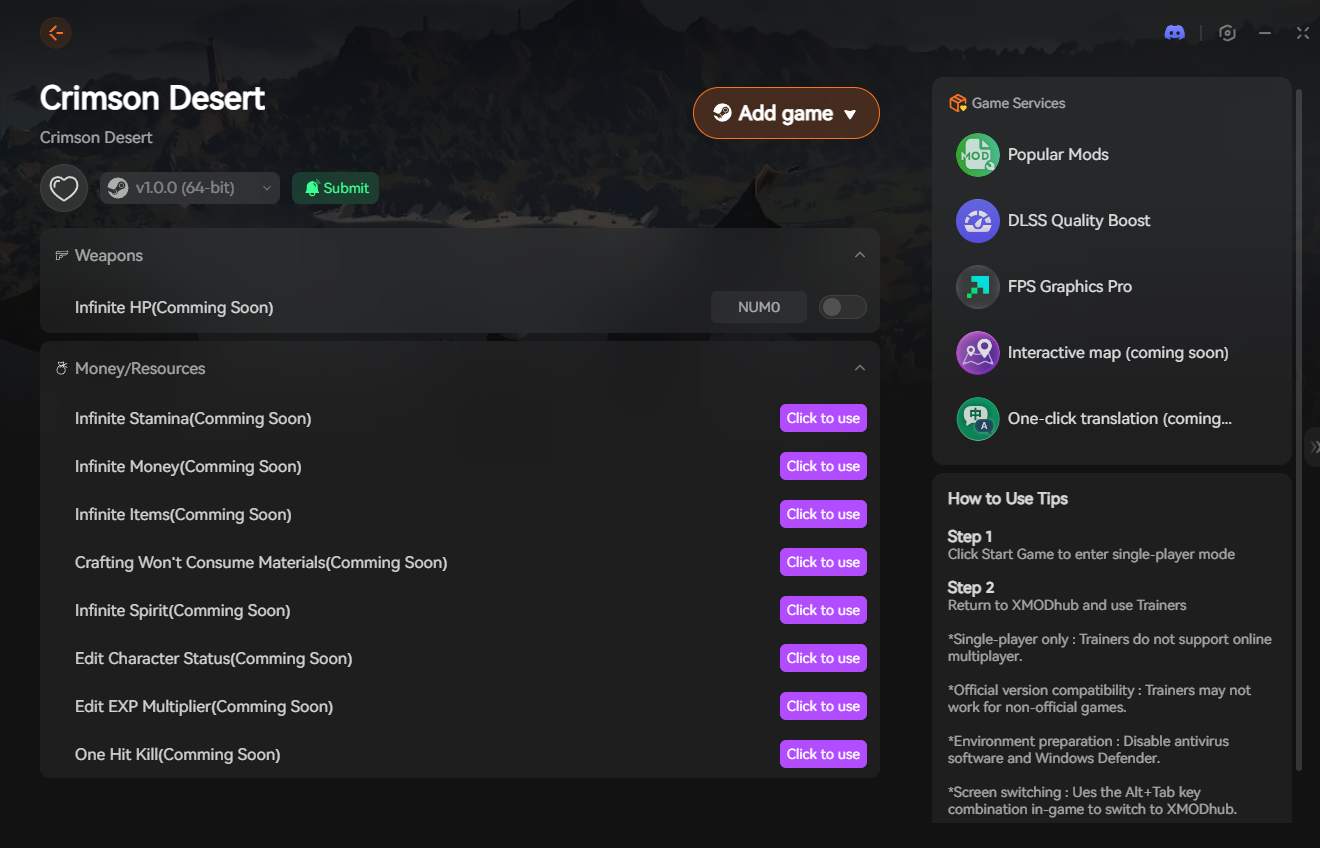
🚀 Download the Crimson Desert XMODhub Trainer Free Here
Top 5 Essential Cheats for Your Playthrough
The XMODhub Trainer offers dozens of customizable options, but these specific toggles will dramatically improve your quality of life in Pywel.
1. God Mode (Infinite Health & Stamina)
Combat against Mythical Beasts requires frame-perfect dodges. One missed parry means death. God Mode ensures Macduff’s health never drops. More importantly, Infinite Stamina allows you to unleash endless heavy attack combos and climb massive cliff faces without plummeting to your doom.
2. Unlimited Gold & Camp Resources
Building your mercenary company is incredible, but upgrading tents and crafting high-tier armor requires an absurd amount of iron and wood. This cheat locks your resource count to 99,999, allowing you to instantly max out your camp.
(🔗 Guide Hub: Prefer farming legitimately? Read How to Farm Gold & Get Unlimited Money in Crimson Desert.)
3. Infinite Carry Weight Limit Bypass
Looting is fun until Macduff becomes over-encumbered, forcing you to walk at a snail’s pace. The Infinite Carry Weight cheat completely removes the encumbrance penalty. You can carry 50 broadswords and 1,000 healing potions without ever slowing down.
4. Infinite Weapon Durability
Weapons in Crimson Desert degrade rapidly with every strike. Having your legendary greatsword shatter during a stronghold siege is infuriating. Toggle this on, and your weapon durability remains frozen at 100%, saving you endless trips to the blacksmith.
5. Super Speed & Teleportation
Pywel is gigantic. Before you unlock advanced mounts or fast travel waypoints, getting from one region to another takes ages. The Super Speed toggle lets you sprint across the map in minutes, while the custom Waypoint Teleport lets you bypass the travel system entirely.
Safety Check: Will I Get Banned?
Because Pearl Abyss is famous for their strictly monitored MMOs, many players are terrified of anti-cheat bans.
Rest assured, you will not be banned for using XMODhub in Crimson Desert. This is fundamentally a single-player, narrative-driven RPG. While it has minor asynchronous online features, your local save file belongs to you. Modifying your single-player experience with a memory trainer does not violate multiplayer anti-cheat protocols. (Note: We strictly advise disabling trainers if you participate in any specific online-only leaderboard events).
Frequently Asked Questions (FAQ)
Q: Does XMODhub work on the Steam Deck?
A: Yes! Unlike traditional cheat engines that struggle with Linux architecture, XMODhub features compatibility settings that allow the overlay to function alongside Crimson Desert on SteamOS.
Q: Do cheats disable Steam Achievements in Crimson Desert?
A: No. Using the XMODhub trainer operates externally and does not flag your save file like a native developer console would. You can play with God Mode on and still unlock all Steam and Epic Games achievements.
Q: Can I spawn specific mercenaries using cheats?
A: Spawning complex NPCs requires heavy script manipulation which can break quest lines. Instead of spawning them, we recommend using the trainer’s “Infinite Charisma/Reputation” toggle to easily recruit any mercenary you encounter naturally in the world.
Conclusion: Reclaim Your Game Time
Crimson Desert is a breathtaking achievement in open-world design, but you shouldn’t have to sacrifice hundreds of hours to mindless grinding just to see the ending. Whether you are stuck on a punishing boss fight, tired of managing your inventory weight, or frustrated by the lack of a developer console, you have the right to tailor the difficulty to your lifestyle.
Stop wrestling with broken cheat tables and locked .ini files. The XMODhub PC Trainer provides the ultimate, crash-free modding flexibility. Bypass the frustration, empower Macduff, and conquer the continent of Pywel on your own terms.
XMODhub is your ultimate PC gaming companion. Supported for 5,000+ games including related massive RPGs like Dragon’s Dogma 2, The Witcher 3, and Cyberpunk 2077.

I am a passionate gamer and writer at XMODhub, dedicated to bringing you the latest gaming news, tips, and insights.
Connect with me:
LinkedIn Profile ↗

 Nancy Miller