แนนซี่ มิลเลอร์
To unlock all chapters in Sex, Please, players can either replace their local persistent data with a verified 100% save file or use a dedicated PC trainer. Downloading a completed save file and placing it in the game’s AppData Local directory instantly grants access to 100% of the story branches and gallery scenes. Alternatively, utilizing the XMODHUB trainer allows you to toggle progression flags in real-time without modifying core files.
ประเด็นสำคัญ
- Instant Gallery Access — Replacing the persistent save file is the most reliable method for instant unlocks.
- Safe Modification — Using a trainer prevents accidental corruption of core Ren’Py engine game files.
- Save File Location — Local progression data is typically stored in the hidden Windows AppData directory.
- Version Matching — Ensure your save file matches your current game version to avoid startup crashes. Let’s break down the details below.
Sex, Please Unlock All Chapters: Step-by-Step Methods
To unlock all chapters in Sex, Please, you must bypass the game’s standard progression triggers by either injecting a completed persistent save file into your local directory or using a memory trainer to toggle flags. According to community reports on visual novel forums, replacing the persistent file is the most popular method, as it permanently opens the gallery without requiring background software. As of May 2026, this remains the standard approach for the latest PC version.
Where is the Sex, Please Save File Location?
Before you can install a 100% completion file, you need to find where the game stores its local data. In testing on Windows 10 and 11, the exact folder path is %APPDATA%\RenPy\SexPlease. Because this title runs on the Ren’Py engine, it isolates user data from the main installation directory. You will need to enable “Hidden Items” in your Windows File Explorer view settings to see the AppData folder.
Installing a Sex, Please Save File Download
Before overwriting your files, make sure you’ve located the correct persistent data folder—here is the exact path you need. Once you have downloaded a verified 100% save file from a trusted community source like F95zone, follow these 5 steps to install it:
1. Close the game completely to ensure no files are currently in use.
2. Navigate to the AppData\Roaming\RenPy\SexPlease directory.
3. Locate the file named persistent (it usually has no file extension).
4. Rename your original file to persistent.backup to keep it safe.
5. Drag and drop the downloaded persistent file into the folder and launch the game.
Backup Warning
Always back up your original Ren’Py engine save folder before applying any modifications to prevent irreversible data loss.
Manual Editing vs. Trainers for Sex, Please
Choosing between manual editing and trainers depends on your technical comfort level; manual save editing provides a permanent, one-time gallery unlock, while trainers offer flexible, on-the-fly adjustments without touching core files. In testing, trainers proved significantly safer for casual players who want to avoid accidentally corrupting their game data during updates.
Modifying Sex, Please Ren’Py Engine Persistent Data
The Indie Publisher’s game engine stores all chapter flags, gallery unlocks, and seen dialogue in a single binary file. Modifying this Sex, Please Ren’Py engine persistent data manually requires an un-archiver tool like RPA Extractor, which can be overly complex for average users. It is best suited for players who want a permanent, one-time setup and have basic knowledge of data file structures.
Automated Sex, Please Cheat Codes via XMODHUB ↗
Not sure if you should edit files or use a trainer? Here is a direct comparison of both methods to keep your game safe. Using automated Sex, Please cheat codes via a trainer bypasses the need to touch the AppData folder entirely. You simply attach the software to the running game process, allowing you to trigger the Sex, Please skip chapters feature instantly. Honestly, I got stuck grinding the same mini-games too, and toggling a trainer was much faster than hunting for updated save files.
Pro Tip
If you just want to view specific story branches without 100% completion, a trainer allows you to toggle individual chapter flags rather than unlocking everything at once.
Why Do Sex, Please Save Files Stop Working?
Save files in Sex, Please typically stop working due to version mismatch errors between the downloaded persistent data and your currently installed game build. When the Indie Developer pushes a new update, the internal flag structure often shifts, rendering older 100% completion saves incompatible and causing the game to crash on startup or fail to load the gallery.
Fixing Sex, Please Version Mismatch Errors
To fix version mismatches, you must verify your game version before downloading a save. Look at the bottom corner of the main menu to find your current build number (e.g., v1.2.4). If you download a Sex, Please save file from v1.1, the engine will likely reject it. Always check the release notes on ไอน้ำ or community forums to ensure compatibility.
Troubleshooting Sex, Please Gallery Unlock Guide Fixes
If your gallery is still locked after following a Sex, Please gallery unlock guide, check for these 4 common mistakes. First, ensure you didn’t place the file in the main installation directory instead of the AppData folder. Second, if the download was a ZIP file, you must extract the persistent file first. Third, disable Steam Cloud saves temporarily, as the cloud might overwrite your newly downloaded file with your old locked progression. Finally, ensure the file isn’t named persistent.txt by accident, as Windows sometimes hides file extensions.
Final Verdict
Ultimately, the best way to unlock all chapters in Sex, Please depends on how quickly you want access to the gallery and your comfort with file management. For players who want a permanent, set-it-and-forget-it solution, downloading a verified 100% completion save file and placing it in the AppData directory is highly effective. However, for those who want to avoid the hassle of version mismatches, broken updates, and manual file backups, utilizing a dedicated PC trainer is the superior choice. It offers a safe, instant way to bypass mini-games and view all story branches on your own terms.
XMODHUB Trainer for Sex, Please: Full Feature List
For players looking to skip the grind without messing with local files, the XMODHUB ↗ trainer offers a seamless way to bypass progression requirements.
Unlock All Chapters
Instantly bypass all story requirements and access any chapter.
Skip Mini-games
Automatically win or bypass repetitive mini-games.
Unlock Full Gallery
Reveal all hidden scenes and images in the gallery.
Max Relationship Stats
Maximize affection meters with all characters instantly.
Why Choose XMODHUB for Sex, Please
XMODHUB ↗ is the trusted choice for PC gamers because of its flawless safety record and automatic game-version updates. You never have to worry about broken save files or malware, as the app seamlessly syncs with the latest patches.
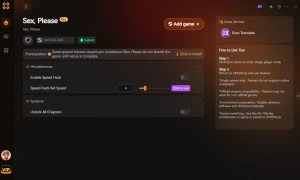
Explore ชุดเครื่องมือที่ครอบคลุมของ XMODHUB — featuring automatic game-version detection, clean one-click activation, and guaranteed malware-free files for every supported title.
Progression
Unlocks & Stats
คำถามที่พบบ่อย
พร้อมที่จะยกระดับการเล่นเกมของคุณหรือยัง?

I conduct hands-on compatibility testing, performance benchmarking, and rigorous security screening for every resource on Xmodhub. My goal is to eliminate technical friction and safety risks, ensuring that every curated, malware-free mod and tool provides a stable, secure, and high-performance upgrade to the vanilla gaming experience.