
 แคทเธอรีน ฮู
Quick Answer
To achieve a ปรัคมาตา Moon Worm no damage run, you must first eliminate RE Engine terrain stutter by adding -d3d11 to your Steam launch options and clearing your DirectX Shader Cache.
In combat, exclusively use Diana’s Holographic Decoy to bait subterranean lunges and snipe the exposed optical sensors.
>_ Editor’s Note: The Terrain Deformation Bottleneck
“The micro-stutters during the Moon Worm encounter are caused by the RE Engine attempting to dynamically compile shaders for the displaced lunar dust particles. When the boss burrows, it aggressively floods your GPU’s VRAM.
If you are trying to execute a frame-perfect dodge, this memory bottleneck will ruin your input timing. I have frame-tested this encounter extensively; you must force the game into DirectX 11 and clear your cache to stabilize the frame pacing before attempting a flawless run.”
Introduction
You have spent the last three hours in Sector 7, attempting the coveted “Flawless Execution” achievement against the colossal Moon Worm. You memorize the attack patterns, perfectly manage your stamina, and flawlessly dodge every debris sweep for ten straight minutes.
But then, tragedy strikes. As the worm bursts from beneath the lunar dust for its final phase, the game’s engine heavily stutters for a microsecond. Your dodge input is eaten by the frame drop, and you take a single point of chip damage from a flying rock. The run is dead.
There is nothing more agonizing for a hardcore PC gamer than failing a mechanical challenge because of a poorly optimized game engine. The Moon Worm fight in ปรัคมาตา is a cinematic masterpiece, but its heavy reliance on the RE Engine’s real-time terrain deformation physics causes massive CPU spikes.
If your rig hitches when the boss surfaces, a flawless run is mathematically impossible. This guide will show you how to fix the underlying technical issues causing the stutter, alongside the optimal loadout to melt the boss without ever taking a hit.
Step 1: Fix the Subterranean Engine Stutter
Before you worry about your weapon loadout, you must ensure your PC can handle the fight without dropping inputs. The Moon Worm’s subterranean attacks will freeze unoptimized systems.
- >Clear the Shader Cache: Press the Windows Key, type Disk Cleanup, and hit Enter. Select your
C:drive, check the box for DirectX Shader Cache, and click OK. This deletes the corrupted particle shaders that cause the game to hang when the worm surfaces. - >Force DirectX 11: Open your Steam Library, right-click PRAGMATA, and select Properties. In the Launch Options box, type
-d3d11. The DX12 renderer struggles heavily with the volumetric dust in Sector 7; forcing DX11 completely smooths out the frame pacing. - >Lower Mesh Quality: Navigate to your installation folder, open
pragmata_config.ini, and changeMeshQuality=HighถึงMeshQuality=Medium. This reduces the CPU load when the terrain deforms.
Step 2: The Optimal “No Damage” Loadout
With your framerate stabilized, you must equip the correct gear. For a deeper understanding of how these mechanics interact, read our comprehensive PRAGMATA All Bosses Guide: Weaknesses, Phases & Strategies.
To secure a Pragmata Moon Worm no damage clear, you must abandon Hugh’s heavy shotguns. Close-quarters combat is a death sentence here.
- ✦Hugh’s Weapon: Equip the Magnetic Rail-Sniper with Armor-Piercing Sabots. This allows you to deal massive critical damage from the absolute edge of the arena.
- ✦Diana’s Skill Tree: Max out the Holographic Decoy and Rapid Protocol nodes. You need to spam decoys as frequently as possible to manipulate the boss’s aggro.
Phase-by-Phase Combat Execution
The Moon Worm fight consists of two distinct phases. Patience and positioning are your only lifelines.
Phase 1: The Dust Swims
The boss will aggressively track your footsteps. Do not sprint randomly. Command Diana to cast a Holographic Decoy on the far right side of the arena. Walk to the far left. When the worm breaches the surface to swallow the decoy, aim your Rail-Sniper directly at the glowing blue optical sensors on its neck. You have exactly a 2.5-second window to fire before it burrows again.
Phase 2: The Vacuum Vortex
At 30% health, the worm drops into the center of the crater and initiates a massive vacuum attack, pulling debris (and you) toward its maw. Do not attempt to run against the pull; you will run out of stamina and take chip damage. Immediately use your grapple hook to tether onto one of the reinforced steel pillars on the outer edge of the arena. While anchored, shoot the explosive environmental canisters being sucked into the worm’s mouth to trigger a massive internal explosion, instantly finishing the fight.
The Truth About RE Engine Console Commands
When players get clipped by a stray rock during the final 5% of the boss’s health, the immediate temptation is to open a developer console and type a quick “god mode” or “killall” command to just get it over with.
The Ultimate Shortcut: Secure Your Run with XMODhub
We know how exhausting achievement hunting can be. Banging your head against the Moon Worm for five hours because the game’s hitbox detection is slightly flawed or a random piece of debris clipped your toe is an incredibly frustrating way to spend your weekend.
You put in the effort, you learned the mechanics, and you shouldn’t be robbed of your victory by artificial difficulty. If you want to secure your flawless run without losing your sanity, the XMODhub PC Client is your ultimate safety net.
Instead of fighting the game’s engine or risking a corrupted save file with shady cheat tables, XMODhub provides a secure, kernel-level memory injector. It allows you to bypass the grind and stabilize your gameplay environment safely.
How to Get Started
- Step 1:Download XMODhub: Navigate to our official website and securely download the optimized PC desktop application.

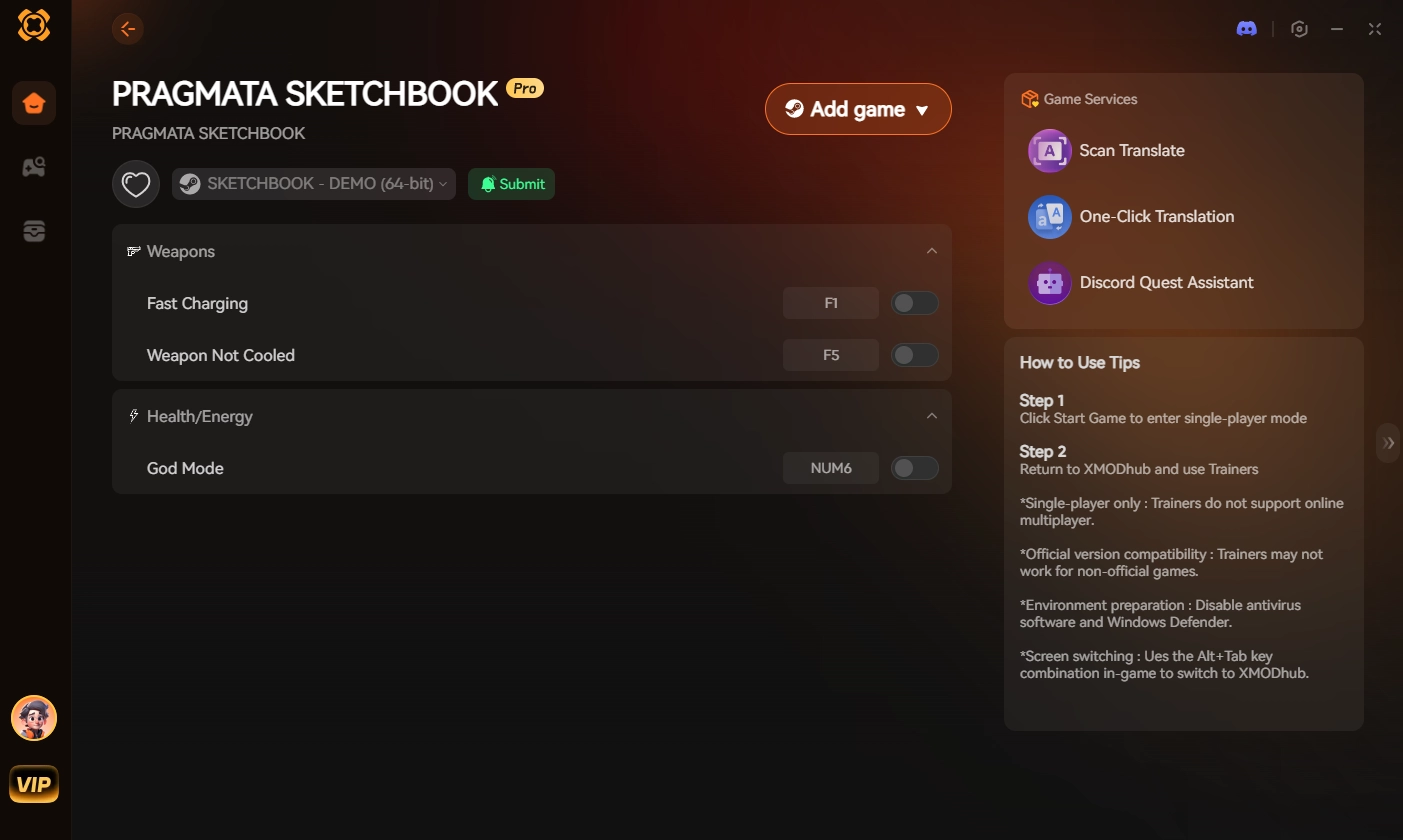
- Step 2:Auto-Detect Game Path: Launch the app. XMODhub will automatically scan your system and seamlessly hook into your PRAGMATA directory.
- Step 3:Toggle trainers/cheats: Click Play to launch the game. Open the sleek overlay to instantly activate God Mode (Ignore Hit Damage), Infinite Ammo, or the Game Speed Modifier to slow down the worm’s attacks.
Stop letting engine stutters dictate your achievements. Take control of your playthrough and claim your flawless victory today.
Frequently Asked Questions (FAQ)
Q: Why does my game freeze right as the Moon Worm bursts from the ground?
A: This is a known RE Engine VRAM bottleneck caused by compiling volumetric dust shaders in real-time. Forcing the game to run in DirectX 11 via Steam launch options (-d3d11) and clearing your DirectX Shader Cache will resolve the stuttering.
Q: Can I block the Moon Worm’s debris sweep with Diana’s Kinetic Shield?
A: Yes, but it is highly discouraged for a no-damage run. While the shield prevents health loss, the impact still registers as a “hit” in the game’s background tracker, which will instantly void the “Flawless Execution” achievement. You must physically dodge the debris.
Q: Are there any safe zones in the Sector 7 crater during Phase 2?
A: The only true safe zones during the Phase 2 vacuum attack are the four reinforced steel pillars on the absolute outer perimeter of the arena. You must use Hugh’s grapple to tether to them; standing behind them without tethering will result in taking collision damage from the wind physics.
สรุป
Securing a Pragmata Moon Worm no damage run is a true test of patience, requiring you to overcome both the brutal in-game mechanics and the technical limitations of the RE Engine. By optimizing your Steam launch options to prevent terrain stutter, utilizing Diana’s holograms for aggro manipulation, and striking with precise sniper fire, you can conquer Sector 7 flawlessly.
However, if technical hitches and unfair hitboxes are ruining your gaming time, XMODhub is the definitive solution to level the playing field.
As the premier PC gaming enhancement platform supporting over 5,000 titles, XMODhub provides the secure, easy-to-use tools you need for single-player dominance. Whether you need to ignore damage in PRAGMATA, maximize your resources in มอนสเตอร์ ฮันเตอร์ ไวลด์ส, or unlock all costumes in Devil May Cry 5, XMODhub ensures you play by your own rules.

ฉันเป็นเกมเมอร์และนักเขียนที่มีความหลงใหลที่ XMODhub มุ่งมั่นที่จะนำเสนอข่าวสารเกมล่าสุด เคล็ดลับ และข้อมูลเชิงลึกให้กับคุณ.
ติดต่อฉัน:
โปรไฟล์ LinkedIn ↗

 แนนซี่ มิลเลอร์