
 แคทเธอรีน ฮู
Want to test out the endgame Heavy Rescue Firetruck early? Are you tired of grinding for the Department Budget just to afford basic station expansions, or perhaps a critical ambulance got permanently stuck in traffic and your simulation is soft-locked?
Using developer commands to spawn assets is a beloved staple of PC management games. Below is the most comprehensive, categorized, and up-to-date list of Unity internal Item IDs, spawn codes, and staff trait IDs for Global Rescue, verified for the latest 2026 Early Access patch.
🚨 Quick Reference: Top 10 Most Wanted Global Rescue IDs
If you don’t want to scroll through thousands of rows of Unity asset data, here are the exact spawn codes for the most essential and frequently searched items in the game (including unlimited budgets, premium vehicles, and facility upgrades).
รูปแบบคำสั่ง: AddResource [Item ID] [Amount] (For currencies/materials)
| ชื่อรายการ | Item Description / Value | Exact Item ID |
|---|---|---|
| Department Budget | The core currency for purchasing and building | Resource_Budget_Total |
| Research Points | Unlocks advanced medical and rescue tech | Resource_Research_Points |
| Heavy Fire Engine | High-capacity water and rescue tool vehicle | Vehicle_FireEngine_Heavy_01 |
| Advanced Ambulance | Mobile ICU for critical patients | Vehicle_Ambulance_Advanced |
| Police SWAT Van | Transports heavily armed tactical units | Vehicle_Police_SWAT_Van |
| Jaws of Life | Critical tool for extracting crash victims | Equipment_Rescue_JawsOfLife |
| Advanced Trauma Kit | Stabilizes severe injuries on-site | Equipment_Medical_TraumaKit |
| Tactical Riot Gear | Protects officers during massive crowd events | Equipment_Police_RiotArmor |
| Helipad Blueprint | Allows construction of air rescue facilities | Facility_Upgrade_Helipad |
| Elite Commander Badge | Instantly promotes a staff member’s rank | Item_Staff_EliteCommander |
💻 How to Enable the Console & Use Spawn Commands
Before you can use the ID codes listed below, you must understand the correct syntax and the backend reality of Global Rescue.
- ✖Open the Console: Officially, Global Rescue is built on the Unity Engine, and the developers have permanently locked the native console in the retail build to prevent simulation-breaking bugs. To input these commands manually, you must first inject a third-party Universal Unity Unlocker (UUU) or BepInEx script hook into the game client. Once injected, press the Tilde key (~) during gameplay.
- ✓The Command Syntax: The standard format requires the command action, the internal asset ID, and the quantity.
- 💬Format & Example:
AddResource [Item ID] [Quantity]— To spawn $500,000 for your department, you would typeAddResource Resource_Budget_Total 500000and press Enter.
⚠️ Expert Warning:
“Typing AddResource Resource_Research_Points 500 is fine if you only need a quick tech unlock. But if you are managing a massive metropolitan map and need to deploy multiple specific vehicles, manually typing case-sensitive Unity Prefab hex codes becomes incredibly repetitive. One wrong character results in a ‘Syntax Error’ or worse, a fatal Unity physics crash if you accidentally spawn a firetruck inside your dispatch room. While the lists below are meticulously verified, I personally switched to a visual UI injector months ago. Seeing the vehicle icon and just clicking ‘Deploy to Station’ is how modern PC modding should feel.”
🚁 The Easy Way: XMODhub Visual Spawner (No Typing Required)
Stop Alt-Tabbing to check massive spreadsheets. Typing long, case-sensitive ID codes breaks your immersion and wastes your limited dispatch time.
The XMODhub PC Client includes a dedicated “Visual Item Spawner” feature specifically built for Global Rescue to bypass the locked and unstable Unity console entirely.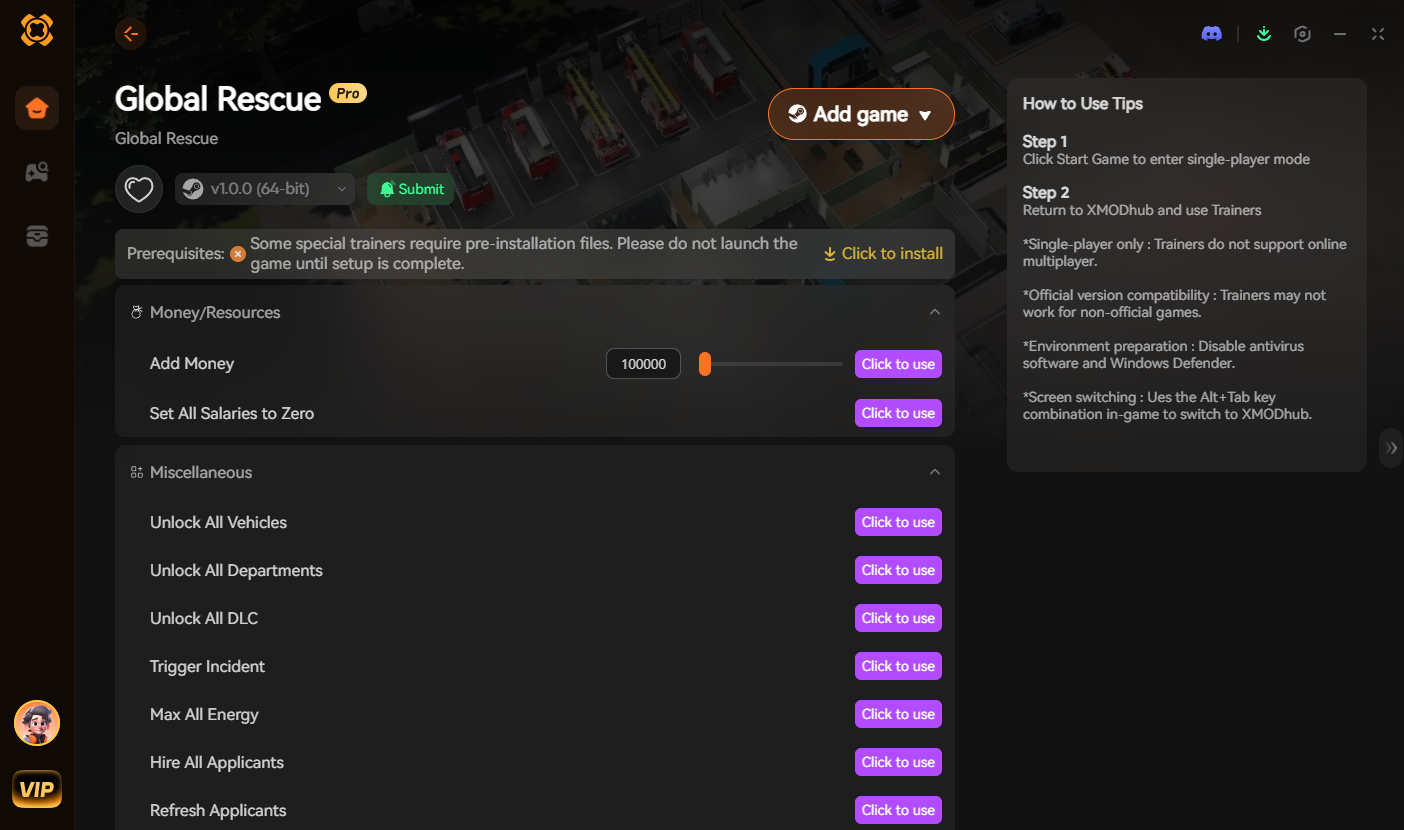
- ★Icon-Based UI: See exactly what the police cruiser, rescue helicopter, or station upgrade looks like before you deploy it.
- ★Instant Search: Just type “Ambulance” or “Budget” in the overlay search bar and click the one you want.
- ★Batch Spawning: Maximize your medical supplies and vehicle spare parts with one button press.
- ★Auto-Updated Lists: When the developers add new DLC emergency services, XMODhub updates its database automatically via the cloud. You never have to hunt for new ID strings again.

🚓 Vehicle IDs List (Fire, Police & EMS)
Use these codes to instantly equip your stations with the fastest and most capable response fleets. Note: Use the SpawnVehicle command to safely place these in empty garage slots.
รูปแบบคำสั่ง: SpawnVehicle [Vehicle ID]
| ชื่อยานพาหนะ | Vehicle ID |
|---|---|
| Standard Police Cruiser | Vehicle_Police_Cruiser_01 |
| Fire Chief SUV | Vehicle_Fire_Chief_SUV |
| Medevac Helicopter | Vehicle_Medical_Helicopter |
| Hazmat Response Truck | Vehicle_Fire_Hazmat_Unit |
| Water Rescue Boat | Vehicle_Rescue_WaterCraft |
🧰 Rescue Equipment & Gear IDs List
Unlock specialized gear to handle complex emergencies, from armed robberies to chemical spills.
รูปแบบคำสั่ง: UnlockGear [Equipment ID]
| Equipment Name | Equipment ID |
|---|---|
| Firefighter SCBA Tank | Equipment_Fire_SCBA_Tank |
| Police Taser X2 | Equipment_Police_Taser_X2 |
| Portable Defibrillator | Equipment_Medical_Defibrillator |
| Thermal Imaging Camera | Equipment_Rescue_ThermalCam |
| Hazmat Suit Level A | Equipment_Fire_HazmatSuit_A |
🏗️ Resources & Upgrades IDs List
Never run out of maintenance materials during a massive city-wide crisis. We recommend spawning these in batches of 500+.
รูปแบบคำสั่ง: AddResource [Item ID] 500
| Consumable Name | Item ID |
|---|---|
| Vehicle Spare Parts | Resource_Vehicle_Parts |
| Station Building Materials | Resource_Building_Materials |
| Fuel Reserves | Resource_Fuel_Reserves |
| Medical Consumables | Resource_Medical_Supplies |
| Dispatch Server Upgrade | Facility_Upgrade_ServerRack |
👨⚕️ Staff Skills, Perks & Traits IDs
You don’t just have to spawn physical items. You can use the console to instantly train your staff, unlock specialized roles, or add permanent character traits to boost their efficiency.
รูปแบบคำสั่ง: AddTrait [Trait ID]
| Skill / Trait Name | Trait ID |
|---|---|
| Veteran Driver | Trait_Staff_VeteranDriver |
| Advanced Triage Specialist | Trait_Staff_AdvancedTriage |
| Crisis Negotiator | Trait_Staff_CrisisNegotiator |
| Iron Lungs (Smoke Res.) | Trait_Staff_IronLungs |
| Master Detective | Trait_Staff_MasterDetective |
⚠️ Troubleshooting: Why Are My Commands Failing?
If you are typing the IDs correctly but the game is throwing errors, check these common issues:
- ✖“Command not found”: The developers permanently locked the console in the retail patch. You must install a Unity script hook (like BepInEx) or use an external memory injector like XMODhub to re-enable the backend.
- ✖Physics Engine Crash (NavMesh Error): If you try to force a
SpawnVehiclecommand into a garage that is already full, the Unity physics engine will panic and crash to the desktop immediately. Always ensure you have an empty parking slot. - ✖“Item ID invalid”: Check if you are trying to spawn an item from a community Steam Workshop Mod. Modded vehicles often have dynamic IDs (e.g.,
xx001234where the xx depends on your specific mod load order). - ✖Square Boxes ([][][]): If the console displays unreadable boxes, your game language settings might not support the external console font. Temporarily switch your game language to English.
📞 Frequently Asked Questions (FAQ)
Q: Are these Item IDs case-sensitive in Global Rescue?
A: Yes, absolutely. Native Unity console commands and Prefab paths in Global Rescue are highly case-sensitive. Typing resource_budget_total instead of Resource_Budget_Total will yield a syntax error. Spacing is also strictly enforced.
Q: Can I spawn items while playing in Multiplayer or Co-Op?
A: No. These console commands are executed client-side and only function in your Single-Player city simulation. Attempting to force spawn vehicles in a multiplayer server will likely result in an immediate desynchronization and a permanent anti-cheat ban.
Q: How do I find the Item IDs for custom modded vehicles?
A: Finding dynamic load-order IDs manually for community mods is extremely difficult. We highly recommend using the XMODhub Item Browser, which automatically scans your active Unity mods, detects the custom assets, and lets you spawn them with a single click without knowing the exact hex ID.
🚓 Conclusion: The Ultimate Sandbox Experience
Having access to the complete Global Rescue Item IDs list is the fastest way to experiment with different dispatch layouts, test the response times of various vehicles, or simply recover from a frustrating logistics bug where your ambulances run out of fuel. Bookmark this page so you can quickly reference the codes whenever you need an emergency resupply of funding.
However, if you want a significantly smoother, crash-free experience where you don’t need to memorize strings of code like Vehicle_FireEngine_Heavy_01 and risk breaking the game’s pathfinding grid, the XMODhub Visual Spawner is the superior modern choice. Browse assets visually. Spawn them instantly. Keep your Steam achievements active.
XMODhub is your ultimate all-in-one toolkit for PC single-player gaming. Whether you need powerful Trainers, real-time resource editors, or Visual Spawners, our engine supports over 5,000+ games—including Global Rescue and similar simulation hits like 911 Operator, City Bus Manager, และ Rescue HQ.

ฉันเป็นเกมเมอร์และนักเขียนที่มีความหลงใหลที่ XMODhub มุ่งมั่นที่จะนำเสนอข่าวสารเกมล่าสุด เคล็ดลับ และข้อมูลเชิงลึกให้กับคุณ.
ติดต่อฉัน:
โปรไฟล์ LinkedIn ↗