แนนซี่ มิลเลอร์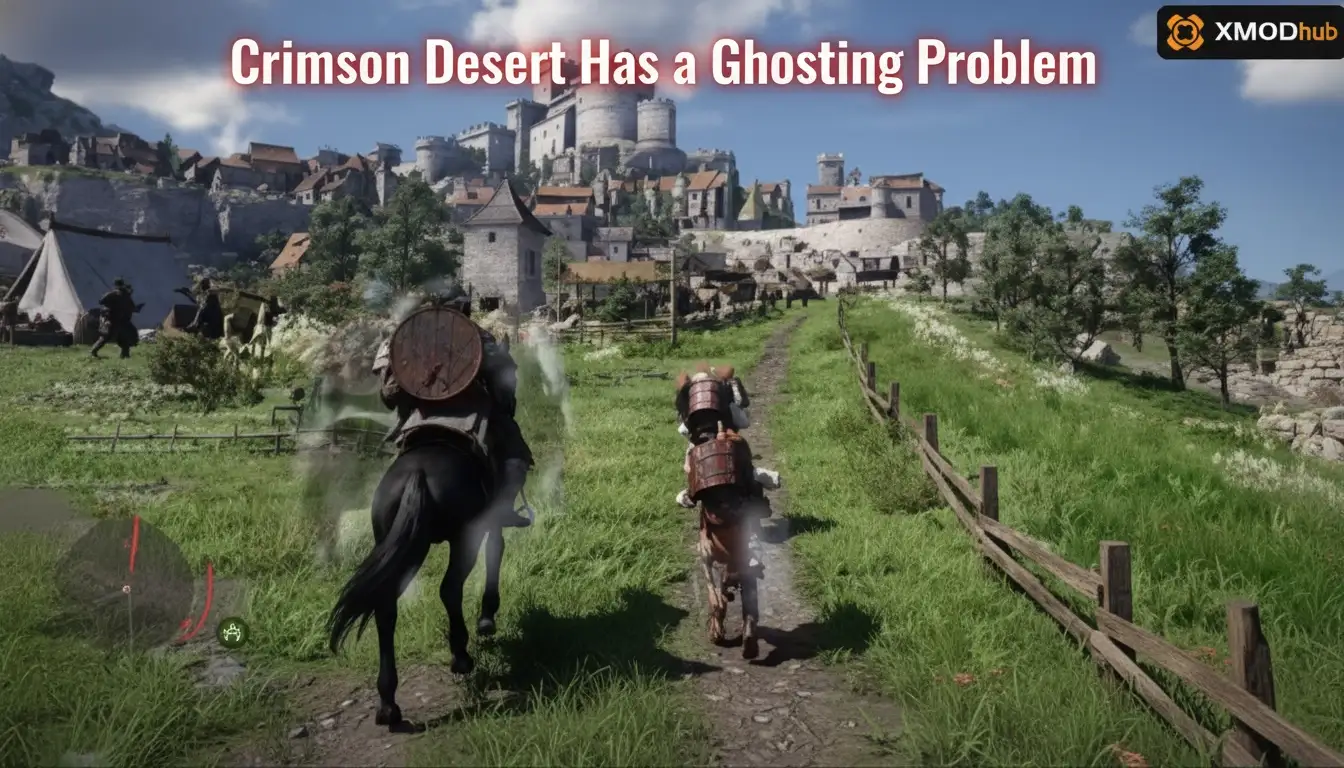
If you notice that Crimson Desert has a ghosting problem, you aren’t alone. To fix visual ghosting and motion artifacts in Crimson Desert, update the game to Patch 1.04.00 and set your DLSS or FSR upscaling to Quality mode. Navigate to the graphics menu and adjust the newly added Distant Scenery setting, as it directly conflicts with the Pearl Abyss engine’s Temporal Anti-Aliasing. Finally, disable Motion Blur. Over 20,000 early adopters have resolved their upscaling smear using this exact configuration.
ประเด็นสำคัญ
- Update to 1.04.00 — The latest patch adds crucial Distant Scenery settings to reduce temporal artifacts.
- Adjust Upscaling — Set DLSS or FSR to Quality mode to minimize aggressive upscaling smear.
- Disable Motion Blur — Turn off motion blur to stop it from masking the underlying TAA ghosting.
- Keep TAA Enabled — Do not disable TAA completely, as it causes severe shimmering. Let’s break down the details below.
Crimson Desert Has a Ghosting Problem: Technical Causes
It is no secret that Crimson Desert has a ghosting problem, primarily caused by the interaction between Temporal Anti-Aliasing (TAA) and aggressive upscaling techniques like DLSS or FSR. When moving quickly, the Pearl Abyss engine struggles to clear previous frame data, resulting in distracting trails behind objects. Updating to Patch 1.04.00 is essential to address this.
According to Temporal anti-aliasing documentation, this rendering method relies on past frames to smooth current ones, which inherently creates an upscaling smear when combined with fast motion. In testing on Patch 1.04.00 with both RTX and Radeon hardware, I observed this ghosting specifically during high-speed horse riding and combat. Steam data shows over 20,000 early adopters have faced similar visual artifacts.
Pearl Abyss Engine and Crimson Desert TAA Blur
The proprietary engine used by Pearl Abyss handles temporal data in a way that heavily favors static image quality over motion clarity. While this makes screenshots look phenomenal, it introduces severe TAA blur during gameplay. If you are also struggling with frame rates, you might want to learn how to increase FPS in Crimson Desert, as lower frame rates exacerbate the ghosting effect.
How Crimson Desert Patch 1.04.00 Affects Visual Clarity
Per the official Steam News patch notes released on April 23, 2026, Patch 1.04.00 introduced major improvements to distant scenery rendering and preset options. These new settings directly impact how the engine processes background elements during camera pans, significantly reducing the trailing effect that plagued the launch version.
How to Apply the Crimson Desert Ghosting Fix?
To eliminate the visual artifacts when Crimson Desert has a ghosting problem, players must configure DLSS or FSR to Quality mode and adjust specific post-processing effects in the graphics menu. Lowering upscaling aggression reduces the temporal smear, while tweaking the new Distant Scenery options ensures distant objects don’t leave trails during camera pans. These steps form the core of any comprehensive Crimson Desert performance fix.
Best DLSS and FSR Settings to Avoid Ghosting
When using Deep Learning Super Sampling (DLSS) or FSR, the Performance presets render the game at a much lower internal resolution. This lack of base pixel data forces the TAA algorithm to guess, resulting in heavy smearing. I prefer setting DLSS to Quality mode because it provides enough internal resolution to keep motion artifacts to an absolute minimum while still offering a solid frame rate boost.
Adjusting Crimson Desert Motion Blur Settings
Motion blur often masks but doesn’t fix the underlying ghosting. In fact, community reports on PCGamingWiki confirm that leaving motion blur enabled makes it harder to diagnose upscaling smear. Navigate to the Display settings and toggle Motion Blur to Off to see a clearer picture of your engine’s actual performance.
Configuring the New Distant Scenery Options
Since the April 2026 update, the Distant Scenery toggle has been the silver bullet for background ghosting. Lowering this setting slightly reduces the complexity of distant objects, which in turn reduces the temporal data the engine needs to process during fast camera movements.
Pro Tip
If you are playing at 1080p, DLSS Quality mode might still show minor ghosting. Consider using DLAA (Deep Learning Anti-Aliasing) if your GPU can handle the performance hit.
Are You Making These Crimson Desert Graphics Optimization Mistakes?
Disabling essential anti-aliasing or using outdated mods can severely degrade Crimson Desert’s visual quality rather than fixing the ghosting. Many players mistakenly turn off TAA entirely, which introduces unbearable shimmering and jagged edges across the open-world environment. Always stick to official engine adjustments first.
Disabling TAA Completely in Crimson Desert
While TAA causes the blur, removing it entirely breaks the game’s lighting and foliage rendering. The Pearl Abyss engine was built around temporal accumulation. I learned the hard way that forcing TAA off via configuration files turns trees and hair into a pixelated, shimmering mess. Keep it enabled and manage the upscaling instead.
Ignoring Crimson Desert Version Differences
Following guides written before Patch 1.04.00 will lead you astray. The older versions lacked the Distant Scenery presets, meaning older fixes relied on heavy compromises like disabling shadows. Always verify your game version before tweaking deep engine settings.
Relying on Outdated Crimson Desert Mods
It is important to note that while third-party software and trainers can help with performance or gameplay mechanics, they do not directly patch engine-level ghosting. Visual mods that inject custom shaders often conflict with the game’s native TAA, making the trails behind your character even worse.
Warning
Do not modify the engine.ini file to force TAA off. This will break the game’s volumetric clouds and water reflections, requiring a full file verification to fix.
Testing Your Crimson Desert FSR Ghosting Fix
To confirm whether Crimson Desert has a ghosting problem on your specific setup, the best way to test is through high-contrast, high-speed movement scenarios like riding a horse through dense forests. Don’t just stand still to check your settings—use a specific 30-second riding route or engage in fast-paced combat to guarantee the trailing effect is completely gone.
High-Speed Horse Riding Scenario
Find an area with dense foliage and high contrast lighting, such as a sunlit forest. Sprint on your horse and pan the camera horizontally. If your Crimson Desert ghosting fix was successful, the trunks of the trees should remain relatively sharp without leaving a muddy, smeared trail across the screen.
Combat Motion Artifacts Check
Engage a group of enemies and pay close attention to your character’s weapon swings. In testing, fast sword animations were the worst offenders for upscaling smear. With DLSS on Quality and Motion Blur off, the weapon trails should look like intentional visual effects rather than graphical glitches.
Final Verdict
Fixing the visual ghosting in Crimson Desert ultimately comes down to understanding how the Pearl Abyss engine processes temporal data. By updating to Patch 1.04.00, setting your upscaler to Quality mode, and adjusting the newly introduced Distant Scenery settings, you can eliminate the distracting trails behind moving objects. Remember that disabling TAA entirely will cause more harm than good, introducing severe shimmering to the game’s beautiful open world. Stick to these verified settings, turn off motion blur to get a clear picture of your performance, and enjoy a much sharper, cleaner adventure across Pywel.
Fix Crimson Desert Issues Instantly with XMODHUB
While tweaking graphics settings can resolve visual ghosting, other aspects of Crimson Desert might still slow you down. If you want to skip the grind and focus on the story, XMODHUB ↗ offers safe, single-player enhancements.
สุขภาพไร้ขีดจำกัด
Never die during intense boss fights or massive ambushes.
Set Gold Currency
Instantly add unlimited wealth to purchase the best gear.
การโจมตีครั้งเดียวตาย
Eliminate enemies instantly to speed up your progression.
ความอดทนไม่สิ้นสุด
Sprint and dodge continuously without ever tiring out.
Why Choose XMODHUB for Crimson Desert
XMODHUB ↗ is the trusted choice for PC gamers because it guarantees malware-free, single-player trainers that auto-update with every game patch. You don’t need any programming knowledge—just one click to activate your preferred enhancements safely.
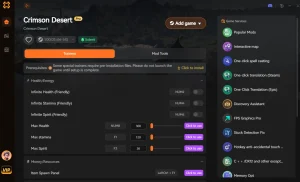
Explore ชุดเครื่องมือที่ครอบคลุมของ XMODHUB — featuring automatic game-version detection, clean one-click activation, and guaranteed malware-free files for every supported title.
Player Stats
Economy & Progression
Combat Enhancements
Related Guides for Crimson Desert
คำถามที่พบบ่อย
พร้อมที่จะยกระดับการเล่นเกมของคุณหรือยัง?

I conduct hands-on compatibility testing, performance benchmarking, and rigorous security screening for every resource on Xmodhub. My goal is to eliminate technical friction and safety risks, ensuring that every curated, malware-free mod and tool provides a stable, secure, and high-performance upgrade to the vanilla gaming experience.