แคทเธอรีน ฮู
🔦 Quick Answer:
What are the best Pratfall mods right now?
Based on community downloads, Godot Engine stability, and our own 2026 testing, the top 5 must-have Pratfall mods are:
- ⛏️Godot Cave Optimizer: Best for overall performance optimization, fixing crucial FPS drops when massive procedural cave-ins occur.
- ⛏️Advanced Backpack UI: Completely overhauls the vanilla inventory UI for better sorting of your bombs, flares, and magic beans.
- ⛏️Unbreakable Ziplines: Removes the durability limit on traversal gear for easier exploration across massive crevasses.
- ⛏️Dynamic Cavern Lighting: Enhances environmental textures, bioluminescent mushroom lighting, and dynamic shadows in the deep biomes.
- ⛏️Permanent Dog Rescue Marker: Adds a fast-travel waypoint and permanent tracker on the map so you never lose track of your missing pet.
📋 Editor’s Note on Testing Methodology
The mods featured in this guide were manually tested by our team on a high-end PC rig (RTX 4090, 64GB RAM) running Pratfall Patch 1.2. We have verified that these Godot-based mods are currently functional and compatible with each other during offline play. Always remember to back up your original save files located at %USERPROFILE%\AppData\Roaming\Godot\app_userdata\Pratfall\ before altering your game directory.
Introduction
Playing Pratfall in its vanilla state is an incredibly chaotic and fun co-op experience, but the PC modding community has taken it to a completely different level. Whether you are annoyed by a clunky inventory system while plummeting down a chasm, want to push your graphics card to its limits with enhanced cave lighting, or simply want to skip the tedious flare-grinding mechanics, there is a mod for exactly that.
However, diving into Godot Engine modding can be overwhelming. With hundreds of .pck files available, figuring out which ones actually work—and which ones will trigger a multiplayer desync and crash your game—is a massive headache.
After spending dozens of hours tweaking load orders and testing co-op compatibility, we have compiled the definitive list of the best Pratfall mods you need to install right now.
คุณอาจสนใจ: The Ultimate Pratfall PC Cheats Guide: Commands, Hacks & Trainers
⛏️ How to Install Mods for Pratfall Safely
Before downloading anything, you need to set up your game directory to accept modified files. Because Pratfall is built on Godot 4.6, the community highly recommends using a dedicated mod loader rather than dropping raw scripts manually.
Step-by-Step Installation:
- Download a Mod Manager: Install a trusted tool like the Godot Mod Loader (GML) configured for Pratfall.
- Create an Account: Register on a popular modding hub like Nexus Mods to download verified files.
- Locate the Paks Folder: Navigate to your game installation and find the
ผู้ดูแลหรือpaksfolder created by the Mod Loader. - Install and Deploy: Drop your downloaded .pck or .zip mod files into the folder, enable them via the manager UI, and ensure your load order prioritizes core framework mods first.
🎒 Top Quality of Life (QoL) Mods
These mods do not drastically change the core cave-diving game; they just remove the annoyances that waste your time.
- ★Advanced Backpack UI: This eliminates the constant scrolling and lets you filter items by consumables, gear, and quest items instantly.
- ★Instant Flare Toss: Skips the agonizingly slow wind-up animation for throwing flares, allowing you to light up dark crevasses immediately.
- ★Clear Trap Indicators: Highlights hidden spike traps and weak floorboards with a subtle red glow so you stop dying to cheap procedural generation.
✨ Best Visual and Graphics Mods
If you have a high-end PC, these mods will make Pratfall’s procedurally generated abyss look like a true next-gen title.
- ✨Dynamic Cavern Lighting: Completely revamps the game’s global illumination, making lava pits and glowing crystals physically cast realistic shadows.
- ✨HD Mining Gear Textures: Upscales character models, pickaxes, and traversal equipment to true 4K resolution.
- ✨Cinematic Abyss ReShade: Removes the game’s default blurry anti-aliasing and adds a terrifying, high-contrast color grade that makes the deep biomes genuinely intimidating.
🧨 Top Gameplay and Overhaul Mods
Looking to change how the game is actually played? These mods adjust physics, difficulty, and progression.
- 🛡️Brutal Gravity Overhaul: Rebalances fall damage and jump physics, making traversal much faster but significantly more dangerous.
- 🛡️Expanded Magic Beans: Adds entirely new types of plantable beans that sprout explosive vines, healing pods, or temporary platforms.
- 🛡️Generous Loot Drops: Adjusts crate spawn rates and chest contents for a much more forgiving solo-survival experience.
🔗 Nexus Mods Alternatives for Pratfall
While Nexus Mods is the undisputed king of PC modding, it is not the only place to find content for Pratfall. Depending on the type of content you are looking for, you can also check:
- •ModDB: Great for massive, total-conversion mods that add entirely new biomes.
- •Steam Workshop: Since the game relies heavily on SteamNetworkingSockets, Workshop integration is the easiest one-click installation method if the developers officially enable it.
- •Discord Communities: Many advanced Godot mod authors host their alpha builds and exclusive custom items on private servers.
📏 Is There a Mod Limit in Pratfall?
Yes, depending on the Godot engine’s memory allocation, there is often a soft cap on how many mods you can install. For Pratfall, pushing past 50 custom .pck plugins will often cause the engine to struggle with procedural generation, resulting in missing textures or infinite loading screens. To bypass this, advanced users have to learn how to repack their mods into a single file—a highly technical and frustrating process.
⚠️ The Danger of Mod Conflicts and Corrupted Saves
While graphic ReShades are usually safe, gameplay mods that alter health, inventory, or core physics stats can be incredibly dangerous to your save file—especially in a co-op game.
The biggest issue in Pratfall modding is Multiplayer Desync. If you install a mod that changes jump height and join a friend’s vanilla lobby, the game’s netcode will panic and crash to the desktop immediately. Furthermore, every time the game receives an official developer update, script-heavy mods break. If you load a solo save file attached to a broken mod, your entire procedural cave seed can become permanently corrupted.
🧰 The Easier Alternative to Gameplay Mods: XMODhub
If your main goal for modding is just to make the game more enjoyable—like giving yourself infinite ziplines, unlimited magic beans, or turning off fall damage to bypass a frustrating cavern—you do not need to risk breaking your game with complex mod managers.
This is where XMODhub shines as the ultimate gameplay enhancer.
Instead of downloading outdated .pck files that conflict with each other, the XMODhub app runs safely alongside Pratfall.
- ★Zero Installation Conflicts: Because it alters active memory dynamically, there are no files to drag and drop, and absolutely no load order nightmares.
- ★Update Proof: XMODhub updates its features automatically when Pratfall patches on Steam, so you never lose access to your Quality of Life tweaks.
- ★Save File & Achievement Safe: Unlike traditional mods that permanently brand your save file or disable achievements, XMODhub leaves zero trace when you close the app.
⚙️ How to Use XMODhub for Pratfall
- Download and Launch the free XMODhub desktop app.

- ค้นหา Pratfall ในคลังเกมของคุณ.
- Click “Play” to launch the game securely.
- Toggle your desired cheats (No Fall Damage, Infinite Flares, Infinite Bombs) directly from the clean UI or via hotkeys.
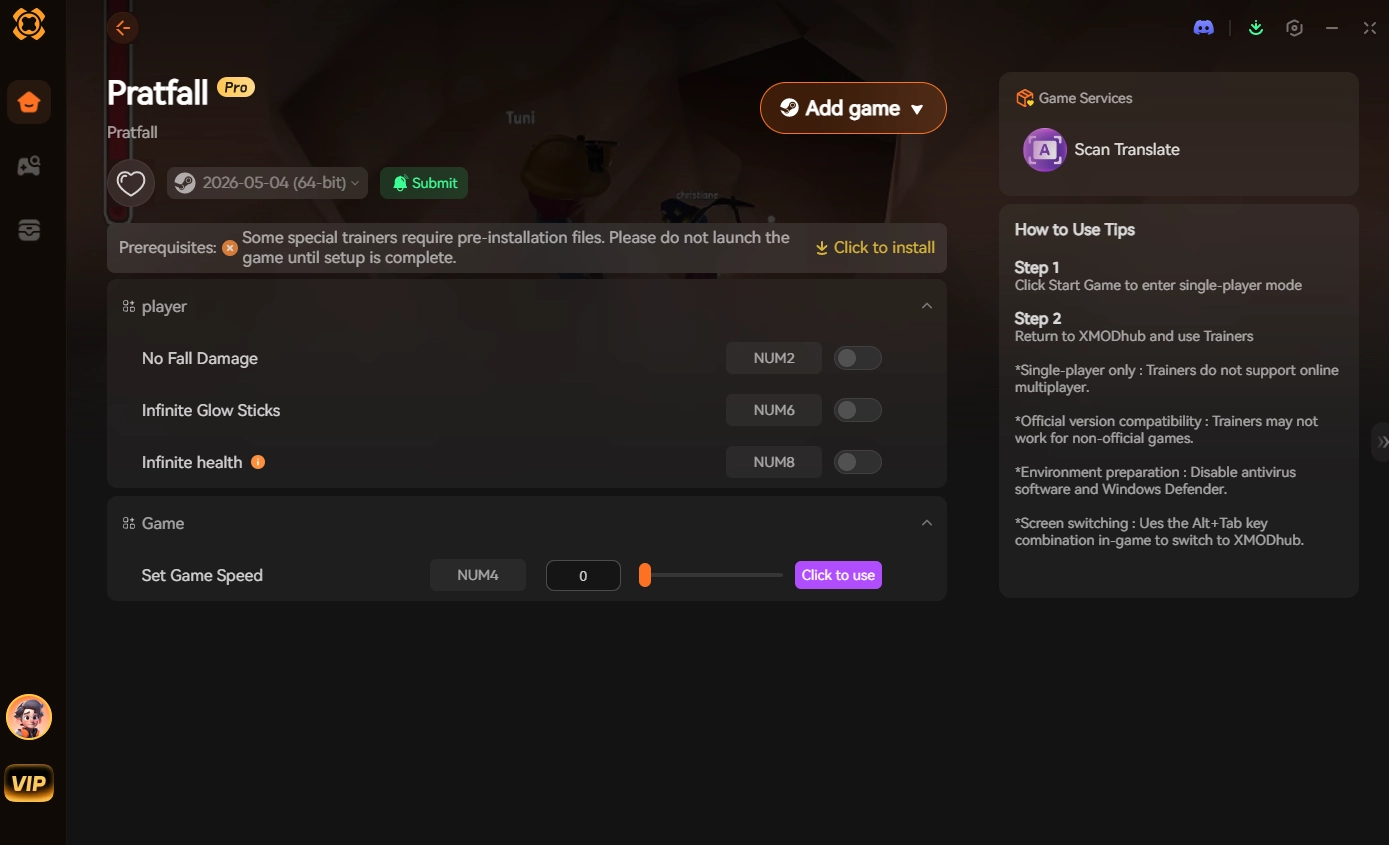
- Done. Focus on rescuing your dog.
⚠️ Troubleshooting: Mods Crashing on Startup
If your game is crashing to a black screen after installing mods, check these common culprits:
- ✖Missing Mod Loader Updates: You installed a new mod but forgot to update your base Godot Mod Loader framework.
- ✖Outdated Mods: Check if the mod has been updated for the latest Pratfall patch. If it has not been updated in months, delete the .pck file immediately.
- ✓Verify Game Files: Go to Steam, right-click Pratfall > Properties > Installed Files > Verify integrity of game files to clear corrupted engine data.
💬 Frequently Asked Questions (FAQ)
Q: Will installing mods ban me from Pratfall?
A: No. Because Pratfall’s co-op uses peer-to-peer Steam connections rather than dedicated competitive servers, developers do not ban players for modifying their own game files. However, you should only use mods in private lobbies with friends who have the exact same mods installed to prevent network desyncs.
Q: Do mods disable Steam achievements?
A: In many cases, yes. Pratfall detects unauthorized script injections and will lock achievement progression. You often have to download a separate Achievement Enabler mod just to fix this, or use a secure memory tool like XMODhub which bypasses the detection entirely.
⛏️ Conclusion
Modding Pratfall is a fantastic way to breathe new life into a chaotic cave-diving game you already love. While visual enhancements and UI tweaks require traditional mod managers, altering your physical stats and inventory does not have to be a complicated, crash-prone process.
For a seamless, risk-free way to customize your difficulty, bypass the endless flare grinding, and truly play by your own rules, XMODhub is the superior choice. With dedicated support for Pratfall and over 5,000+ other single-player and private co-op PC games—including massive indie hits like Spelunky 2, Lethal Company, และ Deep Rock Galactic—XMODhub ensures you spend your time actually playing, rather than troubleshooting broken files.

ฉันเป็นเกมเมอร์และนักเขียนที่มีความหลงใหลที่ XMODhub มุ่งมั่นที่จะนำเสนอข่าวสารเกมล่าสุด เคล็ดลับ และข้อมูลเชิงลึกให้กับคุณ.
ติดต่อฉัน:
โปรไฟล์ LinkedIn ↗

 แนนซี่ มิลเลอร์