แคทเธอรีน ฮู
⚡ Quick Answer
What are the best Graveyard Keeper mods right now?
Based on community downloads, stability, and our own 2026 testing on the Unity engine, the top 5 must-have Graveyard Keeper mods are:
- [01] BepInEx Unity Framework: Best for overall performance optimization and acts as the mandatory script extender for 99% of other mods.
- [02] Inventory Tweaks: Completely overhauls the vanilla inventory UI, expands chest sizes, and auto-stacks heavy materials like Wood Billets.
- [03] No Energy Consumption: Removes the exhausting stamina drain for endless tree chopping, mining, and crafting without sleeping.
- [04] HD Texture Upscale: Enhances the pixel-art environmental textures, church stained glass, and dynamic lighting inside the crypt.
- [05] Sprint & Faster Movement: Adds a dedicated sprint function so you can run from the Graveyard to the Village in seconds.
Introduction
Playing Graveyard Keeper in its vanilla state is an incredibly addictive, albeit incredibly grindy, experience. But the modding community has taken it to a completely different level. Whether you are annoyed by the clunky chest system, want to speed up your zombie workers, or simply want to skip the tedious grind for Blue Tech Points, there is a mod for exactly that.
However, diving into Unity game modding can be overwhelming. With hundreds of BepInEx scripts available, figuring out which ones actually work—and which ones will crash your autopsy session—is a massive headache.
After spending dozens of hours tweaking load orders and testing compatibility against the latest DLCs, we have compiled the definitive list of the best Graveyard Keeper mods you need to install right now.
คุณอาจสนใจ: The Ultimate Graveyard Keeper Cheat Engine Guide (And A Much Easier Alternative)
How to Install Mods for Graveyard Keeper Safely
Before downloading anything, you need to set up your game directory to accept modified files. Because Graveyard Keeper runs on the Unity engine and lacks official Steam Workshop support for heavy scripts, the community relies on external frameworks.
Step-by-Step Installation:
- Download a Mod Manager: Install a trusted tool like Vortex, or prepare to manually manage your files.
- Create an Account: Register on a popular modding hub like Nexus Mods to download files.
- Install the Script Extender: Almost all Graveyard Keeper mods require BepInEx to function. Download the 64-bit version and extract the core files directly into your root game folder alongside the main executable.
- Install and Deploy: Download your chosen mods, place the
.dllfiles into the newly createdBepInEx/pluginsfolder, and launch the game.
Top Quality of Life (QoL) Mods
These mods do not drastically change the core game; they just remove the annoyances that waste your time.
- ✦ Queue Everything: Allows you to queue up dozens of tasks at the Carpenter’s Workbench or Stone Cutter, eliminating the constant menu clicking.
- ✦ Faster Crafting: Speeds up the agonizingly slow progress bars when cutting logs, making nails, or smelting glass.
- ✦ NPC Tracker: Highlights NPC schedules and adds map markers so you never miss the Merchant on Gluttony day or the Bishop on Pride day again.
Best Visual and Graphics Mods
While it is a pixel-art game, these mods will make Graveyard Keeper look incredibly crisp on modern monitors.
- ✦ Dynamic Lighting Overhaul: Completely revamps the game’s global illumination, making the church candles and crypt torches cast realistic, atmospheric shadows.
- ✦ 4K UI Scaling: Upscales character portraits, theology skill trees, and inventory icons to true 4K resolution, removing blur on larger displays.
- ✦ Cinematic ReShade: Removes the game’s default murky color palette and adds a sharper, more vibrant contrast to the farming and village areas.
Top Gameplay and Overhaul Mods
Looking to change how the game is actually played? These mods adjust the economy, corpses, and progression.
- ✦ Economy Rebalance: Adjusts the Farmer and Blacksmith vendor prices, reducing the severe inflation penalty when you sell too many crops or coal at once.
- ✦ No Corpse Decay: Stops bodies from degrading while sitting on the autopsy table or pallet, ensuring you always extract perfect white skulls without rushing.
- ✦ Advanced Zombie Automation: Adds entirely new logistics to your zombie workers, making them move faster, carry more crates to the Tavern, and never stall.
Nexus Mods Alternatives for Graveyard Keeper
While Nexus Mods is the undisputed king of PC modding for this title, depending on the type of content you are looking for, you can also check:
- ▹ GitHub: Many advanced mod authors host their open-source BepInEx plugins and alpha builds directly on GitHub repositories.
- ▹ Graveyard Keeper Discord: The official and fan-made Discord servers are goldmines for troubleshooting and finding niche, fan-updated mods that fix broken abandoned projects.
Is There a Mod Limit in Graveyard Keeper?
Yes, depending on how the Unity engine allocates memory, there is a soft cap on how many mods you can install. For Graveyard Keeper, pushing past 40-50 heavy BepInEx plugins will often cause the engine to stutter or fail to load graveyard assets. The more mods you add, the longer your initial loading screen will be.
The Danger of Mod Conflicts and Corrupted Saves
While UI mods are usually safe, gameplay mods that alter inventory slots, tech points, or corpse ratings can be incredibly dangerous to your save file.
The biggest issue in Graveyard Keeper modding is abandoned scripts. Because the game received several major DLCs (like Game of Crone and Better Save Soul), every time the developers updated the architecture, older script-heavy mods broke.
If you load a 100-hour save file attached to a broken inventory mod, your chests could permanently delete your items, or crucial quest triggers could hard-lock.
The Easier Alternative to Gameplay Mods: XMODhub
If your main goal for modding is just to make the game more enjoyable—like giving yourself infinite energy, unlimited silver coins, or instantly maximizing your Red, Green, and Blue Tech Points to bypass the brutal mid-game grind—you do not need to risk breaking your game with complex mod managers.
This is where XMODhub shines as the ultimate gameplay enhancer.
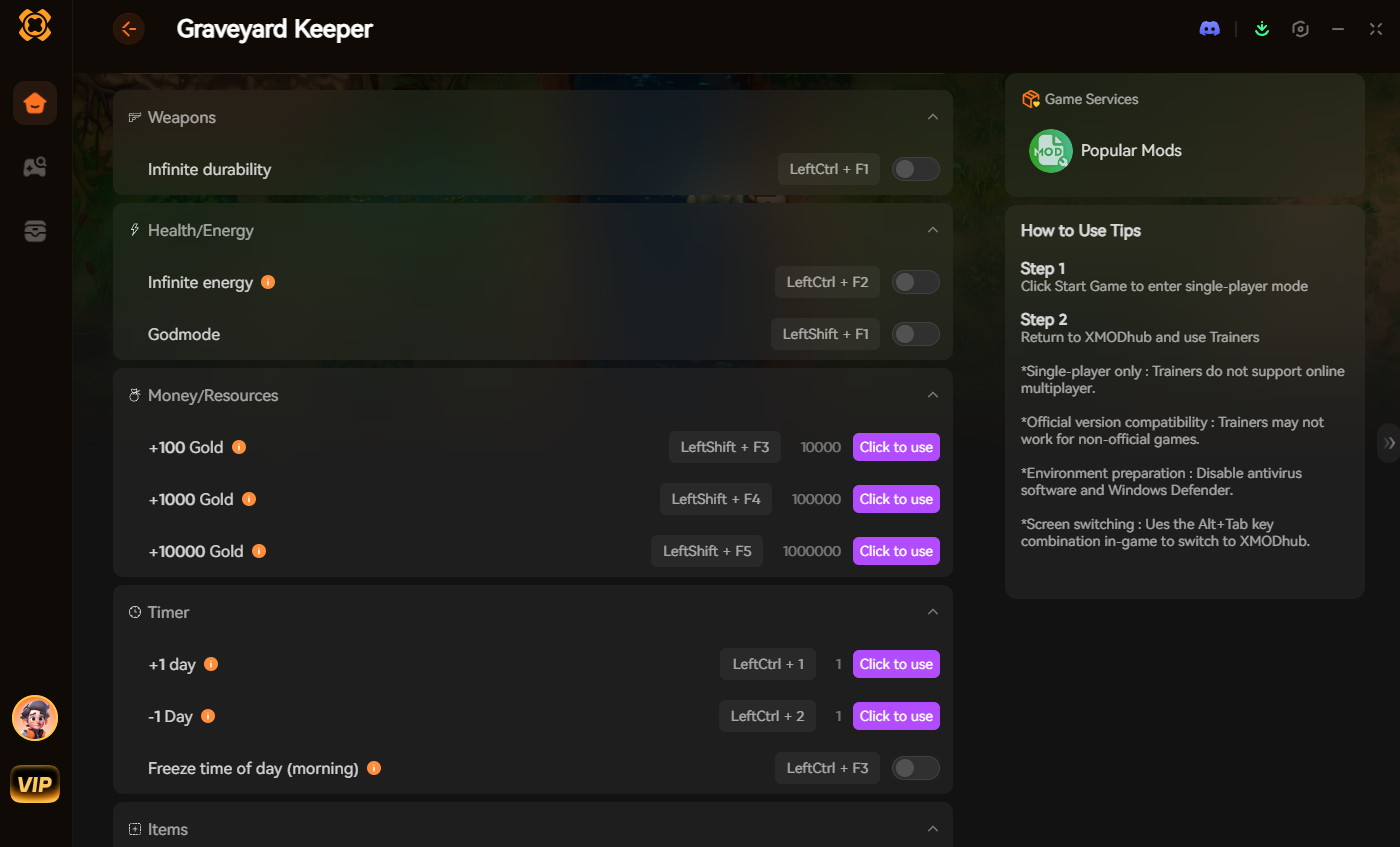
Instead of downloading outdated .dll files that conflict with each other, the XMODhub app runs safely alongside Graveyard Keeper.
- ✓ Zero Installation Conflicts: Because it alters memory dynamically, there are no files to drag and drop into the BepInEx folder, and absolutely no load order nightmares.
- ✓ Update Proof: XMODhub updates its features automatically when Graveyard Keeper patches, so you never lose access to your cheats.
- ✓ Save File & Achievement Safe: Unlike traditional mods that can permanently corrupt your graveyard layout or disable Steam achievements, XMODhub leaves zero trace when you close it.
How to Use XMODhub for Graveyard Keeper

- Download and Launch the free XMODhub desktop app.
- ค้นหา for Graveyard Keeper.

- Click “Play”.
- สลับ your desired cheats (Infinite Energy, Max Tech Points, Super Speed) directly from the clean UI or via hotkeys. Done.
Troubleshooting: Mods Crashing on Startup
If your game is crashing to a black screen after installing mods, check these common culprits:
- ✕ Missing Master Files: You installed a mod but forgot to download the BepInEx framework it depends on.
- ✕ Outdated Mods: Check if the mod has been updated for Patch 1.405. If it hasn’t been updated since 2019, delete it immediately, as it will crash the 64-bit client.
- ✓ Verify Game Files: Go to Steam, right-click Graveyard Keeper > Properties > Installed Files > Verify integrity of game files.
Frequently Asked Questions (FAQ)
Q: Will installing mods ban me from Graveyard Keeper?
A: No. Because Graveyard Keeper is a strictly single-player experience, Lazy Bear Games does not ban players for modifying their own game files or using external trainers.
Q: Do mods disable Steam achievements?
A: In many cases, yes. Modifying Unity engine files can disrupt the communication with the Steam overlay, locking achievement progression. You often have to use a secure memory tool like XMODhub which bypasses the detection entirely to keep unlocking achievements while boosting your stats.
สรุป
Modding Graveyard Keeper is a fantastic way to breathe new life into a game you already love. While visual enhancements and UI tweaks require traditional mod managers like BepInEx, altering your gameplay stats to bypass the exhausting grind does not have to be a complicated, crash-prone process.
For a seamless, risk-free way to customize your difficulty, build the perfect graveyard, and truly play by your own rules, XMODhub is the superior choice.
With dedicated support for Graveyard Keeper and over 5,000+ other single-player PC games—including massive hits like สตาร์ดิว วัลเลย์, Core Keeper, และ My Time at Portia—XMODhub ensures you spend your time actually playing, rather than troubleshooting broken files.

ฉันเป็นเกมเมอร์และนักเขียนที่มีความหลงใหลที่ XMODhub มุ่งมั่นที่จะนำเสนอข่าวสารเกมล่าสุด เคล็ดลับ และข้อมูลเชิงลึกให้กับคุณ.
ติดต่อฉัน:
โปรไฟล์ LinkedIn ↗
 แนนซี่ มิลเลอร์