
 Кэтрин Ху
You are hours deep into a massive exploration run across the continent of Pywel. You attempt an epic grappling takedown on a bandit near a cliffside, the camera violently shakes, and suddenly Kliff is trapped inside a solid boulder. You can swing your sword and hear the wind, but you cannot move, jump, or fast-travel out of the geometry. Experiencing the dreaded Crimson Desert stuck in wall glitch is a massive momentum killer.
Launch-week open-world games are notorious for collision detection issues, and getting soft-locked inside a rock formation can easily ruin your unsaved progress. Because Pearl Abyss built this game on their proprietary BlackSpace Engine, you cannot simply open a developer console and type a “noclip” command to fly out like you would in a Bethesda title. If the game’s native collision traps you and threatens to overwrite your auto-save with a broken location, the most reliable way to break free and protect your progression is by using the coordinate teleport features built into the XMODhub PC Trainer.
Вам также может понравиться: Crimson Desert Cheat Engine Table vs. XMODhub: Best Free Trainer
Answer First: Quick Fixes for Crimson Desert Terrain Glitches
If you are currently trapped inside a wall or continuously falling through the map, immediately try these three verified methods to break the collision detection:
- The Mount Summon Trick: Whistle for your horse. Crimson Desert has dynamic mount spawning. If your horse spawns close enough to your clipped character, mounting it will force Kliff’s model to snap to the saddle, pulling you safely out of the wall.
- Trigger a Ragdoll Animation: If you have an explosive item or a skill that causes self-knockback, cast it directly at your feet. The BlackSpace Engine’s ragdoll physics will momentarily disable your standard collision box, which can pop you out of the terrain trap.
- Alt+F4 Before Auto-Save: If you are falling infinitely under the map, do not wait for the game to kill you. Press Alt+F4 to instantly force-quit the application. This prevents the game from auto-saving your glitched state, allowing you to reload your last safe checkpoint.
Editor’s Note: The Reality of Physics Bugs
“There is a unique kind of heartbreak that happens when you’ve just spent twenty minutes carefully scaling an ancient ruin to find a legendary chest, only for a simple dodge roll to clip you into a pillar.”
“Because Crimson Desert utilizes the highly secure BlackSpace Engine, you are completely locked out of standard PC troubleshooting commands. You can’t toggle God Mode to survive a fall, and you can’t type a coordinate jump. We know how frustrating it is to lose hours of open-world gathering to a simple geometry bug. That is exactly why our team integrated the ‘Teleport to Waypoint’ and ‘Noclip’ functions into the XMODhub PC Trainer. You should be fighting rival mercenaries, not fighting the game’s architecture.”
The BlackSpace Engine: Why You Get Stuck
When a terrain glitch happens, PC players immediately search for Unreal Engine 5 console unlockers to fix it. However, Crimson Desert does not run on UE5. It is built entirely on Pearl Abyss’s custom BlackSpace Engine.
This engine features highly complex wrestling and grappling mechanics. When you initiate a dynamic combat takedown near an uneven surface—like a slope, a dense forest, or a rocky outcrop—the engine sometimes fails to calculate where Kliff’s collision mesh should land. The animation forcefully pushes your character model directly into the static environment mesh, locking you in place.
Because Pearl Abyss disabled the developer console for the retail launch, basic text commands will fail to rescue you.
The Ultimate Escape Tool: Bypassing Walls with XMODhub
Because the game’s traversal physics can occasionally betray you, and native commands are completely blocked, the XMODhub PC Trainer is your safest and most reliable defense against losing your save data.
Teleport to Custom Waypoint
If you are completely wedged inside a mountain, simply open your in-game map, place a custom marker anywhere on safe ground, and use the XMODhub overlay to trigger “Teleport to Waypoint.” The trainer injects directly into the engine’s memory, bypassing the broken collision and instantly moving Kliff to safety.
God Mode for Infinite Falls
If the ground fails to load and you find yourself falling through the abyss, the game will eventually register maximum fall damage and kill you, potentially respawning you without your hard-earned loot. Toggling God Mode ensures you survive the drop until the engine hits its failsafe and teleports you back to the surface.
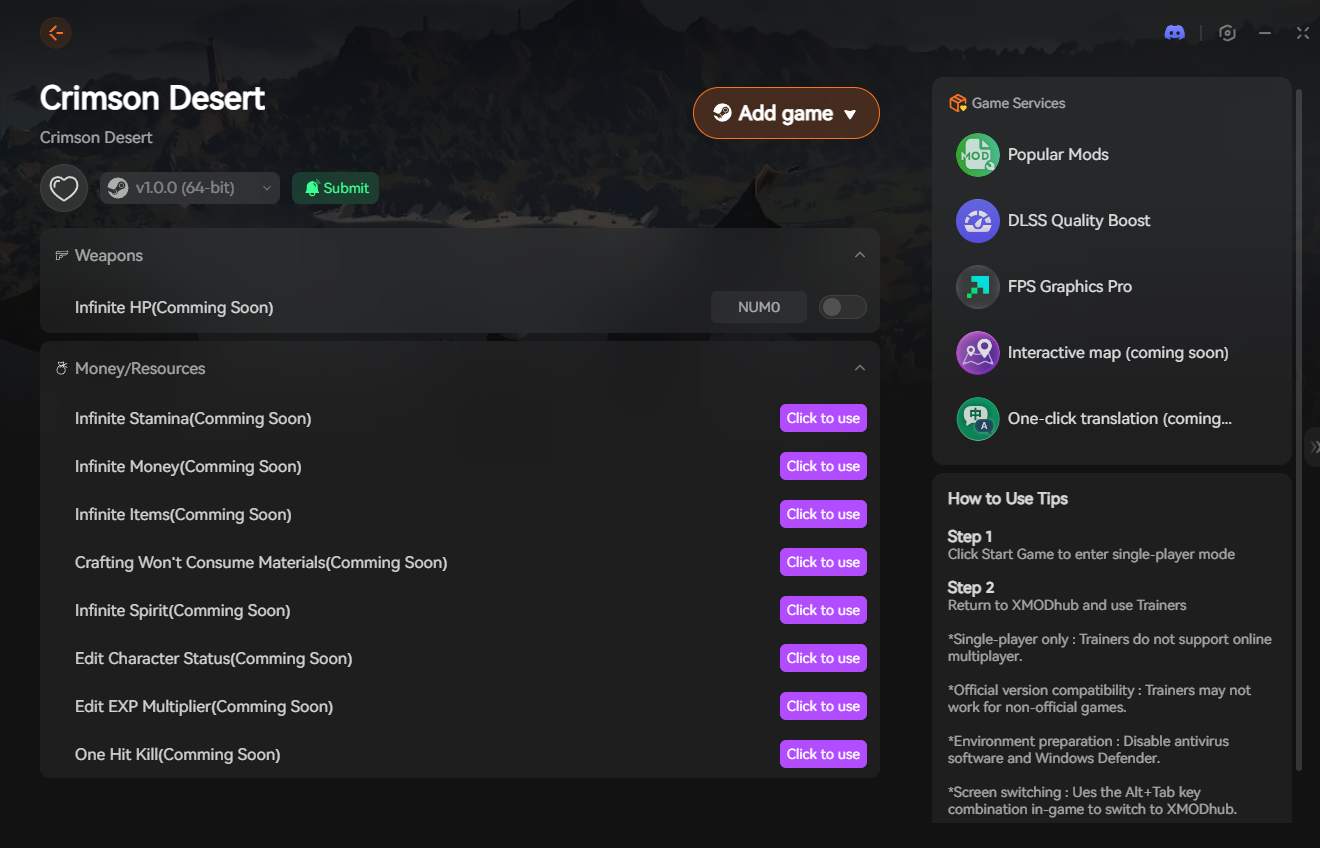
Step-by-Step: Equipping Your Progression Tools
Securing your playthrough against geometry bugs takes less than a minute. Here is how to use the trainer safely in single-player:
-
- Download the Client: Grab the verified, digitally signed XMODhub desktop software from our official website. It is incredibly lightweight and operates silently without triggering anti-cheat false positives.

- Launch & Hook: Boot up Crimson Desert first. Once you are loaded into your save file, open the XMODhub client and click “Play” on the game’s module.
- Inject the Overlay: Press the designated hotkey to bring up the XMODhub in-game menu. It hooks seamlessly into the BlackSpace Engine’s coordinate data.
- Escape the Wall: Activate your teleport or Noclip features, break free from the terrain trap, and immediately manually save your game once you are on solid ground.
PC Save File Location for Manual Backups
If the game auto-saved while you were stuck inside a wall and none of the in-game tricks work, you might need to roll back to an older save file. Always back up your data before exploring glitchy areas.
- •Local Game Saves:
%USERPROFILE%\Documents\Crimson Desert\SaveGames\ - •User Config & UI Settings:
%USERPROFILE%\Documents\Crimson Desert\UserCache\ - •Veteran Tip: Перейдите в раздел
SaveGamesfolder and look for the.bakfiles. These are your previous auto-saves. You can delete the most recent corrupted save and rename a.bakfile to restore your character to an earlier, unstuck position.
Frequently Asked Questions (FAQ)
Q: Is there a native “Unstuck” button in the Crimson Desert menu?
A: Unlike many MMORPGs that feature a dedicated “Escape” or “Rescue” button in the pause menu, Crimson Desert relies heavily on fast travel via the world map. However, if the game registers you as “falling” or “in combat” while stuck in a wall, fast travel is completely disabled.
Q: Will I lose my items if I die while falling through the map?
A: It depends on your current quest state and recent saves, but dying to environmental hazards often resets your inventory to the last registered checkpoint. This is why force-quitting (Alt+F4) or using God Mode is safer than letting the game kill you.
Q: Why don’t my old Unreal Engine noclip commands work?
A: Crimson Desert is built on the proprietary BlackSpace Engine, meaning traditional Unreal Engine modding tools and console unlockers are entirely incompatible. The engine does not recognize standard text-based cheat codes.
Conclusion: Escape the Geometry
Getting trapped inside the environment is one of the most frustrating things that can happen in a massive open-world RPG. While summoning your mount or triggering a ragdoll animation can sometimes miraculously pop you out of a rock, relying on these inconsistent workarounds is stressful.
You shouldn’t have to sacrifice hours of exploration and loot just because Kliff clipped through a poorly rendered cliffside. By equipping the XMODhub PC Trainer, you can completely bypass the BlackSpace Engine’s locked mechanics, teleport yourself to safety instantly, and get back to enjoying the breathtaking world of Pywel.
🚀 Download XMODhub for Crimson Desert Now
Check out more top trainers:
XMODhub supports 5,000+ titles including Dragon’s Dogma 2, The Witcher 3, и Киберпанк 2077.

Я страстный геймер и писатель XMODhub, который стремится предоставить вам самые свежие игровые новости, советы и мнения.
Свяжитесь со мной:
Профиль LinkedIn

 Нэнси Миллер
