Catherine Hu
📋 Table of Contents
Building the ultimate aquatic empire from scratch is no small feat. In the highly competitive, physics-driven world of Waterpark Simulator, players are tasked with managing budgets, satisfying demanding virtual guests, and constructing gravity-defying water slides. However, the game’s economy can often feel like a brutal grind. Sometimes, you just want to bypass the financial restrictions, test out end-game infrastructure, or unleash a little bit of chaos with admin-exclusive weapons. This is exactly where mastering Waterpark Simulator item ids becomes your most valuable asset.
By utilizing specific spawn codes and item IDs, you can bypass the traditional progression system entirely. Whether you are looking to instantly drop a massive wave pool into your park, spawn a horde of VIP guests to test your pathfinding layout, or equip the legendary Admin Taser to deal with unruly NPCs, knowing the exact console commands changes the way you play the game. In this comprehensive guide, we will break down the complete list of item IDs, explain the mechanics of the developer console, and show you how to optimize your gameplay experience seamlessly.
You may also like:The Ultimate Waterpark Simulator Cheat Engine Guide (And A Much Easier Alternative)
Editor’s Note: As a hardcore management sim enthusiast with over a thousand hours logged in park builders, I know firsthand the frustration of grinding for in-game currency just to unlock a basic lazy river or a standard lifeguard tower. Using Waterpark Simulator item ids bypasses the tedious grind, allowing you to focus purely on the architectural and chaotic fun of the game. Whether you want to build a five-star resort or flood the park with rubber ducks, this guide has you covered.
How to Enable the Console and Use Spawn Codes
Before you can start raining luxury sunbeds and high-speed water slides from the sky, you need to know how to interface with the game’s developer console. The process is straightforward but requires you to enable admin privileges if you are playing on a custom server or in a localized single-player instance.
Step-by-Step Console Activation
- Launch the Game: Boot up Waterpark Simulator and load into your saved park or start a completely new sandbox map.
- Open the Developer Console: Press the Tilde (~) key or F8 on your keyboard. This will bring up the semi-transparent command overlay at the top of your screen.
- Enable Admin Mode: Type
sv_cheats 1(or the specific admin password if you are on a multiplayer server) and hit Enter. You will see a confirmation message stating “Developer Cheats Enabled.” - Input the Spawn Command: The universal syntax for spawning items is
spawnitem [Item_ID] [Quantity]. For example, if you want to spawn 5 standard umbrellas, you would typespawnitem prop_umbrella_01 5. - Execute: Press Enter, and the items will instantly materialize at your mouse cursor’s location or directly into your character’s inventory if it is a tool or weapon.
Download Waterpark Simulator Trainer Now
Comprehensive Waterpark Simulator Item IDs List
Below is the meticulously categorized and updated list of Waterpark Simulator item ids for the current 2026 build of the game. We have separated these into logical categories so you can quickly find the exact prop, slide piece, or tool you need for your park.
Water Slides and Pool Infrastructure
The lifeblood of any waterpark is its aquatic attractions. These IDs allow you to bypass the construction timers and instantly plop down massive structures.
- Basic Pool Foundation:
pool_base_standard - Luxury Wave Pool:
pool_wave_advanced - Lazy River Segment (Straight):
river_lazy_straight_01 - Lazy River Segment (Curve):
river_lazy_curve_01 - Kamikaze Speed Slide:
slide_kamikaze_red - Tornado Funnel Slide:
slide_funnel_massive - Enclosed Tube Slide (Neon):
slide_tube_neon_green - Kiddie Splash Pad:
pool_splash_kids - High Dive Platform (10m):
structure_highdive_10m - Water Filtration Pump (Industrial):
utility_filter_pump_t3
Park Props and Decorations
Aesthetics matter just as much as the rides. Use these IDs to heavily detail your park without spending a single dime of your in-game budget.
- Standard Sunbed:
prop_sunbed_white - Luxury Cabana:
prop_cabana_vip - Tropical Palm Tree:
flora_palm_tree_01 - Decorative Tiki Torch:
prop_tiki_torch_lit - Food Stall (Burgers):
stall_food_burger - Drink Stand (Slushies):
stall_drink_slushie - Trash Can (Themed):
prop_trashcan_dolphin - Lifeguard Tower:
structure_lifeguard_tower - Inflatable Flamingo:
prop_inflatable_flamingo - Rubber Duck (Giant):
prop_duck_giant
Weapons, Tools, and Admin Gear
Sometimes the simulation gets out of hand. Guests get stuck, staff members slack off, or you just want to have some sandbox fun. These tool and weapon IDs are usually restricted to developers but are fully accessible via the console.
- Admin Taser (Instantly removes stuck NPCs):
weapon_admin_taser - High-Pressure Water Gun:
weapon_watergun_heavy - Staff Disciplinary Baton:
weapon_staff_baton - Mega Megaphone (Forces crowd dispersal):
tool_megaphone_god - Terrain Manipulator:
tool_terrain_sculptor - Instant Repair Wrench:
tool_wrench_magic - Janitor’s Super Vacuum:
tool_vacuum_industrial - VIP Golden Whistle:
tool_whistle_gold
NPC and Staff Spawners
Testing your park’s capacity requires bodies. Use these IDs to summon specific types of NPCs directly to your cursor.
- Standard Guest (Adult):
npc_guest_adult - Standard Guest (Child):
npc_guest_child - VIP Influencer Guest:
npc_guest_vip - Lifeguard (Elite):
npc_staff_lifeguard_elite - Janitor (Efficient):
npc_staff_janitor_t2 - Mechanic:
npc_staff_mechanic - Health Inspector (Hostile Entity):
npc_event_inspector
The Ultimate Shortcut: Dominate with XMODhub
While manually typing out Waterpark Simulator item ids in the developer console is perfectly fine for spawning a single sunbed or a specific water slide, it becomes incredibly tedious when you are trying to construct a massive, sprawling resort. Constantly opening the console, remembering exact underscore placements, and dealing with syntax errors can completely break your immersion and ruin the flow of your gameplay. Furthermore, some of the most powerful developer tools are heavily encrypted and cannot be spawned via simple text commands.
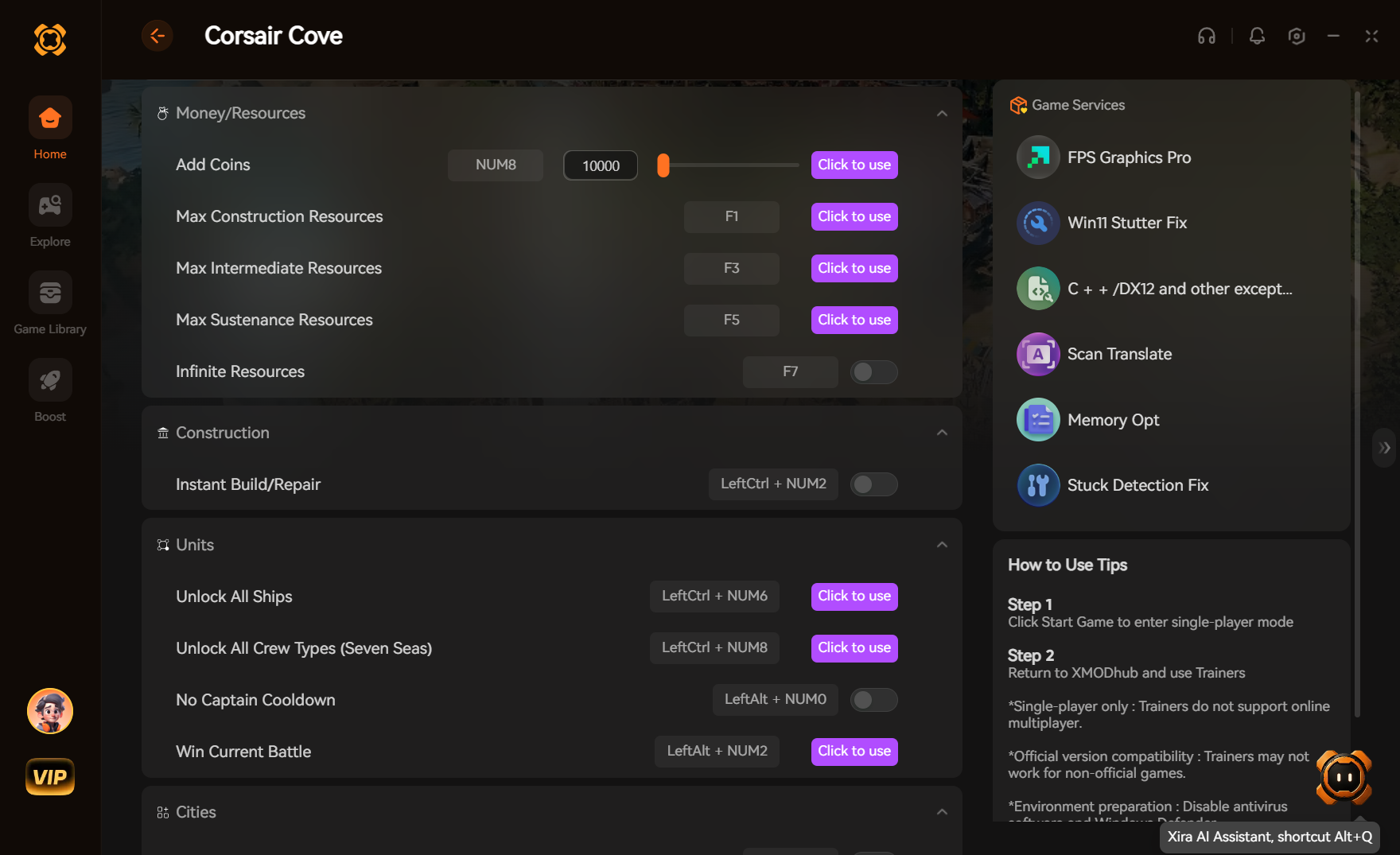
This is exactly where the XMODhub Trainer comes in as the ultimate “God-Mode” solution. XMODhub completely eliminates the need for manual console commands by providing a sleek, intuitive overlay that injects directly into the game engine. Instead of typing spawnitem weapon_admin_taser 1, you simply check a box in the UI. XMODhub offers unlimited money, instant build times, zero maintenance degradation, and a visual drop-down menu for every single item ID in the game. It is the ultimate tool for players who want to push the physics engine to its absolute limits without the headache of manual data entry.
How to Use XMODhub for Waterpark Simulator
Achieving total control over your aquatic empire is remarkably simple with XMODhub. Follow these exact steps to elevate your gameplay:
- Step 1: Download and Install: Navigate to the official XMODhub portal (link provided at the absolute end of this guide) and download the latest version of the client. The installation is lightweight, secure, and fully compatible with the 2026 build of Waterpark Simulator.
- Step 2: Search for the Game: Launch the XMODhub application and use the integrated search bar to find Waterpark Simulator. The software will automatically detect your game directory, whether you are playing on Steam, Epic Games, or a standalone client.
- Step 3: Toggle Cheats and God Mode: Boot up your game through the XMODhub launcher. Once you are loaded into your park, press the designated hotkey (usually Home or F12) to bring up the interactive mod menu. From here, you can toggle unlimited funds, freeze NPC needs, or use the visual item spawner to drop thousands of props into your world with a single click. No typing required.
Advanced Spawn Mechanics and Park Optimization Strategies
When you start heavily utilizing Waterpark Simulator item ids, you are effectively bypassing the game’s natural pacing. While this is incredibly fun, it can lead to severe optimization issues if you do not understand the underlying mechanics of the game’s engine. The 2026 update introduced a highly complex fluid dynamics system and advanced NPC pathfinding algorithms. When you spawn hundreds of items instantly, you force the CPU to calculate collision meshes and physics interactions simultaneously.
To maintain a stable frame rate, it is crucial to understand grid snapping and entity limits. When spawning infrastructure like pool_base_standard or slide_tube_neon_green, always ensure you are aiming at a flat, unobstructed piece of terrain. Spawning complex geometry inside existing structures will cause “Z-fighting” (flickering textures) and can permanently corrupt the navmesh for your guests, causing them to get stuck and plummeting your park’s rating.
Furthermore, be incredibly cautious when spawning dynamic entities. Dropping 500 npc_guest_vip entities into a single wave pool will cause a massive spike in CPU load due to the real-time water displacement calculations. If you are using console commands to stress-test your park, do so in increments of 50 to allow the server tick rate to stabilize.
Item Economics and Resource Scaling Metrics
Understanding the back-end classification of these item IDs is essential for hardcore builders. The game categorizes items not just by their function, but by their impact on the server load and their inherent economic value within the simulation’s code. Below is a deep-dive data table outlining how different classifications of spawn codes interact with the game’s engine.
| Item Classification | Spawn Code Prefix | Server Load Impact | Priority Level |
|---|---|---|---|
| Infrastructure | pool_base_ | Minimal processing required. | High |
| Complex Slides | water_slide_ | Heavy physics calculations. | Medium |
| NPC Entities | char_npc_ | High CPU usage for pathfinding. | Low |
| Admin Weapons | tool_admin_ | Instant physics impulse. | Situational |
| Static Props | prop_decor_ | Negligible memory footprint. | High |
As demonstrated in the table, prioritizing static props and basic infrastructure will allow you to build massive parks without crashing the game. Save the complex slides and heavy NPC spawners for when your foundational layout is completely finalized and optimized.
Frequently Asked Questions
Why do some Waterpark Simulator item ids return an “Invalid Command” error?
If you receive an “Invalid Command” or “Unknown Entity” error, there are usually three culprits. First, double-check your spelling; the console is highly sensitive to typos and underscores. Second, ensure that sv_cheats 1 has been successfully activated. Finally, some item IDs are patched out or renamed during major game updates. The list provided in this guide is verified for the 2026 build, but legacy IDs from older versions will no longer work.
Can I use these spawn codes in multiplayer servers?
The short answer is no, unless you are the server host or have been explicitly granted admin privileges by the host. Waterpark Simulator utilizes server-side authority to prevent regular players from ruining the economy or crashing the server by spawning thousands of complex physics objects. If you host a private co-op session, you can enable cheats and use the IDs freely.
Will using item IDs disable my Steam achievements?
Yes. Like most modern simulation games, activating the developer console and inputting cheat commands will immediately flag your save file and disable all achievement progression for that specific park. If you are hunting for achievements, you must play strictly vanilla. However, using the XMODhub Trainer often bypasses this flag by directly manipulating memory values rather than triggering the game’s internal cheat detection, allowing you to mod the game while still earning achievements.
How do I delete an item I spawned by mistake?
If you accidentally spawn a massive funnel slide in the middle of your food court, you can remove it using the console. Aim your crosshair directly at the offending object, open the console, and type ent_remove or delete_target. Alternatively, equipping the tool_terrain_sculptor or tool_wrench_magic allows you to instantly delete or move objects with a simple left click.
Conclusion / Final Verdict
Mastering the use of Waterpark Simulator item ids is the key to unlocking the true sandbox potential of the game. It liberates you from the constraints of artificial budgets, tedious wait times, and the slow trickle of progression. Whether you are meticulously designing a hyper-realistic resort using specific prop codes or just messing around with admin weapons to terrorize your virtual guests, the developer console gives you absolute freedom.
However, as we have explored, manual entry can be a massive drain on your time and immersion. Remembering complex prefixes and typing out commands repeatedly detracts from the actual fun of building and managing. For players who want to experience the absolute pinnacle of convenience, power, and optimization, relying on a dedicated modding tool is the only logical step forward. Take control of your park, bypass the grind, and build the ultimate aquatic masterpiece today.
Stop Grinding, Start Enjoying.
Bypass the tedious resource gathering and unlock your full potential instantly.

I am a passionate gamer and writer at XMODhub, dedicated to bringing you the latest gaming news, tips, and insights.
Connect with me:
LinkedIn Profile ↗
 Nancy Miller