
 Catherine Hu
No, Village in the Shade does not have a built-in developer console or native text-based cheat codes. Because developer Nippon Ichi Software completely disabled the internal debug console prior to the game’s July 29, 2026 release, pressing the tilde (~) key will not open a command prompt. The only way to cheat, modify your inventory, or alter game mechanics is by using a trusted third-party trainer like XMODhub, which offers 1-click alternatives such as God Mode, Infinite Stamina, and Instant Crop Growth.
Editor’s Note: This guide was last verified against the newest Village in the Shade patch. Whether you are using native engine tools or a dedicated trainer, please back up your save files before modifying game memory to prevent unexpected bugs.
We have all been there. You have just spent hours dying to the same terrifying encounter in the horror-adventure segments of Village in the Shade, or maybe you simply do not have the time to grind for rare mountain fish and high-tier crafting materials after a long day. Single-player games are meant to be enjoyed on your own terms. Whether you want to rapidly expand your Kagatsu homestead, instantly unlock all character customization options, or simply explore the Japanese mountain village without the stress of stamina depletion, let us get your character powered up.
You may also like: The Ultimate Village in the Shade Cheat Engine Guide (And A Much Easier Alternative)
📋 Table of Contents
- Quick Answer: Does Village in the Shade Have Console Commands?
- 1. How to Enable Cheats in Village in the Shade
- 2. The Complete List of Village in the Shade Cheats
- 3. Item IDs and Spawning Guide
- 4. Do Cheats Disable Achievements?
- 5. Why Native Cheats Can Break Your Save Files
- 6. The Safer Alternative: 1-Click Cheats with XMODhub
- 7. Troubleshooting: Cheats Not Working
- 8. Best Cheat Strategies for Early vs. Late Game
- 9. Homestead Upgrade & Resource Priority Matrix
- 10. Frequently Asked Questions (FAQ)
- Conclusion
1. How to Enable Cheats in Village in the Shade
Because Village in the Shade does not feature a native developer console, players cannot simply type in text-based codes to alter their gameplay. In many modern PC ports, especially those developed by Japanese studios like Nippon Ichi Software and published by NIS America, the internal debugging tools used during the game’s production are entirely stripped from the final retail code. This means no amount of editing .ini configuration files or mashing keyboard shortcuts will reveal a hidden command line interface.
Instead, modifying the game requires an external memory editor that can safely inject values into the game’s active RAM while it is running. To enable cheats in Village in the Shade, you must follow a straightforward 3-step process to download and attach XMODhub to the game client:
Step 1: Install the Application
First, you need to download a secure, verified trainer. Navigate to the official XMODhub website and download the desktop client. Install the application on the same drive where your Steam library is located to ensure optimal read and write speeds when the software scans for active game processes.
Step 2: Link the Game Executable
Launch Village in the Shade via Steam and load into your current save file in the village of Kagatsu. Once your character is fully loaded into the game world, tab out to your desktop and open the XMODhub application. Use the search bar to locate “Village in the Shade” within the supported games library. The software will automatically detect the running executable file (usually named VillageInTheShade.exe).
Step 3: Activate Your Cheats
Click the “Play” or “Attach” button within the XMODhub interface. You will hear a distinct audio chime confirming that the trainer has successfully hooked into the game’s memory architecture. From this point forward, you can seamlessly toggle cheats on and off using the provided user interface or by pressing the assigned hotkeys (such as F1, F2, F3) on your keyboard.
2. The Complete List of Village in the Shade Cheats
Because Village in the Shade does not feature a developer console, there are no text-based cheat codes to input. You cannot type commands like god or add_money. However, you can achieve the exact same effects—and often much more powerful ones—using the XMODhub app.
The farming, horror, and adventure mechanics in Village in the Shade are deeply intertwined. Managing your stamina while planting crops during the day is just as critical as surviving the mountain’s secrets at night. Below is the comprehensive list of trainer features available in XMODhub designed specifically to manipulate these mechanics.
| Feature | Effect | How to Activate |
|---|---|---|
| Infinite Health (God Mode) | Prevents all damage taken during the horror and adventure exploration segments in the mountains. | Toggle via XMODhub UI or press NUMPAD 1 |
| Infinite Stamina | Your stamina bar will never deplete when planting crops, chopping wood, fishing, or hunting. | Toggle via XMODhub UI or press NUMPAD 2 |
| Instant Crop Growth | Forces all planted seeds to reach their final harvest stage immediately upon watering them once. | Toggle via XMODhub UI or press NUMPAD 3 |
| Set Currency to Max | Instantly changes your total wealth to 999,999, allowing you to buy all furniture and clothing. | Input desired value in XMODhub UI and click “Apply” |
| Freeze Time of Day | Stops the in-game clock, giving you unlimited time to socialize, farm, and explore before nightfall. | Toggle via XMODhub UI or press NUMPAD 4 |
| Max Livestock Affection | Automatically raises the happiness and affection meters of all your animals to the maximum level. | Toggle via XMODhub UI or press NUMPAD 5 |
| Infinite Item Usage | Consumables, seeds, and crafting materials will not decrease when used or placed in the world. | Toggle via XMODhub UI or press NUMPAD 6 |
| Max NPC Friendship | Instantly maximizes your relationship status with any villager you speak to in Kagatsu. | Toggle via XMODhub UI or press NUMPAD 7 |
| Super Movement Speed | Increases the protagonist’s walking and running speed by 300% for faster map traversal. | Toggle via XMODhub UI or press NUMPAD 8 |
| One-Hit Kill | Instantly defeats any hostile entities encountered during the third-person adventure segments. | Toggle via XMODhub UI or press NUMPAD 9 |
3. Item IDs and Spawning Guide
In PC games that support developer consoles, players typically use a command format like player.additem [ItemID] [Quantity] to spawn specific objects directly into their inventory. This requires looking up complex hexadecimal strings (like 0x0045F) on community wikis.
Because manual item spawning via text is impossible in Village in the Shade without native engine tools, there is no official list of Item IDs that you can type into the game. The proprietary engine handles inventory arrays dynamically, meaning the memory addresses for a specific piece of customized clothing or a rare piece of crafted furniture shift every time you load the game.
Fortunately, XMODhub completely bypasses this highly technical and tedious limitation. Instead of forcing you to hunt down and memorize complex hex codes for every single vegetable, accessory, or crafting material, the trainer features a built-in, visual Inventory Editor. By simply opening the trainer overlay, you can select the exact item you want from a categorized drop-down menu—whether that is a rare cherry blossom sapling or a late-game fishing rod—and instantly maximize its quantity in your backpack with a single click. This eliminates the need to look up complex hex codes and keeps you immersed in the hand-painted world of Kagatsu.
4. Do Cheats Disable Achievements?
One of the most common concerns for PC gamers is whether modifying their game will permanently lock them out of earning Steam achievements. Village in the Shade includes exactly 52 Steam Achievements, ranging from completing the main story secrets to harvesting your first massive crop yield and fully customizing your homestead.
If this game had native console commands, using them would almost certainly disable achievements. Most modern developers program their games to detect when the debug console is opened, instantly flagging the save file as “modified” and severing the connection to the Steamworks achievement API. This is done to prevent players from easily unlocking prestige milestones.
However, because you are using XMODhub, your achievements are completely safe. External trainers operate by manipulating the game’s values in your computer’s random-access memory (RAM) rather than altering the core executable or triggering internal debug flags. Because XMODhub safely bypasses the game’s internal cheat-flagging system, Steam remains entirely unaware that your stamina is infinite or that your crop growth has been artificially accelerated. You can comfortably unlock all 52 achievements, including the most tedious grinding milestones, without any risk of being locked out.
5. Why Native Cheats Can Break Your Save Files
Beyond the achievement lock, native developer tools and memory editors are notoriously unstable. These commands were originally built for developers to test bugs during production, not for everyday gameplay.
Forcing a quest to complete or bypassing intended story triggers can cause crucial NPCs to completely disappear from your map. In a game like Village in the Shade, where befriending the intriguing cast of characters in Kagatsu is a core pillar of the gameplay loop, breaking NPC pathing or event triggers can permanently ruin a 50-hour playthrough.
Memory leaks, corrupted assets, and sudden crashes to the desktop are incredibly common when you spawn too many items at once using raw engine commands. If a developer console allows you to force a seasonal transition instantly, the game engine might fail to unload the previous season’s assets, causing massive frame rate drops and eventual file corruption. Native commands do not have safety rails; if you input the wrong integer, you can permanently brick your save file, forcing you to start your farming adventure completely from scratch.
6. The Safer Alternative: 1-Click Cheats with XMODhub
If you want the benefits of cheats—like infinite health during the horror sequences or skipping the heavy grind of livestock management—without risking your save files or locking your achievements, you need a dedicated game modification tool.
Instead of typing risky code that might corrupt your game world, the XMODhub app hooks into Village in the Shade safely and cleanly. Professional trainer developers spend countless hours mapping the exact memory addresses of the game, ensuring that when you toggle a cheat, it only affects the intended variable without causing a cascade of engine errors.
- Achievement Safe: It bypasses the game’s internal cheat-flagging system, ensuring your Steam profile continues to track your progress flawlessly.
- Save File Protection: It alters values temporarily in your system’s RAM. The moment you close the game, your save file remains uncorrupted and perfectly intact.
- One-Click Toggles: No more memorizing long item IDs or risking typos in a command line. Just hit a hotkey to turn God Mode on instantly.
How to Use XMODhub for Village in the Shade
- Download and Launch the free XMODhub desktop app.

- Search for “Village in the Shade” in the library.
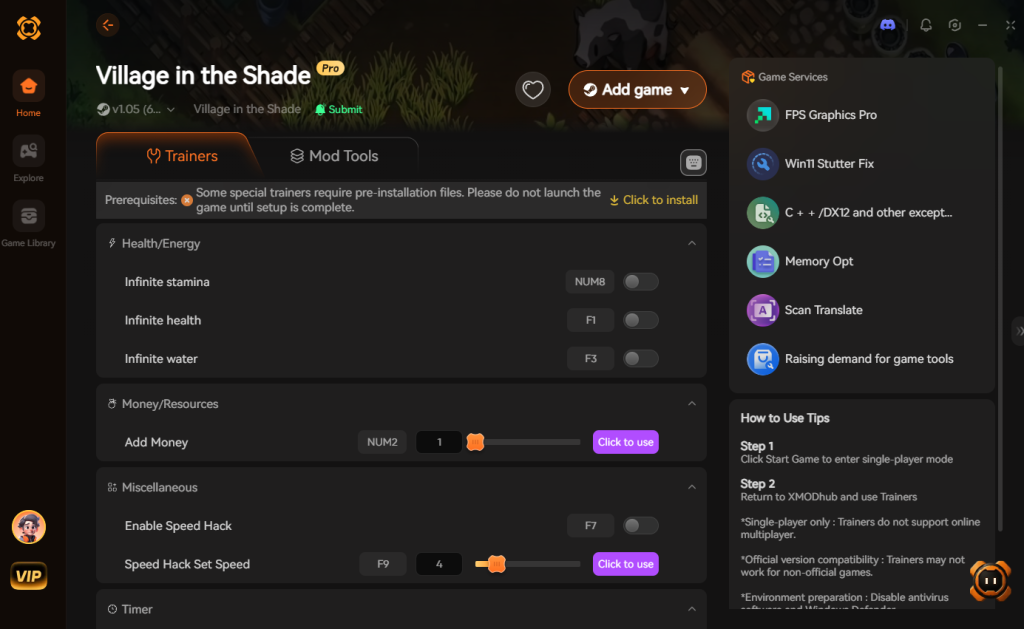
- Click “Play”.
- Toggle your desired cheats directly from the clean UI or via hotkeys.
Download Village in the Shade Trainer Now
7. Troubleshooting: Cheats Not Working
Even with the most advanced modification tools, PC gaming environments are complex, and you might occasionally run into friction. If you find that your cheats for Village in the Shade are not activating properly, consult this detailed troubleshooting checklist:
- Game Version Mismatches: Village in the Shade is scheduled for release on July 29, 2026. Developers frequently release “Day One” patches and subsequent hotfixes to address bugs. When a game updates, its internal memory addresses shift. If your game just updated on Steam, the trainer might temporarily stop working. XMODhub usually pushes an automatic update within 24 hours of a major game patch, so ensure you restart the application to download the latest trainer version.
- Antivirus False Positives: Because trainers inject code into another active process (the game), highly aggressive antivirus software like Windows Defender or Malwarebytes may mistakenly flag XMODhub as a malicious program. To fix this, you must navigate to your antivirus settings and add the XMODhub installation folder to your list of Exclusions or Exceptions.
- Administrator Rights Required: Modifying RAM requires elevated system privileges on Windows. If the cheats are not toggling when you press the hotkeys, close the trainer completely. Right-click the XMODhub shortcut on your desktop and select “Run as Administrator” before launching Village in the Shade again.
- Keyboard Layout and Hotkey Conflicts: If you are using a non-standard keyboard layout (such as AZERTY or a 60% keyboard without a dedicated Numpad), the default hotkeys might not register. Use the XMODhub interface to manually rebind the cheats to keys that are easily accessible on your specific hardware setup.
8. Best Cheat Strategies for Early vs. Late Game
Because Village in the Shade masterfully blends cozy daytime farming mechanics with intense nighttime survival horror, the way you utilize cheats should evolve as you progress through the narrative. Activating every single cheat at once can overwhelm the game’s delicate pacing. Instead, strategic deployment of specific console command alternatives via XMODhub will yield the most satisfying playthrough.
The Early Game: Establishing the Kagatsu Homestead
During your first 10 to 15 hours in the village of Kagatsu, your primary bottlenecks will be stamina depletion and a severe lack of in-game currency. The fields are overgrown with debris, and your starting tools consume massive chunks of energy.
- Strategic Focus: Activate Infinite Stamina and Freeze Time of Day. This powerful combination allows you to clear your entire farm plot, till the soil, and plant your initial seeds without being forced to sleep halfway through the afternoon.
- Economy Boost: Use the Set Currency to Max feature just once to purchase essential backpack upgrades and high-tier seeds from the village merchants. This skips the grueling early-game poverty phase and lets you focus entirely on homestead customization.
The Late Game: Surviving the Mountain Shrines
As you delve deeper into the narrative, the cozy farming aspects take a backseat to exploration and survival. The mountain shrines surrounding Kagatsu are teeming with hostile entities, environmental hazards, and punishing boss encounters.
- Strategic Focus: It is time to toggle on Infinite Health (God Mode) and One-Hit Kill. The horror segments in Village in the Shade are notoriously unforgiving, often featuring instant-death mechanics and scarce healing items. God Mode ensures you can comfortably explore the lore-heavy shrines without the frustration of repeated game-over screens.
- Traversal: The late-game map is massive. Utilizing Super Movement Speed will drastically cut down the time spent backtracking between the deep woods and your farm, ensuring you never miss a seasonal crop harvest while out adventuring.
9. Homestead Upgrade & Resource Priority Matrix
When utilizing a trainer to bypass the standard grind, players often wonder which aspects of their character or farm they should artificially boost first. To maximize your efficiency in Village in the Shade and dominate both the agricultural and survival elements of the game, we have compiled a definitive cheat priority matrix.
Use this data table to determine which XMODhub features will provide the highest return on investment based on your current in-game objectives.
| Upgrade Classification | Specific Ability / Node | Optimal Use Case | Priority Level |
|---|---|---|---|
| Farming Infrastructure | Instant Crop Growth | Rapidly harvesting seasonal Kagatsu vegetables to fulfill massive bulk orders for the village mayor. | High |
| Survival & Combat | Infinite Health (God Mode) | Exploring the deep mountain shrines and surviving scripted Yokai encounters during night cycles. | High |
| Resource Gathering | Infinite Stamina | Chopping ancient hardwood and mining rare ores without the need to constantly consume stamina-restoring meals. | High |
| Economy & Social | Max NPC Friendship | Unlocking hidden character lore, triggering romance events, and securing vendor discounts instantly. | Medium |
| Exploration | Super Movement Speed | Traversing the expansive Japanese village map to locate hidden collectibles before dusk falls. | Medium |
| Livestock Management | Max Livestock Affection | Producing gold-tier milk and eggs without enduring the tedious daily brushing and feeding mini-games. | Low |
10. Frequently Asked Questions (FAQ)
Q: Can I use these cheats on PlayStation 5 or Nintendo Switch?
A: No. Modifying game memory or accessing developer tools for Village in the Shade is strictly limited to the PC version via Steam. Console ecosystems are heavily encrypted and closed off, making it impossible to run external applications like XMODhub on a PS5 or Nintendo Switch.
Q: Is there a penalty for using cheats in single-player?
A: There is no account ban or official penalty for cheating in a single-player environment. Village in the Shade does not utilize anti-cheat software like Easy Anti-Cheat (EAC) because it is a purely offline, single-player farming and adventure game. The only downsides are the potential for corrupted save files and disabled achievements, which can be easily avoided by using a secure trainer like XMODhub.
Q: Can I use Cheat Engine instead of a dedicated trainer?
A: While Cheat Engine is a powerful tool, it requires a deep understanding of hexadecimal scanning, pointer maps, and manual memory isolation. Finding the exact address for your crop growth timer or stamina bar can take hours of trial and error, and one wrong adjustment will instantly crash the game. XMODhub does all of this complex reverse-engineering for you, packaging it into a simple, user-friendly interface.
Q: Does this work on the Steam Deck?
A: Currently, XMODhub is designed natively for Windows operating systems. To use it on a Steam Deck, you would need to run the game and the trainer simultaneously through a compatibility layer like Proton or install Windows directly onto your Steam Deck hardware.
Conclusion
Whether Village in the Shade provides a built-in console or not, taking control of your single-player experience is easier than ever. While tweaking raw engine code can be a fun technical experiment, it comes with significant risks to your save files and achievements. For a flawless, risk-free experience, using a dedicated modification tool is always the smarter choice.
With secure support for over 5,000+ single-player PC games, you can easily customize your gameplay, skip the tedious grind of mountain survival, and play exactly the way you want.

Stop Grinding, Start Enjoying.
Bypass the tedious resource gathering and unlock your full potential instantly.

I am a passionate gamer and writer at XMODhub, dedicated to bringing you the latest gaming news, tips, and insights.
Connect with me:
LinkedIn Profile ↗
 Nancy Miller