Catherine Hu
Yes, Scrap Mechanic does have built-in console commands, but they are hidden behind a developer mode that is disabled by default in the survival mode. To enable these commands, players must manually edit a specific game file (survival_game.lua) to activate the developer flag. Once enabled, you can open the in-game chat by pressing the Enter key and type commands starting with a forward slash (/). The top three most popular Scrap Mechanic cheats are /god (invincibility), /unlimited (infinite inventory and no crafting requirements), and /spawn (instantly generate items or entities).
Editor’s Note: This guide was last verified against the newest Scrap Mechanic patch. Whether you are using native engine tools or a dedicated trainer, please back up your save files before modifying game memory to prevent unexpected bugs.
We have all been there. You have just spent hours dying to the same Farmbot boss in Scrap Mechanic, or maybe you simply do not have the time to grind for Component Kits and Circuit Boards after a long day. Single-player games are meant to be enjoyed on your own terms. Let us get your character powered up so you can focus on building the ultimate transforming vehicle or impenetrable farming fortress.
You may also like: The Ultimate Scrap Mechanic Cheat Engine Guide (And A Much Easier Alternative)
📋 Table of Contents
- Quick Answer: Does Scrap Mechanic Have Console Commands?
- 1. How to Enable Cheats in Scrap Mechanic
- 2. The Complete List of Scrap Mechanic Cheats
- 3. Item IDs and Spawning Guide
- 4. Do Cheats Disable Achievements?
- 5. Why Native Cheats Can Break Your Save Files
- 6. The Safer Alternative: 1-Click Cheats with XMODhub
- 7. Troubleshooting: Cheats Not Working
- 8. Essential Commands for Vehicle Building and Physics Testing
- 9. Frequently Asked Questions (FAQ)
- 10. Conclusion
1. How to Enable Cheats in Scrap Mechanic
Unlike many other PC sandbox games that provide a simple toggle menu or a dedicated tilde (~) console, Scrap Mechanic requires a bit of manual file configuration to unlock its developer commands in the survival mode. Because the developers at Axolot Games intended for the survival mode to be a challenging experience, they locked the command interface behind a Lua script variable.
If you want to use text-based Scrap Mechanic cheats, you will need to follow this meticulous four-step process to enable Developer Mode. Please ensure that Scrap Mechanic is completely closed before you begin this process.
Step 1: Locate Your Local Game Files
Open your Steam client and navigate to your software library. Right-click on Scrap Mechanic in your game list, hover over “Manage,” and select “Browse local files.” This will open the root directory where Scrap Mechanic is installed on your hard drive.
Step 2: Navigate to the Survival Scripts Folder
From the root Scrap Mechanic folder, you need to dig into the specific directory that controls the survival mode logic. Open the Survival folder, then open the Scripts folder, and finally, open the game folder. The exact file path should look something like this: C:\Program Files (x86)\Steam\steamapps\common\Scrap Mechanic\Survival\Scripts\game.
Step 3: Edit the Lua File
In this folder, locate the file named survival_game.lua. Before doing anything, right-click this file, copy it, and paste it on your desktop as a backup. Once safely backed up, right-click the original survival_game.lua file and open it with a text editor like Notepad or Notepad++.
Press Ctrl + F to open the search function and look for the following line of code:
if g_survivalDev then
You need to modify the script so that the game always believes developer mode is active. You can do this by changing the logic or, more simply, by finding the variable g_survivalDev at the top of the file (if it exists) and ensuring it is set to true. Alternatively, in modern patches, players often navigate to survival_constants.lua in the same directory and change g_survivalDev = false to g_survivalDev = true. Save the text file and close the editor.
Step 4: Execute Commands In-Game
Launch Scrap Mechanic and load your survival save file. Once you are loaded into the world, press the Enter key on your keyboard. This will bring up the multiplayer chat window. Because you have enabled developer mode, this chat window now doubles as your developer console. Type your desired command (always starting with a /) and press Enter again to execute it.
2. The Complete List of Scrap Mechanic Cheats
Here are all the verified console commands you can use once you have successfully enabled the developer mode in Scrap Mechanic. We have categorized these commands into two distinct tables: Combat & Survival, and Exploration & World Management.
Table 1: Combat & Survival Commands
These Scrap Mechanic cheats are designed to keep you alive against the relentless hordes of Haybots, Tapebots, and Farmbots, while also bypassing the tedious resource grinding required for complex base building.
| Cheat Code | Effect | Risk Level |
|---|---|---|
/god |
Grants total invincibility. Your Scrap Mechanic character will no longer take damage from enemy bots, drowning, or extreme fall damage. | Low |
/unlimited |
Grants an infinite inventory. You can place unlimited blocks and parts, and the Scrap Mechanic Craftbot will no longer require raw materials to craft items. | Medium |
/sethp [number] |
Instantly sets your player health to the specified numerical value. | Low |
/spudgun |
Instantly places the standard potato-firing Spudgun into your Scrap Mechanic inventory, bypassing the need to rescue the Trader. | Low |
/ammo [number] |
Spawns the specified amount of potato ammunition directly into your inventory. | Low |
/water |
Instantly fills all empty buckets in your inventory with water, allowing for rapid farming in Scrap Mechanic without visiting a lake. | Low |
/die |
Forces your Scrap Mechanic character to die and respawn at the nearest bed. Incredibly useful if you become permanently stuck inside terrain geometry. | Low |
/food [number] |
Instantly restores your hunger meter to the specified value. | Low |
/water [number] |
Instantly restores your hydration meter to the specified value. | Low |
Understanding the /unlimited Command:
It is important to note that activating the /unlimited command fundamentally changes the way Scrap Mechanic processes your inventory. While active, any consumable block (like concrete, wood, or metal) will never decrease when placed. Furthermore, interacting with the Craftbot will show that all crafting requirements are met, allowing you to instantly generate high-tier engines and controllers. However, using this command can sometimes glitch the visual interface of your inventory, requiring a game restart to fix.
Table 2: Exploration & World Commands
These Scrap Mechanic commands allow you to manipulate the environment, control the day and night cycle, and manage the physical entities rendered by the game engine.
| Cheat Code | Effect | Risk Level |
|---|---|---|
/day |
Instantly fast-forwards the Scrap Mechanic world time to early morning, providing clear visibility. | Low |
/night |
Instantly fast-forwards the Scrap Mechanic world time to midnight. Useful for testing lighting rigs on your vehicles. | Low |
/timeprogress [true/false] |
Pauses (false) or resumes (true) the progression of time. Setting it to false gives you infinite daylight to build your Scrap Mechanic creations. |
Low |
/teleport [x] [y] [z] |
Instantly moves your Scrap Mechanic character to the specified map coordinates. | High |
/spawn [entity_name] |
Spawns a specific enemy bot or interactive entity directly at your crosshair location. | High |
/clear |
Deletes all loose items, unattached blocks, and free-roaming creations in your immediate Scrap Mechanic vicinity to improve frame rates. | Medium |
/goto [player_name] |
Teleports your character directly to the location of another player in your Scrap Mechanic multiplayer session. | Low |
/raid [level] |
Manually triggers a bot raid on your current farming location at the specified difficulty level (1-10). | High |
The Danger of the /clear Command:
Scrap Mechanic relies heavily on a complex physics engine. When you chop down trees or destroy enemy bots, the game generates hundreds of loose physical objects. If your frame rate drops, /clear is a lifesaver. However, be extremely careful: if your favorite custom vehicle is not currently attached to a lift or a solid ground peg, the /clear command might register it as a “loose creation” and permanently delete it from your Scrap Mechanic world.
3. Item IDs and Spawning Guide
One of the most powerful features of the developer console is the ability to instantly manifest any item in the game. To do this, you use the command format: /spawn [ItemID].
Because Scrap Mechanic has hundreds of unique parts, memorizing the exact internal string names can be exhausting. If you type the wrong string, the console will simply return an error, or worse, spawn a corrupted missing-texture block. Here is a Markdown Table of the top 10 most highly sought-after Item IDs in Scrap Mechanic to save you hours of grinding.
| Scrap Mechanic Item Name | Internal Item ID | Best Use Case |
|---|---|---|
| Component Kit | obj_consumable_component |
Upgrading seats, engines, and controllers to their maximum level. |
| Circuit Board | obj_consumable_circuitboard |
Crafting advanced logic gates and automated farming defenses. |
| Gas Engine | prt_gasengine |
Powering heavy, fast-moving Scrap Mechanic vehicles. |
| Electric Engine | prt_electricengine |
Powering stealthy, battery-operated vehicles with high torque. |
| Suspension (Sport) | jnt_suspension_sport |
Creating stable wheelbases for high-speed Scrap Mechanic cars. |
| Bearing | jnt_bearing |
The most critical component for any rotational movement or steering. |
| Controller | prt_controller |
Programming complex transformation sequences and walking mechs. |
| Concrete Block 3 | blk_concrete3 |
Building impenetrable walls to defend against Scrap Mechanic Farmbot raids. |
| Spudling Gun | obj_spudgun_spudling |
A rapid-fire weapon excellent for clearing out Tapebots in warehouses. |
| Sunshake | obj_consumable_sunshake |
The ultimate food and hydration restorative item in Scrap Mechanic. |
Warning on Mass Spawning: Never attempt to use a macro to rapidly execute the /spawn command. Spawning more than 20 complex items (like engines or controllers) in a single second will overload the Scrap Mechanic physics engine, resulting in an immediate crash to the desktop and potential save file corruption.
4. Do Cheats Disable Achievements?
Yes, modifying the core game files to enable the developer console carries consequences for your Steam profile. Scrap Mechanic features a variety of achievements, such as “Farmer” for harvesting crops and “Mechanic” for building complex vehicles.
When you edit the survival_game.lua file to activate g_survivalDev = true, the Scrap Mechanic engine detects that the game environment has been tampered with. As a result, the game will flag your current survival save file as a “Developer/Cheated” world. Once this flag is triggered, all Steam achievements are permanently disabled for that specific save file. Even if you go back and revert the Lua file to its original state, the save file retains the flag, meaning you will never be able to earn achievements on that world again.
This is a massive drawback for completionists. If you want to enjoy the benefits of cheats—like skipping the grind for Component Kits—while still earning your official Steam achievements, native console commands are not the solution. You will need to utilize a memory-level trainer like XMODhub, which operates outside of the game’s internal flag system.
5. Why Native Cheats Can Break Your Save Files
Beyond the achievement lock, relying on native developer tools and memory editors in Scrap Mechanic is notoriously unstable. It is crucial to understand that these commands were originally built for the Axolot Games developers to test bugs during production; they were never optimized for everyday, long-term gameplay by consumers.
Physics Engine Explosions (The “Clang”):
Scrap Mechanic is famous for its volatile physics engine. When you use commands like /teleport while seated in a complex vehicle, the game often fails to calculate the new collision data correctly. Your vehicle may violently explode into pieces, or the bearings may stretch to infinity, permanently ruining the creation and causing irreversible frame rate drops.
Broken Quest and Event Triggers:
Forcing a quest to complete or bypassing intended story triggers can cause crucial mechanics to break. For example, if you use the /spudgun command before officially unlocking the Trader hideout, the game’s internal progression logic can fracture. The Trader might completely disappear from your map, or the packing stations for fruits and vegetables might refuse to accept your crates, halting your legitimate progression entirely.
Memory Leaks and Corrupted Assets:
Memory leaks, corrupted assets, and sudden crashes to the desktop are incredibly common when you spawn too many items at once using the console. Because the console does not have safety limiters, typing /spawn obj_consumable_component 1000 will force the game to render 1,000 individual physics objects simultaneously. This will instantly crash Scrap Mechanic, and because the game auto-saves frequently, your save file may become permanently locked in a crash-loop upon loading.
6. The Safer Alternative: 1-Click Cheats with XMODhub
If you want the benefits of cheats—like infinite health to survive Tapebot snipers or skipping the heavy grind for building materials—without risking your hundreds of hours of progress, locking your achievements, or wrestling with Lua file edits, you need a dedicated game modification tool.
Instead of typing risky code that might corrupt your Scrap Mechanic game world, the XMODhub app hooks into the game safely and cleanly at the system memory level.
- Achievement Safe: It entirely bypasses the internal cheat-flagging system of Scrap Mechanic. You can play with God Mode on and still unlock every Steam achievement.
- Save File Protection: It alters values temporarily in your RAM rather than permanently modifying your game files. Your save file remains pristine and uncorrupted.
- One-Click Toggles: No more memorizing long, complicated Item IDs or typing
/spawnrepeatedly. Just hit a hotkey to turn God Mode on instantly or max out your inventory with a single click.
How to Use XMODhub for Scrap Mechanic
- Download and Launch the free XMODhub desktop app from the official secure website.

- Search for “Scrap Mechanic” in the extensive game library.
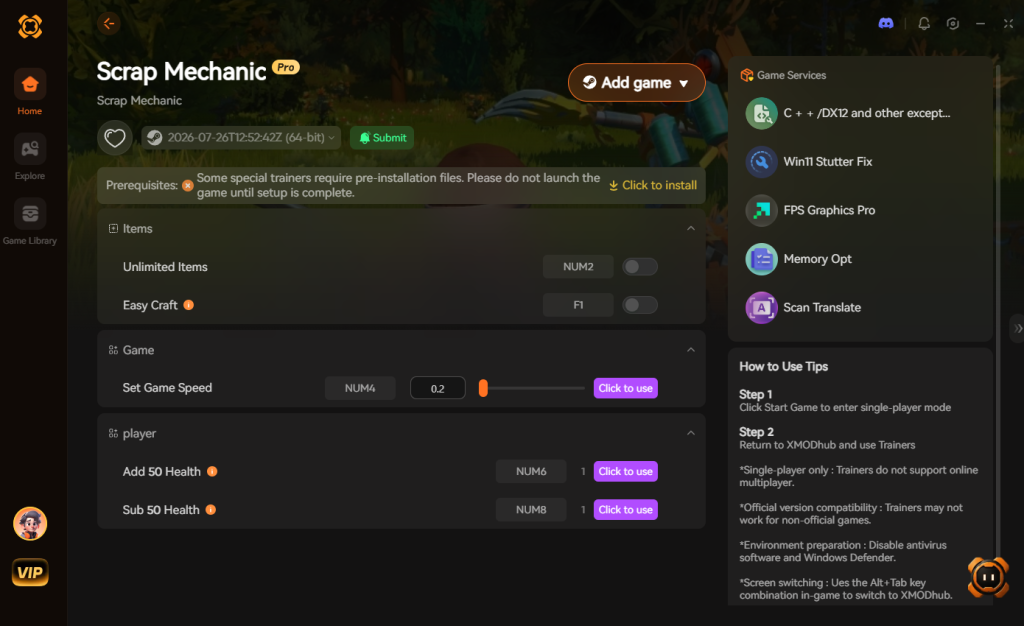
- Click “Play” to launch the game through the secure client.
- Toggle your desired cheats directly from the clean in-game overlay UI or via customizable keyboard hotkeys.
Download Scrap Mechanic Trainer Now
XMODhub Trainer Features for Scrap Mechanic
| XMODhub Feature | Effect | How to Activate |
|---|---|---|
| God Mode | Complete immunity to Farmbots, drowning, and physics damage. | Numpad 1 or UI Toggle |
| Infinite Items | Your inventory items never decrease when placed or consumed. | Numpad 2 or UI Toggle |
| Instant Crafting | The Craftbot finishes all recipes instantly without requiring raw materials. | Numpad 3 or UI Toggle |
| Super Speed | Increases your character’s running speed by 300% for fast exploration. | Numpad 4 or UI Toggle |
| No Thirst/Hunger | Locks your food and water meters at 100% permanently. | Numpad 5 or UI Toggle |
7. Troubleshooting: Cheats Not Working
If you decided to go the manual route and edit the game files, you might run into several frustrating roadblocks. Here are the most common reasons why Scrap Mechanic cheats fail to work and how to fix them:
- Steam Updates Reverting Files: Every time Scrap Mechanic receives a patch, or if you ever click “Verify integrity of game files” in Steam, the client will detect your modified
survival_game.luafile. Steam will automatically delete your modified file and replace it with the default, un-cheated version. You will need to re-apply the developer mode edit after every single game update. - Lua Syntax Errors: Lua is a highly sensitive programming language. If you accidentally deleted a comma, added an extra space, or typed
True(with a capital T) instead oftrue(lowercase) when editing the file, Scrap Mechanic will fail to parse the script. This usually results in the game crashing immediately on the loading screen. Always double-check your syntax and rely on your backup file if things go wrong. - Multiplayer Host vs. Client Restrictions: In Scrap Mechanic multiplayer, the game relies on a peer-to-peer connection. Only the Host (the player who created the world) has the authority to execute console commands. If you are joining a friend’s world as a Client, typing
/godor/unlimitedin the chat will do absolutely nothing, even if you edited your own local Lua files.
8. Essential Commands for Vehicle Building and Physics Testing
While most players seek out Scrap Mechanic cheats simply to survive Farmbot raids, the developer console is equally invaluable for hardcore engineers. Designing complex suspension systems, automated monorails, or walking mechs requires rigorous testing. By utilizing specific console commands, you can create a controlled sandbox environment directly within your survival world, saving you the hassle of constantly exporting blueprints to Creative Mode.
If you are pushing the limits of the game’s physics engine, here are the most effective command combinations to streamline your engineering process:
| Testing Scenario | Recommended Command | Expected Outcome | Priority Level |
|---|---|---|---|
| Suspension Stress Testing | /spawn blk_concrete3 |
Instantly drops maximum-weight blocks onto your chassis to test bearing load and sag. | High |
| Lighting Rig Calibration | /night |
Forces a pitch-black environment to accurately aim vehicle headlamps and sensors. | Medium |
| High-Speed Crash Recovery | /clear |
Instantly removes scattered loose debris after a catastrophic vehicle collision. | High |
| Engine Torque Tuning | /unlimited |
Grants infinite fuel and batteries, allowing uninterrupted engine output adjustments. | High |
| Terrain Traversal Logic | /teleport [x] [y] [z] |
Moves your rig to harsh mountainous terrain to test off-road capabilities. | Low |
Optimizing Frame Rates (FPS) While Using Cheats
One of the major hidden dangers of using Scrap Mechanic console commands is the sudden impact on your CPU. Spawning entities rapidly or relying on infinite inventory glitches can cause severe memory bloat. To maintain a stable 60 FPS while engineering complex builds, we highly recommend executing the /clear command every 30 minutes to wipe unattached bearings, loose spuds, and broken bot parts from the world’s memory cache.
9. Frequently Asked Questions (FAQ)
Q: Can I use these cheats on PlayStation or Xbox?
A: No. Modifying game memory or accessing developer consoles for Scrap Mechanic is strictly limited to the PC version. Furthermore, Scrap Mechanic is currently only available on PC via Steam, so console commands are inherently exclusive to the PC platform.
Q: Is there a penalty for using cheats in single-player?
A: There is no account ban or official penalty for cheating in a single-player environment. Axolot Games does not police private worlds. The only downsides are the potential for corrupted save files and disabled achievements, which can be avoided by using a secure trainer like XMODhub.
Q: Can I use Scrap Mechanic cheats to spawn custom modded items?
A: Yes, provided the mod is properly installed and active in your world. You will need to know the specific internal Item ID assigned by the mod creator, which is usually found on the mod’s Steam Workshop page. You can then use the /spawn [ModItemID] command as usual.
10. Conclusion
Whether Scrap Mechanic provides a built-in console or not, taking control of your single-player experience is easier than ever. While tweaking raw engine code and editing Lua scripts can be a fun technical experiment, it comes with significant risks to your save files, frame rates, and Steam achievements.
For a flawless, risk-free experience, using a dedicated modification tool is always the smarter choice. You do not have to spend your limited free time grinding for Component Kits or losing your favorite vehicle to a physics glitch.
With secure support for over 5,000+ single-player PC games, you can easily customize your gameplay, skip the tedious grind, and play exactly the way you want.
Stop Grinding, Start Enjoying.
Bypass the tedious resource gathering and unlock your full potential instantly.

I am a passionate gamer and writer at XMODhub, dedicated to bringing you the latest gaming news, tips, and insights.
Connect with me:
LinkedIn Profile ↗
 Nancy Miller