Catherine Hu
You just lost your best-geared clone, a full inventory of high-tier loot, and hours of grueling progress in Quasimorph because of a bad tactical decision—or worse, a random crash during a tense extraction. In a game where “if you die, you lose everything,” losing your PMC’s hard-earned resources feels devastating. You’re desperately looking for a way to safeguard your progress, but finding the exact Quasimorph save file location is surprisingly convoluted.
Editor’s Note: As someone who has piled up bodies of my own clones trying to unravel the dark mysteries in this cyberpunk meatgrinder, I’ve learned the hard way that managing your saves manually is sometimes the only way to retain your sanity. This guide outlines exactly where to find your files and how to back them up without breaking the game’s brutal progression loop.
TL;DR: The Short Answer
If you just need the exact path and don’t want to scroll, here is the default Quasimorph save file location on Windows:
- Steam (Windows):
C:\Users\[YOUR_USERNAME]\AppData\LocalLow\Magnum Scriptum\Quasimorph - What to backup: Copy the entire
Quasimorphfolder (or specifically theSavessubfolder) and paste it somewhere safe. - How to restore: Delete the current
Savesfolder in the directory and replace it with your copied backup before launching the game.
Table of Contents
- TL;DR: The Short Answer
- Where is the Quasimorph Save File Location?
- Why You Should Backup Your Quasimorph Saves
- Step-by-Step Guide: How to Backup Your Save Data
- Step-by-Step Guide: How to Restore Your Save Data
- Understanding the Save Mechanics in Quasimorph
- Decoding the Quasimorph Save File Structure
- Strategic Save Management: When Should You Backup?
- The Ultimate Shortcut: Skip the Grind with XMODhub
- Frequently Asked Questions
- Final Verdict: Protecting Your PMC Legacy
Where is the Quasimorph Save File Location?
Quasimorph is an unforgiving mix of classic turn-based roguelike RPG with a unique extraction twist. Because it runs on the Unity engine, its save data is tucked away in the standard AppData hidden folder structure rather than your Documents folder or the Steam installation directory.
Windows Save Path
To find your files quickly, follow this path:
C:\Users\[YOUR_USERNAME]\AppData\LocalLow\Magnum Scriptum\Quasimorph
How to get there instantly:
- Press
Windows Key + Rto open the Run dialog. - Type
%appdata%and hit Enter. This takes you to theRoamingfolder. - Click
AppDatain the address bar at the top to go back one level. - Open the
LocalLowfolder. - Open the
Magnum Scriptumfolder, then openQuasimorph.
Inside this directory, you will see a folder named Saves. This contains all your current progression, ship inventory, clone data, and campaign state.
Linux / Steam Deck Save Path
If you are playing Quasimorph on Linux or a Steam Deck via Proton, the save file location is hidden within the compatdata folder.
Path: ~/.steam/steam/steamapps/compatdata/2059170/pfx/drive_c/users/steamuser/AppData/LocalLow/Magnum Scriptum/Quasimorph/
(Note: 2059170 is the Steam App ID for Quasimorph).
Why You Should Backup Your Quasimorph Saves
Quasimorph advertises itself as a dark, turn-based extraction RPG where you play as the boss of a galactic PMC. You explore abandoned laboratories and derelict temples to complete missions for space corporations. The core rule is simple: if you survive, you keep everything; if you die, you lose everything you took on the mission.
While save scumming (backing up and restoring saves to avoid death penalties) is generally frowned upon in pure roguelike communities, there are highly valid reasons to manually manage your saves in Quasimorph:
- Corrupted Saves: Early Access games, or heavy updates, can sometimes corrupt your progression. A manual backup ensures you don’t lose your entire PMC.
- Testing Builds: The game features many difficulty modifiers and balancing sliders (enemy HP, damage, loot amount, crafting speed). You might want to backup your save before messing with these settings or testing a highly experimental, risky clone build.
- Hardware Swaps: If you are moving from a desktop to a laptop and Steam Cloud fails to sync properly, manually transferring your save file is your only lifeline.
If you are struggling with the core extraction mechanics and finding yourself constantly needing backups because you die before reaching the ship, you might want to brush up on How to Extract Safely in Quasimorph: Surviving Your First Raid to improve your fundamental survival tactics.
Step-by-Step Guide: How to Backup Your Save Data
Backing up your Quasimorph save file is incredibly straightforward once you know where the files are located.
Step 1: Locate the Folder
Navigate to C:\Users\[YOUR_USERNAME]\AppData\LocalLow\Magnum Scriptum\Quasimorph as detailed above.
Step 2: Copy the Saves Folder
Right-click the folder named Saves and select Copy (or press Ctrl+C). It is highly recommended to copy the entire Saves folder rather than individual files inside it to ensure all global progression and specific character states remain synced.
Step 3: Create a Secure Backup Directory
Create a new folder on your Desktop or another secure drive. Name it something recognizable, like “Quasimorph Backups.” Inside that folder, create a subfolder with today’s date or the current mission name (e.g., “Backup_Oct24_Before_Derelict_Temple”).
Step 4: Paste and Secure
Paste the copied Saves folder into your newly created, dated directory. You now have a hard copy of your PMC’s exact state at that moment in time.
Step-by-Step Guide: How to Restore Your Save Data
If the worst has happened—your augmented psychopath died fast, you lost your best gear, and you want to roll back the clock—here is how you safely restore your backup.
Step 1: Close the Game
Never attempt to overwrite save files while Quasimorph is running. Close the game entirely to prevent file corruption.
Step 2: Disable Steam Cloud (Temporary)
Steam Cloud might see your older restored save as a “conflict” and automatically overwrite it with the newer, dead-character save from the cloud.
- Open Steam.
- Right-click Quasimorph in your library and select Properties.
- Under the General tab, toggle off Keep games saves in the Steam Cloud for Quasimorph.
Step 3: Delete Current Saves
Navigate back to the Quasimorph save file location (AppData\LocalLow\Magnum Scriptum\Quasimorph). Delete the existing Saves folder. Do not just paste and overwrite; deleting ensures no remnant files from the “bad” save cause conflicts.
Step 4: Paste the Backup
Go to your backup folder, copy the Saves folder you saved earlier, and paste it into the Magnum Scriptum\Quasimorph directory.
Step 5: Launch the Game
Boot up Quasimorph. Your clone, your ship, and your loot should be exactly as they were when you made the backup. Once you confirm it worked, you can re-enable Steam Cloud; when prompted about a file conflict, choose to upload your local files to the cloud.
Understanding the Save Mechanics in Quasimorph
Quasimorph uses a continuous auto-save system designed to prevent players from easily undoing their mistakes. The game saves your progress when you enter a new floor, when you return to your ship, and crucially, immediately upon your death.
This is why traditional “Load Game” options don’t exist in the middle of a raid. The game wants you to feel the weight of your choices. When you enter a private domicile and proceed to rip and tear your way through, every step matters. If you find yourself in an open field of daisies and gunfire during a defense mission, the game will remember if you get gunned down.
Manual file management bypasses this intentional design. While adjusting the in-game difficulty sliders (enemy HP, action points, backpack stack size) is the developer-intended way to tailor your experience, manual file backups provide an absolute safety net against the game’s brutal realities.
Decoding the Quasimorph Save File Structure
When you copy that Saves folder, you aren’t just backing up a single checkpoint. Quasimorph tracks a complex web of persistent data. Understanding what is actually inside your backup can help you avoid breaking your campaign. If you attempt to cherry-pick individual files rather than copying the entire folder, you risk desyncing your PMC Progression from your Clone Roster.
Here is a breakdown of what your backup folder actually preserves:
| Data Type | Description | Impact on Restoration |
|---|---|---|
| PMC Progression | Faction standing, unlocked tech, ship upgrades, and corporate trading rep. | Completely retained and rolled back globally if the entire folder is backed up. |
| Clone Roster | Available Mercenaries, their current classes, stats, and equipped loadouts. | Reverts to the exact state of the backup; permanently dead clones will be revived. |
| Magnum Ship Inventory | Stashed weapons, medical supplies, crafting materials, and barter items. | Prevents the devastating loss of high-tier loot like Energy Weapons or rare Artifacts. |
| Mid-Raid State | Auto-saves generated upon entering a new floor during a planetary extraction. | Highly volatile. Restoring a mid-raid save can sometimes cause map generation bugs. It’s always safer to backup before deploying. |
Strategic Save Management: When Should You Backup?
As any veteran of this unforgiving extraction RPG will tell you, you shouldn’t be backing up your game after every single minor skirmish. Not only is it tedious, but it also ruins the adrenaline rush that makes Quasimorph great. However, there are specific tactical moments where securing your save file is highly recommended:
- Before High-Skull Corporate Missions: If you are taking on a max-difficulty sabotage or assassination contract for a major faction and bringing your absolute best Power Armor and Plasma Rifles, make a backup. A single bad roll against an enemy with a shotgun can end your run instantly.
- Approaching High Quasimorphosis: The Quasimorphosis meter is the game’s ticking time bomb. If you are deep in a facility, the meter is pushing dangerously high, and you know a Baron (a brutal demonic boss) is about to spawn, backing up your save before descending to the next floor might save your favorite clone.
- Major Trading Excursions: Before you commit your hard-earned rare items to a corporate trading terminal for a faction upgrade, secure your save. If the faction reward pool rotates unfavorably or you misclick, you can easily undo the transaction.
The Ultimate Shortcut: Skip the Grind with XMODhub
Let’s be honest: constantly digging into your AppData folder to backup and restore files every time you attempt a high-risk extraction is tedious. Quasimorph is an incredibly unforgiving game. If you are tired of losing your best clones and having your progression wiped because of bad RNG or a massive demon spawn, there is a much faster way to tilt the odds in your favor.
Instead of wrestling with hidden file directories, use XMODhub. It is the ultimate tool for players who want to enjoy the tactical depth of Quasimorph without the punishing grind. With XMODhub, you can instantly activate features like Infinite Health for your clones, Unlimited Action Points, or Infinite Inventory Weight to hoard all that precious corporate loot.
Taking control of your PMC is incredibly simple:
- Download and Install XMODhub: Grab the lightweight client from the official site.

- **Auto-Detect Quasimorph:** Launch the app, and it will instantly recognize your game installation.
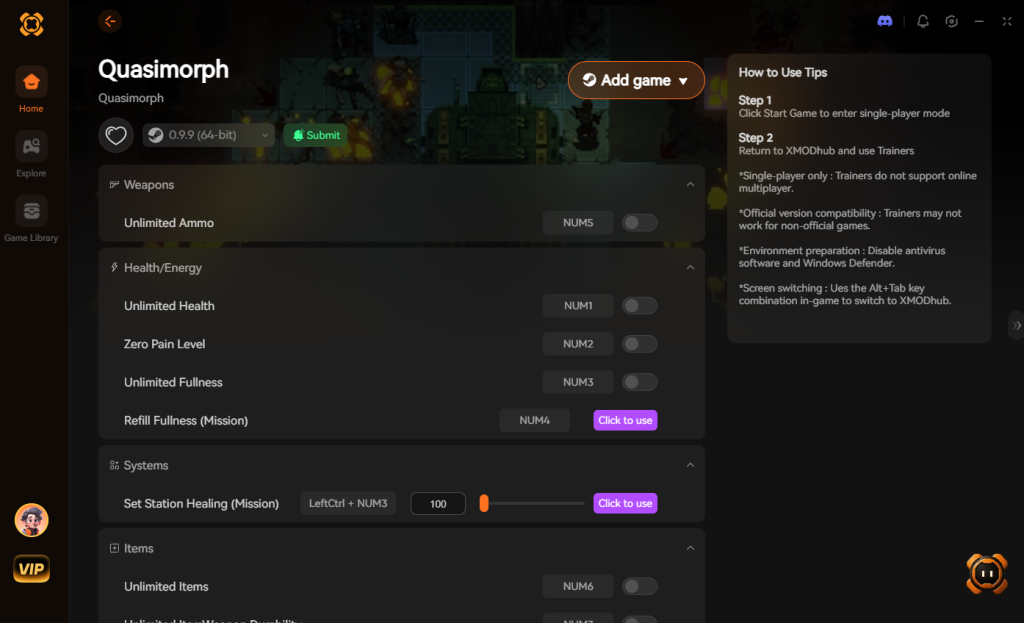
- Toggle Cheats: Boot the game through XMODhub and use the overlay to turn on Infinite AP, God Mode, or No Reload with a single click.
Why waste time managing save files when you can just ensure your clone survives the raid in the first place?
Download Quasimorph Trainer Now
Frequently Asked Questions
Why can’t I find the AppData folder on Windows?
The AppData folder is hidden by default in Windows. To see it, open File Explorer, click on the View tab at the top, and check the box next to Hidden items. Alternatively, using the %appdata% run command bypasses the need to unhide the folder.
Can I transfer my Quasimorph save from PC to Steam Deck?
Yes. Since both platforms use the exact same file structure for saves, you can manually copy the Saves folder from your Windows PC and paste it into the correct compatdata directory on your Steam Deck (or let Steam Cloud handle the sync).
Will manually backing up saves get me banned in Quasimorph?
No. Quasimorph is a single-player game. There is no anti-cheat system monitoring your save files, and you will not be banned for modifying, backing up, or restoring your own local data.
Does modifying the game’s difficulty sliders disable achievements?
Currently, adjusting the massive array of difficulty modifiers at the start of a campaign (such as faction advance speed, crafting speed, or enemy count) allows you to tailor the game to your liking. Always check current patch notes, but generally, single-player balancing does not heavily penalize achievement hunters.
Final Verdict: Protecting Your PMC Legacy
Navigating the Quasimorph save file location is an essential skill for players looking to protect their time investment in an otherwise brutal, unforgiving universe. By locating your files in the LocalLow directory and keeping meticulous backups, you ensure that bugs, crashes, or simple bad luck don’t erase hours of hard-earned progression.
However, if the cycle of dying, losing everything, and manually restoring files is burning you out, remember that gaming should be fun, not a chore. XMODhub offers a seamless way to bypass the frustration, supporting over 5,000+ single-player titles. Whether you are managing your space PMC in Quasimorph, surviving the gritty extraction zones of Zero Sievert, or exploring the tactical depths of XCOM 2, XMODhub gives you the power to play by your own rules. Stop digging through folders—start extracting successfully.

Stop Grinding, Start Enjoying.
Bypass the tedious resource gathering and unlock your full potential instantly.

I am a passionate gamer and writer at XMODhub, dedicated to bringing you the latest gaming news, tips, and insights.
Connect with me:
LinkedIn Profile ↗