
 Catherine Hu
No, Moonlighter does not have a built-in developer console or native text-based cheat codes. Because the developers at Digital Sun designed Moonlighter as a tightly balanced rogue-lite economy simulator, they completely removed all internal debugging tools and developer consoles prior to the game’s official launch. This means you cannot press the tilde key (~) to open a command prompt, nor can you type in traditional cheat codes to instantly spawn items or grant yourself invincibility.
However, this does not mean you are out of luck. The only guaranteed, working method to cheat in Moonlighter is by using a third-party memory trainer like XMODhub. By attaching a dedicated trainer to your active game session, you gain access to 1-click alternatives that bypass the need for a developer console entirely. This allows you to instantly activate God Mode, secure Infinite Gold for your shop, and apply Infinite Items to bypass the punishing inventory management system.
Editor’s Note: This guide was last verified against the newest Moonlighter patch, including the Between Dimensions DLC. Whether you are using native engine tools or a dedicated trainer, please back up your save files before modifying game memory to prevent unexpected bugs.
We have all been there. You have just spent hours dying to the same boss in Moonlighter, or maybe you simply do not have the time to grind for Empowering Crystals from the Tech Dungeon or massive amounts of Gold to upgrade the Blacksmith after a long day. Single-player games are meant to be enjoyed on your own terms. Let us get your character powered up.
You may also like: The Ultimate Moonlighter Cheat Engine Guide (And A Much Easier Alternative)
📋 Table of Contents
- Quick Answer: Does Moonlighter Have Console Commands?
- 1. How to Enable Cheats in Moonlighter
- 2. The Complete List of Moonlighter Cheats
- 3. Item IDs and Spawning Guide
- 4. Do Cheats Disable Achievements?
- 5. Why Native Cheats Can Break Your Save Files
- 6. The Safer Alternative: 1-Click Cheats with XMODhub
- 7. Troubleshooting: Cheats Not Working
- 8. Optimizing Progression: Best Shop Upgrades to Target First
- 9. Conquering the Between Dimensions DLC Difficulty Spike
- 10. Frequently Asked Questions (FAQ)
- Conclusion
1. How to Enable Cheats in Moonlighter
Since there is no developer console hidden within the game files of Moonlighter, players cannot type in codes to alter their gameplay. Many players waste hours searching through configuration files (.ini) or trying to add launch parameters in Steam hoping to unlock a hidden command prompt, but these methods simply do not exist in the compiled retail version of the Unity engine game.
Instead, to modify your game and enable powerful enhancements, you must use a trusted external application that safely injects these modifications into the game’s active memory. Here is the simple 3-step process to download and attach XMODhub to Moonlighter to enable cheats:
Step 1: Download and Install the Application
Navigate to the official XMODhub website and download the desktop application. The software is lightweight and designed to run quietly in the background without consuming excessive system resources. Run the installer and create your free account to access the massive library of supported single-player titles.
Step 2: Locate Moonlighter in the Library
Once the application is open, use the search bar at the top to find “Moonlighter”. The software automatically detects which storefront you purchased the game from—whether it is Steam, Epic Games Store, or GOG—and selects the correct memory addresses for your specific game version. This is crucial because different storefronts often compile their executables slightly differently, which can easily break manual Cheat Engine tables.
Step 3: Launch and Inject
Click the “Play” button directly from the XMODhub interface. The application will launch Moonlighter and automatically hook into the game process. Once you are loaded into your save file and standing in your shop or a dungeon, simply use the designated hotkeys (or click the toggles on your second monitor) to activate your desired cheats instantly.
2. The Complete List of Moonlighter Cheats
Because Moonlighter does not feature a developer console, there are no text-based cheat codes to input. You cannot type “add_gold 10000” or “god_mode 1” anywhere in the game. However, you can achieve the exact same effects using the XMODhub app.
The dual-gameplay loop of Moonlighter—managing your storefront during the day and delving into rogue-lite dungeons at night—presents unique challenges. The trainer features are specifically designed to alleviate the most frustrating aspects of both phases. Whether you are tired of getting overwhelmed by enemies in the Desert Dungeon or you are annoyed by customers refusing to pay premium prices for your hard-earned loot, these toggles give you total control.
Here are the trainer features available in XMODhub for Moonlighter:
| Feature | Effect | How to Activate |
|---|---|---|
| God Mode (Invincibility) | Prevents all incoming damage. You can walk through the Golem, Forest, Desert, and Tech dungeons without ever taking a single point of damage from enemies, bosses, or environmental traps. | Toggle via UI or press Numpad 1 |
| Infinite Health | Instantly locks your health bar to its maximum value. If you take massive burst damage, your health instantly regenerates, saving you from wasting expensive potions crafted by the Wooden Hat merchant. | Toggle via UI or press Numpad 2 |
| Infinite Gold | Grants you an unlimited amount of currency. You can instantly purchase all town upgrades, expand your shop to the maximum size, and buy the most expensive weapons and armor from Vulcan’s Forge without grinding. | Toggle via UI or press Numpad 3 |
| One-Hit Kills | Multiplies your damage output exponentially. Every enemy and major dungeon boss will die in a single strike from any weapon, drastically speeding up your nightly farming runs. | Toggle via UI or press Numpad 4 |
| Infinite Items / Max Stack | Automatically maximizes the quantity of any item you pick up or move in your inventory. This completely breaks the economy in your favor, allowing you to sell stacks of 99 high-tier artifacts to customers. | Toggle via UI or press Numpad 5 |
| Ignore Crafting Requirements | Allows you to craft any weapon, armor piece, or potion at the town vendors even if you do not have the required monster parts or raw materials in your inventory. | Toggle via UI or press Numpad 6 |
| Super Movement Speed | Increases Will’s base movement speed. This is incredibly useful for dodging fast boss attacks or quickly running around your shop to restock shelves and catch thieves before they steal your merchandise. | Toggle via UI or press Numpad 7 |
3. Item IDs and Spawning Guide
In many PC games, players can use the developer console to manually spawn specific items by typing a command followed by a unique hexadecimal string known as an Item ID. Because Moonlighter lacks native engine tools and a command console, manually spawning items via text is completely impossible. You will not find any functional list of Item IDs for Moonlighter on the internet because there is no interface in the game that can process them.
The inventory system in Moonlighter is notoriously complex. It features a grid-based backpack where items often come with “curses”—modifiers that force you to place an item on the top row, destroy adjacent items upon returning to town, or automatically teleport items home. Trying to manually inject items into this highly volatile, grid-based memory structure using generic hex editors often results in instant game crashes or permanently corrupted inventory slots.
XMODhub bypasses this complex problem entirely. Instead of forcing you to look up complex hex codes to spawn a specific piece of Chilled Lava or an Iron Sponge, the trainer allows you to instantly maximize your existing inventory stacks or add infinite currency with a single click. If you need a specific weapon, you do not need its Item ID; you simply activate the “Ignore Crafting Requirements” cheat and have the Blacksmith forge it for you instantly. This eliminates the need to look up complex codes and protects your save file from inventory corruption.
4. Do Cheats Disable Achievements?
One of the biggest concerns for completionists is whether modifying the game will lock them out of earning Steam or Epic Games Store achievements. In games that feature native console commands, developers usually implement a strict script: the moment the console is opened or a cheat command is recognized, a flag is permanently triggered in your save file that disables all achievement tracking.
Fortunately, because you are using an external memory trainer rather than native in-game commands, your achievements in Moonlighter remain entirely safe. XMODhub operates by temporarily injecting values directly into your system’s RAM rather than altering the game’s hardcoded scripts. This means the internal cheat-flagging system of Moonlighter and the storefront overlay APIs are completely bypassed.
You can activate Infinite Health to effortlessly defeat the final boss of the Tech Dungeon, or use Infinite Gold to quickly unlock the “Perfect Merchant” achievement, and the storefront client (Steam/Epic) will register these milestones as completely legitimate. You get to enjoy the thrill of unlocking rare achievements without having to endure the grueling, repetitive grind that normally accompanies them.
5. Why Native Cheats Can Break Your Save Files
Beyond the achievement lock, native developer tools and memory editors are notoriously unstable. These commands were originally built for developers to test bugs during production, not for everyday gameplay.
Forcing a quest to complete or bypassing intended story triggers can cause crucial NPCs to completely disappear from your map. Memory leaks, corrupted assets, and sudden crashes to the desktop are incredibly common when you spawn too many items at once. In a rogue-lite game like Moonlighter, the dungeons are procedurally generated every time you enter them at night. If a native console command were used to force-skip a floor or instantly teleport to a boss room, the game engine would likely fail to generate the required exit doors or loot chests, leaving your character permanently soft-locked in an empty void.
Furthermore, the shop management phase relies on delicate economic scripts. Customers have specific pathfinding AI that dictates how they approach tables, examine prices, and walk to the cash register. Using raw memory editors to force a customer to buy an item for an absurdly high price can break their AI loop, causing them to stand frozen in your shop forever, preventing the day-night cycle from advancing and ruining your entire playthrough.
6. The Safer Alternative: 1-Click Cheats with XMODhub
If you want the benefits of cheats—like infinite health or skipping the heavy grind—without risking your save files or locking your achievements, you need a dedicated game modification tool.
Instead of typing risky code that might corrupt your game world, the XMODhub app hooks into Moonlighter safely and cleanly. It understands the specific memory architecture of the game, ensuring that when you activate a modification, it only affects the intended variables without spilling over into critical game logic.
- Achievement Safe: It bypasses the game’s internal cheat-flagging system, allowing you to 100% the game on your own terms.
- Save File Protection: It alters values temporarily in your RAM. Once you close the game, your save file remains uncorrupted and intact.
- One-Click Toggles: No more memorizing long item IDs or struggling with hexadecimal addresses. Just hit a hotkey to turn God Mode on instantly.
How to Use XMODhub for Moonlighter
- Download and Launch the free XMODhub desktop app.

- Search for “Moonlighter” in the library
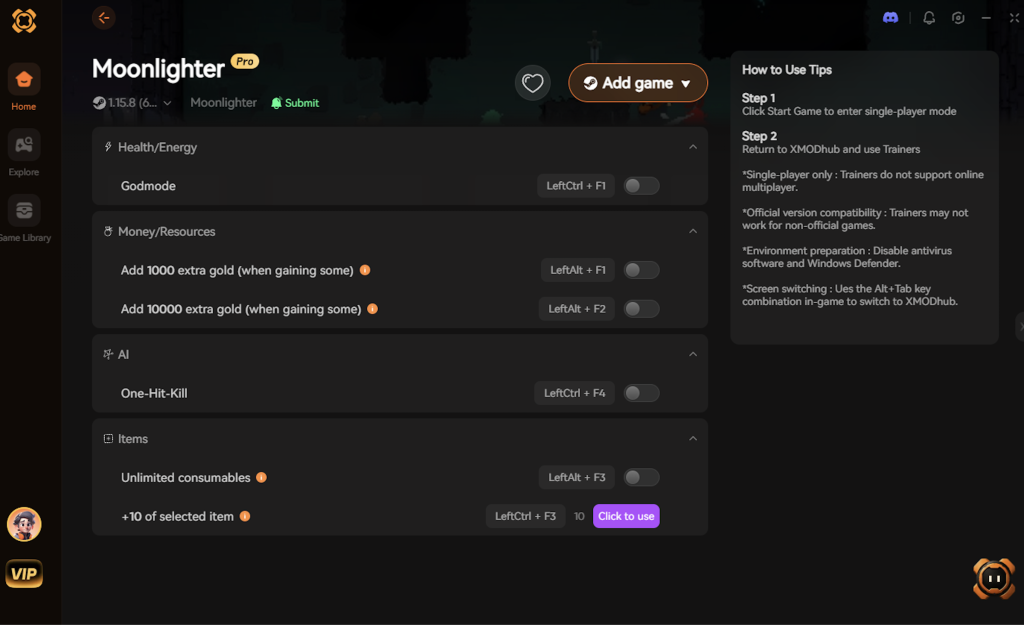
- Click “Play”.
- Toggle your desired cheats directly from the clean UI or via hotkeys.
Download Moonlighter Trainer Now
7. Troubleshooting: Cheats Not Working
Even with the most advanced tools, PC gaming environments can sometimes cause unexpected hiccups. If you find that your modifications for Moonlighter are not activating properly, run through this comprehensive troubleshooting checklist:
- Game Version Mismatch: Moonlighter has received several updates over its lifespan, including the massive “Between Dimensions” DLC. Whenever a game updates, the memory addresses shift. If your cheats are not working, ensure that your game is fully updated on Steam/Epic, and verify that XMODhub has automatically downloaded the latest trainer profile for the current patch.
- Antivirus False Positives: Because memory trainers must inject code into another active process (Moonlighter.exe) to function, overly aggressive antivirus software (like Windows Defender or Norton) will often flag them as suspicious based on heuristics and block the injection silently. To fix this, add the XMODhub installation folder to your antivirus exclusion list.
- Administrator Rights Requirement: Modifying system memory requires elevated permissions in Windows 10 and 11. If you launch the trainer normally, it might lack the authority to read the game’s RAM. Always right-click the XMODhub shortcut and select “Run as Administrator” before launching Moonlighter.
8. Optimizing Progression: Best Shop Upgrades to Target First
When you activate the Infinite Gold cheat, the entire economy of Rynoka opens up to you instantly. However, unlocking everything blindly can sometimes leave players feeling overwhelmed by the sudden influx of inventory management and town upgrades. To maintain a satisfying progression curve while utilizing cheats, it is highly recommended to prioritize specific town infrastructure first.
By strategically spending your unlimited currency on the right vendors, you can streamline your dungeon runs without entirely removing the fun of running your own storefront. Below is the optimal upgrade path to follow once you have secured infinite funds.
| Upgrade Category | Specific NPC / Shop Node | Strategic Benefit with Cheats | Priority Level |
|---|---|---|---|
| Town Infrastructure | Vulcan’s Forge | Instantly forge max-tier weapons using the Ignore Crafting Requirements toggle. | Essential |
| Consumables Support | The Wooden Hat | Stockpile premium healing potions and top-tier weapon enchantments. | Essential |
| Shop Architecture | Level 3 Shop Upgrade | Unlocks maximum floor space and additional display cases for high-volume sales. | High |
| Economic Management | Advanced Cash Register | Generates massive passive bonus tips from wealthy customers. | High |
| Inventory Clearance | Discount Sale Boxes | Quickly clears out junk loot from your infinite inventory stacks. | Medium |
Prioritizing Vulcan’s Forge ensures that your damage output scales appropriately for the Desert and Tech dungeons, even if you choose not to use the One-Hit Kill cheat. Meanwhile, upgrading your own shop architecture ensures you can display the rarest artifacts you acquire, keeping the business management simulation highly engaging.
9. Conquering the Between Dimensions DLC Difficulty Spike
For players who have reached the endgame, the Between Dimensions DLC introduces a notorious difficulty spike. The expansion adds the Wanderer Dungeon—an interdimensional rift filled with highly aggressive new enemies, complex mini-bosses, and punishing environmental hazards that can easily wipe out an unprepared merchant.
This is where memory trainers truly shine. The DLC introduces “Trick Weapons,” which boast incredible power but often come with severe health-draining penalties or sluggish attack animations. By enabling Infinite Health and God Mode, you can experiment with these volatile Trick Weapons without the fear of instantly dying to their inherent curses.
Furthermore, the new Corrupted Artifacts found in the Wanderer Dungeon take up massive amounts of inventory space and feature the most frustrating curse mechanics in the game. Utilizing the Infinite Items toggle allows you to bypass the tedious grind of repeatedly diving into the interdimensional rift just to gather enough materials for the final tier of DLC gear. You get to experience the phenomenal new story content and boss fights without the artificial time-gating.
10. Frequently Asked Questions (FAQ)
Q: Can I use these cheats on PlayStation or Xbox?
A: No. Modifying game memory or accessing developer consoles for Moonlighter is strictly limited to the PC version. Console ecosystems are heavily encrypted and closed off, making it impossible to run external memory trainers or inject code without heavily modifying the console hardware itself.
Q: Is there a penalty for using cheats in single-player?
A: There is no account ban or official penalty for cheating in a single-player environment. Moonlighter does not feature any anti-cheat software (like Easy Anti-Cheat or BattlEye) because it does not have a competitive multiplayer component. The only downsides are the potential for corrupted save files and disabled achievements, which can be avoided entirely by using a secure trainer like XMODhub.
Q: Will the Infinite Items cheat break the cursed item mechanics?
A: No. The trainer is designed to maximize the stack count of the item itself without altering the underlying properties of the grid slot. Curses (like destroying adjacent items) will still function based on the game’s logic, but since you have infinite items, the penalty of losing an adjacent item becomes completely negligible.
Q: Does Infinite Gold affect the shop’s popularity rating?
A: Modifying your gold directly does not negatively impact your shop’s reputation. Your popularity rating is determined by how accurately you price items for your customers. You can use Infinite Gold to buy all the town upgrades immediately, while still playing the shopkeeping mini-game normally if you choose to.
Conclusion
Whether Moonlighter provides a built-in console or not, taking control of your single-player experience is easier than ever. While tweaking raw engine code can be a fun technical experiment, it comes with significant risks to your save files and achievements. For a flawless, risk-free experience, using a dedicated modification tool is always the smarter choice.
With secure support for over 5,000+ single-player PC games, you can easily customize your gameplay, skip the tedious grind, and play exactly the way you want.
Stop Grinding, Start Enjoying.
Bypass the tedious resource gathering and unlock your full potential instantly.

I am a passionate gamer and writer at XMODhub, dedicated to bringing you the latest gaming news, tips, and insights.
Connect with me:
LinkedIn Profile ↗
 Nancy Miller