Catherine Hu
Table of Contents
- TL;DR: The Short Answer
- Content Navigation
- The Official Stance on Modding at Launch
- Why the Community Desperately Needs a Mod Tool
- The Challenges of Modding the New 3D Engine
- Current Community Workarounds and Generic Injectors
- Memory Editing: The Reliable Bridge
- The Ultimate Shortcut: XMODhub
- Pre-Modding Checklist: Securing Your Save Data
- Mod Tool vs. Memory Trainer: Feature Comparison
- Frequently Asked Questions
- Final Verdict: Navigating the Endless Vault
You have just upgraded Will’s shop, stepped into the newly rendered glorious cozy 3D dungeons [2], and realized that crafting the latest expanded arsenal weapons requires an agonizing amount of repetitive farming. Reviewers have already pointed out that “the grind eventually becomes a bit noticeable” [2], and you are likely scouring the internet for a dedicated Moonlighter 2: The Endless Vault mods tool to tweak drop rates, adjust shopkeeper mechanics, or fix the slightly long loading times [2]. Unfortunately, jumping into a freshly released indie title looking for a fully-fledged modding API often leads to immense frustration and dead-end forums.
As a PC gaming veteran who dove into the 1.0 release on September 2, 2026 [2], I immediately felt the sting of the mid-game grind. Searching for a simple mod manager or an official workshop tool resulted in nothing but empty directories. Based on community reports, attempting to force generic mod loaders into the game’s directory without an official framework often leads to corrupted save files rather than a customized shopkeeping experience.
TL;DR: The Short Answer
If you are looking for an official, developer-supported Moonlighter 2: The Endless Vault mods tool, here is the current reality:
- Official Status: No official fix has been confirmed yet. Neither Digital Sun nor 11 bit studios have released a native modding toolkit for the 1.0 version [2].
- The Core Problem: The transition to a 3D environment [2] has made asset swapping and logic editing significantly more complex than in the original 2D game.
- Community Workarounds: Based on community reports, players are currently relying on generic engine injectors (like BepInEx) for minor tweaks, though stability is highly questionable.
- The Best Alternative: Until a dedicated Moonlighter 2: The Endless Vault mods tool is built by the community, memory editing remains the most reliable way to bypass the game’s noticeable grind [2].
- Instant Solution: Scroll down to the XMODhub section if you want to skip the technical headache and instantly adjust your game parameters.
Content Navigation
- The Official Stance on Modding at Launch
- Why the Community Desperately Needs a Mod Tool
- The Challenges of Modding the New 3D Engine
- Current Community Workarounds and Generic Injectors
- Memory Editing: The Reliable Bridge
- The Ultimate Shortcut: XMODhub
- Pre-Modding Checklist: Securing Your Save Data
- Mod Tool vs. Memory Trainer: Feature Comparison
- Frequently Asked Questions
- Final Verdict: Navigating the Endless Vault
The Official Stance on Modding at Launch
Moonlighter 2: The Endless Vault launched on September 2, 2026, across PC, PlayStation 5, Xbox Series X, and Nintendo Switch 2 [2]. As an Action RPG with heavy roguelike mechanics and shopkeeping [1], it is the exact type of game that thrives on community-created content. Modders naturally want to add new weapons to the expanded arsenal [1], introduce custom customer AI for the shop, or create entirely new dungeon biomes.
However, at this stage of the release cycle, the developers have focused entirely on delivering a polished 1.0 experience. The game has received generally positive reviews, scoring in the 70-80 range on Metacritic [2], with praise directed at its engaging gameplay loop and charming story [3]. Because the focus was on stabilizing the core loot-and-sell loop and fixing minor technical issues [3], a dedicated Moonlighter 2: The Endless Vault mods tool was not included in the launch package. If you are waiting for a seamless, one-click Steam Workshop integration, no official fix has been confirmed yet.
Why the Community Desperately Needs a Mod Tool
To understand why the search volume for a Moonlighter 2: The Endless Vault mods tool is skyrocketing, we have to look at the game’s core design and the friction points identified by early adopters.
1. The Noticeable Grind
While the loot-and-sell loop is as addictive as ever [2], the progression curve steepens sharply in the mid-to-late game. To craft the highest-tier gear from the expanded arsenal [1], Will must dive into the Endless Vault repeatedly. Reviewers have explicitly noted that “the grind eventually becomes a bit noticeable” [2]. A mod tool would allow players to tweak XML or JSON files to increase resource drop rates, effectively respecting the player’s time.
2. Loading Time Optimization
Another technical critique from the launch window is that “the loading times could be shorter” [2]. In PC gaming, when developers fall short on optimization, the community steps in. A proper modding tool would allow technical modders to unpack the game’s asset bundles, compress textures, or optimize how the 3D environments are loaded into memory, creating community patches that drastically reduce loading screens.
3. Expanding the Shopkeeping Mechanics
The shopkeeping system is more finetuned and engaging for new and veteran players [3]. However, hardcore management sim fans always want more depth. A robust mod tool would enable the community to inject new variables into the economy—such as dynamic inflation, seasonal demand shifts, or entirely new classes of customers with unique bartering behaviors.
The Challenges of Modding the New 3D Engine
One of the biggest selling points of Moonlighter 2: The Endless Vault is that it manages to bring everything great about the original into “glorious cozy 3D” [2]. While this is a massive visual upgrade, it creates a significant hurdle for casual modders.
In the original 2D game, modifying a weapon or a character was often as simple as replacing a sprite sheet. In a fully 3D environment, introducing new weapons to the expanded arsenal [1] requires 3D modeling, rigging, texturing, and animating. Without an official Moonlighter 2: The Endless Vault mods tool that provides an SDK (Software Development Kit) to import these 3D assets smoothly into the game’s proprietary rendering pipeline, adding custom visual content is currently nearly impossible for the average user.
Current Community Workarounds and Generic Injectors
Because no official fix has been confirmed yet regarding mod support, the hardcore PC community has resorted to generic workarounds. Based on community reports, here is how advanced users are attempting to modify the game:
Generic Engine Mod Loaders
Since many modern indie Action RPGs [1] are built on standard engines (like Unity or Unreal), some players are attempting to force generic modding frameworks (such as BepInEx or MelonLoader) into the game’s root directory.
- The Process: This involves placing the framework files alongside the game’s executable, running the game once to generate configuration folders, and then writing custom
.dllplugins to hook into the game’s code at runtime. - The Risk: Because the game’s codebase is heavily obfuscated and lacks an official API, these generic injections often cause the game to crash, particularly during transitions between the shop and the dungeons.
Asset Unpacking
Some users are utilizing generic asset extractors to pull the game’s files, looking for plain-text configuration files that dictate weapon damage, enemy health, and item prices. If successful, these files can be edited in a text editor and repacked. However, any official patch from 11 bit studios [2] will instantly overwrite these manual changes, making this a highly volatile method of modding.
Memory Editing: The Reliable Bridge
Given the instability of generic mod loaders and the total absence of an official Moonlighter 2: The Endless Vault mods tool, how are players actually bypassing the grind right now? The answer lies in memory manipulation.
Instead of trying to rewrite the game’s files permanently, players are altering the game’s values in their system’s RAM while the game is running. If you want to give Will infinite gold to upgrade the shop instantly, or multiply the amount of crafting materials in your huge backpack [2], you do not need a complex modding API.
For players who want to bypass the wait for a dedicated modding framework, leaning into memory manipulation via a Moonlighter 2: The Endless Vault cheat engine table is currently the most viable community-driven workaround. This method allows you to isolate the specific addresses governing Will’s health, inventory quantities, and currency, allowing you to bypass the hurdles thrown at Will in every direction [3] without corrupting your installation files.
The Ultimate Shortcut: XMODhub
Let’s be completely honest: you probably don’t want to spend three hours learning how to unpack 3D asset bundles or manually search for hexadecimal memory addresses just to make the grind less noticeable [2]. You want to play the game, enjoy the charming story [3], and experience the expanded arsenal [1] on your own terms.
If you are tired of waiting for a Moonlighter 2: The Endless Vault mods tool that may never arrive, XMODhub is the ultimate shortcut. XMODhub is a premium, one-click trainer ecosystem that bypasses the need for complex mod installations.
Here is how you can instantly take control of your shopkeeper’s destiny:
- Download and Install XMODhub: Grab the lightweight desktop client from the official site. It is safe, secure, and requires no technical knowledge.

- Auto-Detect Moonlighter 2: The Endless Vault: Launch the game. XMODhub will automatically detect your 1.0 installation (whether on Steam, Epic, or GOG) and load the specific cheat profile for the game.
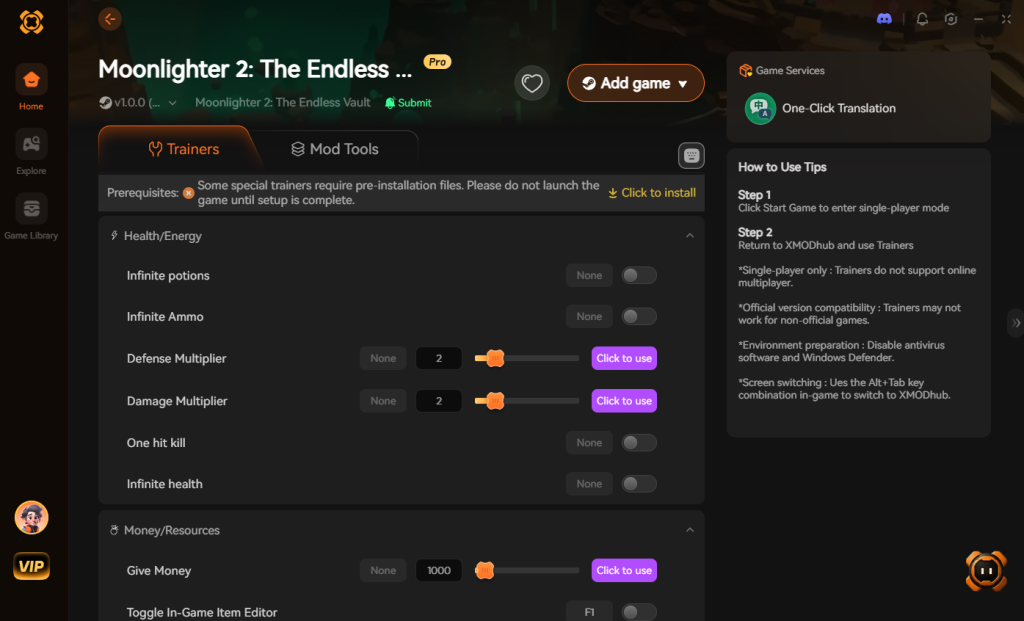
- Toggle Cheats Instantly: Use simple hotkeys or the sleek UI to activate features like:
- Infinite Health & Stamina: Survive the Endless Vault without breaking a sweat.
- Max Gold / Instant Wealth: Upgrade your shop to the maximum tier immediately.
- 100% Drop Rates: Eradicate the noticeable grind completely.
- One-Hit Kill: Test out the new combat builds and weapons [3] with devastating efficiency.
Why wait for a modding community to reverse-engineer the game when XMODhub gives you God-mode on day one?
Download Moonlighter 2: The Endless Vault Trainer Now
Pre-Modding Checklist: Securing Your Save Data
If you still intend to experiment with experimental community injectors while waiting for an official Moonlighter 2: The Endless Vault mods tool, you must prioritize data security. The transition between the shop management phase and the dungeon crawling phase is highly susceptible to memory leaks when using unoptimized .dll files.
Before applying any third-party modifications, you need to locate and back up your save files. Navigate to your local AppData directory (usually found by pressing Win + R and typing %appdata%). Look for the LocalLow folder, then find the Digital Sun directory. Copy the entire Moonlighter 2 folder and paste it safely onto your desktop. If a generic injector corrupts your progression, simply delete the corrupted folder in the directory and replace it with your clean backup.
Mod Tool vs. Memory Trainer: Feature Comparison
To help you decide the best way to customize your gameplay experience, we have compiled a data-driven comparison of the current methods available for modifying the game. This table highlights why many players are shifting away from traditional modding attempts toward memory trainers.
| Feature / Method | Official Mod Tool (TBA) | Generic Injectors (BepInEx) | XMODhub Trainer |
|---|---|---|---|
| Setup Time | Unknown (Not Released) | 30+ Minutes | Instant (1-Click) |
| System Stability | High | Low (High Crash Risk) | Maximum |
| Game Version Compatibility | 1.0 (Future) | Often breaks on minor patches | Auto-Updates Seamlessly |
| Feature Set | Visuals & Deep Logic | Basic Value Tweaks | Infinite Gold, God Mode, 100% Drops |
| Risk of Save Corruption | Low | Very High | Zero |
Frequently Asked Questions
Is there an official Moonlighter 2: The Endless Vault mods tool available?
No. As of the September 2, 2026 release [2], no official fix has been confirmed yet. The developers at Digital Sun have not released an official modding API or announced Steam Workshop integration.
Can I mod the new 3D graphics and models?
Currently, it is extremely difficult. Because the game transitioned into “glorious cozy 3D” [2], replacing models requires advanced 3D rigging knowledge and generic asset unpackers. Based on community reports, visual modding is highly unstable without official developer tools.
How can I reduce the noticeable grind without mods?
If you cannot use mods, you have two choices: optimize your shopkeeping strategy to maximize profits using in-game mechanics, or use external memory editing tools/trainers like XMODhub to artificially inflate your inventory and gold.
Will applying generic mod frameworks corrupt my save file?
Yes, there is a high risk. Because Moonlighter 2: The Endless Vault does not natively support these frameworks, injecting .dll files can cause memory leaks or save state corruption. Always back up your save files located in your AppData folder before attempting any manual modding.
Final Verdict: Navigating the Endless Vault
Moonlighter 2: The Endless Vault is a brilliant follow-up that successfully finds the “sweet spot” of balancing an action RPG experience combined with roguelike elements [3]. However, its reliance on a loot-and-sell loop inherently introduces a grind that not every PC gamer has the time to endure.
While the search for a dedicated Moonlighter 2: The Endless Vault mods tool currently ends in disappointment due to the lack of official support, you are not entirely out of luck. Whether you choose to dive into the technical weeds of memory editing or take the streamlined path, you have options to customize your experience.
For the absolute best, most frictionless experience, XMODhub remains the undisputed king. Why struggle with broken generic injectors when XMODhub supports over 5,000+ single-player PC games? Whether you are managing Will’s shop, escaping the underworld in Hades II, or serving sushi in Dave the Diver, XMODhub ensures you play the game exactly how you want to. Download XMODhub today, skip the grind, and become your village’s ultimate hero [3].
Stop Grinding, Start Enjoying.
Bypass the tedious resource gathering and unlock your full potential instantly.

I am a passionate gamer and writer at XMODhub, dedicated to bringing you the latest gaming news, tips, and insights.
Connect with me:
LinkedIn Profile ↗
 Nancy Miller