
 Catherine Hu
How do you cheat in How to Fish? To cheat in How to Fish, you can manually attach Cheat Engine to the game’s executable and scan for changing numeric values, such as your current in-game cash from selling fish or your shotgun ammunition reserves. However, because frequent game updates routinely break Cheat Engine tables (.CT files), the safest and most efficient alternative is using an auto-updating mod manager like XMODhub. This platform provides seamless 1-click cheats without requiring any tedious memory scanning or hex editing.
[Editor’s Note] Look, I get it. We all start How to Fish thinking we’re going to play it completely legit. But after dying to the mutated Boss Fish on the third island for the 15th time, or spending hours grinding for casino chips to gamble away in the fish casino, the fun stops. I’ve been messing with Cheat Engine for years, and trying to isolate the exact memory values for this game’s current patch almost drove me insane. Today, I’m going to show you how to manually hack the values if you want the technical challenge—but I’ll also share the 1-click shortcut I actually use to save my sanity. –Catherine Hu, Content Lead at XMODhub
You may also like:The Ultimate How to Fish Console Commands and Cheats Guide
📋 Table of Contents
- Quick Answer
- 1. How to Use Cheat Engine for How to Fish (The Manual Way)
- 2. Common CE Errors: Pointers Breaking & Not Attaching
- 3. The Better Alternative: 1-Click Cheats with XMODhub
- 4. Where to Find Safe How to Fish engine table (.CT) Files?
- 5. Advanced Engine Table Features: AOB Injections & Custom Scripts
- 6. Frequently Asked Questions (FAQ)
- Conclusion: Work Smarter, Not Harder
1. How to Use Cheat Engine for How to Fish (The Manual Way)
If you want to go the old-school route and find the memory addresses yourself, here is the basic “First Scan/Next Scan” method tailored specifically for this game. Because How to Fish heavily relies on an economy system where you catch fish, sell their bloody corpses, and buy heavier weapons, manipulating your cash balance is the easiest entry point for memory editing.
Here is the exact step-by-step process to isolate and manipulate your cash and weapon upgrade currency in How to Fish:
- Attach to the Correct Process: Launch How to Fish and load into your current island save file. Once your character is fully spawned in, Alt-Tab out of the game and open Cheat Engine. Click the glowing PC icon in the top-left corner of the Cheat Engine interface. Scroll through the process list until you find How to Fish.exe. Select it and click “Open”. Do not select the launcher or the crash handler; you must hook directly into the main game executable.
- Perform the Initial Value Scan (First Scan): Return to How to Fish and check your exact current cash amount. Let’s say you have exactly 150 dollars after punching a few fish into submission. Alt-Tab back to Cheat Engine. In the “Value” box, type 150. Ensure the “Value Type” is set to “4 Bytes” (the standard integer format for currency in this engine) and the “Scan Type” is set to “Exact Value”. Click “First Scan”. The left panel will populate with thousands, sometimes millions, of memory addresses that currently hold the value of 150.
- Force the Game to Change the Value: You now need to alter your cash balance in the game to filter down those millions of results. Go back into How to Fish. You have two options: either buy a cheap weapon upgrade (like sharpening your melee knife) to decrease your cash, or catch a fish, execute a 360 no-scope trick shot for a multiplier, and sell it to increase your cash. Let’s assume you sell a shrimp and your new balance is 320 dollars.
- Filter the Memory Addresses (Next Scan): Alt-Tab back to Cheat Engine immediately. Do not do anything else in the game, as background processes might shift memory. Change the number in the “Value” box from 150 to 320. Click the “Next Scan” button (do not click First Scan again, or you will reset your progress). The list on the left should now shrink drastically, ideally down to just 1 to 3 addresses. If you still have dozens of addresses, repeat step 3 and step 4 until only a handful remain.
- Freeze and Modify the Isolated Value: Once you have isolated the correct memory address, double-click it to drop it into the bottom address pool. Double-click the number under the “Value” column in the bottom pool and change it to 9999999. Finally, click the small square checkbox to the left of the address to “Freeze” it. This prevents the game from lowering your cash. You can now walk into the fish casino and gamble away your dignity without ever actually losing a single cent, or instantly buy the laser sight and explosive ammunition for your assault rifle.
| In-Game Stat | Value Type | Description |
|---|---|---|
| Cash / Money | 4 Bytes | The primary currency earned by selling fish. Easy to find using exact value scans. Modifying this allows you to buy all firearms instantly. |
| Trick Shot Multiplier | Float | The decimal multiplier awarded for quick scopes or 360 no scopes. Requires scanning for unknown initial values and increased/decreased values. |
| Ammunition | 4 Bytes | Tracks bullets in your current clip (e.g., shotgun shells, sniper rounds). Best scanned by shooting a round, pausing, and scanning the new value. |
| Player Health | Float | Your character’s vitality. Often hidden behind dynamic pointers, making it difficult to freeze without writing an assembly script. |
| Gambling Chips | 4 Bytes | The secondary currency used exclusively in the fish casino. Can be frozen to ensure you never lose your bets. |
2. Common CE Errors: Pointers Breaking & Not Attaching
If you are pulling your hair out because CE isn’t working for How to Fish, you aren’t alone. Modifying modern PC games is rarely as simple as a basic 4-byte scan anymore. Here is what’s probably happening behind the scenes:
Error: “Cannot attach to process” / Game Crashes:
How to Fish might be using specific engine protections or anti-debugging measures that detect when an external memory editor attempts to read its allocated RAM. When Cheat Engine uses its standard Windows API injection (OpenProcess), the game’s security threads detect the intrusion and immediately force a crash to desktop to prevent manipulation. To bypass this, you need to configure Cheat Engine to use a stealthier attachment method. Go to Edit > Settings > Debugger Options. Change the debugger method from the default Windows debugger to “Use VEH Debugger” (Vectored Exception Handling). VEH debugging hooks into the game’s exception handler rather than directly halting the CPU threads, making it significantly harder for How to Fish to detect that you are snooping around in its memory. Additionally, ensure you are running Cheat Engine as an Administrator, as standard user privileges cannot access the memory space of a game running with elevated rights.
The Pointer Problem:
You finally found the address for your sniper rifle ammunition, you froze it, and you are having a blast fighting seagulls. But then, you complete a quest, defeat a boss fish, and load into a new island. Suddenly, your game crashes, or your infinite ammo stops working. Why? Because of Dynamic Memory Allocation (DMA). Every time How to Fish loads a new level or island, the operating system assigns the game a completely new block of RAM. The address 0x1A2B3C4D that held your ammo on Island 1 now holds rendering data for a seagull on Island 2.
To fix this manually, you have to perform “Pointer Scanning.” This involves finding the base address (a static address that never changes, usually relative to How to Fish.exe) and calculating the exact hexadecimal offsets that point to your dynamic ammo address. For a game like How to Fish, health and ammo values can be buried under 5 or 6 levels of multi-level pointers. Writing a reliable assembly script (AOB injection) to intercept the instruction that decreases your ammo takes hours of trial and error. This is exactly why most players give up on manual memory editing and look for a pre-made How to Fish engine table, or better yet, a dedicated trainer.
3. The Better Alternative: 1-Click Cheats with XMODhub
Here is the dirty little secret of the modding community: Nobody actually wants to spend two hours updating Cheat Engine tables every time a patch drops. The moment How to Fish updates on Steam to add a new weapon or fix a bug, the static base addresses shift. Your hard-earned memory addresses break, your carefully downloaded .CT files become useless, and your game crashes to the desktop the moment you try to activate God Mode.
| Feature / Metric | Manual Cheat Engine | XMODhub Auto-Trainer |
|---|---|---|
| Setup Time | 30 – 60+ minutes per session | Under 5 seconds (1-Click) |
| Update Reliability | Breaks on every minor game patch | Auto-updates via Cloud Tech |
| Crash Risk | High (Due to outdated pointers/offsets) | Extremely Low (Safely hooked) |
| Ease of Use | Requires technical knowledge of Hex/RAM | Beautiful UI with simple toggles |
| Feature Access | Limited to what you can manually find | Premium features pre-coded |
Why XMODhub beats manual CE for How to Fish:
- Zero Hex Codes Needed: Just toggle a beautiful switch on our UI. You don’t need to know the difference between a Float and a 4-Byte integer.
- Auto-Updating Cloud Tech: When How to Fish patches, XMODhub updates its trainer automatically behind the scenes. No more broken assembly scripts or hunting for updated forum posts.
- Premium Features Instant Access:
- Undetected God Mode / Infinite Health (Survive any boss fish attack).
- Unlimited Dynamite bundles and Sniper Rifle rounds.
- Super Speed & Custom Jump Height (Navigate islands instantly).
- One-Hit Kills for annoying bosses and seagull swarms.
- Max Trick Shot Multipliers (Always get the 360 no-scope payout).
How to Use XMODhub for How to Fish?
- Download and Launch the free XMODhub desktop app.

- Search for “How to Fish” in the library of 5,000+ supported titles.
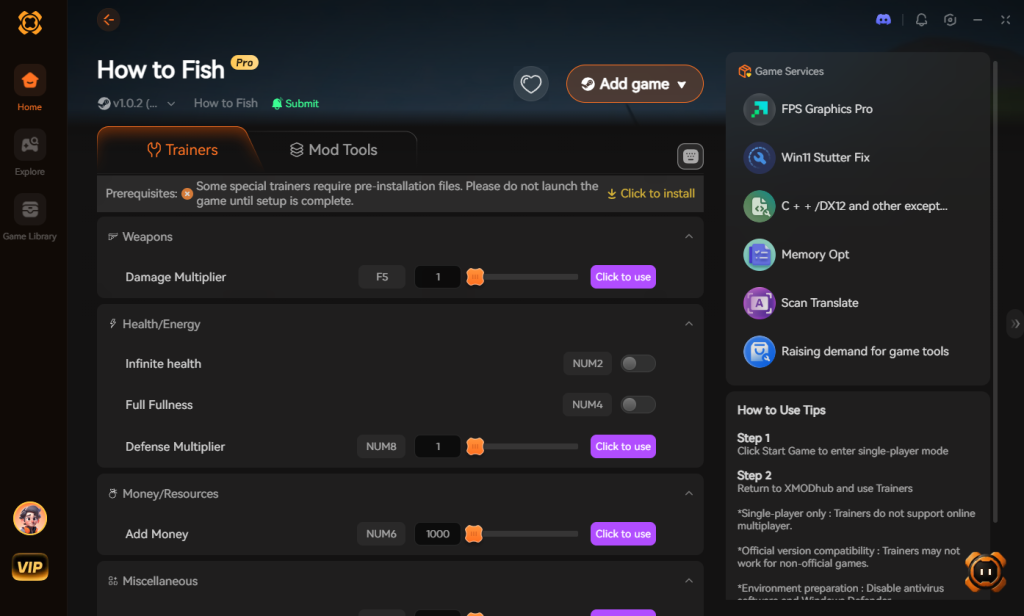
- Click “Play” to auto-hook the game safely, bypassing all engine protections automatically.
- Toggle your desired cheats directly from the clean UI or via customizable hotkeys on your keyboard while in-game.
Download How to Fish Trainer Now
4. Where to Find Safe How to Fish engine table (.CT) Files?
If you absolutely insist on using Cheat Engine, you’ll want a pre-made Cheat Table (.CT file) created by a veteran reverse engineer. However, searching Google for a “How to Fish engine table” is a massive cybersecurity minefield.
When you download a .CT file from unverified Discord servers, obscure modding forums, or sketchy YouTube descriptions, you are taking a massive risk with your PC’s security. A .CT file is not just a list of addresses; it can contain embedded Lua scripts. Malicious actors frequently disguise Remote Access Trojans (RATs), keyloggers, and crypto-miners as game cheats. Because Cheat Engine requires Administrator privileges to hook into How to Fish, any malicious Lua script embedded in that table automatically gains full administrative access to your Windows operating system.
We have seen countless cases where a player downloads a supposed “Infinite Casino Chips” table for How to Fish, only to find their GeForce GTX 1050 maxed out at 100% usage while idle because a hidden crypto-miner is running in the background. Furthermore, Discord webhooks can be used to silently steal your browser cookies and Steam session tokens the moment you execute the script.
If you must use a How to Fish engine table, only download from highly reputable, heavily moderated communities like FearLess Revolution, and always open the .CT file in a raw text editor first to inspect the Lua code for suspicious web requests or executable drops. Alternatively, bypass this massive security headache entirely by using a verified, digitally signed application like XMODhub, which undergoes strict security audits and provides the exact same cheats without the malware risk.
5. Advanced Engine Table Features: AOB Injections & Custom Scripts
If you manage to locate a premium How to Fish engine table, you will likely notice it contains far more than just basic memory addresses. Advanced table creators utilize Array of Byte (AOB) scans and custom Lua scripts to manipulate the game’s core logic. Instead of merely freezing your cash balance, a sophisticated engine table can rewrite the assembly instructions (ASM) that govern how the game calculates damage, fish spawn rates, and weapon recoil.
For example, a standard 4-byte scan might help you find your current shotgun ammo, but an AOB injection script can tell the game engine to completely ignore the “subtract bullet” command when you pull the trigger. This results in true infinite ammo without needing to constantly freeze dynamic addresses. However, these advanced features come with a steep learning curve and a substantially higher risk of game instability.
| Cheat / Script Category | Technical Method Used | Gameplay Impact | Stability / Crash Risk |
|---|---|---|---|
| Infinite Health (God Mode) | AOB Injection (NOPing damage code) | Grants absolute immunity to Boss Fish attacks. | Medium (Updates break AOBs) |
| Inventory Item Multiplier | Multi-level Pointer Tracking | Duplicates caught fish and rare bait in real-time. | High (Inventory arrays shift frequently) |
| No Reload / Infinite Ammo | Code Injection (Freezing decrement) | Allows continuous fire for shotguns and sniper rifles. | Low (Relatively stable static addresses) |
| Fish Rarity Modifier | Lua Scripting & Memory Hooking | Forces the engine to spawn only legendary or mutated fish. | Very High (Engine often detects hooks) |
Why AOB Scripts Break After Mini-Patches
One of the most frustrating aspects of relying on a downloaded How to Fish engine table is dealing with silent background updates. Developers often push small hotfixes to patch minor bugs or tweak fish spawn algorithms. Even if a patch is only 10MB, recompiling the game executable drastically shifts the Array of Byte patterns.
When you launch Cheat Engine and tick the box for your favorite God Mode script, the engine fails to find the expected AOB pattern in the RAM, resulting in a script compilation error or an immediate hard crash to your desktop. This is the exact reason why maintaining a manual table is essentially a full-time job for modders, and why cloud-updated solutions like XMODhub are rapidly replacing traditional .CT files for modern gamers looking for a frictionless experience.
6. Frequently Asked Questions (FAQ)
| Platform / Mode | Cheat Engine Compatibility | XMODhub Compatibility | Ban Risk Level |
|---|---|---|---|
| Steam (Single-player) | Yes (Requires manual updates) | Yes (Fully Supported) | Zero Risk |
| Steam (Online Co-op) | Highly Unstable / Desyncs | Host Only / Use Caution | Low (Private Lobbies) |
| Epic Games Store | Yes (Different base addresses) | Yes (Auto-detects version) | Zero Risk |
| Xbox Game Pass (PC) | Blocked by UWP Encryption | Yes (Bypasses UWP) | Zero Risk |
Q: Can I use Cheat Engine on the Xbox Game Pass version of How to Fish?
A: Usually, no. Game Pass uses strict Universal Windows Platform (UWP) file encryption that actively blocks Cheat Engine from reading the memory space. The executable is heavily protected, and attempting to inject a debugger will usually result in an “Access Denied” error or an instant crash. However, XMODhub is specifically engineered to bypass these UWP restrictions seamlessly, allowing you to cheat on the Game Pass version just as easily as the Steam version.
Q: Is it illegal to use Cheat Engine?
A: Modifying data on your own PC for a single-player experience like How to Fish is completely legal. There are no laws against altering the RAM on your own hardware. However, it does violate the Terms of Service of most games if used online. Just never bring memory editors into a public multiplayer server or competitive environment, as this can result in a permanent ban of your account. Stick to single-player or private online co-op with your friends.
Q: Will using Cheat Engine drop my FPS or slow down my PC?
A: Yes, it can, depending on how you use it. During a “First Scan,” Cheat Engine dumps the entire allocated memory of How to Fish into your RAM and Pagefile to search for values. If you have only the minimum required 8 GB of RAM, this massive data dump can cause severe stuttering or temporarily freeze your PC. Furthermore, if you write a poorly optimized assembly script or set your “Freeze Interval” too low (e.g., forcing Cheat Engine to rewrite your health value 1000 times a second), it will heavily tax your Intel Core i5 or AMD Ryzen 3 CPU, leading to massive frame drops during intense boss fish fights. XMODhub avoids this by using highly optimized, native code injection that has zero impact on your frame rate.
Conclusion: Work Smarter, Not Harder
Learning how memory manipulation works in Cheat Engine is a cool flex. Understanding pointers, hexadecimal offsets, and vectored exception handling gives you a great peek under the hood of game development. But let’s be real—when you come home from a long day at work, you just want to spawn in that fully upgraded assault rifle with the laser sight and explosive ammo, and wreck some mutated sea creatures without taking a computer science class.
Why spend 45 minutes digging through hex codes, fighting game crashes, and risking malware with a shady How to Fish engine table when you can click one button and instantly get God Mode? And the best part? XMODhub supports over 5,000+ PC games. Once you install the app, you can ditch the complicated cheat tables for good and get back to what actually matters: enjoying the chaotic, unhinged fun of the game.

Stop Grinding, Start Enjoying.
Bypass the tedious resource gathering and unlock your full potential instantly.

I am a passionate gamer and writer at XMODhub, dedicated to bringing you the latest gaming news, tips, and insights.
Connect with me:
LinkedIn Profile ↗
 Nancy Miller