Catherine Hu
How do you cheat in Figure Shop Simulator? To cheat in Figure Shop Simulator, you can manually attach Cheat Engine to the game’s executable and scan for changing numeric values like your total Shop Funds (Money) or the exact quantity of 3D Printer Filament in your warehouse. However, because game updates frequently break Cheat Engine tables (.CT files), the safest and easiest alternative is using an auto-updating mod manager like XMODhub, which provides 1-click cheats without requiring any complex memory scanning.
[Editor’s Note] Look, I get it. We all start Figure Shop Simulator thinking we’re going to play it completely legit. But after going bankrupt because you overstocked on a dying anime trend for the 15th time, or spending hours grinding for enough cash to finally afford the Tier 3 Industrial 3D Printer, the fun stops. I’ve been messing with Cheat Engine for years, and trying to isolate the exact memory values for this game’s current patch almost drove me insane. Today, I’m going to show you how to manually hack the values if you want the technical challenge—but I’ll also share the 1-click shortcut I actually use to save my sanity.
You may also like:The Ultimate Figure Shop Simulator Console Commands and Cheats Guide
📋 Table of Contents
- Quick Answer
- 1. How to Use Cheat Engine for Figure Shop Simulator (The Manual Way)
- 2. Common CE Errors: Pointers Breaking & Not Attaching
- 3. The Better Alternative: 1-Click Cheats with XMODhub
- 4. Where to Find Safe Figure Shop Simulator Cheat Tables (.CT)?
- 5. Top Cheat Engine Scripts & Table Features Explained
- 6. How to Fix Outdated Figure Shop Simulator Cheat Tables
- 7. Frequently Asked Questions (FAQ)
- Conclusion: Work Smarter, Not Harder
1. How to Use Cheat Engine for Figure Shop Simulator (The Manual Way)
If you want to go the old-school route and find the memory addresses yourself, here is the basic “First Scan/Next Scan” method tailored specifically for the economic and inventory mechanics of this game.
Because Figure Shop Simulator heavily revolves around resource management, pricing, and 3D printing times, manipulating these values can instantly transform your struggling retail store into a massive figure collection empire. Here is the exact, highly specific five-step process to isolate and modify your primary Shop Funds and 3D Printer Filament quantities.
Step 1: Boot and Attach to the Correct Process
First, launch Figure Shop Simulator and load into your saved game where you have control over your store. Once your character is standing in the shop, minimize the game (Alt+Tab) and open Cheat Engine. Click the glowing PC monitor icon in the top-left corner of the Cheat Engine interface. Scroll through the process list until you find FigureShopSimulator.exe. Select it and click “Open”. Do not attach it to the Steam bootstrapper or the crash handler; you must target the main executable where the game’s active memory is being processed.
Step 2: Execute the Initial 4-Byte Scan for Shop Funds
Take note of your exact current Shop Funds in the game. Let’s assume you currently have exactly $4,250 in your bank. In Cheat Engine, ensure the “Value Type” is set to “4 Bytes” (which is the standard integer format most Unity and Unreal Engine games use for basic currencies). Type 4250 into the “Value” text box and hit “First Scan”. The left panel will likely populate with hundreds, if not thousands, of memory addresses that currently share that exact number. Do not touch any of them yet, as modifying the wrong address will instantly crash Figure Shop Simulator to your desktop.
Step 3: Force the Game Logic to Update the Memory Value
Return to Figure Shop Simulator. You need to change your money value to filter out the garbage data. Walk over to your computer terminal and purchase something cheap—perhaps a basic display shelf, a small batch of generic resin, or a low-tier marketing campaign. Let’s say you spend $250 on new store decorations, dropping your total funds to $4,000. Wait for the transaction to fully process and the UI to update.
Step 4: Refine with the Next Scan
Alt-Tab back to Cheat Engine. Change the number in the “Value” box from 4250 to your new balance of 4000. Click the “Next Scan” button (absolutely do not click First Scan again, or you will reset your progress). The list of thousands of addresses should now shrink down to just a handful—usually between one and three addresses. If you still have more than five, go back into Figure Shop Simulator, spend a little more money, and repeat the Next Scan process with the new value until you have isolated the true address.
Step 5: Freeze and Modify the Economy
Double-click the remaining addresses in the left panel to drop them into your active cheat table at the bottom of the window. Change the value of these addresses to 9999999 and check the small box to the left of the address to “Freeze” it. Return to Figure Shop Simulator. You may need to trigger one more financial transaction (like setting a price or selling a figure to a customer) for the visual UI to update. Once it does, you will officially have infinite money, allowing you to instantly buy the biggest warehouse expansions and the most premium 3D printers available.
| Value Type | In-Game Stat / Mechanic | Recommended Scan Type | Difficulty Level |
|---|---|---|---|
| 4 Bytes | Shop Funds / Bank Money | Exact Value | Easy |
| Float | 3D Printer Progress Timer | Value Between (e.g., 0.0 to 1.0) | Medium |
| 4 Bytes | Filament / Resin Quantity | Exact Value | Easy |
| Float | Customer Satisfaction Rating | Unknown Initial Value | Hard |
| String | Custom Store Name / Signage | String (Text) | Medium |
2. Common CE Errors: Pointers Breaking & Not Attaching
If you are pulling your hair out because CE isn’t working for Figure Shop Simulator, you aren’t alone. Modding modern simulation games comes with a host of technical hurdles. Here is what’s probably happening under the hood:
Error: “Cannot attach to process” / Game Crashes:
Figure Shop Simulator might be using specific engine protections or memory obfuscation techniques. Modern game engines frequently implement basic anti-tamper mechanisms, even in single-player business simulators, to prevent simple memory injection. If the game instantly crashes to the desktop the moment you attempt to freeze a value, or if Cheat Engine throws a “Cannot attach to process” error, the game’s memory architecture is likely rejecting standard Windows API debugging hooks.
To bypass this, you need to configure Cheat Engine to use the VEH Debugger (Vectored Exception Handling). Go to Cheat Engine’s settings, navigate to the “Debugger Options” tab, and switch the debugging method from the default Windows Debugger to VEH Debugger. This method intercepts memory exceptions at a lower level, allowing Cheat Engine to read and write to Figure Shop Simulator’s memory space without triggering the game’s internal crash handlers. Additionally, ensure you are running Cheat Engine as an Administrator, as standard user privileges are often insufficient to read the memory pages of modern 64-bit executables.
The Pointer Problem:
Nothing is more frustrating than spending thirty minutes perfectly isolating the memory address for your rare collector’s figure inventory, only to lose it all when you reload your save. This happens because memory addresses in Figure Shop Simulator shift after every loading screen due to Dynamic Memory Allocation (DMA) and Address Space Layout Randomization (ASLR). Every time you close your store for the night and the game calculates the next day’s trends, the engine dumps the old memory structures and loads new ones into entirely different RAM locations.
To fix this manually, you have to engage in pointer scanning. This involves finding the static base address of the game (e.g., FigureShopSimulator.exe+0x1A2B3C) and calculating a complex chain of hexadecimal offsets that eventually point to your dynamic value. Writing assembly scripts to handle these pointer chains is incredibly tedious. One small patch from the developers that adds a new type of shelf or a new customer animation can shift the entire memory structure, breaking your meticulously crafted pointer chains and rendering your .CT file completely useless.
3. The Better Alternative: 1-Click Cheats with XMODhub
Here is the dirty little secret of the modding community: Nobody actually wants to spend two hours updating Cheat Engine tables every time a patch drops. The moment Figure Shop Simulator updates on Steam, your hard-earned memory addresses shift, and your game crashes to the desktop.
| Feature Metric | Manual Cheat Engine | XMODhub Auto-Trainer |
|---|---|---|
| Setup Time | 15 – 45 Minutes (Requires scanning) | < 1 Minute (Instant Injection) |
| Update Reliability | Breaks on every minor game patch | Cloud-updated automatically |
| Crash Risk | High (Freezing wrong addresses) | Extremely Low (Verified hooks) |
| Ease of Use | Requires Hex/Memory knowledge | Simple UI Toggle Switches |
| Feature Access | Basic values (Money, Items) | Complex scripts (Instant Print, God Mode) |
Why XMODhub beats manual CE for Figure Shop Simulator:
- Zero Hex Codes Needed: Just toggle a beautiful switch on our UI. You don’t need a computer science degree to enjoy your game.
- Auto-Updating Cloud Tech: When the game patches to add new figure trends or store expansions, XMODhub updates its trainer automatically behind the scenes. No more broken scripts or waiting for forum users to update their tables.
- Premium Features Instant Access:
- Undetected God Mode / Infinite Shop Reputation
- Unlimited Shop Funds and Infinite 3D Printer Resin
- Super Speed & Custom Jump Height (Great for moving around a massive warehouse)
- Instant 3D Printing (Bypass all manufacturing wait times to stock shelves instantly).
How to Use XMODhub for Figure Shop Simulator?
- Download and Launch the free XMODhub desktop app.

- Search for “Figure Shop Simulator” in the library.
- Click “Play” to auto-hook the game safely.
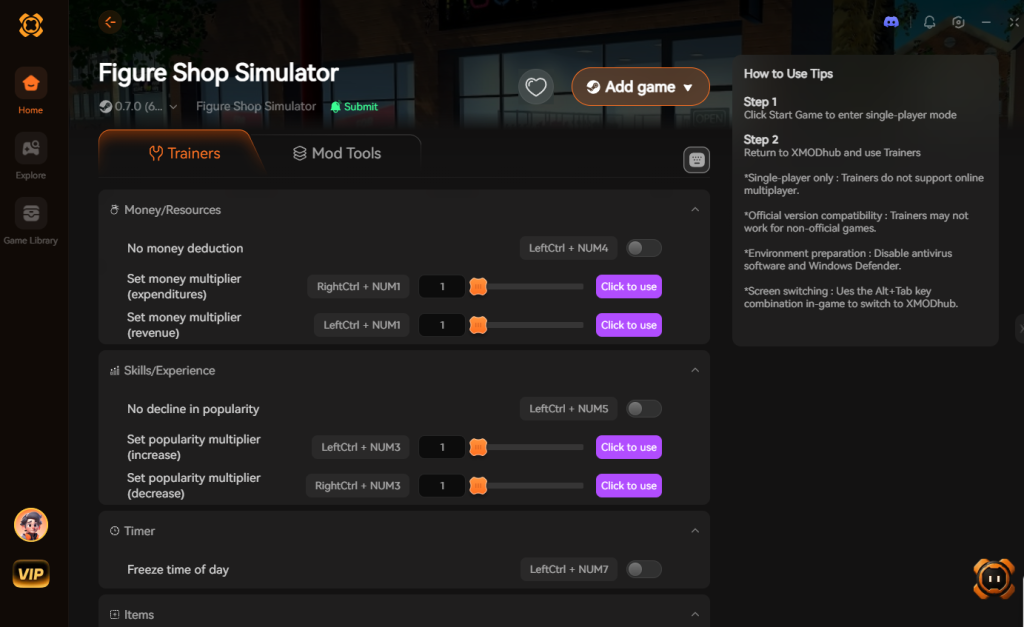
- Toggle your desired cheats directly from the clean UI or via hotkeys.
Download Figure Shop Simulator Trainer Now
4. Where to Find Safe Figure Shop Simulator Cheat Tables (.CT)?
If you absolutely insist on using CE, you’ll want a pre-made Cheat Table (.CT file). However, you must navigate this space with extreme caution. Because Figure Shop Simulator is an indie simulation game, official, heavily moderated cheat tables might be scarce, pushing players to search deep into unverified forums and sketchy Discord servers.
Downloading random .CT files from unknown sources carries severe cybersecurity risks. A Cheat Engine table is not just a text file containing memory addresses; it is capable of executing complex Lua scripts directly on your machine. Malicious actors frequently take advantage of gamers looking for shortcuts. They will upload a file claiming to offer “Figure Shop Simulator Infinite Money + Max Level,” but hidden within the obfuscated Lua code is a payload designed to compromise your system.
When you open the table and allow it to execute its script, it can silently download Remote Access Trojans (RATs), install hidden crypto-miners that throttle your GPU, or scrape your browser cookies to steal your Steam and email passwords. Because Cheat Engine requires administrative privileges to function, any malicious script running inside it also inherits those same system-level permissions, bypassing basic Windows Defender protections.
This is exactly why relying on random forum attachments is a massive gamble. Emphasizing safety is paramount. A verified, sandboxed application like XMODhub is the infinitely safer choice. XMODhub’s development team professionally reverse-engineers the game and hosts the memory hooks securely, entirely eliminating the risk of accidental malware execution while providing a far superior user experience.
5. Top Cheat Engine Scripts & Table Features Explained
When you do manage to find a legitimate, working .CT file for Figure Shop Simulator, you’ll likely notice it contains more than just basic address pointers. Advanced cheat tables utilize Assembly (ASM) and Lua scripting to fundamentally alter how the game engine behaves. Instead of just changing your money from $100 to $9,999, these scripts intercept the code that deducts money and neutralizes it entirely.
Understanding what these scripts do can help you troubleshoot when things go wrong. Here is a breakdown of the most common script categories you will encounter in a high-quality Figure Shop Simulator cheat table, alongside their stability metrics:
| Script / Hack Category | Specific Memory Function | In-Game Impact | Update Difficulty |
|---|---|---|---|
| Economy Modifiers | NOP (No Operation) on subtraction opcode | Buying shelves and figures costs absolutely nothing. | Easy |
| Inventory Control | Array of Bytes (AOB) Injection | Locks 3D printer resin and filament at maximum capacity. | Medium |
| Time Manipulation | Engine Speedhack / Tick Rate Override | Customers move faster; daily shifts end instantly. | Hard |
| Reputation Hacks | Force Max Float Value | Instantly unlocks high-tier anime figure licenses. | Medium |
| God Mode / Anti-Bankruptcy | Conditional Jump Bypass | Prevents the game-over screen even if debt reaches zero. | Hard |
While activating an AOB Injection script is incredibly satisfying, keep in mind that these are the first features to break during a game update. A single line of code changed by the developers can shift the Array of Bytes, causing your table to fail to activate (usually indicated by a script refusing to check the box with a red “X”).
6. How to Fix Outdated Figure Shop Simulator Cheat Tables
So, Figure Shop Simulator just received a massive “Summer Convention DLC” update, and now your favorite .CT file is completely broken. When you try to toggle “Infinite Shop Funds,” nothing happens, or worse, the game instantly crashes. This occurs because the static offsets that the cheat table relies on have moved.
If you want to manually repair the table, you will need to utilize Cheat Engine’s Memory Viewer and perform an AOB (Array of Bytes) scan.
The AOB Scan Repair Method
- Open the Broken Script: Right-click the broken cheat in your table and select “Change script”.
- Identify the Original Bytes: Look for the line under
[ENABLE]that says something likeAOBScanModule(MoneyHack, FigureShopSimulator.exe, 89 43 10 48 8B 5C 24 30). Those hex numbers are the game’s original assembly instructions. - Perform a Custom Scan: Copy that string of hex numbers. Go to your main Cheat Engine window, change the “Value Type” to “Array of byte”, paste the numbers, and hit First Scan.
- Update the Offsets: If nothing shows up, the developers changed the code. You will need to manually find your money address again (using the 5-step method in Section 1), right-click the address, and select “Find out what writes to this address.” Spend some money in-game to trigger the instruction.
- Replace the Code: Open the disassembler, copy the new bytes, and paste them into your broken Lua script, replacing the old AOB string.
Does reading that make your head spin? That is exactly why manual memory hacking is a dying art for casual players. Rebuilding assembly scripts after every minor hotfix is a massive time sink. This is the exact pain point that XMODhub’s cloud-based architecture solves by doing all of this reverse-engineering for you on the server side.
7. Frequently Asked Questions (FAQ)
| Platform / Storefront | Compatibility with Cheat Engine | Ban Risk Level | XMODhub Support |
|---|---|---|---|
| Steam | Yes (Requires manual pointer updates) | 0% (Singleplayer) | 100% Seamless |
| Epic Games Store | Yes (Different base addresses) | 0% (Singleplayer) | 100% Seamless |
| Xbox Game Pass (PC) | No (Blocked by UWP encryption) | 0% (Singleplayer) | 100% Seamless |
Q: Can I use Cheat Engine on the Xbox Game Pass version of Figure Shop Simulator?
A: Usually, no. Game Pass uses strict UWP (Universal Windows Platform) file encryption and aggressive memory virtualization that actively blocks standard debuggers like Cheat Engine from attaching to the process. Trying to force it often results in immediate access denial. However, XMODhub is specifically engineered to bypass these UWP restrictions seamlessly, allowing you to mod the Game Pass version just as easily as the Steam version.
Q: Is it illegal to use Cheat Engine?
A: Modifying data on your own PC for a single-player experience like Figure Shop Simulator is completely legal. You own the hardware and are altering local memory for personal enjoyment. Just never bring memory editors into a multiplayer server or competitive environment, as that violates Terms of Service and will trigger anti-cheat bans.
Q: Will using Cheat Engine drop my FPS or slow down my PC?
A: It depends heavily on how you use it. During a “First Scan,” especially if you are searching for an “Unknown Initial Value,” Cheat Engine dumps gigabytes of active RAM into your system’s pagefile to compare data. This causes massive CPU spikes, extreme disk I/O bottlenecks, and can temporarily freeze your PC or drop your game to 1 FPS. Once the scan is complete, the load disappears. Active freezing (locking a value at 9999) has a negligible performance impact, but freezing too many values simultaneously can cause thread desync within the game engine, leading to micro-stutters.
Conclusion: Work Smarter, Not Harder
Learning how memory manipulation works in Cheat Engine is a cool flex. Understanding the nuances of 4-byte integers, float values, and pointer chains provides a fascinating glimpse into how video games actually function under the hood. But let’s be real—when you come home from a long day at work, you just want to spawn in that legendary 1/4 Scale Mecha Collector Figure, instantly stock your massive retail shelves, and watch the profits roll in without taking a computer science class.
Why spend 45 minutes digging through hex codes, fighting game crashes, and risking malware when you can click one button and instantly get God Mode and infinite shop funds? And the best part? XMODhub supports over 5,000+ PC games. Once you install the app, you can ditch the complicated cheat tables for good and focus entirely on building the ultimate figure collection empire in Figure Shop Simulator.

Stop Grinding, Start Enjoying.
Bypass the tedious resource gathering and unlock your full potential instantly.

I am a passionate gamer and writer at XMODhub, dedicated to bringing you the latest gaming news, tips, and insights.
Connect with me:
LinkedIn Profile ↗