
 Catherine Hu
No, Deskrawl: Idle ARPG does not have a built-in developer console or native text-based cheat codes. Because the game is uniquely designed to run continuously as a minimalist overlay at the bottom bar of your desktop environment, the developers did not implement a traditional text parser or command-line interface for players to interact with. There is no tilde (~) key function to bring up a hidden menu, and attempting to modify the configuration files will not magically unlock a developer mode.
Since native console commands are entirely nonexistent, the only way to cheat, modify your gameplay, or accelerate your progression is by using a specialized third-party trainer like XMODhub. By injecting directly into the game’s memory safely, XMODhub offers powerful 1-click alternatives such as God Mode, Infinite Currency, Max Legendary Drop Rates, and Instant Enemy Capture, completely bypassing the need for manual code entry.
Editor’s Note: This guide was last verified against the newest Deskrawl: Idle ARPG patch. Whether you are using native engine tools or a dedicated trainer, please back up your save files before modifying game memory to prevent unexpected bugs.
We have all been there. You have just spent hours dying to the same boss in Deskrawl: Idle ARPG, or maybe you simply do not have the time to grind for legendary loot drops and capturing elusive elite enemies after a long day at the office. Single-player games are meant to be enjoyed on your own terms, without the artificial padding of endless grinding. Let us get your character powered up and dominating the screen.
You may also like: The Ultimate Deskrawl: Idle ARPG Cheat Engine Guide (And A Much Easier Alternative)
📋 Table of Contents
- Quick Answer: Does Deskrawl: Idle ARPG Have Console Commands?
- 1. How to Enable Cheats in Deskrawl: Idle ARPG
- 2. The Complete List of Deskrawl: Idle ARPG Cheats
- 3. Item IDs and Spawning Guide
- 4. Do Cheats Disable Achievements?
- 5. Why Native Cheats Can Break Your Save Files
- 6. The Safer Alternative: 1-Click Cheats with XMODhub
- 7. Troubleshooting: Cheats Not Working
- 8. Best Cheat Configurations for AFK Farming
- 9. Priority Upgrades to Exploit with Infinite Currency
- 10. Frequently Asked Questions (FAQ)
- Conclusion
1. How to Enable Cheats in Deskrawl: Idle ARPG
As established, Deskrawl: Idle ARPG operates as a passive, bottom-of-the-screen application designed for you to farm legendary items and build overpowered heroes while you work or relax. Because of this unique, unobtrusive architecture, the development team completely omitted a developer console. You cannot press the Tilde (~) key, F12, or any other traditional hotkey to open a command prompt. Furthermore, editing the game’s .ini or .json configuration files will only result in corrupted launch parameters rather than unlocking hidden developer tools.
Therefore, enabling cheats in Deskrawl: Idle ARPG requires an external memory modification tool. This is where XMODhub comes in as the industry standard. Instead of typing complex strings of text, you utilize a clean, overlay-friendly interface to toggle memory injections.
Here is the comprehensive, step-by-step process to enable cheats in Deskrawl: Idle ARPG using XMODhub:
Step 1: Download and Install the XMODhub Client
Navigate to the official XMODhub website and download the latest version of the desktop client. The application is lightweight and designed to run silently in your system tray, which perfectly complements the desktop-bar nature of Deskrawl: Idle ARPG. Run the installer as an administrator to ensure the software has the necessary permissions to interact with other active processes on your machine.
Step 2: Launch Deskrawl: Idle ARPG and Attach the Trainer
Start Deskrawl: Idle ARPG through Steam normally and let it settle into your desktop’s bottom bar. Once your hero is actively grinding mobs on the screen, open the XMODhub application. In the search bar, type “Deskrawl: Idle ARPG” and select the official trainer profile. Click the prominent “Play” or “Attach” button. XMODhub will automatically scan your system’s active memory, locate the game’s executable process, and establish a secure, achievement-safe hook.
Step 3: Activate Your Desired Cheats via Hotkeys or UI
Once the connection is established, you will hear a subtle audio cue confirming the injection. You can now minimize the XMODhub window. To activate cheats, simply press the designated hotkeys (such as Numpad 1 for Infinite Health, or Numpad 2 for Instant Skill Cooldowns) while Deskrawl: Idle ARPG is running. You will see the effects immediately reflected in your hero’s performance as they effortlessly decimate the enemy hordes.
2. The Complete List of Deskrawl: Idle ARPG Cheats
Because Deskrawl: Idle ARPG does not feature a developer console, there are no text-based cheat codes to input. You cannot type “god” or “give_item” into any interface. However, you can achieve the exact same—and often far superior—effects using the XMODhub app.
Below is the complete list of trainer features available through XMODhub for Deskrawl: Idle ARPG. These memory toggles are designed to eliminate the tedious aspects of the idle grind while maximizing your enjoyment and loot acquisition.
| Feature / Cheat Toggle | Effect and Gameplay Impact | How to Activate |
|---|---|---|
| Infinite Hero Health (God Mode) | Locks your hero’s health bar at its maximum value. No matter how much damage high-level elite mobs or bosses inflict, your character will never die, ensuring uninterrupted farming sessions while you are away from your keyboard. | Numpad 1 / UI Toggle |
| Instant Skill Cooldowns | Bypasses the internal timers for all of your hero’s active abilities. Your character will continuously spam their most powerful area-of-effect (AoE) attacks, clearing the screen of enemies in milliseconds. | Numpad 2 / UI Toggle |
| Max Legendary Drop Rate | Alters the game’s internal Random Number Generator (RNG) loot tables. Every enemy defeated is guaranteed to drop the highest tier of loot available in their specific loot pool, filling your inventory with legendary weapons and armor instantly. | Numpad 3 / UI Toggle |
| Infinite Gold / Currency | Freezes your currency values. Whenever you spend gold or resources to upgrade your hero’s stats or refine gear, the amount does not decrease. This allows for infinite and immediate max-level upgrades. | Numpad 4 / UI Toggle |
| 100% Enemy Capture Rate | Deskrawl: Idle ARPG features a mechanic where you capture enemies to serve you. This cheat overrides the capture probability formula, ensuring that every single capture attempt succeeds on the first try, regardless of the enemy’s rarity or resistance stats. | Numpad 5 / UI Toggle |
| Super Attack Speed | Multiplies your hero’s base attack speed by a factor of 10. Your character will unleash a blur of basic attacks, drastically increasing your overall Damage Per Second (DPS) and farming efficiency. | Numpad 6 / UI Toggle |
| Game Speed Multiplier (Speedhack) | Accelerates the entire game engine. Since Deskrawl: Idle ARPG is an idle game, time is your biggest obstacle. This feature makes the game run at 2x, 5x, or even 10x speed, allowing you to condense hours of idle grinding into mere minutes. | Numpad 7 / UI Toggle |
| Infinite Inventory Space | Prevents the “Inventory Full” flag from triggering. You can leave the game running overnight without worrying about your character stopping their grind because they have run out of space to store new legendary items. | Numpad 8 / UI Toggle |
3. Item IDs and Spawning Guide
In many traditional RPGs, players can look up specific hexadecimal Item IDs and use console commands like player.additem [ID] [Amount] to force specific gear into their inventory.
Because Deskrawl: Idle ARPG lacks a developer console and a text parser, manually spawning items via text commands is completely impossible without native engine tools. There is no internal database of Item IDs that a player can interact with through the game’s minimalist user interface. Furthermore, because Deskrawl: Idle ARPG utilizes a randomized affix system for its legendary loot—meaning stats are dynamically generated upon the item dropping—simple hex codes would not be sufficient to generate the exact weapon you want anyway.
However, you do not need Item IDs when using a modern solution. XMODhub bypasses this archaic method entirely by allowing you to instantly maximize your inventory’s potential. Instead of looking up complex hex codes on wikis and typing them out one by one, you simply activate the Max Legendary Drop Rate and Infinite Currency features. By doing this, you force the game to naturally generate the best possible items at an accelerated rate, and you have infinite resources to reroll their stats until you achieve the perfect build. This eliminates the tedious research and potential game-crashing errors associated with manual item spawning.
4. Do Cheats Disable Achievements?
One of the biggest concerns for PC gamers when utilizing cheats or console commands is the status of their digital achievements. Deskrawl: Idle ARPG is fully integrated with Steam, featuring a variety of achievements tied to grinding mobs, farming specific amounts of loot, and capturing rare enemies.
If Deskrawl: Idle ARPG had a native developer console, using it would almost certainly flag your save file and permanently disable your ability to earn Steam achievements. This is a standard practice in the industry; developers hardcode triggers that detect when the console is opened, instantly severing the connection to the Steamworks API to preserve the “integrity” of the achievement system.
Fortunately, because you must use XMODhub to modify Deskrawl: Idle ARPG, your achievements remain completely safe. XMODhub operates externally, reading and writing to the game’s allocated RAM without ever triggering the game’s internal cheat-detection flags. The game engine simply believes that you are incredibly lucky with your legendary drops and highly skilled at surviving boss encounters. Therefore, you can use God Mode to clear the hardest content and still proudly display the resulting 100% completion achievements on your Steam profile.
5. Why Native Cheats Can Break Your Save Files
Beyond the achievement lock, native developer tools and memory editors are notoriously unstable. These commands were originally built for developers to test bugs during production, not for everyday gameplay.
Forcing a quest to complete or bypassing intended story triggers can cause crucial NPCs to completely disappear from your map. Memory leaks, corrupted assets, and sudden crashes to the desktop are incredibly common when you spawn too many items at once. Without a safety net, one wrong command can permanently corrupt a save file you have invested hundreds of hours into.
6. The Safer Alternative: 1-Click Cheats with XMODhub
If you want the benefits of cheats—like infinite health or skipping the heavy grind—without risking your save files or locking your achievements, you need a dedicated game modification tool.
Instead of typing risky code that might corrupt your game world, the XMODhub app hooks into Deskrawl: Idle ARPG safely and cleanly.
- Achievement Safe: It bypasses the game’s internal cheat-flagging system.
- Save File Protection: It alters values temporarily. Your save file remains uncorrupted.
- One-Click Toggles: No more memorizing long item IDs. Just hit a hotkey to turn God Mode on instantly.
How to Use XMODhub for Deskrawl: Idle ARPG
- Download and Launch the free XMODhub desktop app.

- Search for “Deskrawl: Idle ARPG” in the library.
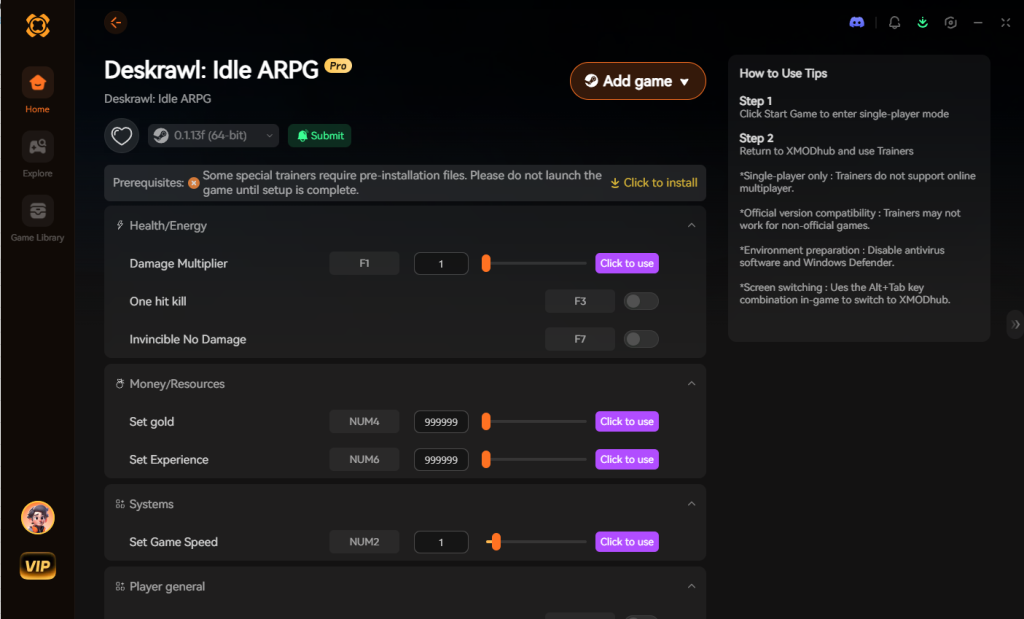
- Click “Play”.
- Toggle your desired cheats directly from the clean UI or via hotkeys.
Download Deskrawl: Idle ARPG Trainer Now
7. Troubleshooting: Cheats Not Working
Even with the most streamlined software, PC gaming environments are highly variable. If you find that XMODhub is not successfully injecting into Deskrawl: Idle ARPG, or the hotkeys are unresponsive, consult the following comprehensive troubleshooting steps:
- Antivirus and Windows Defender Interference: The most common reason a trainer fails to work is that your operating system’s security software intercepts the memory injection process, mistaking it for malicious activity. Because trainers intentionally modify the RAM of another program, they exhibit behavior similar to certain viruses. To fix this, you must open your Windows Security settings, navigate to Virus & Threat Protection, and add the entire XMODhub installation folder to your list of Exclusions.
- Game Version Mismatches: Deskrawl: Idle ARPG is an actively supported game on Steam, meaning it occasionally receives hotfixes and updates. When a game updates, the internal memory addresses for health, gold, and damage shift. If Steam automatically updated Deskrawl: Idle ARPG, your current trainer version might be targeting the old memory addresses. Always ensure you have clicked the “Update” button within the XMODhub client so the trainer profile matches the latest Steam build of the game.
- Lacking Administrator Privileges: For a third-party application to read and write to the memory of a game launched by Steam, it requires elevated system permissions. If you simply double-click the XMODhub icon, Windows may restrict its access. Right-click the XMODhub shortcut and select “Run as Administrator.” This guarantees the software has the necessary clearance to bypass Windows User Account Control (UAC) limitations and successfully hook into Deskrawl: Idle ARPG.
8. Best Cheat Configurations for AFK Farming
Deskrawl: Idle ARPG is fundamentally designed to be a passive experience, meant to run quietly at the bottom of your screen while you focus on other tasks. However, to truly maximize your progression while you are completely away from the keyboard (AFK), you need to synergize specific memory toggles. Activating every single cheat at once can sometimes cause inventory clutter or make the progression curve feel entirely obsolete. Instead, we recommend utilizing these targeted, strategic configurations:
The “Overnight Legendary Miner” Setup
If your ultimate goal is to wake up to an inventory bursting with top-tier, perfectly rolled loot, you should activate Infinite Inventory Space, Max Legendary Drop Rate, and Infinite Hero Health. By entirely removing the inventory cap, your character will never stop looting when their bags get full—a common bottleneck in idle games. The guaranteed legendary drops mean every single pixel of that infinite space is populated with high-value gear, and God Mode ensures a random, over-leveled elite boss does not end your farming run prematurely while you sleep.
The “Speedrunner’s Capture” Setup
For players looking to quickly build their army of captured enemies to unlock late-game synergies, toggle on 100% Enemy Capture Rate, Super Attack Speed, and the Game Speed Multiplier (5x). This aggressive setup allows your hero to blitz through the enemy spawn tables. The significantly faster game speed forces rare enemies to appear much quicker than normal, while the guaranteed capture rate ensures you never miss adding a powerful boss to your companion roster due to bad RNG.
9. Priority Upgrades to Exploit with Infinite Currency
When you activate the Infinite Gold / Currency toggle in XMODhub, you are suddenly faced with the delightful problem of having unlimited resources but still needing to manually click through the game’s extensive upgrade trees. To save you time and optimize your hero’s base stats before you even step into the endgame content, it is crucial to know which nodes yield the highest return on investment.
Maxing out your core nodes first ensures that even if you decide to turn the cheats off later for a “vanilla” experience, your hero will have a permanent, legitimate power base to work from. Here is a strategic breakdown of which skill nodes and upgrades you should prioritize when utilizing infinite currency:
| Upgrade Classification | Specific Ability / Node | Optimal Use Case | Priority Level |
|---|---|---|---|
| Damage Output | Critical Strike Multiplier | Melting elite mob health bars instantly and clearing screens fast. | High |
| Utility | Capture Net Efficiency | Ensuring maximum success on rare enemy captures when not using the 100% trainer toggle. | Medium |
| Survivability | Passive Health Regeneration | Sustaining through continuous boss waves if you choose to turn God Mode off. | High |
| Loot Optimization | Magic Find Bonus | Stacking natively with trainer drop rate modifiers for absolute maximum yields. | Low |
| Mobility/Speed | Base Attack Speed Enhancer | Synergizing with the Super Attack Speed cheat to break the game’s DPS limits. | High |
By focusing your infinite wealth on these specific classifications, you build an unstoppable foundation that makes the rest of your Deskrawl: Idle ARPG journey incredibly smooth.
10. Frequently Asked Questions (FAQ)
Q: Can I use these cheats on PlayStation or Xbox?
A: No. Modifying game memory or accessing developer consoles for Deskrawl: Idle ARPG is strictly limited to the PC version. Console ecosystems are closed environments that do not permit third-party memory injection tools like XMODhub. Furthermore, Deskrawl: Idle ARPG is fundamentally designed as a desktop-bar application, making it a PC-exclusive experience by nature.
Q: Is there a penalty for using cheats in single-player?
A: There is no account ban or official penalty for cheating in a single-player environment. The only downsides are the potential for corrupted save files and disabled achievements, which can be avoided by using a secure trainer like XMODhub. You are not competing against other players, so Valve (Steam) and the game developers do not enforce anti-cheat protocols like Easy Anti-Cheat (EAC) or BattlEye for this title.
Q: Will using the Game Speed Multiplier crash Deskrawl: Idle ARPG?
A: While XMODhub’s speedhack is highly optimized, pushing the game speed beyond 10x can sometimes cause the game’s visual rendering to desynchronize from its internal logic, leading to stuttering. If you experience frame drops while using the speed multiplier, simply lower the speed back down to 2x or 5x. The game engine is lightweight, but processing thousands of damage numbers per second at 10x speed can tax older CPUs.
Q: Do I need an internet connection to use XMODhub with this game?
A: You only need an internet connection to initially download the XMODhub client and the specific trainer profile for Deskrawl: Idle ARPG. Once the profile is downloaded and cached on your local machine, you can run Steam in Offline Mode and use the trainer without an active internet connection, perfect for playing on a laptop while traveling.
Conclusion
Whether Deskrawl: Idle ARPG provides a built-in console or not, taking control of your single-player experience is easier than ever. While tweaking raw engine code can be a fun technical experiment, it comes with significant risks to your save files and achievements. For a flawless, risk-free experience, using a dedicated modification tool is always the smarter choice.
With secure support for over 5,000+ single-player PC games, you can easily customize your gameplay, skip the tedious grind, and play exactly the way you want.

Stop Grinding, Start Enjoying.
Bypass the tedious resource gathering and unlock your full potential instantly.

I am a passionate gamer and writer at XMODhub, dedicated to bringing you the latest gaming news, tips, and insights.
Connect with me:
LinkedIn Profile ↗
 Nancy Miller