
 Catherine Hu
How do you cheat in Celestial Descends? To cheat in Celestial Descends, you can manually attach Cheat Engine to the game’s executable and scan for changing numeric values like your current Action Points (AP) during grid combat or your total count of Spirit Stones in the open-world inventory. However, because game updates frequently break Cheat Engine tables (.CT files), the safest and easiest alternative is using an auto-updating mod manager like XMODhub, which provides 1-click cheats without requiring any memory scanning.
[Editor’s Note] Look, I get it. We all start Celestial Descends thinking we’re going to play it completely legit. But after dying to the Void Dragon Guardian in the third roguelike realm for the 15th time, or spending hours grinding for Mythic Cultivation Pills, the fun stops. I’ve been messing with Cheat Engine for years, and trying to isolate the exact memory values for this game’s current patch almost drove me insane. Today, I’m going to show you how to manually hack the values if you want the technical challenge—but I’ll also share the 1-click shortcut I actually use to save my sanity.
You may also like: The Ultimate Celestial Descends Console Commands and Cheats Guide
📋 Table of Contents
- Quick Answer
- 1. How to Use Cheat Engine for Celestial Descends (The Manual Way)
- 2. Common CE Errors: Pointers Breaking & Not Attaching
- 3. The Better Alternative: 1-Click Cheats with XMODhub
- 4. Where to Find Safe Celestial Descends Cheat Tables (.CT)?
- 5. Top Features Every Celestial Descends Cheat Engine Table Should Have
- 6. How to Fix a Broken .CT File After a Game Update
- 7. Frequently Asked Questions (FAQ)
- Conclusion: Work Smarter, Not Harder
1. How to Use Cheat Engine for Celestial Descends (The Manual Way)
If you want to go the old-school route and find the memory addresses yourself, here is the basic “First Scan/Next Scan” method tailored for this game. Because Celestial Descends is a deep tactical RPG with complex Xianxia mechanics and roguelike elements, manipulating the game requires a solid understanding of how its engine stores numerical data.
In this specific walkthrough, we are going to focus on isolating the memory address for your Spirit Stones—the primary currency required for upgrading your cultivation level and buying essential tactical gear before you start a new roguelike run.
Step 1: Attach Cheat Engine to the Game Process
First, launch Celestial Descends and load into your current open-world save file or the main hub area. Once your character is fully loaded and you can open your inventory, minimize the game (or run it in borderless windowed mode). Open Cheat Engine. Click on the glowing PC icon in the top-left corner of the Cheat Engine interface. Scroll through the process list until you find the executable for Celestial Descends (usually named something like CelestialDescends-Win64-Shipping.exe). Select it and click “Open.”
Step 2: Execute the First Scan for Your Base Currency
Open your in-game inventory in Celestial Descends and check your exact number of Spirit Stones. Let’s say you currently have exactly 4,520 Spirit Stones. Switch back to Cheat Engine. In the “Value” input box, type 4520. Ensure the “Scan Type” is set to “Exact Value” and the “Value Type” is set to “4 Bytes” (which is the standard data type for most RPG currencies). Click the “First Scan” button. Cheat Engine will search through the gigabytes of RAM allocated to Celestial Descends and likely return thousands of addresses that happen to share the value of 4,520. Do not touch any of these yet.
Step 3: Alter the Value Within the Game
You now need to force Celestial Descends to change that specific memory value so Cheat Engine can filter out the garbage data. Return to the game and perform an action that changes your Spirit Stone count. Go to a local merchant in the hub world and purchase a basic healing item, or upgrade a minor node on your character’s cultivation tree. Let’s assume you spent 120 Spirit Stones, leaving you with a new total of 4,400.
Step 4: Perform the Next Scan to Isolate the Address
Alt-tab back to Cheat Engine. Without changing any other settings, delete your old number in the “Value” box and type in your new total: 4400. Click the “Next Scan” button (do absolutely not click First Scan again, or you will reset your progress). The list of thousands of addresses on the left side of the screen should now shrink drastically, ideally leaving you with just one or two static addresses. If you still have more than five addresses, repeat Step 3 and Step 4 until the list is narrowed down to a single memory line.
Step 5: Modify and Freeze the Memory Value
Double-click the final isolated address in the left pane to drop it into your active cheat list at the bottom of the Cheat Engine window. Double-click the number under the “Value” column in the bottom pane and change it to whatever you desire—for example, 9999999. Go back into Celestial Descends, open your inventory, and you should instantly see yourself holding millions of Spirit Stones. You can also click the small checkbox next to the address in Cheat Engine to “Freeze” the value. Freezing forces the memory address to constantly overwrite itself with your chosen number, meaning no matter how many items you buy, your currency will never decrease.
| Memory Value Type | Typical In-Game Stat in Celestial Descends | Scanning Difficulty | Common Data Format |
|---|---|---|---|
| Currency / Gold | Spirit Stones, Faction Reputation | Easy | 4 Bytes |
| Combat Stats | Current Health (HP), Max Health | Medium | 4 Bytes or Float |
| Tactical Resources | Action Points (AP), Movement Range | Hard (Small numbers) | Byte / 2 Bytes |
| Spatial Data | Grid Coordinates (X, Y, Z positioning) | Very Hard | Float |
| Roguelike Mechanics | Turn Counters, Run Timer | Medium | 4 Bytes |
2. Common CE Errors: Pointers Breaking & Not Attaching
If you are pulling your hair out because CE isn’t working for Celestial Descends, you aren’t alone. Modifying a modern tactical RPG is rarely as simple as a basic memory scan. Here is what’s probably happening when things go wrong:
Error: “Cannot attach to process” / Game Crashes:
Celestial Descends might be using specific engine protections to prevent unauthorized memory reading. Modern game engines often implement basic anti-tamper mechanisms or memory obfuscation that detect when a standard Windows debugger attempts to hook into the executable. When standard Cheat Engine tries to use the OpenProcess API to inject its scanning threads, the game’s security layer intercepts the request, resulting in an immediate crash to the desktop or a silent failure where Cheat Engine simply cannot see the game data.
To bypass this frustrating issue, you need to configure Cheat Engine to use the VEH (Vectored Exception Handling) Debugger. Go to Cheat Engine’s settings, navigate to the “Debugger Options” tab, and switch the debugging method from the default Windows debugger to “Use VEH Debugger.” This method hooks into the game’s exception handling routines rather than traditional debugging ports, making it significantly harder for the engine running Celestial Descends to detect and block the software. After applying this setting, restart both the game and Cheat Engine for the changes to take effect safely.
The Pointer Problem:
Perhaps the most infuriating aspect of manually hacking Celestial Descends is dealing with dynamic memory allocation, especially due to its roguelike elements. You might spend twenty minutes perfectly isolating the memory address for your character’s Action Points (AP) on a specific grid map. You freeze the value, enjoy your infinite turns, and easily clear the tactical battle. But the moment you enter a portal to the next roguelike realm, a loading screen appears, and suddenly your cheat stops working. Worse, the game might crash entirely.
This happens because Celestial Descends does not store your character’s stats in a permanent, static location on your RAM. Every time a new level, grid map, or instance loads, the game engine destroys the old memory structures and allocates completely new ones on the memory heap. The address 0x1A4B89C that held your Action Points five minutes ago is now holding environmental data for a tree, which is why freezing it causes a fatal crash.
To fix this, advanced users must find “Pointers”—static base addresses that act as a roadmap, telling the game where the dynamic variables have moved to. Finding multi-level pointers requires generating pointermaps, reverse-engineering the game’s assembly code, and writing custom AOB (Array of Bytes) injection scripts. It is a highly technical, time-consuming process that requires a deep understanding of computer science. If you do not want to spend your evening writing Assembly code just to get infinite movement range, manual memory editing is going to be incredibly frustrating.
3. The Better Alternative: 1-Click Cheats with XMODhub
Here is the dirty little secret of the modding community: Nobody actually wants to spend two hours updating Cheat Engine tables every time a patch drops. The moment Celestial Descends updates on Steam, your hard-earned memory addresses shift, your carefully crafted pointers break, and your game crashes to the desktop.
| Feature / Metric | Manual Cheat Engine | XMODhub Auto-Trainer |
|---|---|---|
| Setup Time | 30 to 60+ minutes per session | Under 10 seconds |
| Update Reliability | Breaks on every minor game patch | Auto-updates via cloud technology |
| Crash Risk | Very High (Freezing wrong dynamic addresses) | Virtually Zero (Engineered injections) |
| Ease of Use | Requires technical knowledge / Hex codes | 1-Click visual UI toggles |
| Feature Access | Limited to what you can manually find | Instant access to complex scripts |
Why XMODhub beats manual CE for Celestial Descends:
- Zero Hex Codes Needed: Just toggle a beautiful switch on our UI. You do not need to understand data types, memory offsets, or pointers.
- Auto-Updating Cloud Tech: When the game patches, XMODhub updates its trainer automatically. No more broken scripts. Our dedicated team monitors Steam updates and pushes new trainer logic directly to your desktop app.
- Premium Features Instant Access:
- Undetected God Mode / Infinite Health for your entire tactical squad.
- Unlimited Heavenly Jade and Primordial Qi Shards for instant maximum cultivation.
- Super Speed & Custom Jump Height to traverse the open world instantly.
- One-Hit Kills for annoying bosses that ruin your perfect roguelike runs.
How to Use XMODhub for Celestial Descends?
- Download and Launch the free XMODhub desktop app from our official website.

- Search for “Celestial Descends” in the integrated game library.
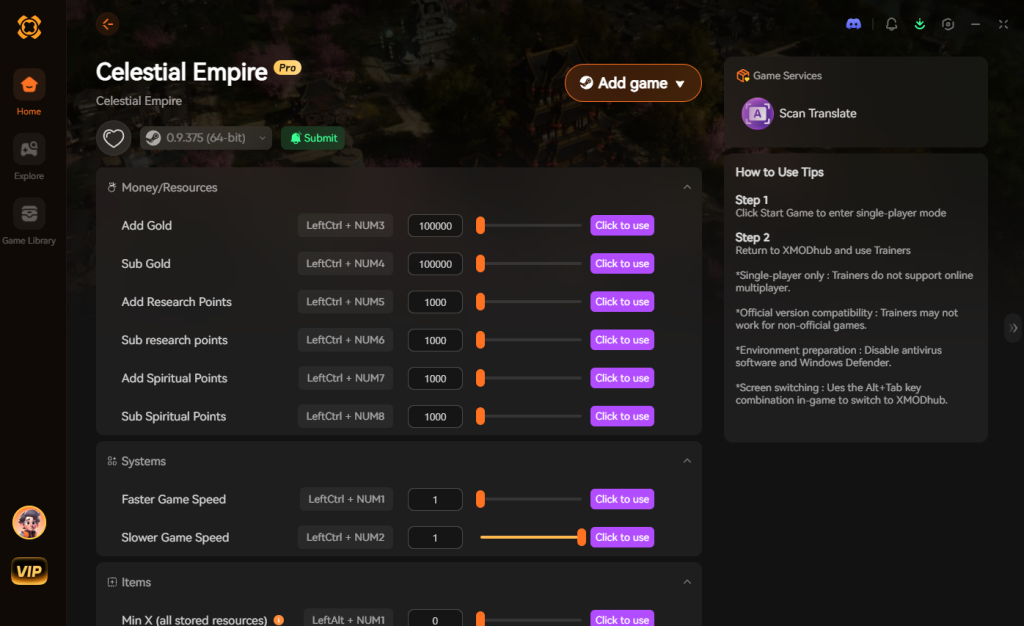
- Click “Play” to auto-hook the game safely. The app will automatically detect your game directory and launch it with the trainer hooked.
- Toggle your desired cheats directly from the clean UI or via customizable keyboard hotkeys without ever needing to alt-tab out of your tactical battles.
Download Celestial Descends Trainer Now
4. Where to Find Safe Celestial Descends Cheat Tables (.CT)?
If you absolutely insist on using CE and want to bypass the grueling process of finding pointers yourself, you’ll want a pre-made Cheat Table (.CT file). A Celestial Descends cheat engine table is a file created by another user that contains pre-saved addresses, pointers, and custom assembly scripts designed specifically for the game.
However, you must exercise extreme caution when downloading these files. The internet is flooded with shady forums, unmoderated Discord servers, and sketchy download portals claiming to offer the ultimate Celestial Descends cheat engine table. You need to understand a critical cybersecurity reality: Cheat Engine tables are not just harmless text files. They have the capability to execute embedded Lua scripts directly on your machine with administrative privileges.
Malicious actors frequently upload fake .CT files disguised as game cheats. Once you open the file and attach it to your game, the hidden Lua script executes in the background. These scripts can silently download and install Remote Access Trojans (RATs), deploy aggressive cryptocurrency miners that will permanently throttle your GPU, or execute credential stealers that scrape your browser for saved passwords and banking information. Because Cheat Engine itself requires elevated system privileges to read and write to memory, you are essentially handing a hacker the keys to your entire operating system.
If you must download a .CT file, only use highly reputable, heavily moderated communities like FearLess Revolution, and only download files from users with massive reputation scores. Never download a cheat table from a random YouTube video description or a generic file-hosting site.
This severe security risk is exactly why a verified, digitally signed application like XMODhub is the safe choice. With a dedicated development team and strict security protocols, you never have to worry about malware, embedded trojans, or compromised system integrity.
5. Top Features Every Celestial Descends Cheat Engine Table Should Have
When hunting for the perfect Celestial Descends cheat engine table, you want to ensure it covers both the tactical grid combat and the open-world Xianxia progression. A basic script that only alters your Spirit Stones won’t help you survive the late-game roguelike realms. Here are the essential scripts and pointers a high-quality .CT file must include to be worth your time.
| Cheat / Script Category | Specific Functionality | In-Game Application | Risk of Crashing |
|---|---|---|---|
| Grid Combat Overrides | Infinite Action Points (AP) | Moving across the entire map in a single turn. | High |
| Cultivation Multipliers | EXP / Qi Gain x100 | Instantly reaching the Mythic Cultivation tier. | Low |
| Inventory Management | Item ID Spawner | Spawning legendary gear like the Void Dragon Sword. | Medium |
| Roguelike Modifiers | Freeze Realm Timer | Exploring timed dungeon nodes without penalties. | High |
6. How to Fix a Broken .CT File After a Game Update
So, you finally found a working Celestial Descends cheat engine table, but a new hotfix just dropped on Steam and now none of the scripts will activate. This is the reality of using manual cheat tables. When developers patch the game, the memory offsets shift, rendering your downloaded .CT file completely useless.
To fix a broken script, you need to update the Array of Bytes (AOB) signatures. Right-click the broken script in Cheat Engine and select “Change Script.” Look for the line of code that says AOBScanModule. The string of hex codes next to it is what Cheat Engine is searching for. You will need to manually reverse-engineer the updated game executable, find the new memory instruction for that specific action (like taking damage or spending currency), and replace the old AOB string with the new one.
If reading Assembly language and debugging hex codes sounds like a nightmare, this is exactly why the majority of the player base transitions to an automated tool like XMODhub. Our cloud servers handle the AOB signature updates automatically, so you never have to look at a single line of code.
7. Frequently Asked Questions (FAQ)
| Platform / Environment | Cheat Engine Compatibility | XMODhub Compatibility | Ban Risk Level |
|---|---|---|---|
| Steam (PC) | Yes (Requires manual updates) | Yes (Fully Supported) | None (Singleplayer) |
| Epic Games Store | Yes (Requires manual updates) | Yes (Fully Supported) | None (Singleplayer) |
| Xbox Game Pass (PC) | No (Blocked by UWP encryption) | Yes (Custom bypass) | None (Singleplayer) |
| Multiplayer / Co-op | Highly Dangerous | Disabled for safety | Extreme (Account Ban) |
Q: Can I use Cheat Engine on the Xbox Game Pass version of Celestial Descends?
A: Usually, no. Game Pass uses strict UWP (Universal Windows Platform) file encryption and restricted folder permissions that actively block Cheat Engine from attaching to the executable. Even if you manage to bypass the folder restrictions, the memory structure is often heavily obfuscated compared to the Steam release. However, XMODhub is specifically engineered to bypass these restrictions seamlessly, fully supporting the Game Pass version without requiring you to modify your Windows registry or alter folder ownership.
Q: Is it illegal to use Cheat Engine?
A: Modifying data on your own PC for a single-player experience like Celestial Descends is completely legal. You own the hardware and you are simply manipulating the data stored temporarily in your own RAM. There are no laws against cheating in a single-player offline game. Just never bring memory editors into a multiplayer server, as that violates the Terms of Service and will result in a permanent account ban.
Q: Will using Cheat Engine drop my FPS or slow down my PC?
A: It depends heavily on how you are using it. When you perform a “First Scan” with an “Unknown Initial Value” across a massive open-world game like Celestial Descends, Cheat Engine has to dump gigabytes of active RAM into your system’s pagefile. This causes massive CPU spikes, disk thrashing, and severe temporary frame drops. However, once a value is isolated and “Frozen,” the impact is negligible. Active freezing simply writes a few bytes of data to a specific memory address at a set interval (usually 250 milliseconds). This background process uses virtually zero CPU cycles and will not impact your in-game framerate.
Conclusion: Work Smarter, Not Harder
Learning how memory manipulation works in Cheat Engine is a cool flex. Understanding data types, navigating hex codes, and successfully writing your own assembly scripts to bypass dynamic memory allocation is a genuinely valuable technical skill. But let’s be real—when you come home from a long day at work, you just want to spawn in that legendary Transcendent Void Sword, maximize your grid movement range, and wreck some Xianxia enemies without taking a computer science class.
Why spend 45 minutes digging through hex codes, crashing your game, and losing your roguelike run progress when you can click one button and instantly get God Mode? And the best part? XMODhub supports over 5,000+ PC games. Once you install the app, you can ditch the complicated cheat tables for good and focus on what actually matters: enjoying the game on your own terms.
Stop Grinding, Start Enjoying.
Bypass the tedious resource gathering and unlock your full potential instantly.

I am a passionate gamer and writer at XMODhub, dedicated to bringing you the latest gaming news, tips, and insights.
Connect with me:
LinkedIn Profile ↗
 Nancy Miller

