Catherine Hu
You have spent nearly an hour trekking through a treacherous biome in Outbound, your inventory is bursting with rare resources, and your energy levels are dangerously low. You desperately open your map, scanning the corners of the screen for a teleport button or a portal icon, only to realize with sinking dread that there is no fast travel option. You are hundreds of meters away from your base, and the trek back feels like a death sentence. We have all been there—the moment the scale of Outbound hits you, and the reality of its survival mechanics sets in.
🗺️ Editor’s Note
Having clocked over 100 hours in open-world survival games and specifically deep-diving into the mechanics of Outbound, I can tell you that the lack of fast travel is a deliberate design choice. It forces players to plan their logistics, build efficient mobile bases, and master the art of terrain navigation. This guide is written to help you stop fighting the game’s movement system and start mastering it.
⚡ TL;DR: The Short Answer
To put it bluntly: No, there is no traditional fast travel system in Outbound. You cannot simply click a button on your map to teleport back to your base or a safe zone. The game is built around the concept of nomadic living and exploration, where the journey itself is a core gameplay loop. Below is a quick breakdown of how you should view traversal:
| Fonctionnalité | Status in Outbound | Player Strategy |
|---|---|---|
| Fast Travel (Teleportation) | Aucun | Do not rely on it; plan your routes. |
| Vehicle/Mobile Base | Available | Prioritize upgrading your mobile platform. |
| Stamina Management | High Priority | Stock up on food and energy-restoring items. |
| Map Navigation | Manual | Learn the terrain and biome shortcuts. |
⛰️ Mechanics Deep Dive: Why Traversal is Challenging
The traversal system in Outbound is not just about moving from point A to point B; it is about resource management, environmental hazards, and strategic positioning. When developers remove fast travel, they are essentially asking the player to treat the game world as a living, breathing entity that needs to be conquered, not just traversed. In Outbound, your vehicle serves as your lifeline. The distance between biomes is intentionally vast to emphasize the scarcity of resources and the difficulty of survival.
Understanding the physics of movement in Outbound is key. The game calculates terrain elevation, vehicle weight, and fuel efficiency. If you are struggling to move across the map, it is likely because you are attempting to traverse terrain that your current vehicle setup is not optimized for, or you are ignoring the environmental constraints of the biome you are in.
⚠️ Common Mistakes: Why You Are Running Out of Time
Many players, especially those new to the survival genre, fall into the same traps when exploring the world of Outbound. Avoiding these errors will save you hours of backtracking and frustration:
1. The Straight-Line Fallacy
The most common mistake is assuming that the shortest distance between two points is a straight line. In Outbound, this is rarely true. Trying to drive or walk in a straight line often leads you into high-elevation areas, dense forests, or resource-poor zones that drain your stamina and vehicle fuel. You must learn to read the map and follow natural corridors.
2. Ignoring Inventory Weight
Movement speed and stamina consumption are heavily tied to your inventory weight. Many players hoard everything they find, only to realize that they are moving at a snail’s pace. If you are on an expedition, you must prioritize high-value resources. If your inventory is full of low-value items, you are actively sabotaging your return trip.
3. Neglecting Fuel and Food Logistics
Exploration in Outbound requires fuel for your vehicle and food for your character. Players often set out without a surplus of these items, leading to “dead zones” where they are stuck in the middle of nowhere. Always calculate your return trip before you even leave your base.
🏕️ Alternative Methods: The Nomadic Strategy
Since you cannot teleport, you must change your approach to base building and exploration. Instead of having one static base, consider the “Nomadic Hub” strategy. This involves establishing smaller, secondary outposts as you push into new territories. This approach effectively creates a chain of safe zones, reducing the distance you need to travel in one go.
To master this, you need a deep understanding of the map. Before you commit to a new, long-distance expedition, it is vital to study the terrain. For a comprehensive breakdown of where to find the best materials and how the biomes connect, check out our Outbound Map Guide: All Resource & Biome Locations (2026). Having this knowledge allows you to plan your “nomadic path” effectively, ensuring you are never too far from a resource node or a safe resting spot.
Leveraging Vehicle Upgrades
Your vehicle is not just a container; it is your primary tool for traversal. As you progress in Outbound, focus on upgrading your vehicle’s mobility components before anything else. Increased speed, better fuel efficiency, and improved suspension will allow you to traverse difficult terrain with ease. Do not ignore the upgrade tree; it is the closest thing you have to “fast travel” in this game.
🚀 Advanced Tips: Pathing and Efficiency
Once you have the basics of nomadic survival down, it is time to look at advanced optimization. High-level players in Outbound treat the map like a puzzle.
1. Establishing “Highways”
Clear trees, rocks, and other obstacles along the paths you travel most frequently. By manually clearing a path between your primary base and your resource-rich outposts, you create a “highway” that significantly reduces travel time and vehicle damage. It takes initial effort, but the long-term payoff is massive.
2. Biome-Specific Shortcuts
Every biome in Outbound has natural bottlenecks. Learn to identify these. Often, following the edge of a mountain range or a riverbank is faster than cutting through the center of a dense forest. Use your map markers to drop breadcrumbs—this is essential for navigating back during low-visibility conditions (like night or storms).
3. Stamina Management Loops
If you are traveling on foot, never let your stamina drop to zero. Stop, eat, and regenerate. It is faster to take three short breaks during a long walk than it is to recover from a complete stamina depletion. Combine this with resource gathering to make your travel time productive.
🗺️ Strategic Navigation: Mastering the Map
Without the luxury of teleportation, your map is your most powerful tool. Players who treat their map as a dynamic navigation aid rather than a static image tend to suffer 70% less downtime. Here are the essential habits for expert navigation:
Expedition Preparation Checklist
To avoid getting stranded in the wilderness, use this checklist before departing on any long-distance trek:
| Item Category | Essential Quantity | Why? |
|---|---|---|
| Fuel Reserves | 2x Estimated Need | Prevents stranding due to terrain consumption. |
| High-Calorie Food | 3-5 Units | Maintains stamina during long-distance walking. |
| Repair Kits | 2+ Units | Fixes vehicle damage from rough terrain. |
| Portable Beacons | 1-2 Units | Marks your path back in low visibility. |
🚀 XMODhub: The QoL Solution
Let’s be honest: while the “hardcore” experience of Outbound is rewarding, sometimes the game’s grind can feel repetitive, especially when you are in the mid-to-late game and just want to focus on building or exploration without the constant anxiety of managing fuel or walking speed. This is where XMODhub becomes a game-changer.
If you are tired of the tedious travel times and want to focus on the creative aspects of Outbound, XMODhub offers quality-of-life (QoL) tweaks that can make your experience much smoother. You can toggle features like infinite vehicle fuel, increased sprint speed, or even unlimited stamina, effectively allowing you to traverse the map at your own pace without the artificial barriers.
How to get started with XMODhub for Outbound:

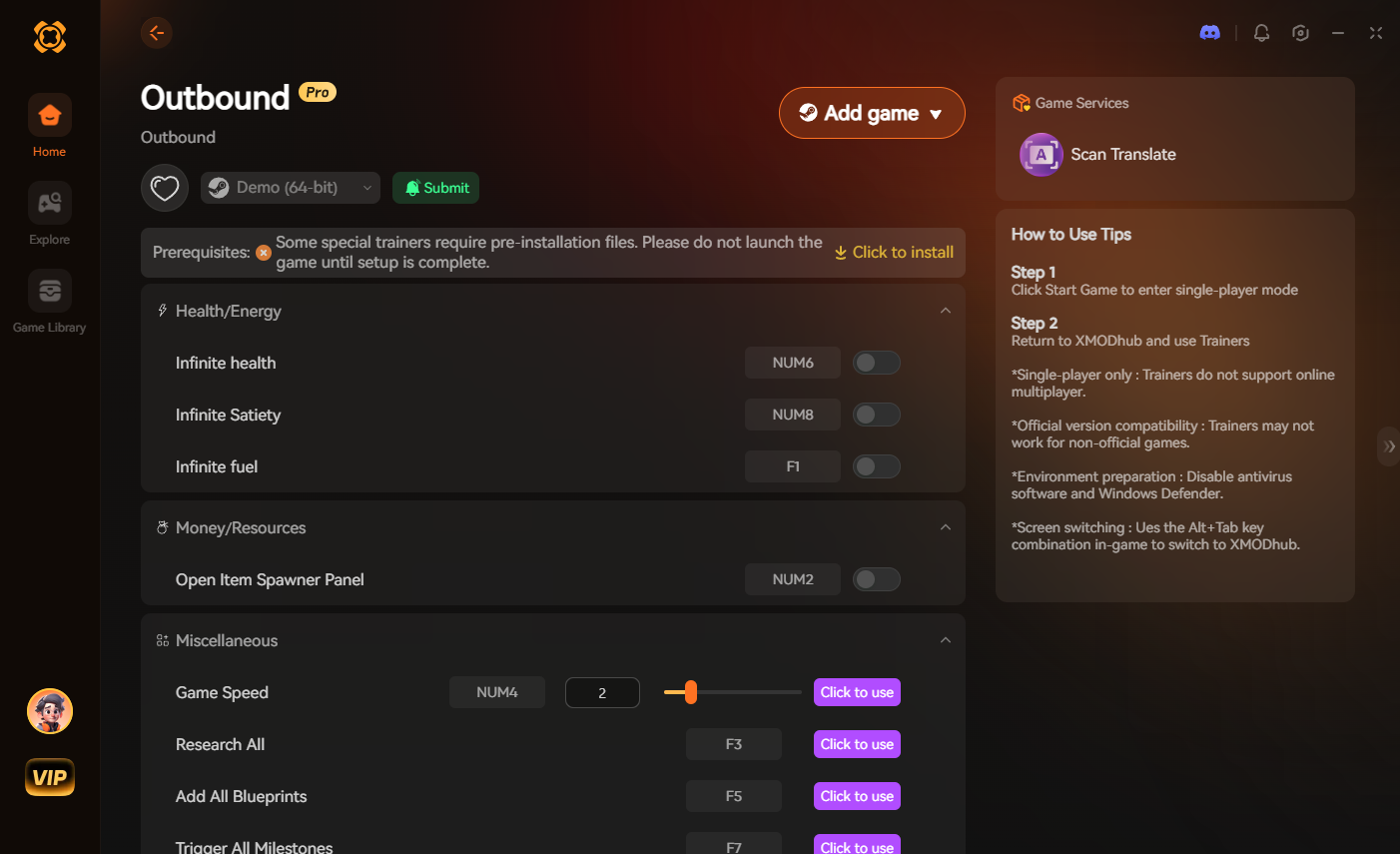
Using these tools doesn’t mean you are “cheating” the game; it means you are customizing your experience to fit your schedule and playstyle. It turns the tedious travel into a streamlined, enjoyable exploration process.
💬 Frequently Asked Questions
A: While you cannot build paved highways, you can clear vegetation and obstacles to create clear paths. Flattening terrain with your vehicle is also a viable way to create makeshift roads that make travel much faster.
A: No, Outbound does not support remote item teleportation. You must physically transport all resources. This is why building a mobile base is so critical—you bring the storage with you.
A: Yes, extreme weather conditions can significantly slow down your vehicle and deplete your character’s stamina faster. Always check the weather forecast if available or look for signs of incoming storms to plan your travel accordingly.
A: Prioritize fuel efficiency and suspension upgrades. A vehicle that can handle rough terrain without breaking down is far superior to a fast vehicle that constantly gets stuck or runs out of fuel.
🌟 Final Verdict: Mastering the World of Outbound
Outbound is a game of patience and preparation. While the lack of fast travel can be frustrating initially, it is the very mechanism that makes your accomplishments—like reaching a distant biome or successfully transporting a massive haul of resources—feel earned. By focusing on smart pathing, nomadic base building, and vehicle optimization, you can turn the map into your playground rather than your prison.
If you find that the travel mechanics are preventing you from enjoying the core building and survival loops, don’t hesitate to leverage the XMODhub ecosystem. Supporting over 5,000+ games, including massive titles like Satisfaisant, XMODhub provides the tools to tailor your gaming experience to your exact preferences. Whether you choose to play the game as intended or with a few QoL enhancements, the most important thing is that you enjoy your journey through the world of Outbound.

Je suis un joueur passionné et j'écris sur XMODhub, qui se consacre à vous apporter les dernières nouvelles, astuces et idées en matière de jeux.
Connectez-vous avec moi :
Profil LinkedIn
 Nancy Miller