Catherine Hu
Want to test out the endgame Time Machine early to save a doomed run? Are you tired of grinding for Tickets just to satisfy Jeff Booth’s ridiculous debt quota, or perhaps your teammate accidentally shredded a critical body part and now your playthrough is completely soft-locked?
Using developer console commands to spawn items is a beloved staple of PC gaming freedom. Below is the most comprehensive, categorized, and up-to-date list of Unity internal Item IDs, spawn codes, and perk IDs for Gamble With Your Friends, verified for the latest 2026 patch.
🎰 Quick Reference: Top 10 Most Wanted Gamble With Your Friends IDs
If you don’t want to scroll through thousands of rows of Unity asset data, here are the exact spawn codes for the most essential and frequently searched items in Gamble With Your Friends (including Tickets, Golden Dice, and top-tier sketchy items).
Format de la commande : SpawnItem [Item_ID] [Amount] (Requires BepInEx Console Enabler)
| Nom de l'article | Item Description / Value | Exact Item ID (Unity Prefab) |
|---|---|---|
| Tickets | Standard currency to pay off the loan shark | Currency_Tickets_Stack |
| VIP Casino Chips | High-roller chips for the upper floors | Currency_Chips_VIP_01 |
| Time Machine | Rewinds time to save a lost roulette bet | Item_Sketchy_TimeMachine |
| Rigged Coin | Guarantees a winning flip | Item_Sketchy_RiggedCoin |
| Golden Dice | Forces a favorable dice roll | Item_Sketchy_GoldenDice |
| First Aid Medkit | Restores health after taking casino damage | Consumable_Medkit_Standard |
| Energy Drink | Provides a temporary movement speed boost | Consumable_EnergyDrink_Speed |
| Severed Arm | Sacrificial item for the Body Shredder | BodyPart_Arm_Left |
| Security Keycard | Unlocks restricted backroom areas | QuestItem_Keycard_Security |
| Lucky Charm | Passively increases slot machine odds | Item_Accessory_LuckyCharm |
💻 How to Enable the Console & Use Spawn Commands
Before you can use the ID codes listed below, you must understand the correct syntax and the backend reality of Gamble With Your Friends.
SpawnItem [Item_ID] [Quantity] — To spawn 5000 Tickets to save your run, you would type SpawnItem Currency_Tickets_Stack 5000 and press Enter.⚠️ Expert Warning:
“Typing SpawnItem Item_Sketchy_TimeMachine 1 is fine if you are playing completely solo. But if you are in a co-op lobby, manually typing case-sensitive Unity hex codes becomes incredibly dangerous. Gamble With Your Friends relies on syncing the shared bank and physical items across all players. Spawning an item locally via text commands often causes a network desynchronization (desync)—meaning you can see the item, but your friends cannot, which will eventually crash the lobby. While the lists below are meticulously verified, I personally switched to a visual UI injector months ago. Seeing the item icon and clicking ‘Add to Shared Inventory’ handles the network syncing safely behind the scenes.”
🚀 The Easy Way: XMODhub Visual Spawner (No Typing Required)
Stop Alt-Tabbing to check massive spreadsheets. Typing long, case-sensitive ID codes breaks your chaotic casino immersion and wastes precious time while your 5-minute quota timer is ticking down.
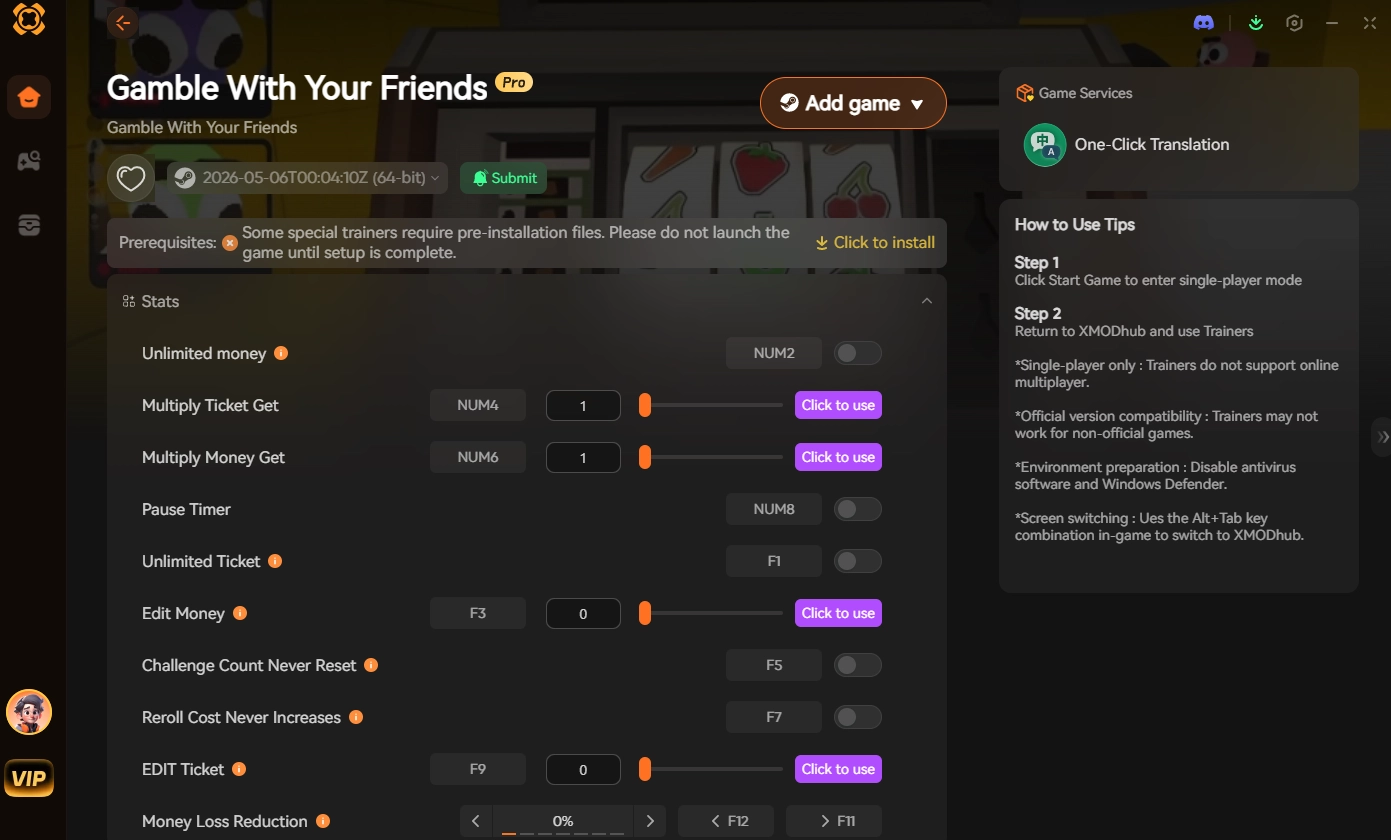
Le XMODhub PC Client includes a dedicated “Visual Item Spawner” feature specifically built for Gamble With Your Friends.
🃏 Sketchy Items & Tools IDs List
Use these codes to instantly equip yourself with the best tools to rig the casino games in your favor.
Format de la commande : SpawnItem [Item_ID] 1
| Nom de l'outil | Exact Item ID |
|---|---|
| Hacked Tablet | Item_Tool_HackedTablet |
| Magnetic Roulette Ball | Item_Sketchy_MagnetBall |
| Marked Playing Cards | Item_Sketchy_MarkedDeck |
| Lockpick Set | Item_Tool_LockpickSet |
| EMP Grenade | Item_Tool_EMP_Grenade |
🍖 Body Parts & Consumables IDs List
Never run out of things to throw into the Body Shredding Machine again.
Format de la commande : SpawnItem [Item_ID] 1
| Consumable Name | Exact Item ID |
|---|---|
| Severed Leg | BodyPart_Leg_Right |
| Mysterious Blood Bag | Consumable_BloodBag_Sketchy |
| Adrenaline Syringe | Consumable_Syringe_Adrenaline |
| Stale Casino Sandwich | Consumable_Food_StaleSandwich |
| Bandage Wrap | Consumable_Medical_Bandage |
💰 Currency & Casino Chips IDs List
Instantly fund your team’s gambling addiction without grinding the penny slots.
Format de la commande : SpawnItem [Item_ID] [Amount]
| Currency Name | Exact Item ID |
|---|---|
| Standard Casino Chips | Currency_Chips_Standard |
| High-Roller Chips | Currency_Chips_HighRoller |
| Platinum Tokens | Currency_Tokens_Platinum |
| Gold Bars | Currency_GoldBar_Vault |
🏅 Skills, Perks & Traits IDs
In the Unity Engine, player perks (like increased movement speed or inherent luck) are not physical items you can drop on the ground. You can use the console to instantly alter your character’s internal variables.
Format de la commande : AddTrait [Trait_ID]
| Perk / Trait Name | Trait ID |
|---|---|
| Aura of Luck | Trait_Passive_LuckBoost |
| Sprinter’s Lungs | Trait_Passive_InfiniteSprint |
| Iron Liver (Poison Res.) | Trait_Passive_ToxinResist |
| Bargainer (Shop Discount) | Trait_Social_ShopDiscount |
⚠️ Troubleshooting: Why Are My Commands Failing?
If you are typing the IDs correctly but the game is throwing errors, check these common issues:
💬 Frequently Asked Questions (FAQ)
Q: Are these Item IDs case-sensitive in Gamble With Your Friends?
A: Yes, absolutely. Native Unity console commands and prefab strings are strictly case-sensitive. Typing currency_tickets_stack instead of Currency_Tickets_Stack will yield a syntax error. Spacing is also strictly enforced.
Q: Can I spawn items while playing in Public Multiplayer?
A: No. These console commands are executed client-side. Attempting to force spawn items in a public multiplayer lobby will trigger a massive network desync, ruining the shared bank account data for random players and likely resulting in an anti-cheat ban. Only use these in private lobbies with consenting friends!
Q: How do I find the Item IDs for custom modded sketchy items?
A: Finding dynamic load-order IDs manually for community mods is extremely difficult. We highly recommend using the XMODhub Item Browser, which automatically scans your active BepInEx mods, detects the custom items, and lets you spawn them with a single click without knowing the exact hex string.
🎰 Conclusion: The Ultimate Sandbox Experience
Having access to the complete Gamble With Your Friends Item IDs list is the fastest way to experiment with different casino-rigging strategies, test the limits of the Body Shredder, or simply recover from a frustrating streak of bad luck that wiped out your shared bank account. Bookmark this page so you can quickly reference the codes whenever you need an emergency resupply of Tickets.
However, if you want a significantly smoother, crash-free experience where you don’t need to memorize strings of code like Item_Sketchy_TimeMachine and risk desyncing your multiplayer lobby, the XMODhub Visual Spawner is the superior modern choice. Browse items visually. Spawn them instantly into the shared bank. Keep your team’s run alive.
XMODhub is your ultimate all-in-one toolkit for PC single-player and private co-op gaming. Whether you need powerful Trainers, real-time visual spawners, or shared bank editors, our engine supports over 5,000+ games—including Gamble With Your Friends and similar chaotic multiplayer hits like Lethal Company.

Je suis un joueur passionné et j'écris sur XMODhub, qui se consacre à vous apporter les dernières nouvelles, astuces et idées en matière de jeux.
Connectez-vous avec moi :
Profil LinkedIn
 Nancy Miller