Catherine Hu
Want to test out the endgame Orbital Strike Laser early? Are you tired of grinding through endless bot swarms just to unlock rare Titanium Armor blocks, or perhaps your perfect roguelite run was ruined because you could not find a Repair Bubble in time?
Using developer console commands to spawn items is a beloved staple of PC gaming freedom. Below is the most comprehensive, categorized, and up-to-date list of Unreal Engine 5 Blueprint paths, spawn codes, and block IDs for TerraTech Legion, verified for the latest Early Access patch.
⚡ Quick Reference: Top 10 Most Wanted TerraTech Legion IDs
If you do not want to scroll through thousands of rows of engine data, here are the exact spawn codes for the most essential and frequently searched items in the game (including Massive XP Gems, high-tier weapons, and critical survival utilities).
Formato del comando: Summon [Blueprint Path]
| Nombre del artículo | Item Description / Value | Exact Item ID (UE5 Blueprint) |
|---|---|---|
| Massive XP Gem | Instantly grants huge amounts of run experience | BP_Pickup_XPGem_Massive_C |
| Heavy Plasma Cannon | Fires devastating AOE energy blasts | BP_Weapon_Plasma_Heavy_C |
| Orbital Strike Laser | Calls down a massive laser from orbit | BP_Weapon_OrbitalLaser_C |
| Titanium Armor Plate | Highest durability chassis protection | BP_Block_Armor_Titanium_C |
| Anti-Gravity Hover Pad | Allows your Tech to float over rough terrain | BP_Movement_Hover_Advanced_C |
| Repair Bubble Projector | Heals all blocks within its spherical radius | BP_Utility_RepairBubble_C |
| Energy Shield Generator | Absorbs incoming enemy projectiles | BP_Utility_ShieldGen_C |
| Heavy Tread Wheel | Maximum traction for massive vehicles | BP_Movement_Wheel_HeavyTread_C |
| Scrap Magnet | Drastically increases pickup radius for loot | BP_Utility_ScrapMagnet_C |
| Gatling Gun Battery | Extreme fire-rate kinetic weapon | BP_Weapon_Gatling_Basic_C |
💻 How to Enable the Console & Use Spawn Commands
Before you can use the ID codes listed below, you must understand the correct syntax and the backend reality of the developer console in TerraTech Legion.
Summon [Blueprint Path] — To drop a massive XP gem at your vehicle’s coordinates, you would type Summon BP_Pickup_XPGem_Massive_C and press Enter.⚠️ Expert Warning:
“Typing Summon BP_Weapon_Plasma_Heavy_C is fine if you are completely stationary in an empty field. But if you are in the middle of a massive bot swarm, manually typing case-sensitive UE5 blueprint paths is incredibly dangerous. Forcing a physical block to spawn in the world can cause clipping errors. If the block spawns inside your current vehicle chassis, the physics engine will violently reject the collision, resulting in your Tech launching into the sky or an immediate fatal crash to the desktop. While the lists below are meticulously verified, I personally switched to a visual UI injector months ago. Seeing the weapon icon and simply clicking ‘Add to Inventory’ safely bypasses the physics engine entirely.”
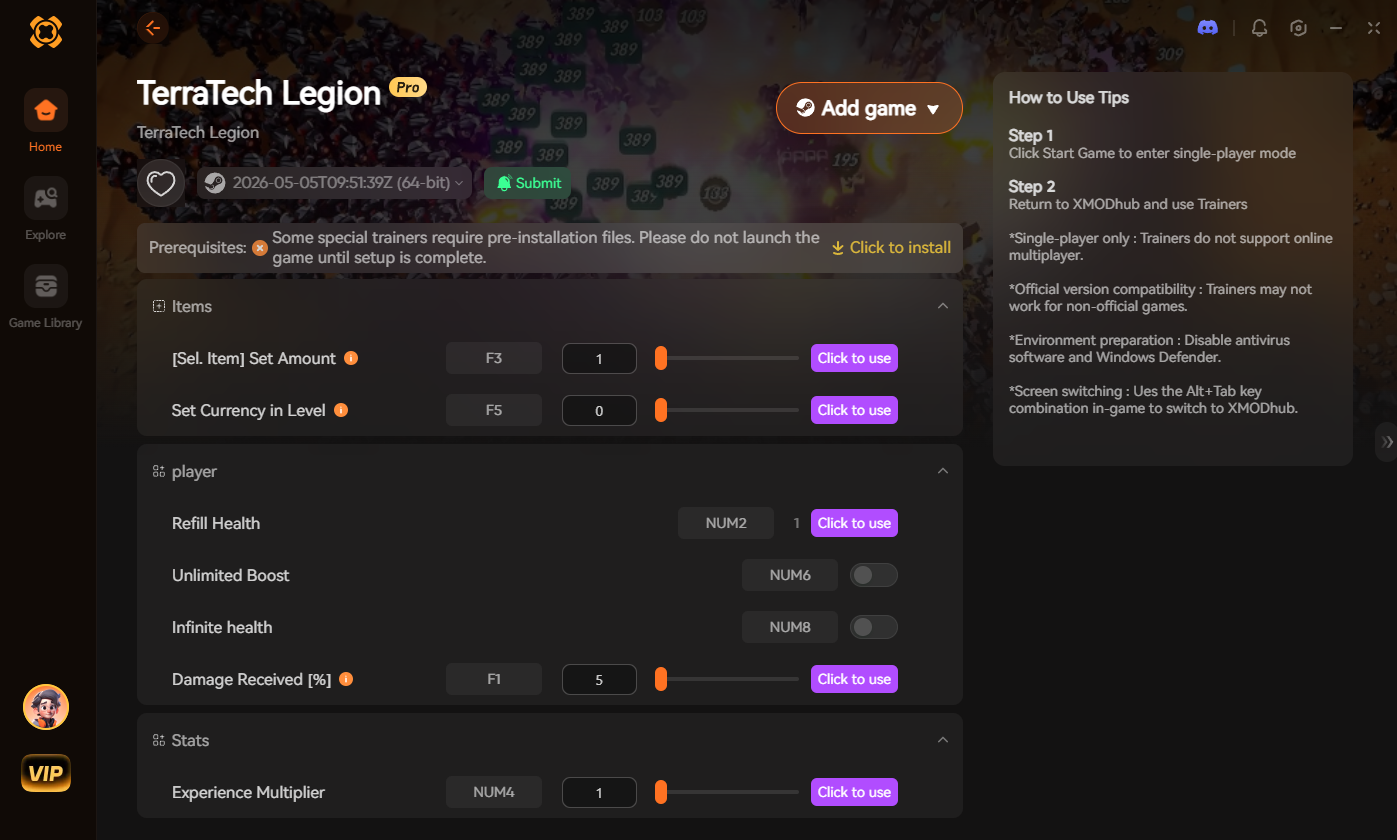
🚀 The Easy Way: XMODhub Visual Spawner (No Typing Required)
Stop Alt-Tabbing to check massive spreadsheets. Typing long, case-sensitive Blueprint paths breaks your bullet-heaven immersion and wastes precious time when enemies are closing in.
En XMODhub PC Client includes a dedicated “Visual Item Spawner” feature specifically built for TerraTech Legion to bypass the unstable UE5 Summon commands.
🔫 Weapon Block IDs List (Ballistic & Energy)
Use these codes to instantly equip your Tech with the best arsenal available. Note: Spawning these drops the physical block on the ground for you to attach.
Formato del comando: Summon [Blueprint Path]
| Weapon Name | Blueprint ID Path |
|---|---|
| Twin Machine Gun | BP_Weapon_MachineGun_Twin_C |
| Heavy Artillery Cannon | BP_Weapon_Artillery_Heavy_C |
| Tesla Coil Emitter | BP_Weapon_TeslaCoil_C |
| Homing Missile Pod | BP_Weapon_Missile_Homing_C |
| Industrial Buzzsaw | BP_Weapon_Melee_Buzzsaw_C |
🛡️ Armor & Chassis IDs List
Upgrade your vehicle’s core durability instantly.
Formato del comando: Summon [Blueprint Path]
| Armor / Chassis Name | Blueprint ID Path |
|---|---|
| Light Carbon Chassis (1×1) | BP_Block_Chassis_Carbon_1x1_C |
| Reinforced Steel Plate (2×2) | BP_Block_Armor_Steel_2x2_C |
| Sloped Aerodynamic Block | BP_Block_Armor_Slope_C |
| Heavy Tungsten Bumper | BP_Block_Bumper_Tungsten_C |
| Core Extension Module | BP_Block_CoreExtension_C |
🚀 Mobility & Utility IDs List
Ensure you can outrun the swarm and survive the Planetary Bosses.
Formato del comando: Summon [Blueprint Path]
| Utility Name | Blueprint ID Path |
|---|---|
| Off-Road Suspension Wheel | BP_Movement_Wheel_Offroad_C |
| Jet Turbine Thruster | BP_Movement_Thruster_Jet_C |
| Auto-Targeting Radar | BP_Utility_Radar_Advanced_C |
| Energy Battery Pack | BP_Utility_Battery_HighCap_C |
| Overclock Generator | BP_Utility_OverclockGen_C |
🏅 Skills, Perks & Traits IDs
Unreal Engine 5 handles roguelite perks (like increased fire rate, max block capacity, or luck rerolls) via complex internal player state functions, not simple item drops. There is no native console command to instantly learn a perk in TerraTech Legion.
If you want to instantly max out your Weapon Damage Multiplier or unlock Infinite Rerolls, you must use a dedicated memory trainer like XMODhub, which maps these complex logic gates to simple toggle buttons.
⚠️ Troubleshooting: Why Are My Commands Failing?
If you are typing the IDs correctly but the game is throwing errors, check these common issues:
Command not found: The developers permanently locked the console in the retail patch. You must use an external injector like Universal Unreal Unlocker to re-enable it.
Physics Engine Crash (Fatal Error): When you use the Summon command, the game drops a physical 3D block at your coordinates. If you are moving at high speeds or standing too close to a wall, the item will clip into the environment. The UE5 physics engine cannot resolve the collision, resulting in an instant crash to the desktop.
Item ID invalid: Unreal Engine Blueprint paths are brutally exact. If you miss the
_C at the end of the path (which denotes it as a compiled class), the engine will not recognize the object.💬 Frequently Asked Questions (FAQ)
Q: Are these Item IDs case-sensitive in TerraTech Legion?
A: Yes, absolutely. Unreal Engine 5 asset directories are highly case-sensitive. Typing bp_weapon_plasma_heavy_c will result in an error. You must capitalize the exact path strings as shown in the tables above.
Q: Can I spawn items while playing in Multiplayer or Co-Op?
A: No. These console commands are executed client-side and only function in Single-Player. If the game introduces an online leaderboard or co-op mode, attempting to force spawn items will likely result in a permanent anti-cheat ban.
Q: How do I find the Item IDs for custom modded blocks?
A: Finding dynamic load-order Blueprint paths for community mods manually is extremely difficult. We highly recommend using the XMODhub Item Browser, which automatically scans your active mod load order, detects the custom blocks, and lets you inject them directly into your inventory with a single click without knowing the hex ID.
🚀 Conclusion: The Ultimate Sandbox Experience
Having access to the complete TerraTech Legion Blueprint IDs list is the fastest way to experiment with different vehicle builds, test weapon synergies, or simply recover from a frustrating early-game death. Bookmark this page so you can quickly reference the exact paths whenever you need an emergency resupply of Repair Bubbles.
However, if you want a significantly smoother, crash-free experience where you do not need to memorize strings of code like BP_Weapon_Plasma_Heavy_C or risk physics collisions destroying your roguelite run, the XMODhub Visual Spawner is the superior modern choice. Browse blocks visually. Spawn them instantly. Keep your achievements active.
XMODhub is your ultimate all-in-one toolkit for PC single-player gaming. Whether you need powerful Trainers, real-time visual spawners, or block editors, our engine supports over 5,000+ games—including TerraTech Legion and similar action hits like Deep Rock Galactic: Survivor, Soulstone Survivors, y Vampire Survivors.

Soy un jugador apasionado y escritor en XMODhub, dedicado a traerte las últimas noticias de juegos, consejos y puntos de vista.
Conecta conmigo:
Perfil en LinkedIn

 Nancy Miller