
 Catherine Hu
Quick Answer
To successfully execute the PRAGMATA Diana healing cancel, you must wait for the exact frame the green health UI registers on your screen.
Immediately press the kinetic dodge button combined with a backward or lateral directional input to break the RE Engine’s recovery animation lock.
>_ Editor’s Note: The RE Engine Active vs. Recovery Frames
“The combat engine in PRAGMATA divides every action into three phases: Startup, Active, and Recovery. Diana’s healing protocol has a very long Recovery phase to balance its power. However, the ‘Active’ frame—the exact millisecond your health pool is actually replenished—happens much earlier in the sequence.
By inputting a high-priority movement command (like a kinetic dodge) precisely after the Active frame triggers, the engine’s input buffer overwrites the Recovery phase. If you do it too early, the heal cancels entirely; too late, and you eat a boss attack.”
Introducción
You are in the middle of the grueling Sector 7 Moon Worm boss fight. Your health is critically low, and you finally find a two-second window to command Diana to initiate her healing protocol. The nanites swarm around Hugh, but the animation feels agonizingly slow.
Just as your health bar fills up, the Moon Worm rears back and unleashes a massive subterranean sweep. Because Hugh is still stuck in the unskippable “recovery” frames of the healing animation, your dodge input is completely ignored. You are glued to the lunar dust, take the full force of the attack, and die instantly.
There is nothing more infuriating in a hardcore PC action game than dying to an animation lock. Capcom’s RE Engine is renowned for its deliberate, weighty combat pacing, meaning every action is a massive commitment. The game intentionally punishes you for healing at the wrong time by rooting you in place. However, veteran players know that you never let an animation finish naturally. If you want to survive the endgame bosses, you must master the art of animation cancelling. This guide breaks down the exact frame data required to exploit the engine’s input buffering and reclaim your mobility.
Why You Keep Dying During Diana’s Healing Protocol
To master high-level combat, you must understand why the engine is actively fighting against your reflexes. When you trigger Diana’s Defensive Utility skills, PRAGMATA enforces a strict penalty. Hugh is forced to stand completely still to sync with Diana’s holographic tether.
If you just mash the dodge button while the healing nanites are swirling, the game’s input polling rate will ignore you because you are in the “Startup” phase. You are fundamentally misunderstanding the rhythm of the game.
Before you can effectively break these rules, you need to ensure you have allocated your neural cores correctly so the heals actually matter. Be sure to read our comprehensive guide on the Best PRAGMATA Diana Skill Tree Path for Early & Late Game to optimize your loadout first.
Step-by-Step PRAGMATA Diana Healing Cancel
Executing this exploit requires muscle memory. You cannot look at Hugh’s character model; you must train your eyes to watch the HUD and listen to the audio cues.
- 1.Initiate the Protocol: Command Diana to heal. Hugh will brace himself. Do not touch your movement keys or dodge button during this Startup phase.
- 2.Identify the Active Frame: Watch your health bar in the bottom corner of the screen. The exact moment you see the green chunk of health successfully apply to your gauge, you will also hear a distinct, high-pitched digital chime.
- 3.Execute the Cancel: The millisecond the health applies, slam your kinetic dodge button along with a backward directional input (S key on a keyboard, or pulling down on the left thumbstick).
| Animation Phase | Duration | Player Action Required | Consequence of Failure |
|---|---|---|---|
| Startup | 1.2 Seconds | Stand still, do not press inputs. | Pressing buttons here queues a delayed, unsafe action. |
| Active Frame | 0.1 Seconds | Execute Dodge + Direction. | You miss the cancel window. |
| Recovery | 1.5 Seconds | (Bypassed if canceled correctly). | Rooted in place, vulnerable to heavy attacks. |
The Reality of Native Console Commands
When players realize how punishing a nearly 3-second animation lock is during an endgame boss fight, their first instinct is to look for a PC developer console to simply turn off animation lag or increase game speed.
The Ultimate Shortcut: Bypass Animation Locks with XMODhub
Let us be completely honest: staring at your HUD and timing a split-second button press every single time you need to heal is exhausting. If you are an adult with a busy schedule, spending hours building the muscle memory for the Pragmata Diana healing cancel is a frustrating way to spend your weekend.
You bought the game to experience the breathtaking sci-fi narrative and explore the Cradle station, not to be repeatedly crushed by a boss because your finger slipped by a millisecond.
If you are tired of fighting the engine’s deliberate clunkiness and want to enjoy fluid, uninterrupted combat, the XMODhub PC Client is your ultimate solution.
Instead of relying on strict frame-perfect inputs or risky hex edits, XMODhub uses a professional, secure kernel-level memory injector. It allows you to artificially manipulate the RE Engine’s physics parameters and cooldowns safely.
How to Get Started

- Primer paso:Download XMODhub: Navigate to our official website and securely download the optimized PC desktop application.
- Segundo paso:Auto-Detect Game Path: Launch the app. XMODhub will automatically scan your system and seamlessly hook into your PRAGMATA directory.
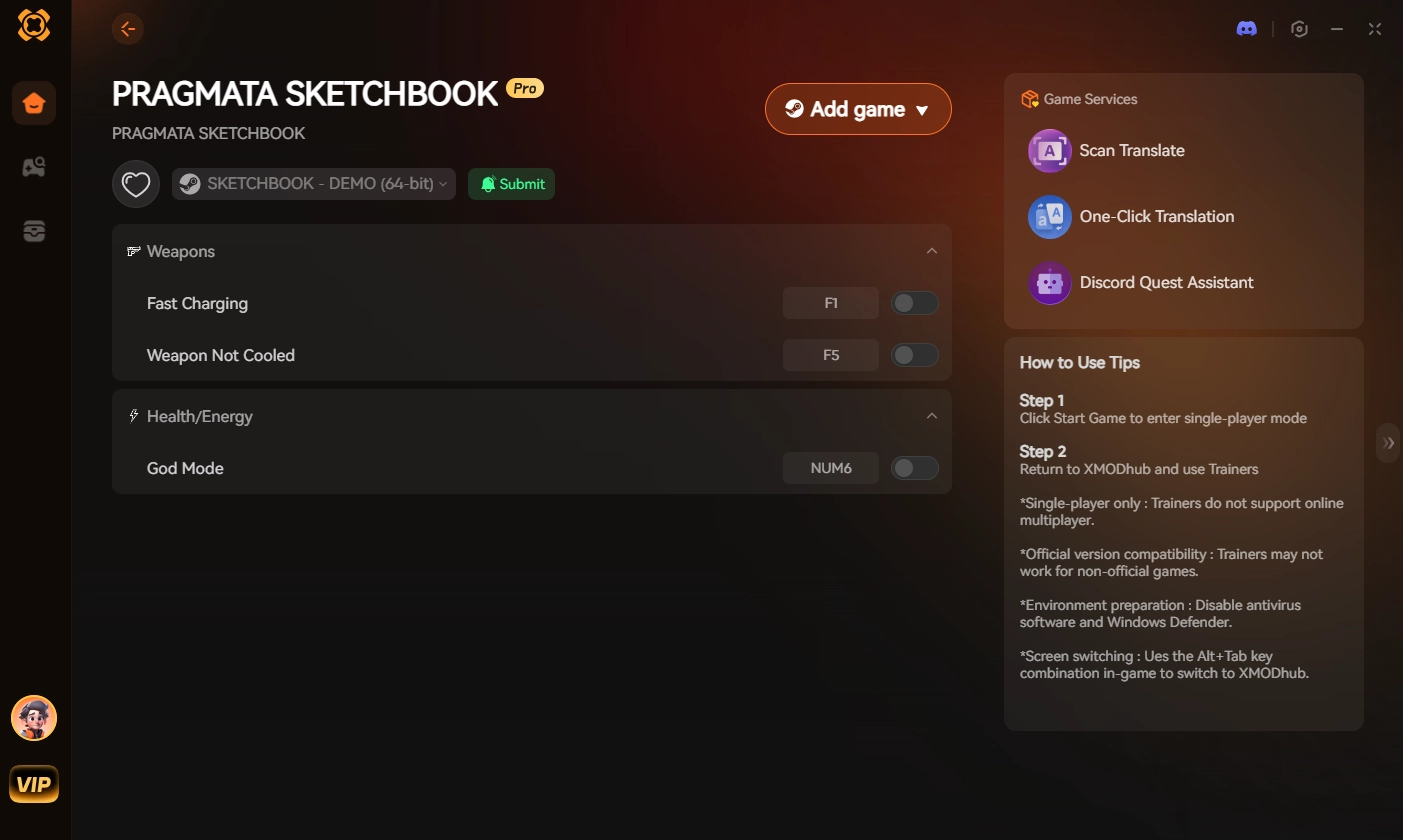
- Paso 3:Toggle trainers/cheats: Click Play to launch the game. Open the sleek overlay to activate Instant Ability Cooldowns, Game Speed Modifiers (to make canceling easier), or simply toggle God Mode to ignore the need to heal entirely.
Stop letting artificial animation locks gatekeep your experience. Take control of your combat fluidity and dominate the lunar colony completely on your own terms.
Frequently Asked Questions (FAQ)
Q: Does the PRAGMATA Diana healing cancel work with kinetic shields?
A: Yes. The same input buffering logic applies to Diana’s Kinetic Shield deployments. Wait for the blue holographic hex-grid to physically render on the screen in front of you, then immediately execute a lateral dodge to cancel Hugh’s follow-through animation.
Q: Why does my dodge input get ignored during the healing animation?
A: If your input is ignored, you are suffering from RE Engine input buffering issues. If you mash the dodge button during the “Startup” phase, the game’s logic queues that command and executes it late, or drops it entirely. You must press the button only once, exactly on the Active frame.
Q: Can I upgrade Diana’s skill tree to permanently remove the healing animation?
A: No. There is no skill node in the vanilla game that completely removes the animation lock. However, investing in the “Rapid Protocol” node slightly speeds up the entire animation sequence, making the overall window shorter, but you still have to manually cancel the recovery frames to be perfectly safe.
Conclusión
Mastering the PRAGMATA Diana healing cancel is an absolute necessity for surviving the brutal, relentless encounters against the Edus AI. By understanding the RE Engine’s distinct phases of Startup, Active, and Recovery, and executing a kinetic dodge the exact moment your green health values register, you can shatter the game’s artificial movement penalties and stay light on your feet.
However, if frame-perfect reflex challenges are ruining your immersion and draining your free time, XMODhub is the definitive answer.
As the premier PC gaming enhancement platform supporting over 5,000 titles, XMODhub provides the reliable tools you need to bypass artificial friction. Whether you want to ignore animation locks in PRAGMATA, maximize your resources in Comodines de Monster Hunter, or unlock all style ranks in Devil May Cry 5, XMODhub ensures you always play your game, your way.

Soy un jugador apasionado y escritor en XMODhub, dedicado a traerte las últimas noticias de juegos, consejos y puntos de vista.
Conecta conmigo:
Perfil en LinkedIn