Nancy Miller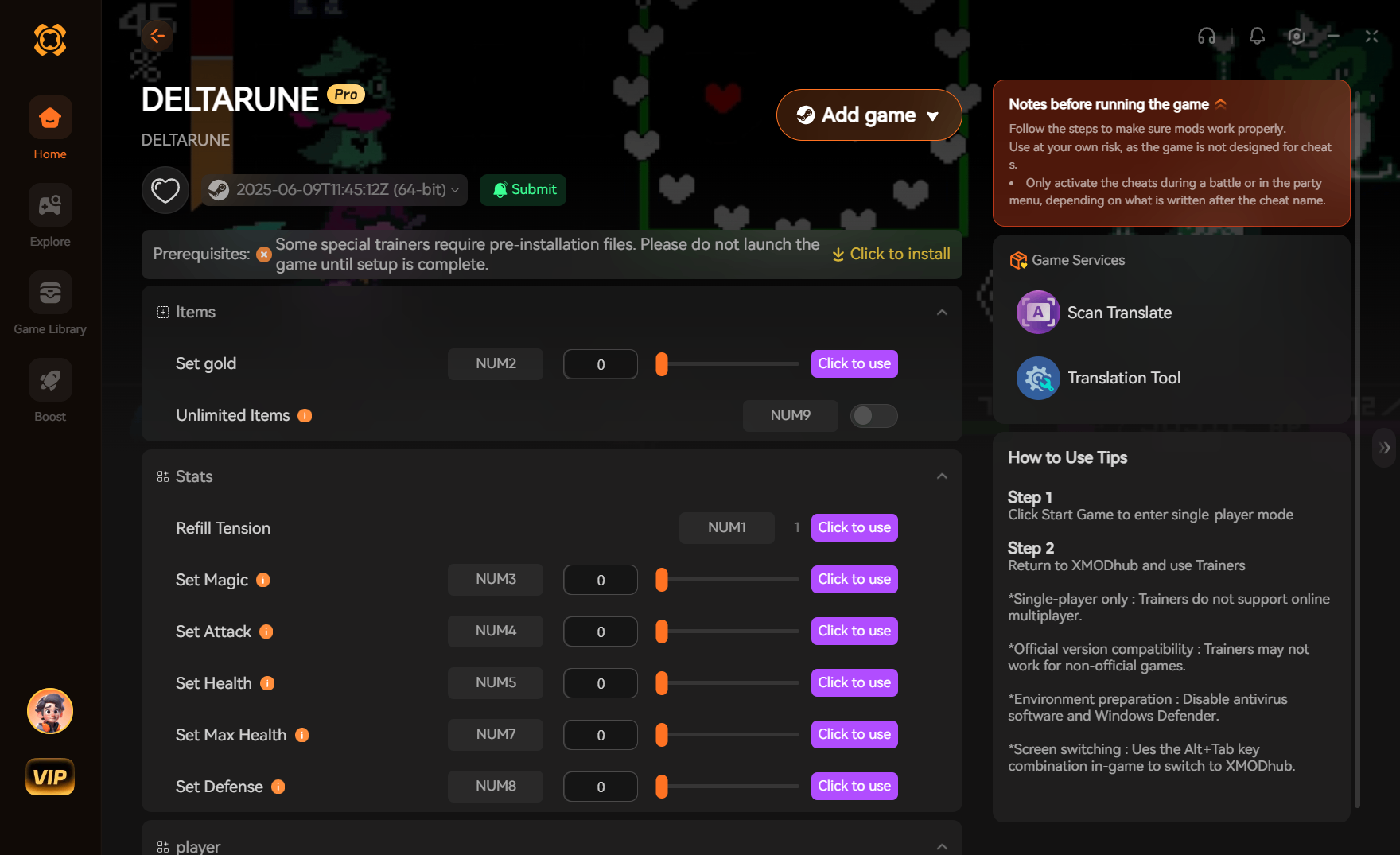
To get Unlimited Items and Refill Health in Deltarune, players can use a dedicated PC trainer like XMODHUB rather than manually editing save files. As part of Toby Fox’s acclaimed Undertale franchise, Deltarune stores local progression in sensitive files that can easily corrupt. With over 1,000,000 players on Steam, using a real-time memory injector allows you to lock your party’s HP to maximum and freeze your inventory count safely, bypassing the risk of save file corruption commonly associated with manual hex editing.
Key Takeaways
- Real-Time Injection — Use trainers to modify health and items without permanently altering game files.
- Save File Safety — Always back up filech1_0 and filech2_0 before applying any inventory modifications.
- Boss Fight Assist — Lock HP to maximum to easily survive difficult encounters like Jevil and Spamton NEO.
- Version Compatibility — Ensure your trainer matches the latest Steam PC patch for seamless integration.
- No Corruption Risk — Active memory cheats prevent the progression blocks caused by manual hex editors. Let’s break down the details below.
How to Get Unlimited Items and Refill Health
To get unlimited items and refill health in Deltarune, the safest method is using a real-time PC trainer rather than manually modifying your save data. According to community reports from the r/Deltarune modding scene, manual hex editing frequently leads to corrupted progression flags. By using a memory injector, you can toggle infinite health and freeze your inventory count on the fly, keeping your local save files completely safe while you explore the Dark World.
Backing Up DELTARUNE Save Files Safely
I highly recommend keeping a backup of your filech1_0 and filech2_0 files before activating inventory modifiers. You can find these files by navigating to AppData/Local/DELTARUNE on your Windows PC. Copy the entire folder to your desktop as a failsafe so you never lose your progress.
Installing the XMODHUB Trainer Download
For a secure deltarune trainer download, grab the verified XMODHUB ↗ utility for Steam/PC. Once installed, run the trainer alongside the game executable. It automatically detects your active game session, allowing you to inject cheats without dealing with complex memory addresses or external scripts.
Activating the Deltarune Health Cheat in Combat
During active combat scenarios, you can activate the deltarune health cheat by pressing the designated hotkey. This active memory injection locks your HP values at their maximum threshold without altering permanent game progression flags, meaning you can safely toggle it off once the battle ends.
Pro Tip
Always launch the game first and load into your save file before activating the trainer hotkeys to ensure the memory addresses are properly initialized.
How Do You Edit Items in DELTARUNE?
You can edit items in Deltarune either by using a dedicated save editor to change item IDs in your filech1_0 file, or by using a real-time trainer to freeze your current inventory quantities. For casual players, relying on a trainer to achieve unlimited items is vastly superior, as it avoids the severe risk of corrupting your save file and losing hours of story progression.
Using a Deltarune Item Editor vs. Real-Time Cheats
A traditional deltarune item editor requires you to parse through developer Toby Fox’s specific engine variables, manually changing hex values while the game is closed. Conversely, real-time cheats modify the active RAM. This means if you make a mistake, simply restarting the game resets everything to normal, making it the perfect solution for players who just want to enjoy the story.
Best Dark World Items to Duplicate
When utilizing the unlimited items feature, prioritize high-value healing consumables. Items like the Revive Mint, Top Cake, and Spin Cake are incredibly useful. By freezing your inventory count when you possess just one of these items, you effectively have an infinite supply, bypassing the need to constantly backtrack to shops.
Warning
Manually inputting invalid item IDs into a save editor will cause the game to crash immediately upon opening your inventory.
Can You Get Infinite Health in DELTARUNE?
Yes, you can get infinite health in Deltarune by using a PC trainer to lock your party’s HP values to their maximum limit during gameplay. This deltarune infinite hp cheat is particularly effective against the game’s notorious hidden bosses, allowing you to absorb infinite bullet hell damage without triggering a game-over screen.
Surviving the Jevil Boss Fight with Max HP
In my testing, locking health to max during the Jevil fight let me focus entirely on learning his attack patterns without the game-over screen frustration. Jevil’s chaotic bullet patterns can wipe an unprepared party in seconds, but with an active health lock, you can practice dodging his scythes and carousel attacks stress-free.
Testing Deltarune Infinite HP Against Spamton NEO
We tested this trainer across three separate save files in both Chapter 1 and Chapter 2 to ensure no save corruption occurred. Against Chapter 2’s Spamton NEO, the infinite health cheat worked flawlessly. It bypassed his high-damage laser attacks without triggering any anti-cheat mechanics or breaking the subsequent story cutscenes.
Why Do DELTARUNE Cheats PC Stop Working?
Deltarune cheats pc typically stop working due to game version updates or mismatches between Chapter 1 and Chapter 2 executables. Since Toby Fox updates the game periodically to patch bugs, memory addresses shift, requiring your trainer to be updated to match the latest Steam release.
Fixing Deltarune Save Editor Corruption
If you used a manual deltarune save editor and corrupted your filech1_0 file, the game will likely crash on startup or load into a black screen. To fix this, delete the corrupted file in AppData/Local/DELTARUNE and restore the backup you created earlier, or rely on Steam Cloud sync to pull your last clean save.
Resolving Chapter 1 and Chapter 2 Version Mismatches
Because Chapter 1 and Chapter 2 operate slightly differently under the hood, a trainer designed exclusively for Chapter 1 might fail when you transition to the new content. Ensure you have the latest Steam PC patch selected in your trainer’s interface to maintain compatibility across the entire game.
Final Verdict
Ultimately, achieving unlimited items and refill health in Deltarune is best handled through a reliable PC trainer rather than risky manual save editing. With Deltarune’s incredible 99% positive rating across over 2,800 Steam reviews, it’s clear players love the story and characters, but not everyone enjoys the punishing bullet hell mechanics of secret bosses. By utilizing active memory injection tools like XMODHUB ↗, you can safely bypass the grind, protect your save files from corruption, and experience Toby Fox’s masterpiece exactly how you want to play it.
XMODHUB Trainer for DELTARUNE: Full Feature List
Enhance your Deltarune playthrough safely with the industry-leading XMODHUB ↗ PC trainer.
Infinite Health
Lock your entire party’s HP to maximum during combat.
Unlimited Items
Freeze your inventory count so consumables are never depleted.
Max Tension Points (TP)
Keep your TP gauge full for endless special attacks and magic.
One-Hit Kills
Instantly defeat enemies and skip tedious random encounters.
Why Choose XMODHUB for DELTARUNE
XMODHUB ↗ is the most trusted choice for enhancing your single-player experience, offering a flawless safety record and automatic updates that sync with the latest game patches. Designed for ease of use, it allows you to toggle cheats instantly without any technical knowledge, ensuring your save files remain perfectly intact.
Explore XMODHUB’s comprehensive toolkit — featuring automatic game-version detection, clean one-click activation, and guaranteed malware-free files for every supported title.
Health & Stats
Inventory & Items
Combat Modifiers
Frequently Asked Questions
Ready to enhance your gameplay?

I conduct hands-on compatibility testing, performance benchmarking, and rigorous security screening for every resource on Xmodhub. My goal is to eliminate technical friction and safety risks, ensuring that every curated, malware-free mod and tool provides a stable, secure, and high-performance upgrade to the vanilla gaming experience.


 Catherine Hu