Catherine Hu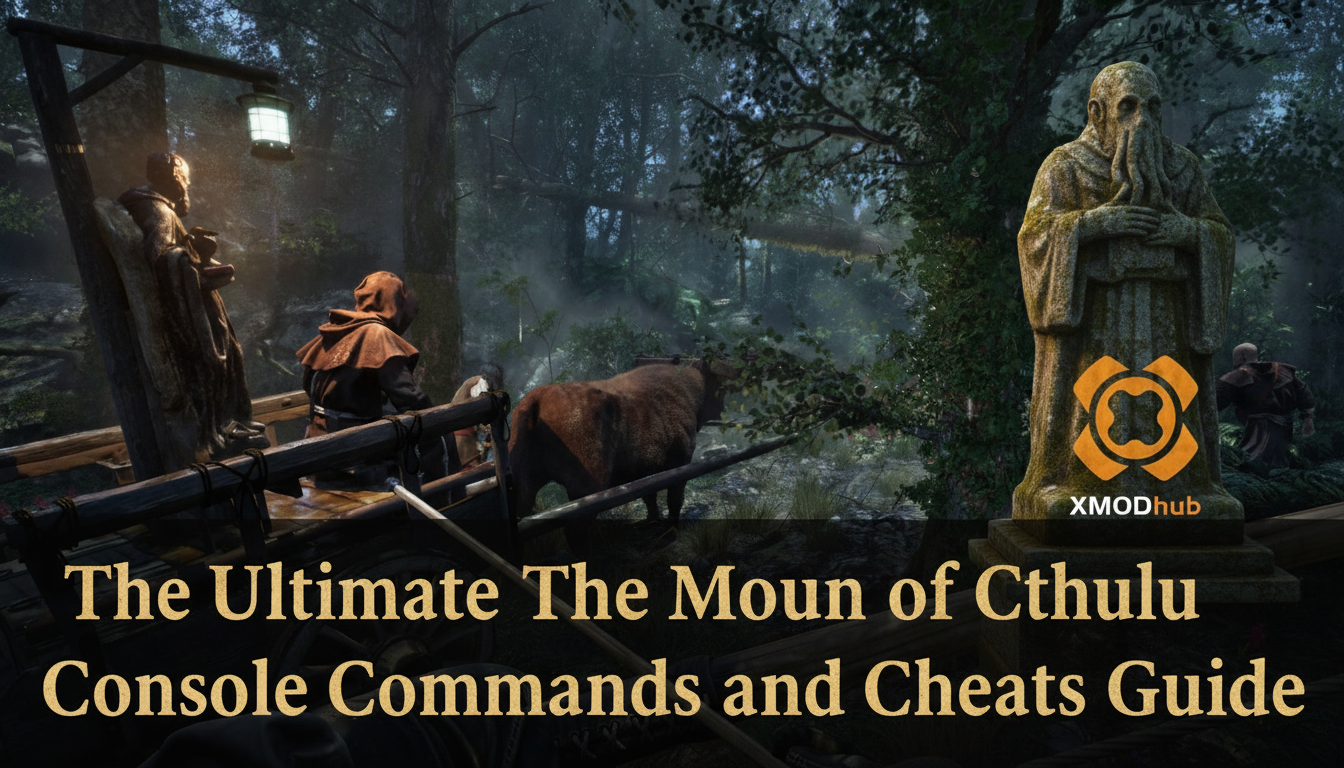
No, The Mound: Omen of Cthulhu does not have a built-in developer console or native text-based cheat codes. Because the game was designed by ACE Team as a four-player co-op horror first-person shooter, the developers intentionally disabled the command console in the retail build to prevent matchmaking griefing and desynchronization between host and client players. Pressing the tilde key (~) or modifying the configuration files will not grant you access to traditional developer tools.
However, you are not out of luck. The only way to effectively cheat in your solo or private lobbies is by using a secure, third-party memory trainer like XMODhub. This application bypasses the restricted engine framework, offering powerful 1-click alternatives such as God Mode, Infinite Sanity, and Unlimited Ammo without requiring you to type out complex command lines.
Editor’s Note: This guide was last verified against the newest The Mound: Omen of Cthulhu patch. Whether you are using native engine tools or a dedicated trainer, please back up your save files before modifying game memory to prevent unexpected bugs.
We have all been there. You have just spent hours dying to the same boss in The Mound: Omen of Cthulhu, or maybe you simply do not have the time to grind for Eldritch Resin and Cursed Relics after a long day. Single-player games are meant to be enjoyed on your own terms. Let us get your character powered up.
You may also like:The Ultimate The Mound: Omen of Cthulhu Cheat Engine Guide (And A Much Easier Alternative)
📋 Table of Contents
- Quick Answer: Does The Mound: Omen of Cthulhu Have Console Commands?
- 1. How to Enable Cheats in The Mound: Omen of Cthulhu
- 2. The Complete List of The Mound: Omen of Cthulhu Cheats
- 3. Item IDs and Spawning Guide
- 4. Do Cheats Disable Achievements?
- 5. Why Native Cheats Can Break Your Save Files
- 6. The Safer Alternative: 1-Click Cheats with XMODhub
- 7. Troubleshooting: Cheats Not Working
- 8. Optimal Progression: What to Upgrade First with Infinite Currency
- 9. The Sanity Mechanic Explained (And Why Bypassing It Saves Time)
- 10. Frequently Asked Questions (FAQ)
- Conclusion
1. How to Enable Cheats in The Mound: Omen of Cthulhu
Since there is no developer console active in the public release build of The Mound: Omen of Cthulhu, players cannot simply press a key to open a text box and type in codes. Modern multiplayer-adjacent titles heavily lock down their executable files to maintain parity across platforms like PlayStation 5, Xbox Series X|S, and PC. Attempting to force the console open via hex editing the game’s executable or injecting generic Unreal Engine unlockers usually results in an immediate crash to the desktop.
Instead, modifying your game requires a seamless memory injection tool. Here is the highly secure, 3-step process to download and attach XMODhub to the game to enable cheats:
Step 1: Download and Install the Client
Navigate to the official XMODhub website and download the lightweight desktop application. The software is thoroughly vetted and entirely free of malicious bloatware. Install it on the same storage drive where your Steam or Epic Games Store installation of The Mound: Omen of Cthulhu resides for the fastest read/write injection speeds.
Step 2: Locate the Game in the Library
Launch XMODhub. The software features an automated scanning protocol that will detect your installation of The Mound: Omen of Cthulhu. If you have installed the game on a custom directory path, you can manually search for the title in the top search bar and link the game’s primary executable file (TheMound-Win64-Shipping.exe).
Step 3: Attach and Play
Click the massive “Play” button directly within the XMODhub interface. This action launches the game while simultaneously hooking the trainer into the game’s active memory allocation. Once you load into the South American cursed jungle, you can utilize a second monitor or an in-game overlay to toggle your desired modifications instantly.
2. The Complete List of The Mound: Omen of Cthulhu Cheats
Because The Mound: Omen of Cthulhu does not feature a developer console, there are no text-based cheat codes to input. However, you can achieve the exact same effects using the XMODhub app.
Surviving the Lovecraftian threats and managing your team’s sanity as madness creeps in can be an incredibly oppressive experience. When the standard difficulty options are not nuanced enough for your casual play sessions, these trainer features will level the playing field.
Here is the comprehensive list of trainer features available in XMODhub for The Mound: Omen of Cthulhu:
| Feature | Effect | How to Activate |
|---|---|---|
| God Mode (Invincibility) | Completely nullifies all incoming damage from Lovecraftian entities, environmental hazards, and friendly fire. | Numpad 1 or UI Toggle |
| Infinite Sanity | Freezes your sanity meter at 100%. Prevents the screen-warping madness effects and hallucinations triggered by the cursed jungle. | Numpad 2 or UI Toggle |
| Unlimited Ammo | Your current magazine never depletes. Fire your weapons continuously without ever needing to scavenge for ammunition boxes. | Numpad 3 or UI Toggle |
| No Reload | Bypasses the lengthy reload animations entirely. Crucial for surviving massive swarm ambushes in tight cavern corridors. | Numpad 4 or UI Toggle |
| Infinite Stamina | Allows you to sprint indefinitely through the vast expanses of the majestic jungle without exhaustion. | Numpad 5 or UI Toggle |
| One-Hit Kills | Multiplies your base weapon damage exponentially. Every standard enemy and elite boss will die from a single bullet or melee strike. | Numpad 6 or UI Toggle |
| Ghost Mode (Invisibility) | Enemies lose their aggro tracking. You can walk right past terrifying Lovecraftian horrors without triggering their pursuit mechanics. | Numpad 7 or UI Toggle |
| Set Custom Movement Speed | Increases your base walking and sprinting speed by a customizable multiplier (1.5x to 5.0x). Great for rapid exploration. | Numpad 8 or UI Toggle |
| Infinite Medkits | Locks your consumable healing items to their maximum carrying capacity. | Numpad 9 or UI Toggle |
| Max Riches / Currency | Instantly grants you 999,999 of the in-game currency used to secure riches and upgrade your loadouts between expeditions. | Ctrl + Numpad 1 |
| Disable Recoil & Spread | Forces your weapon’s crosshair to remain perfectly static, eliminating all vertical and horizontal kickback during sustained fire. | Ctrl + Numpad 2 |
3. Item IDs and Spawning Guide
In older PC titles, players could open a text prompt and type a command like player.additem [Hex Code] [Quantity] to instantly spawn weapons, upgrade materials, or quest items.
Because The Mound: Omen of Cthulhu lacks native engine tools, manually spawning items via text is impossible. The game utilizes dynamic memory allocation, meaning that the internal addresses for items like Sanity Syringes, High-Caliber Rounds, or specific Cursed Idols change every single time you load a new instance of the jungle. Without a developer console to translate these dynamic pointers, static Item IDs simply do not exist for the end user.
XMODhub bypasses this complex limitation entirely by utilizing advanced pointer scanning. Instead of forcing you to hunt down outdated spreadsheets of complex hex codes, the trainer directly edits the inventory values currently loaded in your active session. With a single click, you can instantly maximize your entire inventory, duplicate your rarest crafting materials, or add infinite currency. This eliminates the tedious process of manual item spawning and lets you get right back to the heart-pounding action.
4. Do Cheats Disable Achievements?
When modifying any modern PC game, achievement hunting is a massive concern for the community. The Mound: Omen of Cthulhu features a robust list of achievements tied to exploring the jungle, defeating specific Lovecraftian bosses, and surviving expeditions on the highest difficulty settings.
If this game were to have a native developer console, utilizing it would almost certainly trigger a flag within the game’s internal logic. Most modern developers program their engines to immediately sever the connection to the Steamworks API or Epic Online Services the moment a developer command is executed. This permanently taints the save file, labeling it as “cheated,” and completely locks you out of earning any further achievements on that specific character profile.
This is where third-party trainers shine. Because XMODhub operates externally and alters the game’s temporary memory values in RAM rather than modifying the core executable or save state logic, the game remains completely unaware that any parameters have been altered. The anti-cheat flagging system is never triggered. You can comfortably utilize God Mode to survive a grueling boss fight, and the moment the creature dies, the corresponding achievement will seamlessly pop up on your Steam or Epic account. XMODhub safely bypasses achievement locks, allowing you to 100% the game on your own terms.
5. Why Native Cheats Can Break Your Save Files
Beyond the achievement lock, native developer tools and memory editors are notoriously unstable. These commands were originally built for developers to test bugs during production, not for everyday gameplay.
Forcing a quest to complete or bypassing intended story triggers can cause crucial NPCs to completely disappear from your map. Memory leaks, corrupted assets, and sudden crashes to the desktop are incredibly common when you spawn too many items at once.
6. The Safer Alternative: 1-Click Cheats with XMODhub
If you want the benefits of cheats—like infinite health or skipping the heavy grind—without risking your save files or locking your achievements, you need a dedicated game modification tool.
Instead of typing risky code that might corrupt your game world, the XMODhub app hooks into The Mound: Omen of Cthulhu safely and cleanly.
- Achievement Safe: It bypasses the game’s internal cheat-flagging system.
- Save File Protection: It alters values temporarily. Your save file remains uncorrupted.
- One-Click Toggles: No more memorizing long item IDs. Just hit a hotkey to turn God Mode on instantly.
How to Use XMODhub for The Mound: Omen of Cthulhu
- Download and Launch the free XMODhub desktop app.

- Search for “The Mound: Omen of Cthulhu” in the library.
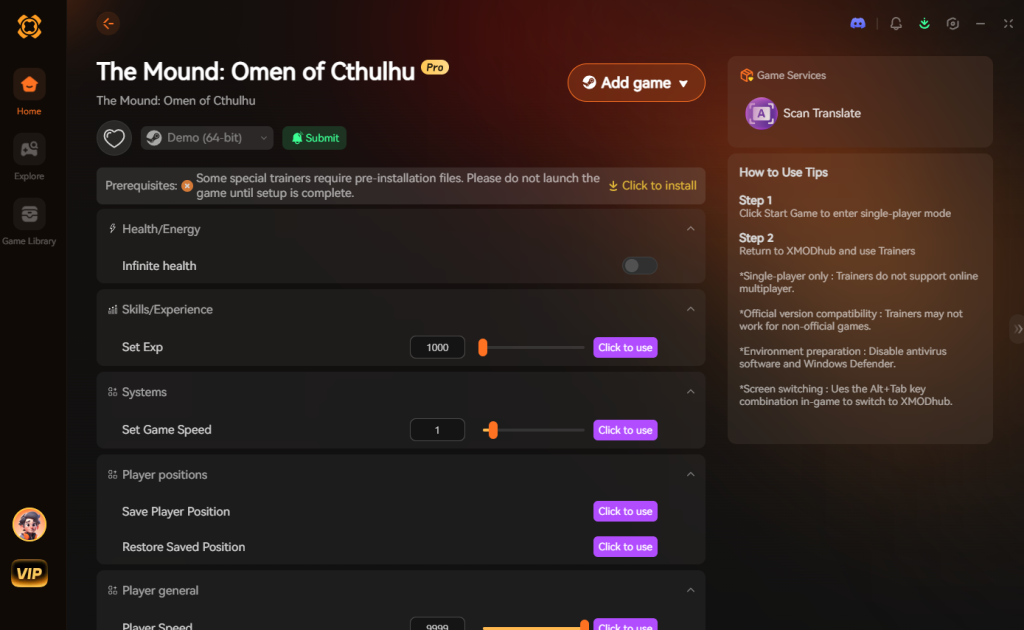
- Click “Play”.
- Toggle your desired cheats directly from the clean UI or via hotkeys.
Download The Mound: Omen of Cthulhu Trainer Now
7. Troubleshooting: Cheats Not Working
Even with the most streamlined software, PC gaming environments can be highly volatile due to differing hardware configurations and background applications. If you find that your XMODhub toggles for The Mound: Omen of Cthulhu are failing to activate or are causing audio stuttering, consult the following troubleshooting steps:
- Game Version Mismatch: The Mound: Omen of Cthulhu launched on July 15, 2026, and ACE Team frequently deploys hotfixes to balance the co-op scaling. If the game updates, the memory addresses shift. Ensure your XMODhub client is synced to the latest version. The trainer will automatically download the updated pointer maps when you restart the application.
- Administrator Rights Required: Operating systems like Windows 11 heavily restrict third-party software from reading the memory of other active applications. You must right-click the XMODhub shortcut and select “Run as Administrator” to grant the trainer the necessary elevated privileges to hook into the game’s engine.
- Antivirus False Positives: Because memory trainers inject code into another active process—a behavior shared by malicious software—overzealous antivirus programs like Windows Defender or Malwarebytes will often quarantine the trainer’s core .dll files. You must add the XMODhub installation folder to your antivirus exclusion list to prevent the software from being silently blocked in the background.
- Overlay Conflicts: If your hotkeys are not registering, ensure that conflicting overlays (such as the Discord in-game overlay, GeForce Experience, or Rivatuner Statistics Server) are temporarily disabled. These overlays intercept keystrokes and can prevent the trainer from recognizing your Numpad inputs.
8. Optimal Progression: What to Upgrade First with Infinite Currency
One of the most popular reasons players seek out The Mound: Omen of Cthulhu cheats is to bypass the brutal early-game grind. By utilizing the Max Riches / Currency toggle in XMODhub, you instantly gain access to top-tier upgrades that would otherwise take dozens of hours of repetitive expeditions to unlock.
However, even with infinite resources, the game’s skill tree requires you to unlock nodes in a specific sequence. If you are looking to create the ultimate Eldritch-hunting build right out of the gate, here is the optimal progression path to prioritize at your base camp:
| Upgrade Classification | Specific Ability / Node | Optimal Use Case | Priority Level |
|---|---|---|---|
| Mobility | Eldritch Dash T1 | Rapidly escaping dense swarm ambushes and dodging boss AoE attacks. | High |
| Defense | Cursed Resin Plating | Absorbing stray projectile hits and mitigating environmental acid damage. | High |
| Offense | Heavy Caliber Conversion | Staggering elite Lovecraftian horrors instantly to interrupt their casting animations. | Medium |
| Utility | Deep Pockets (Max Ammo) | Carrying extra High-Caliber Rounds for prolonged cavern expeditions. | Low (If using Unlimited Ammo cheat) |
| Sanity | Neural Fortitude | Slowing the passive decay of your sanity meter in high-corruption zones. | Low (If using Infinite Sanity cheat) |
By focusing your cheated currency on Mobility and Defense first, you ensure that your character can outmaneuver the game’s most terrifying monstrosities, leaving the raw damage output to your overpowered arsenal.
9. The Sanity Mechanic Explained (And Why Bypassing It Saves Time)
A core pillar of The Mound: Omen of Cthulhu’s gameplay loop is the Sanity Meter. As you delve deeper into the cursed South American jungle, exposure to unnatural geometry, grotesque enemy designs, and reading forbidden lore will slowly drain your character’s mental fortitude.
When your Sanity drops below 50%, the game engine begins rendering severe audio-visual hallucinations. You will hear phantom footsteps, your screen will warp with aggressive motion blur, and fake enemies will spawn to waste your ammunition. If it hits 0%, your character suffers a heart attack, resulting in an instant permadeath for that specific expedition run.
While this mechanic is brilliant for atmospheric horror, it becomes incredibly tedious for completionists trying to explore every corner of the map for hidden Cursed Relics. Constantly managing your Sanity Syringes disrupts the pacing of exploration. By activating the Infinite Sanity cheat via XMODhub, you completely freeze this mechanic. The screen remains crystal clear, the fake enemies disappear, and you are free to explore the darkest caverns of the Mound at your own pace without the constant ticking clock of madness hanging over your head.
10. Frequently Asked Questions (FAQ)
Q: Can I use these cheats on PlayStation or Xbox?
A: No. Modifying game memory or accessing developer consoles for The Mound: Omen of Cthulhu is strictly limited to the PC version. The closed ecosystems of the PlayStation 5 and Xbox Series X|S do not allow unsigned third-party code injection, making trainers completely incompatible with console hardware.
Q: Is there a penalty for using cheats in single-player?
A: There is no account ban or official penalty for cheating in a single-player environment. The only downsides are the potential for corrupted save files and disabled achievements, which can be avoided by using a secure trainer like XMODhub.
Q: Can I use XMODhub in public co-op matchmaking?
A: It is highly advised against. While XMODhub is designed for single-player and private lobbies, attempting to force memory alterations into a public server hosted by other players will likely result in a severe desync error, instantly disconnecting you from the session. Always keep your modifications restricted to solo play or private sessions with consenting friends.
Conclusion
Whether The Mound: Omen of Cthulhu provides a built-in console or not, taking control of your single-player experience is easier than ever. While tweaking raw engine code can be a fun technical experiment, it comes with significant risks to your save files and achievements. For a flawless, risk-free experience, using a dedicated modification tool is always the smarter choice.
With secure support for over 5,000+ single-player PC games, you can easily customize your gameplay, skip the tedious grind, and play exactly the way you want.

Stop Grinding, Start Enjoying.
Bypass the tedious resource gathering and unlock your full potential instantly.

I am a passionate gamer and writer at XMODhub, dedicated to bringing you the latest gaming news, tips, and insights.
Connect with me:
LinkedIn Profile ↗


 Nancy Miller