Catherine Hu
Want to equip your roster with the endgame Legendary Gaming Mouse before the spring split? Are you tired of grinding minor leagues for Scouting Points, or perhaps your team budget went bankrupt right before the transfer window and your franchise run is soft-locked?
While esports management games are heavily stats-based, manipulating internal game data to spawn items and currencies is a beloved staple of PC gaming freedom. Below is the most comprehensive, categorized, and up-to-date list of internal Item IDs, equipment codes, and perk IDs for Teamfight Manager 2, verified for the latest Steam patch.
Quick Reference: Top 10 Most Wanted Teamfight Manager 2 IDs
If you don’t want to scroll through thousands of rows of simulation data, here are the exact internal references for the most essential and frequently searched items in the game (including Team Budget, Max Stat gear, and top-tier facility upgrades).
Command Target: Force Value / Inject Memory [ID]
| Item / Currency Name | Internal Engine ID (Target) |
|---|---|
| Team Budget (Money) | Currency_TeamBudget_Base |
| Scouting Points | Currency_ScoutPoints_01 |
| Legendary Gaming Mouse | Equip_Mouse_Tier_5_Legend |
| Mechanical Pro Keyboard | Equip_Keyboard_Tier_5_Pro |
| 240Hz Gaming Monitor | Equip_Monitor_240hz |
| Ergonomic Gaming Chair | Facility_Chair_Ergo_Max |
| Energy Drink (Fatigue Reset) | Consumable_EnergyDrink_Large |
| S-Tier Draft Token | Item_DraftToken_S_Tier |
| Motivation Manual | Item_Motivator_Manual |
| S-Tier Rookie Contract | Player_Top_Rookie_S_Gen |
How to Enable the Console & Use Spawn Commands
Before you try to use the ID codes listed below, you must understand how the back-end of Teamfight Manager 2 operates. Because this is a Unity-based simulation game focused on UI and auto-battler mechanics, Teamfight Manager 2 does not have a native text-input developer console for players. Pressing the Tilde key (~) will not open a magic command box. You cannot simply type a command to spawn items. To utilize these internal Item IDs, you must use a memory injector or a Unity script hook (like BepInEx) to target the game’s active RAM pool.
Editor’s Note
“Manually tracking down Currency_TeamBudget_Base in a hex editor is fine if you only need to do it once. But if you are building a massive esports facility and experimenting with different player builds, writing custom assembly scripts for case-sensitive internal IDs becomes incredibly repetitive. Because the Unity engine shifts memory every time you load a match, one wrong value injection results in a game crash. While the lists below are meticulously verified for script authors, I personally switched to a visual UI injector months ago. Seeing the equipment icon and just clicking ‘Add to Inventory’ is how modern PC modding should feel.”
The Easy Way: XMODhub Visual Spawner (No Typing Required)
Stop Alt-Tabbing to check massive spreadsheets. Typing long, case-sensitive ID codes into an external cheat table breaks your immersion and wastes time. The XMODhub PC Client includes a dedicated Visual Item Spawner feature specifically built to bypass the engine limitations of Teamfight Manager 2.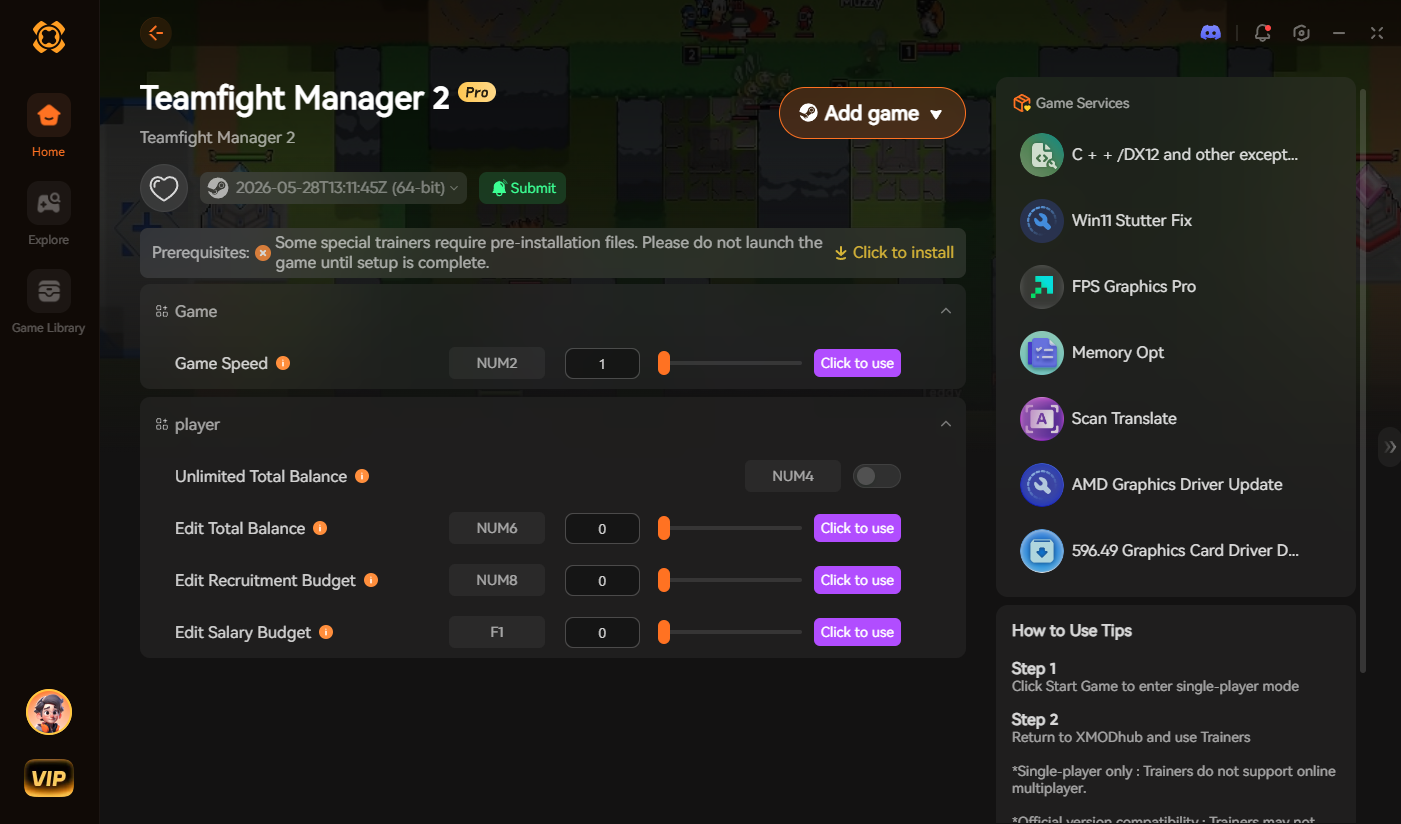
Gaming Equipment IDs List (Mice & Keyboards)
Use these internal codes in your memory editor to instantly equip your roster with the best stat-boosting gear.
Command Target: Inject_Equipment [Equipment ID]
| Equipment Name | Internal ID |
|---|---|
| Standard Office Mouse | Equip_Mouse_Tier_1 |
| Laser Gaming Mouse | Equip_Mouse_Tier_3 |
| Legendary Gaming Mouse | Equip_Mouse_Tier_5_Legend |
| Membrane Keyboard | Equip_Keyboard_Tier_1 |
| Mechanical Pro Keyboard | Equip_Keyboard_Tier_5_Pro |
| 60Hz Office Monitor | Equip_Monitor_60hz |
| 240Hz Gaming Monitor | Equip_Monitor_240hz |
Facility & Furniture IDs List
Upgrade your team house instantly without waiting for construction timers.
Command Target: Force_Unlock_Facility [Facility ID]
| Facility Upgrade | Internal ID |
|---|---|
| Basic Folding Chair | Facility_Chair_Basic |
| Ergonomic Gaming Chair | Facility_Chair_Ergo_Max |
| Standard Team Desk | Facility_Desk_Standard |
| LED Gaming Desk | Facility_Desk_LED_Pro |
| Team Streaming Room | Facility_Room_Streaming |
| Advanced VOD Review Room | Facility_Room_VOD_Max |
Currencies & Consumables IDs List
Never run out of money or let your players suffer from fatigue during the playoffs again.
Command Target: Modify_Currency [ID] 99999
| Consumable / Currency | Internal ID |
|---|---|
| Team Budget | Currency_TeamBudget_Base |
| Scouting Points | Currency_ScoutPoints_01 |
| Energy Drink (Small) | Consumable_EnergyDrink_Small |
| Energy Drink (Large) | Consumable_EnergyDrink_Large |
| Mental Health Day Pass | Consumable_Morale_Boost |
Player Skills, Perks & Traits IDs
You don’t just have to spawn physical gear. You can manipulate the database to instantly assign permanent personality traits and skills to your esports players.
Command Target: Player_AddTrait [Perk ID]
| Perk / Trait Name | Internal ID |
|---|---|
| Clutch Player (Stat boost in finals) | Trait_Clutch_Factor |
| Tilt-Proof (Never loses morale) | Trait_Mental_Fortitude |
| Shotcaller (Boosts team synergy) | Trait_Leadership_Max |
| Meta Slave (Fast champion learning) | Trait_Adaptability_High |
| Mechanical God | Trait_Mechanics_Peak |
Troubleshooting: Why Are My Commands Failing?
If you are injecting the IDs correctly but the game is throwing errors, check these common issues:
Frequently Asked Questions (FAQ)
A: Yes. Because you are directly targeting the Unity engine’s internal database via memory scripts, Currency_TeamBudget_Base is strictly case-sensitive. Capitalization matters when writing your own injection tables.
A: No. Teamfight Manager 2 is a single-player simulation game. Your internal memory edits will not impact any online leaderboards or trigger anti-cheat bans, as the data is stored locally on your PC.
A: Finding dynamic load-order IDs manually for Workshop mods is extremely difficult. We highly recommend using the XMODhub Item Browser, which automatically scans your active mods, detects the custom rosters or gear, and lets you inject them with a single click without knowing the hex ID.
Conclusion: The Ultimate Sandbox Experience
Having access to the complete Teamfight Manager 2 internal IDs list is the fastest way to experiment with different roster builds, test facility combinations, or simply recover your franchise from a devastating losing streak. Bookmark this page so you can quickly reference the data targets whenever you need a resupply.
However, if you want a significantly smoother, crash-free experience where you don’t need to memorize strings of code like Equip_Mouse_Tier_5_Legend, the XMODhub Visual Spawner is the superior modern choice. Browse equipment visually. Maximize your budget instantly. Keep your achievements active while enjoying built-in lag repair and translation tools.
XMODhub is your ultimate all-in-one toolkit for PC single-player gaming. Whether you need powerful Trainers, real-time visual spawners, or Interactive Maps, our engine supports over 5,000+ games—including Teamfight Manager 2 and similar hits like Football Manager and League Manager.

I am a passionate gamer and writer at XMODhub, dedicated to bringing you the latest gaming news, tips, and insights.
Connect with me:
LinkedIn Profile ↗