
 Catherine Hu
Quick Answer: What is the best and safest TBH: Task Bar Hero mods tool?
To modify your background gameplay safely without corrupting your active save files, you need to understand the right software options for this unique taskbar-overlay game:
Editor’s Note
I have been modding PC single-player and idle games for over a decade. Our team physically tested these utilities on a clean installation of the latest Steam build of TBH: Task Bar Hero. We actively monitor tool stability across different desktop environments. Always back up your local save directory located at %USERPROFILE%\AppData\LocalLow\ before deploying any new mods tool or editing memory values.
Let’s be brutally honest: watching your tiny hero walk across your Windows taskbar is incredible for the first few hours, but eventually, you hit a massive wall. Whether you are exhausted by a ridiculous gold resource grind, tired of losing to an unfair late-game boss loop, or just want to crank up the animation speed so your progression matches your real-world work pace, you are going to need a dependable TBH: Task Bar Hero mods tool.
I cannot tell you how many save files I have completely ruined over the years because I downloaded a sketchy utility or dragged raw memory hacks into the wrong system directories. Finding a safe tool that actually works—without triggering a massive red flag on your antivirus or causing your entire Windows taskbar to freeze up—can be incredibly frustrating.
In this guide, I am breaking down the exact utilities you actually need. We will cover how this indie game structures its backend, where to find your hidden local game folders, and the ultimate plug-and-play solution for gamers who just want to tweak their stats and get straight back to the fun.
Why You Need a Dedicated Mods Tool
Listen to me carefully: never try to manually patch or force inject loose files into your TBH: Task Bar Hero root directory. When I first started messing with Unity overlay games, I tried editing files directly. The result? Total disaster. Because this game integrates directly with your active Windows desktop UI to render its screen elements, the engine is highly sensitive. If two different scripts try to alter the same hero stat or speed multiplier simultaneously, the game will panic, freeze your taskbar interface, and instantly crash to the desktop (CTD).
A dedicated tool acts as a traffic controller, ensuring that memory addresses are modified safely and in the exact sequence required to keep your background app stable while you work.
Where is the TBH: Task Bar Hero Mods Folder Located?
Because TBH: Task Bar Hero is a lightweight Unity application, it does not feature an official or dedicated \Mods folder like a massive RPG. If you are trying to perform manual cleanups or back up your progression, finding the hidden directory is the most common roadblock for new players.
Depending on your platform setup, navigate to the following file paths:
C:\Program Files (x86)\Steam\steamapps\common\TBH Task Bar Hero\%localappdata%lownotfound\TBH_Task_Bar_Hero (or check the corresponding developer folder under LocalLow) to find your local settings and secure save data.Top TBH: Task Bar Hero Mods Tools Compared
Depending on what you are actually trying to achieve, you need to pick the right software architecture. Here is what the veteran community uses:
The Easiest, Crash-Free Alternative: XMODhub
Here is the dirty secret about traditional modding frameworks: they are incredibly fragile for indie games. Every time the developers release a tiny bug-fix patch, your manually installed scripts will break. Your save file becomes a hostage until someone updates the mod code weeks later.
As an adult with a job and responsibilities, I do not have time to troubleshoot code errors on my only day off. If your primary goal is to gain an advantage—such as activating God Mode, getting unlimited upgrade currency, or multiplying your hero’s movement speed—XMODhub is the undisputed king.
I highly recommend XMODhub for gameplay enhancements because:
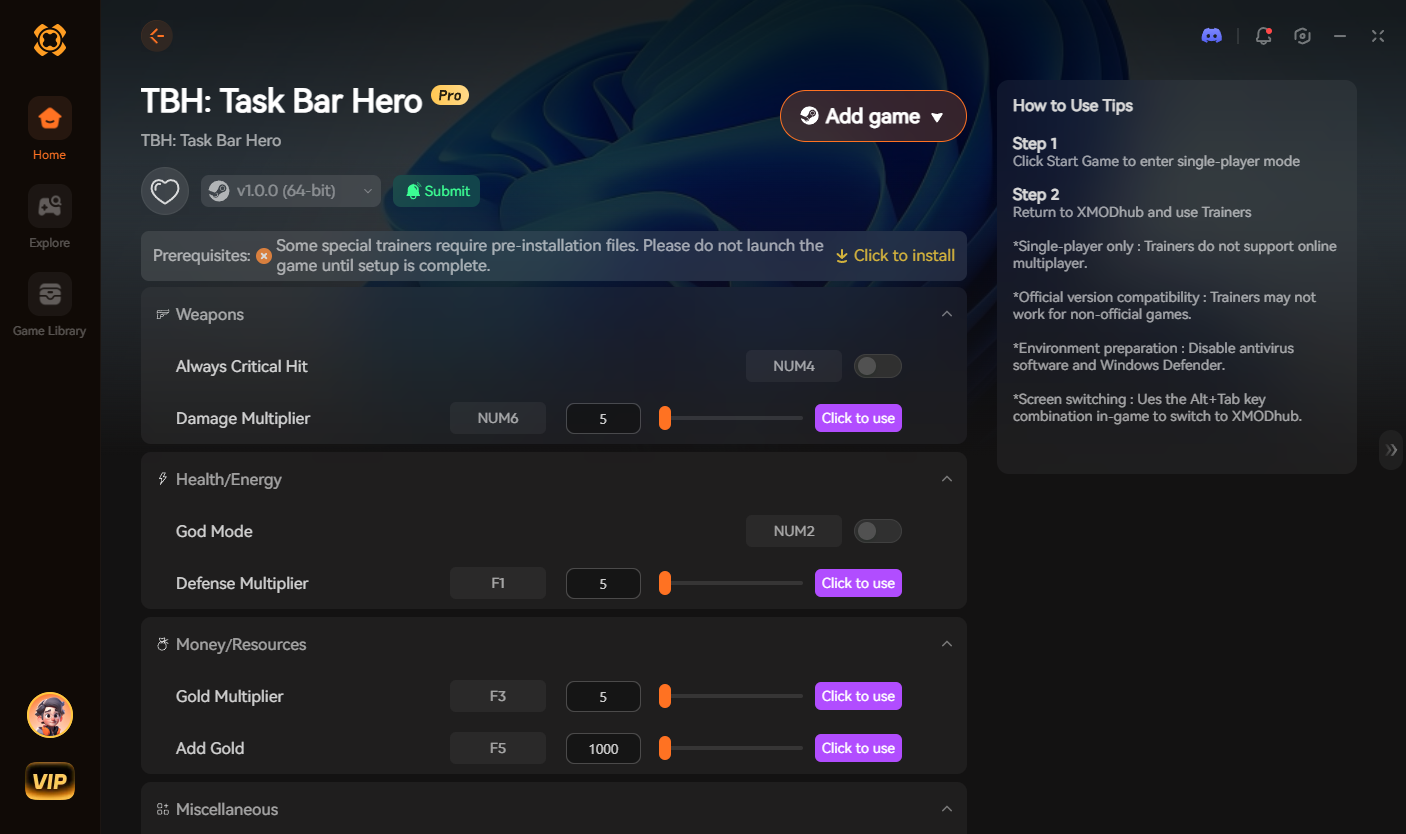
Download the TBH: Task Bar Hero Mods Tool Here and Play on Your Terms
Troubleshooting: What to Do When Your Mods Tool Breaks
Even with the best tools, things can go wrong if your PC environment changes. If your game refuses to launch or overlay correctly, follow my emergency checklist:
How to Avoid Malware and Fake Download Buttons
The PC gaming space is filled with fake download buttons and malicious software disguised as gaming utilities. Protect your rig by following these strict rules:
Frequently Asked Questions (FAQ)
A: If you use invasive file-replacement methods or open a corrupted save, the engine may lock achievement triggers. However, using a refined memory-based utility like XMODhub alters the active value pool in real-time, allowing your Steam achievements to unlock perfectly normal as you progress.
A: Because TBH: Task Bar Hero is a local, single-player desktop idle experience, there are no multiplayer matchmaking servers or online anti-cheat systems. Developers do not ban accounts for customizing single-player game sessions on their own machines.
A: If you use XMODhub, simply closing the desktop app clears the temporary injections from your PC’s RAM. Your game instantly reverts to its pure, vanilla state upon the next launch.
Conclusion
Customizing your background progression is the absolute best part of owning TBH: Task Bar Hero on PC. By choosing the correct mods tool, you can skip the tedious idling mechanics, bypass the frustration of losing your progress to an unexpected boss wipe, and focus entirely on the fun parts of the game.
For raw development and asset hunting, stick to coding tools. But if you want a seamless, crash-free way to dominate the game instantly without needing a computer science degree, download XMODhub. Join thousands of us who are taking back control of our gaming sessions in TBH: Task Bar Hero and other massive companion hits like Rusty’s Retirement. Launch your tool, load your save, and play exactly how you want today.

I am a passionate gamer and writer at XMODhub, dedicated to bringing you the latest gaming news, tips, and insights.
Connect with me:
LinkedIn Profile ↗


 Nancy Miller