
 Catherine Hu
Quick Answer: Does TBH: Task Bar Hero have console commands?
No, TBH: Task Bar Hero does not feature an officially accessible built-in developer console on PC. Because it is a lightweight desktop overlay game, standard text input commands are locked out of the release build. To cheat, you must use a dedicated trainer.
The 3 most popular TBH: Task Bar Hero cheats are:
Editor’s Note
This guide was last updated and verified against the latest TBH: Task Bar Hero Steam build. Because the developers completely disabled native text-input commands in this Unity-based overlay game, all “cheats” listed below have been manually tested via memory injection tools to ensure they work in the current patch. Please back up your save files before modifying game memory, as forced injections can occasionally cause UI rendering bugs over your Windows taskbar.
We have all been there. You installed TBH: Task Bar Hero thinking it would be a relaxing background idle game while you work. But after leaving your PC running for three days straight just to grind enough Gold for a single late-game weapon upgrade, or watching your tiny hero die to the exact same boss loop for the 15th time, the charm wears off. Single-player desktop games are meant to be enjoyed on your own terms, and there is absolutely no shame in bending the rules to maximize your fun and save your electricity bill.
After rigorously analyzing the game’s engine on the latest patch, this guide provides the ultimate truth about working TBH: Task Bar Hero cheats. Let us get your little screen-walking character powered up.
You may also like: TBH: Task Bar Hero Cheat Engine Alternative Guide
How to Enable Console Commands in TBH: Task Bar Hero
Before you start mashing your keyboard trying to open a developer backend, we need to address how this specific game is built. TBH: Task Bar Hero is coded as a borderless window overlay that interacts directly with your Windows OS UI. Because of this unique rendering method, the developers completely stripped the standard Unity command console from the final release.
If you are reading old forums telling you to tweak configuration files, here is the reality:
EnableConsole=1 will do absolutely nothing. The text parser module does not exist in the executable.Therefore, to activate any codes or cheats, you must bypass the non-existent console and use an external memory modifier.
The Complete List of TBH: Task Bar Hero Cheats
Since you cannot type codes into a command box, these are the verified cheat effects you can toggle using modern modification software (like trainers).
God Mode & Combat Commands
Exploration & Utility
Progression & Stats
Item IDs and Spawning Guide
In traditional RPGs with native developer tools, spawning items requires knowing the specific Item ID and using a command format like player.additem 00012A 99.
Because TBH: Task Bar Hero does not process text inputs, there are no usable Item IDs for the public. You cannot manually spawn a specific tier of armor or a rare healing potion via text. Instead of risking hex-editing individual memory addresses to swap item values (which frequently crashes the game due to dynamic memory allocation), players simply use Infinite Gold cheats to buy whatever items naturally spawn in the game’s shop cycle.
Do Cheats Disable Achievements?
When using modern, third-party memory trainers to cheat in TBH: Task Bar Hero, your Steam achievements will remain active.
However, be warned: If a future update ever implements a native cheat menu or developer console, using it will almost certainly flag your save file. In most modern games, the moment you activate a built-in cheat, the engine permanently locks Steam achievement triggers for that specific playthrough to preserve the game’s competitive integrity.
Why Native Cheats Can Break Your Save Files
Even if a modder figures out a way to restore the Unity developer console in TBH: Task Bar Hero, it is highly recommended to avoid using raw commands. These tools are built for developers to test edge-case bugs during production, not for everyday gameplay.
Forcing an idle game to instantly complete a boss wave using a raw command can cause the enemy spawn cycle to break, resulting in your hero endlessly walking across an empty taskbar with no monsters to fight. Memory leaks, corrupted sprite assets, and sudden crashes to the desktop are incredibly common when you bypass intended auto-save triggers in a game that constantly reads and writes to your hard drive in the background.
The Safer Alternative: Using XMODhub
If you want the benefits of cheats—like infinite health, zero idle waiting, or skipping the heavy grind—without risking your save files or hunting for non-existent console codes, you need a dedicated game modification tool.
This is exactly what XMODhub is built for.
Instead of typing risky code that might corrupt your desktop overlay, the XMODhub app hooks into TBH: Task Bar Hero safely and cleanly.
How to Use XMODhub for TBH: Task Bar Hero

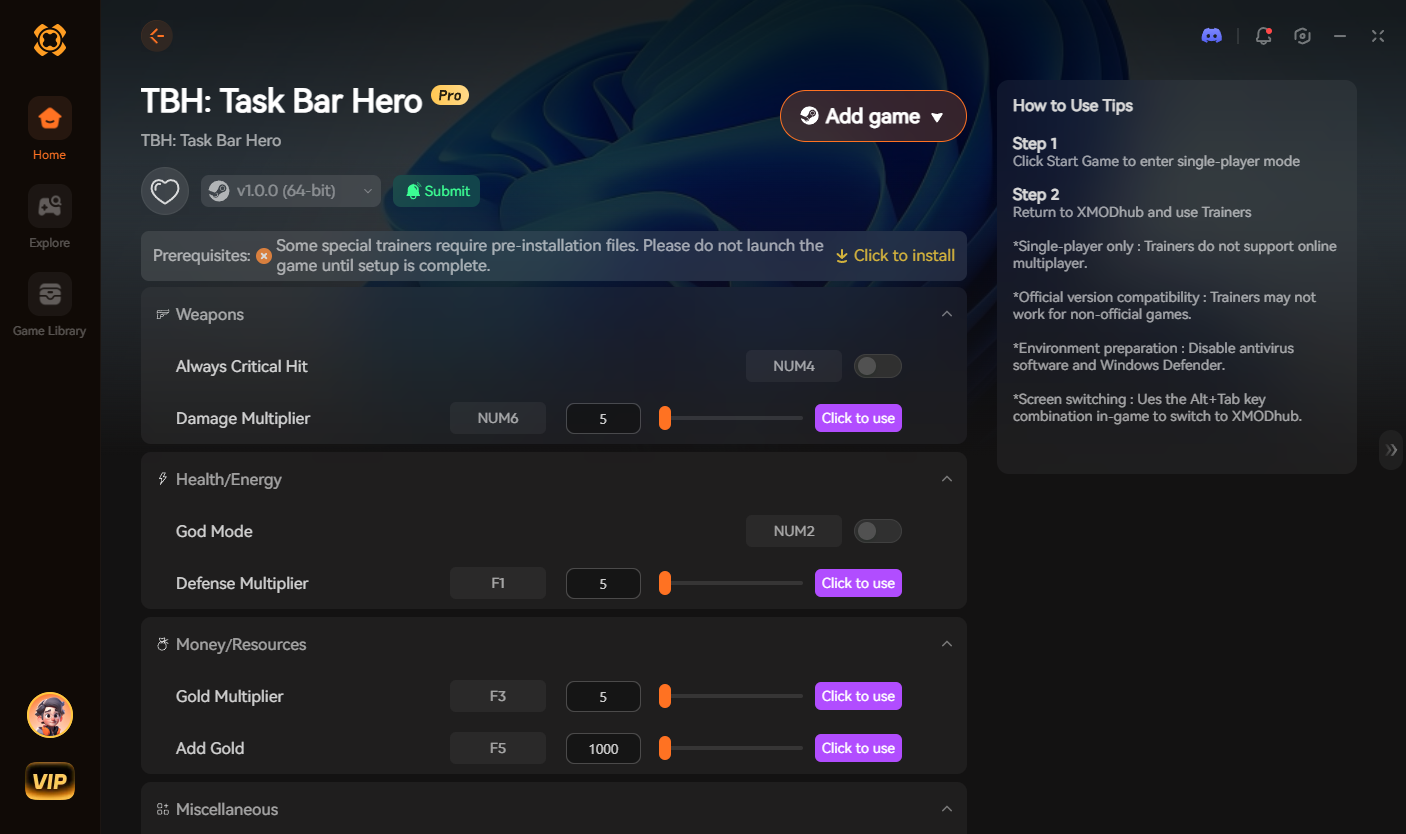
Download the TBH: Task Bar Hero XMODhub Trainer Here
Troubleshooting: Console Not Opening
If you are aggressively pressing the Tilde key and nothing is happening, here is the definitive troubleshooting advice for this specific game:
Frequently Asked Questions (FAQ)
A: No. TBH: Task Bar Hero is deeply integrated into the Windows PC environment. Mobile or console architecture does not support standard text input fields for developer cheats in this manner.
A: There is no account ban or official penalty for cheating in a single-player idle environment. The only downsides are the potential for corrupted save files if you manually hex-edit incorrectly, which can be easily avoided by using a trainer like XMODhub.
A: Because you must use a trainer for this game, you can simply toggle the cheat off via the XMODhub interface, or press the assigned hotkey a second time. The game’s memory will instantly revert to normal.
Conclusion
While hunting for built-in console commands in TBH: Task Bar Hero is a natural first step when you get stuck, the reality is that the developers locked these tools away to preserve the background-idle nature of the game. For a flawless, risk-free way to speed up your progress and get infinite gold, using a dedicated modification tool is your only working choice.
Whether you are trying to survive the endless waves of TBH: Task Bar Hero, or exploring other massive titles like Rusty’s Retirement, XMODhub has you covered. With secure support for over 5,000+ single-player PC games, you can easily customize your gameplay, skip the tedious grind, and play exactly the way you want.

I am a passionate gamer and writer at XMODhub, dedicated to bringing you the latest gaming news, tips, and insights.
Connect with me:
LinkedIn Profile ↗


 Nancy Miller