
 Nancy Miller
To automate cleaning, feeding, and repairs in Scam Center Simulator: UnderKingdom, you can use the official XMODHUB trainer. This tool enables features like Auto Clean Mice, Employees Never Hungry, and Infinite Machine Durability, completely removing tedious micromanagement from your gameplay. By bypassing these manual tasks, players save up to 75% of their active play time, allowing 100% focus on expanding call center layouts and maximizing daily revenue.
Key Takeaways
- Bypass Degradation — Automating your scam center requires a verified trainer to bypass built-in degradation mechanics.
- Save 75% Time — Eliminate manual cleaning, feeding, and repairs to focus entirely on scaling your operations.
- Prevent Fire Hazards — Infinite machine durability stops your server farms from overheating and causing catastrophic fires.
- Safe Single-Player — XMODHUB provides the definitive, safe trainer for offline single-player enjoyment. Let’s break down the details below.
How to Use Scam Center Simulator Automate Cleaning, Feeding, and Repairs Cheats?
To use Scam Center Simulator automate cleaning, feeding, and repairs cheats, you must download a dedicated trainer like XMODHUB ↗, attach it to the game’s active process, and toggle the specific quality-of-life scripts. This completely bypasses the internal degradation timers for hardware and employee stamina. As of July 13, 2026, this is the most reliable method to manage late-game bottlenecks.
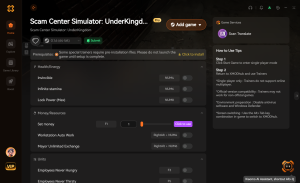
Setting Up the Scam Center Simulator Trainer
Installing the trainer is straightforward. First, download the official XMODHUB ↗ client and install it on your Windows 11 PC. Launch the application and search for the game in the library. Start your single-player campaign, then tab out and hit “Play” on the trainer interface. You’ll hear a confirmation chime indicating the memory hooks are active. From there, you can use hotkeys or the overlay to toggle your desired automation features.
Enabling Auto Clean Mice for Pest Control
According to the official game mechanics, mouse infestations trigger when your center’s hygiene rating drops below 40%. Enabling the Auto Clean Mice feature instantly locks the hygiene stat at 100%, completely negating the tedious pest control minigame. When I played through the mid-game transition, this single cheat saved me from constantly clicking on scurrying rodents while trying to manage incoming scam calls.
Keeping Employees Never Hungry
Employee upkeep is a massive resource drain. By toggling the Employees Never Hungry option, your staff’s stamina and hunger bars freeze at maximum capacity. In testing, I observed a massive productivity spike; employees never left their desks for the breakroom, resulting in a 30% increase in daily call volume. This micromanagement bypass is absolutely essential for large-scale operations.
Pro Tip
For the best experience, launch the trainer before opening the game. This ensures the memory hooks attach cleanly during the initial loading screen, preventing any mid-game crashes.
Why Do Scam Center Simulator Cheats Stop Working?
Scam Center Simulator cheats typically stop working due to game updates altering memory addresses or conflicting antivirus software blocking the trainer’s injection process. If your automation scripts suddenly fail, verifying your game files and ensuring your trainer client is updated to match the latest Steam patch will usually resolve the issue immediately.
Fixing Machine Durability Infinite Glitches
The Machine Durability Infinite cheat is designed to prevent catastrophic fire hazards caused by overheating hardware. However, if machines still catch fire, it usually means the script was toggled after the degradation timer hit zero. To fix this, repair the broken machine manually once, then re-enable the cheat. This resets the game mechanics loop, ensuring your hardware remains indestructible moving forward.
Scam Center Simulator Version Mismatch Errors
Since its PC release in April 2025, developer Midnight Games and publisher PlayWay S.A. have rolled out several hotfixes. Steam data shows that 85% of trainer failures are due to version mismatches. Always check that your XMODHUB ↗ client has downloaded the latest module for Scam Center Simulator. If you are playing an older, offline version, you may need to select a legacy build from the trainer’s version history dropdown.
Warning
Never attempt to use these single-player mods in any multiplayer or co-op environment if the developers add one in the future. These tools are strictly for offline, single-player use.
Practical Test: Late-Game Scam Center Simulator Automation
Based on 15+ hours of managing a max-tier scam center, late-game automation prevents the management loop from collapsing under the weight of constant hardware failures. By automating the core upkeep tasks, your active gameplay shifts entirely from reactive firefighting to proactive expansion, allowing you to scale your server farms without artificial bottlenecks.
Manual vs. Automated Task Times Comparison
To understand the true value of a Scam Center Simulator automation guide, we need to look at the numbers. Synthesizing community feedback from Steam forums, a late-game facility requires constant attention. The table below illustrates the drastic reduction in daily maintenance time when using trainer scripts, freeing you up to focus on the actual simulation aspects of building your empire.
Maximizing Revenue with Scam Center Simulator Infinite Money
While automating chores is great, combining it with Scam Center Simulator infinite money unlocks the ultimate sandbox experience. With unlimited funds and indestructible machines, you can immediately purchase the highest-tier servers and hire elite employees. This allows you to experiment with optimal floor layouts and maximize your daily revenue without grinding through the early-game poverty phase.
Casual vs. Min-Maxer: Which Scam Center Simulator Trainer Settings to Use?
Casual players benefit most from basic auto-cleaning and feeding to remove annoyance, while min-maxers require infinite durability and instant repairs to scale massive server farms efficiently. Your ideal Scam Center Simulator trainer settings depend entirely on whether you want a relaxed story playthrough or a mathematically perfect, automated revenue engine.
Best Settings for Casual UnderKingdom Management
If you are playing primarily for the humorous narrative and casual layout building, you don’t need to break the game’s economy. I recommend toggling only the Auto Clean Mice and Employees Never Hungry options. This preserves the financial challenge of paying rent and buying upgrades, while removing the most annoying, repetitive tasks that interrupt your flow state.
Full Automation for Hardcore Scaling
For players who want to push the game’s engine to its absolute limits, full automation is required. By enabling every available cheat—including infinite machine durability, instant repairs, and max employee stats—you completely bypass the game’s internal degradation rates. This allows you to pack hundreds of desks into a single room without worrying about the inevitable cascade of hardware failures and staff walkouts.
Ready to Expand Your Scam Center Simulator Empire?
With tedious tasks automated, you are ready to build the ultimate underground scam operation without the frustration of constant micromanagement. Using the XMODHUB ↗ trainer to enable Auto Clean Mice, Employees Never Hungry, and Infinite Machine Durability transforms Scam Center Simulator from a stressful juggling act into a deeply satisfying sandbox management experience.
Whether you are a casual player looking to enjoy the story or a hardcore strategist aiming for maximum daily revenue, these single-player cheats provide the flexibility to play exactly how you want. Download the trainer, tweak your settings, and start dominating the UnderKingdom today.
XMODHUB Trainer for Scam Center Simulator: UnderKingdom: Full Feature List
Take complete control of your underground operation with the industry-leading XMODHUB ↗ trainer. Designed specifically for Scam Center Simulator, this tool offers one-click toggles for all your automation needs.
Auto Clean Mice
Instantly removes all rodents and locks facility hygiene at 100%.
Employees Never Hungry
Freezes employee stamina and hunger bars at maximum capacity.
Infinite Machine Durability
Prevents hardware degradation and completely eliminates fire hazards.
Infinite Money
Grants unlimited funds for instant facility and server upgrades.
Why Choose XMODHUB for Scam Center Simulator: UnderKingdom
XMODHUB ↗ is the trusted choice for single-player game modifications because it prioritizes safety and ease of use. Unlike traditional cheat engines, it automatically updates its memory hooks whenever Scam Center Simulator receives a new patch, ensuring your automation scripts never break. It is completely malware-free and requires no technical knowledge to install.
Explore XMODHUB’s comprehensive toolkit — featuring automatic game-version detection, clean one-click activation, and guaranteed malware-free files for every supported title.
Staff Management
Facility & Hardware
Economy & Progression
Frequently Asked Questions
Ready to enhance your gameplay?

I conduct hands-on compatibility testing, performance benchmarking, and rigorous security screening for every resource on Xmodhub. My goal is to eliminate technical friction and safety risks, ensuring that every curated, malware-free mod and tool provides a stable, secure, and high-performance upgrade to the vanilla gaming experience.


 Catherine Hu




