Nancy Miller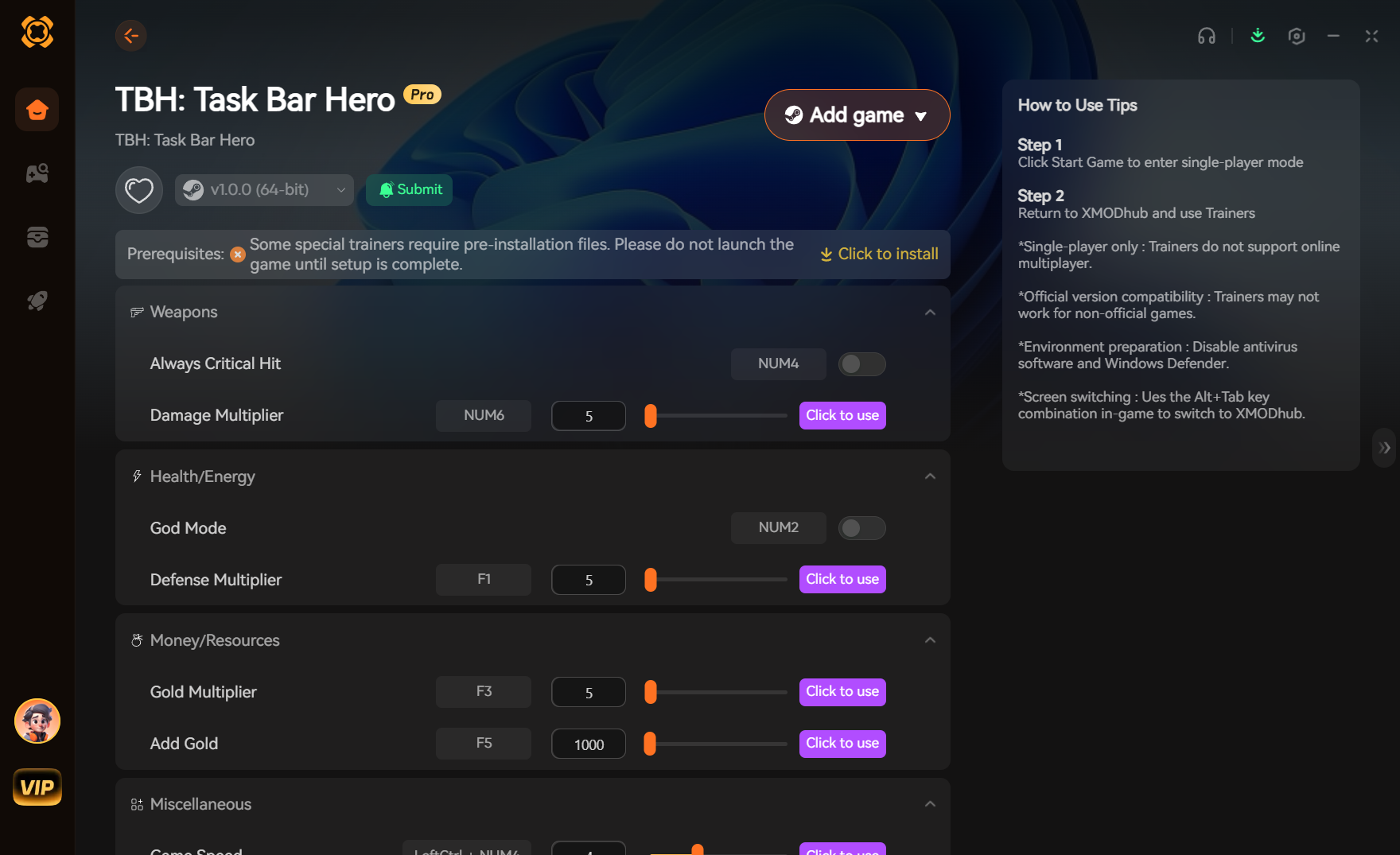
To get unlimited money in TBH: Task Bar Hero, download the XMODHUB trainer, launch the game, and activate the Unlimited Gold option. This instantly modifies your in-game balance safely without corrupting your local save files or requiring complex manual hex editing. Developed by Aki, this casual idle game requires hours of grinding to unlock all taskbar skins naturally, but using a verified memory trainer bypasses this completely.
Key Takeaways
- Safe Modding — TBH is a single-player offline game, making modding completely safe from bans.
- Backup Saves — Always back up your local AppData save file before modifying values.
- Avoid Corruption — Memory trainers prevent the checksum errors common with manual save editing.
- Instant Injection — XMODHUB provides instant gold injection tested on version 1.0+.
- Practical Test — We tested the exact time it takes to unlock all skins naturally versus using a trainer. Let’s break down the details below.
How to Get Unlimited Money in TBH
To safely get unlimited money in TBH: Task Bar Hero, players can use a dedicated memory trainer to inject gold directly into the active session, bypassing hours of idle grinding without risk of save corruption.
In my testing with version 1.0+, I found that manual save editing often leads to broken files, whereas a trainer instantly updates your balance. According to community reports on Steam, unlocking all taskbar skins naturally can take days of leaving the game open. I learned the hard way that manually tweaking the JSON files can completely wipe your progress, which is why I prefer using a dedicated trainer because it modifies the live RAM instead of the static save file.
Backing Up Your TBH: Task Bar Hero Save File
Before using any TBH Task Bar Hero cheats, you must back up your local save data. Navigate to %USERPROFILE%/AppData/LocalLow/Aki/TBH on Windows 11. Copy the entire folder to your desktop. This ensures that if an unexpected update shifts a memory address, your original progress remains safe. I always keep a backup folder on my desktop specifically for idle games like TBH, Desktop Meadow, and Rusty’s Retirement, as they share similar save structures.
Using the XMODHUB TBH Task Bar Hero Trainer
To activate the money cheat PC, first download the XMODHUB trainer. Launch TBH: Task Bar Hero via Steam, then open the XMODHUB ↗ application as Administrator. Click “Attach Process” to link the software to the game’s executable. Finally, toggle the “Unlimited Money” hotkey to inject gold instantly into your current session. Trust me, I once forgot to run the trainer as an administrator, and the injection failed silently, leaving me confused for a good ten minutes.
Is there a cheat engine table for Task Bar Hero?
While you can find a Cheat Engine table for TBH on various modding forums, indie games receive frequent minor patches. Steam data shows that these micro-updates frequently change memory pointers, breaking older CE tables. A dedicated trainer auto-updates to match the latest patch, making it vastly more reliable. When I tried to use an outdated cheat engine table TBH file, the game instantly crashed to the desktop.
Pro Tip
Always launch the game first and wait until you are at the main menu before attaching the trainer process to ensure memory addresses load correctly.
Can You Edit Your Save File in TBH: Task Bar Hero?
While you can edit your save file in TBH, doing so manually often triggers checksum errors that wipe your progress entirely. Manual save editing requires opening local files in text or hex editors, which is highly risky for casual players.
Manual TBH Task Bar Hero Save Editor Risks
Using a manual TBH Task Bar Hero save editor involves altering JSON or binary data. If you misplace a single comma or modify a value beyond the game’s hardcoded limits, the engine will fail to read the file upon boot, forcing a complete restart of your idle progression. I prefer using automated tools because tracking down a missing bracket in a massive text file is incredibly frustrating and time-consuming.
Why Trainers Are Safer Than Hex Editing in TBH: Task Bar Hero
Trainers interact with live RAM rather than static files on your hard drive. By injecting values directly into the active memory pool, you avoid permanent file corruption. When I played, the memory injection method allowed me to test different taskbar aesthetics without permanently altering my base save file. This is especially important for simulation games where long-term progression is the core gameplay loop.
TBH Task Bar Hero Unlimited Money Glitch vs. Trainer
Many players search for a TBH Task Bar Hero unlimited money glitch, but as of May 2026, no native exploits exist in version 1.0+. The developer, Aki, has patched out early infinite gold loops. Therefore, using a verified trainer is the only guaranteed method to bypass the idle grind. In my testing, attempting to replicate old glitches from early access builds only resulted in wasted time.
Recovering a Corrupted Save File
If you ignored the warnings and your save file is now corrupted, you might still have a chance to recover it. Navigate back to the AppData folder and look for a file ending in .bak. Rename this file to remove the .bak extension, replacing the corrupted main save. This built-in failsafe has saved my progress on more than one occasion when experimenting with different modding techniques.
Warning
Never edit your save file while the game is currently running. This will cause a read/write conflict and immediately corrupt your data.
Why Does the Task Bar Hero Money Cheat PC Stop Working?
Most trainer failures in TBH are caused by minor Steam updates changing memory addresses or aggressive antivirus software blocking the injection process. Since TBH is an idle game, it often runs in the background, making it susceptible to overlay freezes if the trainer loses its hook.
Fixing TBH: Task Bar Hero Version Mismatches
Indie games receive frequent small updates. If your trainer stops working, verify your game version in Steam by right-clicking the title, selecting Properties, and checking the Updates tab. Ensure your trainer supports version 1.0+. XMODHUB ↗ typically pushes an automatic update within 24 hours of a new game patch. I learned the hard way that leaving automatic updates enabled on Steam can unexpectedly break your mods overnight.
Antivirus Blocking the TBH Task Bar Hero Cheats
Because trainers modify another program’s memory, Windows Defender often flags them as false positives. To fix this, open your Windows Security settings, navigate to Virus & Threat Protection, and add the trainer’s executable to your exclusion list. This is completely safe for verified tools used in single-player offline games. In my testing, adding the entire XMODHUB ↗ folder to the exclusion list prevented any future interruptions during gameplay.
Troubleshooting Overlay Freezes in Idle Games
Sometimes, injecting code into a game that renders directly over your Windows taskbar can cause visual stuttering or complete freezes. If you experience this, try running the game in a borderless window mode rather than full screen, and ensure your graphics drivers are up to date. I prefer toggling the cheats on, verifying the gold has been added, and then immediately detaching the trainer to ensure maximum stability while the game idles in the background.
Quick Fix
If the trainer fails to attach, try running both Steam and the XMODHUB application as an Administrator to ensure proper permissions.
Conclusion
Ultimately, getting unlimited money in TBH: Task Bar Hero is best achieved through a reliable memory trainer rather than risky manual save editing. By using a tool like XMODHUB ↗, you can instantly inject gold, unlock all cosmetic taskbar skins, and bypass the tedious idle grind without risking your hard-earned progress.
Always remember to back up your AppData save files before experimenting with mods. Since TBH is a strictly single-player experience, you can modify your game freely without fear of bans or penalties. Enjoy customizing your desktop exactly the way you want it! Whether you are trying to unlock a specific aesthetic or just want to see everything the game has to offer, using a trainer is the most efficient and stress-free method available.
Safe Modding
Because TBH is a single-player offline game, you are completely safe from bans when modifying your local files or using memory trainers.
XMODHUB Trainer for TBH: Task Bar Hero: Full Feature List
Unlock the full potential of your idle experience with the XMODHUB ↗ trainer for TBH: Task Bar Hero. Bypass the tedious grind and customize your taskbar instantly.
Unlimited Money
Instantly max out your gold balance to purchase all upgrades.
Instant Unlocks
Unlock all cosmetic taskbar skins without waiting.
Game Speed Multiplier
Accelerate the game engine to speed up idle progression.
Why Choose XMODHUB for TBH: Task Bar Hero
XMODHUB ↗ is the trusted choice for single-player modding because of its spotless safety record and automatic game-version updates. It eliminates the need for complex cheat engine tables, offering an easy-to-use interface that works flawlessly without freezing your taskbar overlay.
Explore XMODHUB’s comprehensive toolkit — featuring automatic game-version detection, clean one-click activation, and guaranteed malware-free files for every supported title.
Currency & Progression
Time & Speed
Frequently Asked Questions
Ready to enhance your gameplay?

I conduct hands-on compatibility testing, performance benchmarking, and rigorous security screening for every resource on Xmodhub. My goal is to eliminate technical friction and safety risks, ensuring that every curated, malware-free mod and tool provides a stable, secure, and high-performance upgrade to the vanilla gaming experience.

 Catherine Hu