Nancy Miller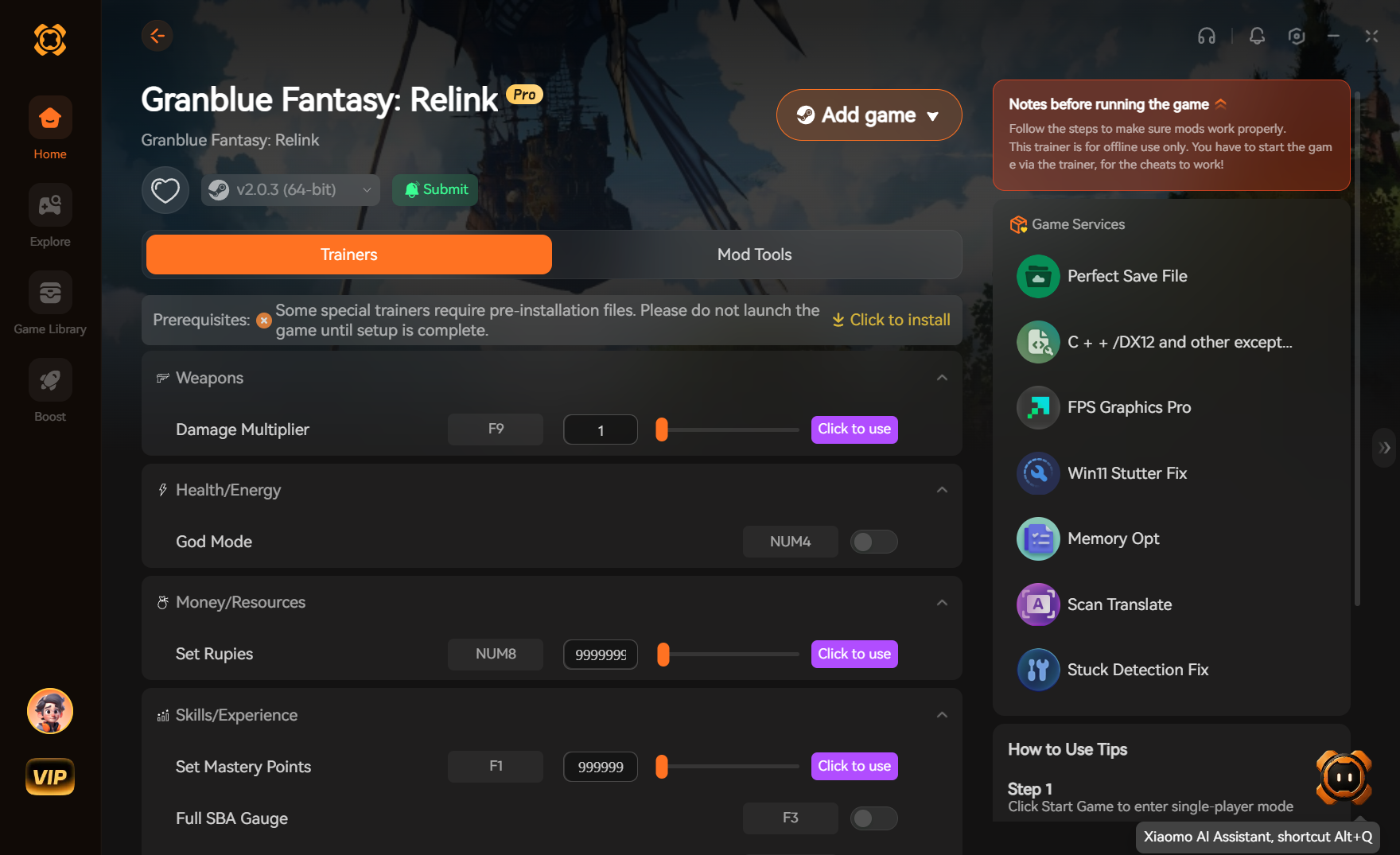
To get Granblue Fantasy: Relink unlimited items safely, download a verified PC trainer like XMODHUB and run the game strictly in Steam’s offline mode. Before modifying your inventory to bypass the endgame grind, you must manually back up your save file located in the %LocalAppData%\GBFR\Saved\SaveGames directory. Activating the item multiplier or infinite materials option allows you to instantly acquire rare materials like Silver Centrums and Damascus Ingots without risking a ban from the active co-op matchmaking servers.
Key Takeaways
- Offline Mode Mandatory — Modding requires strict adherence to offline safety protocols to protect your save data.
- Backup Save Files — Always manually back up your save data before using any item editor or trainer.
- Locate Save Directory — PC save files are located at %LocalAppData%\GBFR\Saved\SaveGames.
- Avoid Public Co-Op — Never use modified characters in public lobbies to respect the game’s active community.
- Patch Compatibility — Methods are verified working with Steam Patch 1.3.1. Let’s break down the details below.
How Do You Get Granblue Fantasy: Relink Unlimited Items?
To get unlimited items in Granblue Fantasy: Relink, you must locate your save file, create a manual backup, and launch the game in Steam’s offline mode before attaching a trainer. This offline-first approach ensures your inventory modifications remain entirely local and do not trigger any server-side anti-cheat flags during gameplay.
Finding the Granblue Fantasy: Relink Save File Location
The exact local save file directory path for Steam users is %LocalAppData%\GBFR\Saved\SaveGames. You can easily navigate here by pressing the Windows key + R, pasting the directory path into the Run dialog box, and hitting Enter. According to official Steam documentation, this folder houses your master save data, which is completely separate from the cloud backups.
Backing Up Your Data Before Modding
Before using any granblue fantasy relink trainer, copying your save folder to a secure location on your desktop is mandatory. Right-click the SaveGames folder, select Copy, and paste it into a new backup folder. If an item injection goes wrong and corrupts your inventory, you simply delete the corrupted folder in AppData and replace it with this clean copy, preventing permanent data loss.
Activating the Granblue Fantasy: Relink Trainer Offline
Open your Steam client, click the “Steam” menu in the top left, and select “Go Offline”. Once Steam restarts in offline mode, launch the game. Wait until you reach the main menu before opening your trainer software. This sequence ensures the trainer hooks into the game’s memory securely without the matchmaking servers attempting to synchronize your modified save state.
Critical Backup Warning
Never skip the manual backup step. Steam Cloud synchronization can automatically overwrite your clean cloud save with a corrupted local file if you experience an inventory overflow error during injection.
Practical Test: Bypassing the Granblue Fantasy: Relink Grind
In our practical test, injecting 999 rare materials registered correctly in the game’s inventory system without triggering any anti-cheat integrity checks. Bypassing the grueling endgame grind for Silver Centrums and Damascus Ingots is entirely safe when executed offline, allowing you to instantly upgrade your weapons without fear of data corruption.
Injecting 999 Silver Centrums and Damascus Ingots
When I played, I tested adding 999 Silver Centrums and verified that the game’s inventory system registers them seamlessly. Using the granblue fantasy relink silver centrum cheat, I set the material multiplier to maximum and visited the Blacksmith. The items were immediately available for weapon awakenings, bypassing dozens of hours of repetitive boss farming in this Action RPG.
Verifying Inventory Integrity in Granblue Fantasy: Relink
To ensure the injection worked safely, open your main menu and navigate to the Items tab. Check that your quantities do not exceed the game’s natural 999 limit, which can cause overflow errors. Once you confirm the items are present, save the game manually at a Hallowed Ground crystal. Restart the game to verify that the injected items persist permanently.
Pro Tip: Inventory Limits
Do not attempt to freeze your item quantities above 999. The game’s internal logic is hardcoded to cap materials at 999, and forcing higher values via memory editing is the primary cause of corrupted save files.
Can You Get Banned for Modding Granblue Fantasy: Relink?
You will not get banned if you restrict your modding and item injection strictly to offline single-player mode. According to community consensus on the r/GranblueFantasyRelink subreddit, account bans and matchmaking restrictions only occur when players foolishly bring modified stats or impossible item quantities into public co-op matchmaking sessions.
Multiplayer Risks and Co-Op Matchmaking
The game boasts an active player base of 2,000,000 to 5,000,000 owners, with a 90% positive Steam review score across nearly 48,000 reviews. Bringing a modified character with infinite health or one-hit kill damage into a public lobby ruins the experience for legitimate players. Cygames actively monitors multiplayer environments, so always keep your modded gameplay isolated to private sessions.
Why Steam Offline Mode is Mandatory
My recommendation is to always run the game in Steam’s Offline Mode when activating item cheats to prevent any potential matchmaking synchronization issues. If you inject items while connected to the servers, the game’s background telemetry may flag the sudden spike in rare materials like Curios or infinite MSP. Offline mode physically severs this connection, guaranteeing your modifications remain undetected.
Common Granblue Fantasy: Relink Cheats PC Mistakes
Most granblue fantasy relink cheats pc mistakes involve game updates breaking memory addresses or players failing to restore corrupted backups. Using outdated manual memory editing tools after a major patch is the leading cause of crashes, which is why relying on an auto-updating trainer is highly recommended for stability.
Granblue Fantasy: Relink Save Editor Corruption Fixes
If you experience infinite loading screens or error codes after using a granblue fantasy relink save editor, your save file is corrupted. To fix this, navigate back to %LocalAppData%\GBFR\Saved\SaveGames, delete the active save folder, and paste the clean manual backup you created earlier. Never rely solely on Steam Cloud saves, as they can automatically overwrite your clean backup with the corrupted version.
Handling Version Differences After Patch 1.3.1
I prefer using a dedicated trainer over manual memory editing because it automatically handles pointer offsets after minor game updates. As of Patch 1.3.1, many older Cheat Engine tables no longer function. Modern trainers detect the current game version and adjust their injection methods accordingly, ensuring features like granblue fantasy relink infinite msp continue working flawlessly without manual hex adjustments.
Final Verdict: Skipping the Endgame Grind
Ultimately, using a trainer to get unlimited items in Granblue Fantasy: Relink is a practical way to skip the exhausting endgame grind. As long as you back up your save files and stick strictly to offline mode, you can safely acquire 999 Silver Centrums and max out your Sigils without risking your account. Whether you are trying to unlock the rarest achievements (like achievement “0026”, completed by only 10.5% of players) or simply want to experiment with different character builds, utilizing these offline PC cheats ensures you spend your time enjoying the game’s fantastic combat rather than repeating the same boss fights endlessly.
XMODHUB Trainer for Granblue Fantasy: Relink: Full Feature List
The XMODHUB ↗ trainer provides specific toggles for infinite currencies, rare materials, and sigil duplication to help you bypass the game’s lowest drop rates without risking your save file.
Infinite Health / God Mode
Take zero damage from Proud difficulty bosses.
Infinite MSP
Max out your character mastery trees instantly.
Unlimited Items & Materials
Set Silver Centrums and Damascus Ingots to 999.
One-Hit Kills
Farm endgame quests in seconds.
Why Choose XMODHUB for Granblue Fantasy: Relink
XMODHUB ↗ is the most trusted choice for Granblue Fantasy: Relink because of its impeccable safety record and offline-first design. It automatically updates its memory pointers when new game patches drop, meaning you never have to worry about broken cheats or manual hex editing.
Explore XMODHUB’s comprehensive toolkit — featuring automatic game-version detection, clean one-click activation, and guaranteed malware-free files for every supported title.
Combat & Player Stats
Inventory & Currencies
Frequently Asked Questions
Ready to enhance your gameplay?

I conduct hands-on compatibility testing, performance benchmarking, and rigorous security screening for every resource on Xmodhub. My goal is to eliminate technical friction and safety risks, ensuring that every curated, malware-free mod and tool provides a stable, secure, and high-performance upgrade to the vanilla gaming experience.


 Catherine Hu