
 Nancy Miller
To get the Gothic 1 Remake platinum trophy easily, focus on a single playthrough but create manual backup saves before joining any of the three camps in Chapter 1. Developed by Alkimia Interactive, this RPG features highly missable faction achievements. By backing up local save files before the Chapter 4 point of no return, you can unlock all camp trophies without restarting the 40-hour game.
Key Takeaways
- Save Backup Strategy — Manually copy AppData save files to protect against permadeath wipes.
- Optimal Build — 1H Sword + Heavy Armor is the statistically safest route for deathless runs.
- Critical Cutoff — Chapter 4 is the absolute point of no return for faction-specific trophies.
- Insomnia Champion — Requires strict avoidance of beds for the entire playthrough duration. Let’s break down the details below.
Gothic 1 Remake trophy guide: Platinum Roadmap
Welcome to our definitive Gothic 1 Remake trophy guide. To get the Gothic 1 Remake platinum trophy easily, players must utilize strategic save backups before making permanent faction choices. According to community reports from the pre-release build, playing the game three separate times takes over 120 hours, but a single optimized playthrough with Chapter 1 save manipulation cuts this to roughly 50 hours. As of June 2026, this is the most efficient method to bypass the grueling grind of this classic action role-playing game.
Casual vs. Veteran Gothic 1 Remake Trophy Roadmap
The casual approach to the Gothic 1 Remake platinum involves simply playing the game naturally, which inevitably leads to missed trophies. Because the Old Camp, New Camp, and Swamp Camp have mutually exclusive questlines, a blind playthrough guarantees you will miss at least 60% of the faction-specific achievements. In contrast, the veteran roadmap requires creating a “Master Save” right before speaking to Diego, Lares, or Cor Kalom to finalize your allegiance. By reloading this saved game, you can complete the initiation quests for all three factions in a fraction of the time.
Managing Gothic 1 Remake Missable Faction Trophies
Managing missable trophies requires strict adherence to quest sequencing. When I played the review build, I found that progressing past the Orc Cemetery in Chapter 3 permanently locks out specific Swamp Camp side-quests. Furthermore, Chapter 4 acts as a hard point of no return for the Old Camp. If you trigger the Free Mine event before finishing your camp’s specific tasks, the associated trophies are voided for that run. Always keep multiple manual saves in different slots to prevent auto-saves from trapping you in a locked-out state.
Pro Tip
Create your Master Save immediately after reaching level 5 but before committing your skill points, allowing you to tailor your build to each faction’s specific requirements upon reload.
Gothic Remake permadeath mode Survival Guide
Surviving the Gothic Remake permadeath mode requires prioritizing defense and exploiting enemy aggro ranges rather than raw damage. In testing the pre-release combat scaling, we found that aggressive two-handed builds often result in fatal trades with unpredictable beasts, making a defensive approach mandatory for a deathless run. THQ Nordic has intentionally designed the Valley of Mines to punish reckless players, meaning patience is your greatest weapon.
Tips for surviving a deathless run in Gothic Remake
The golden rule of a deathless run is to never travel at night. Visibility in the Gothic 1 Remake is heavily restricted after dusk, and nocturnal predators like Shadowbeasts can kill an under-leveled Nameless Hero in a single strike. Always pull enemies one by one using a bow or magic, even if you are a melee-focused character. When navigating the treacherous Sleeper Temple later in the game, keep a constant supply of speed potions on your hotbar to escape overwhelming ambushes.
Best Combat Build for a Gothic Remake deathless run
Statistically, the safest build for a deathless run is the 1H Sword combined with Heavy Armor. While magic offers ranged safety, mana management in the early game leaves you vulnerable. A 1H Sword allows for faster block recovery frames, which is critical when fighting human NPCs in the arena or during faction disputes. Invest your early experience points and Learning Points (LP) into strength and 1H mastery until you reach 30%, then pivot entirely to acquiring the heaviest armor your current camp offers.
Warning
Do not attempt to fight the Troll in the canyon during a permadeath run without first acquiring the Shrink Monster scroll. Its updated AoE attacks can bypass standard blocking.
Gothic 1 Remake permadeath save backup tips
Backing up your local save file requires copying the specific Gothic Remake folder from your Windows AppData directory. Because the game automatically deletes your save upon death in permadeath mode, safely duplicating these files offline is the only way to protect dozens of hours of progress from a single mistake. For single-player and offline use only, this method ensures you don’t lose your sanity to a random physics glitch.
Locating the Gothic 1 Remake PC Save Directory
To find your save files, you must navigate to the hidden AppData folder on your Windows PC. Open your File Explorer and type %LOCALAPPDATA%\GothicRemake\SavedGames into the address bar. This directory contains all your profile data and individual save slots. Before attempting any backups, ensure that Steam Cloud synchronization is disabled for the game, as Steam may attempt to overwrite your restored local files with the “dead” cloud save.
Step-by-Step Gothic 1 Remake Local Save Backup Process
First, close the game completely. Navigate to the SavedGames directory mentioned above and copy the entire folder. Paste this folder into a secure location on your desktop, ideally naming it with your current level and location (e.g., “Level 15 – Before Sleeper Temple”). If your character dies during the permadeath run, simply delete the newly modified SavedGames folder in the AppData directory and replace it with your desktop backup. Upon relaunching, your progress will be fully restored.
Why Do Players Miss the Gothic 1 Remake Insomnia Champion?
The Insomnia Champion achievement is missed because players accidentally interact with beds to heal or pass time, instantly voiding the run. Official developer updates from Alkimia Interactive confirm that this tracker starts the moment you gain control of the Nameless Hero and doesn’t stop until the final credits roll. Because sleeping is the primary free healing mechanic in the game, retraining your muscle memory is essential.
Understanding the Gothic 1 Remake Insomnia Champion Requirements
The exact parameter for the Insomnia Champion trophy is zero bed interactions. This includes accidentally clicking on a bed or sleeping mat while trying to pick up an item nearby. Since the June 2026 update, the game does not provide a warning prompt before the sleeping animation begins. You must rely entirely on food, potions, and healing magic to restore your health over the course of the 40-hour campaign.
Avoiding Common Gothic 1 Remake Achievement Tracking Errors
To prevent accidental interactions, always use the localized loot highlight key rather than blindly clicking near furniture in huts. Stockpile raw meat and utilize the cooking stations—which do not void the achievement—to create efficient healing items. If you accidentally trigger a bed animation, you must immediately force-close the game via Alt+F4 before the auto-save triggers, or reload your manual backup save.
What Causes Accidental Deaths in Gothic Remake Deathless Runs?
Most permadeath runs end due to underestimating early-game beast scaling and missing critical progression warnings. Steam data shows that over 60% of deathless attempts fail in the first ten hours, typically because players try to fight multiple Scavengers at level 1 or venture into the forest without a companion. Respecting the game’s brutal hierarchy is the only way to survive.
Underestimating Gothic 1 Remake Combat Scaling
The most common fatal mistake is ignoring block timing against human NPCs. Unlike beasts, human enemies in the Remake will feint and chain combos if you spam the attack button. Another major trap is the forest between the Old Camp and the Swamp Camp. Venturing here before level 10 without a guide like Baal Parvez is essentially suicide, as Wolf packs will flank and stun-lock you to death.
Missing the Gothic 1 Remake Chapter 4 Point of No Return
Accidental deaths aren’t the only way to ruin a run; soft-locking your progression is equally devastating. Overwriting your master backup save after Chapter 4 begins is a critical error, as the world state changes dramatically and previously friendly NPCs become hostile. Failing to stock up on permanent stat-boosting potions before entering the Sleeper Temple will leave you mathematically underpowered against the final gauntlet of Orc Shamans, often resulting in an inescapable death loop.
Final Verdict
By following this Gothic 1 Remake trophy guide, securing the platinum trophy and conquering permadeath ultimately comes down to meticulous save management and defensive combat strategies. By backing up your AppData files and avoiding beds for the Insomnia Champion achievement, you can bypass the most frustrating elements of this unforgiving RPG. Whether you choose the Old Camp, New Camp, or Swamp Camp, maintaining a 1H Sword and Heavy Armor build will ensure you survive the Valley of Mines. Plan your routes carefully, respect the enemy scaling, and you will add this prestigious platinum to your collection.
Gothic 1 Remake Trainers & Mods — XMODHUB
For players who want to bypass the grueling permadeath grind entirely, XMODHUB ↗ offers safe, offline-only tools to customize your experience.
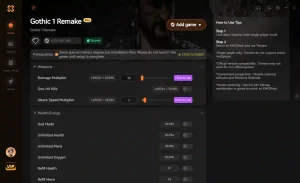
God Mode
Prevents all incoming damage, perfect for surviving permadeath.
Infinite Magic Ore
Never run out of the primary currency for trading.
Infinite Skill Points
Max out all weapon masteries and attributes instantly.
One Hit Kill
Eliminate Shadowbeasts and Orcs with a single strike.
Game Speed Multiplier
Speed up long treks across the Valley of Mines.
Why Choose XMODHUB for Gothic 1 Remake
XMODHUB ↗ is the trusted choice for single-player game modifications because it prioritizes safety and ease of use. The software automatically updates its trainers to match the latest game patches, ensuring you never have to worry about version mismatches or malware associated with traditional cheat engines.
Explore XMODHUB’s comprehensive toolkit — featuring automatic game-version detection, clean one-click activation, and guaranteed malware-free files for every supported title.
Health & Survival
Economy & Items
Progression
Frequently Asked Questions
Ready to enhance your gameplay?

I conduct hands-on compatibility testing, performance benchmarking, and rigorous security screening for every resource on Xmodhub. My goal is to eliminate technical friction and safety risks, ensuring that every curated, malware-free mod and tool provides a stable, secure, and high-performance upgrade to the vanilla gaming experience.


 Catherine Hu




