
 Catherine Hu
Quick Answer: How do you cheat in Ghosts Keep Out?
To cheat in Ghosts Keep Out, you can manually attach Cheat Engine to the game’s executable and scan for changing numeric values like your current Ectoplasm currency reserves or your real-time Sanity meter. However, because game updates frequently break Cheat Engine tables (.CT files), the safest and easiest alternative is using an auto-updating mod manager like XMODhub, which provides 1-click cheats without requiring any complex memory scanning or hex editing.
Editor’s Note
Look, I get it. We all start Ghosts Keep Out thinking we’re going to play it completely legit. But after dying to The Poltergeist King in the Cellar level for the 15th time, or spending hours grinding for Pure Salt Crystals just to build a basic defensive ward, the fun stops. I’ve been messing with Cheat Engine for years, and trying to isolate the exact memory values for this game’s current patch almost drove me insane. Today, I’m going to show you how to manually hack the values if you want the technical challenge—but I’ll also share the 1-click shortcut I actually use to save my sanity.
You may also like: The Ultimate Ghosts Keep Out Console Commands and Cheats Guide
1. How to Use Cheat Engine for Ghosts Keep Out (The Manual Way)
If you want to go the old-school route and find the memory addresses yourself, here is the basic “First Scan/Next Scan” method tailored specifically for the survival and base-defense mechanics of this game. Finding your Ectoplasm (the primary currency used to buy traps, wards, and structural upgrades) is the absolute best place to start, as it is an easily quantifiable whole number.
Here is exactly how to isolate and manipulate your resources in Ghosts Keep Out using a manual memory scan:
| In-Game Stat | Memory Value Type | Search Strategy | Volatility / Difficulty |
|---|---|---|---|
| Ectoplasm (Currency) | 4 Bytes (Integer) | Exact Value, First/Next Scan | Low – Easy to isolate by buying/selling traps. |
| Sanity Meter / Health | Float | Unknown Initial Value, Decreased Value | Medium – Requires taking ghost damage to filter. |
| Trap Cooldown Timers | Float | Unknown Initial Value, Changed Value | High – Timers count down rapidly, requiring pausing. |
| Pure Salt Crystals | 4 Bytes (Integer) | Exact Value, First/Next Scan | Low – Standard inventory item quantity search. |
| Player Movement Speed | Float | Unknown Initial Value, Unchanged Value | Very High – Requires advanced pointer scanning to find. |
2. Common CE Errors: Pointers Breaking & Not Attaching
If you are pulling your hair out because CE isn’t working for Ghosts Keep Out, you aren’t alone. Memory editing modern PC games is a complex beast, and engine updates constantly throw wrenches into the works. Here is what’s probably happening behind the scenes:
Error: “Cannot attach to process” / Game Crashes
Ghosts Keep Out might be using specific engine protections or anti-debugging measures that detect when a standard Windows debugger attempts to inject into its memory space. When standard Cheat Engine tries to hook into the game, the game’s watchdog threads notice the intrusion and forcefully terminate the application, resulting in a sudden crash to your desktop. To bypass this, you need to configure Cheat Engine to use the VEH Debugger (Vectored Exception Handling).
To fix this crash, open Cheat Engine, navigate to Edit > Settings > Debugger Options. Check the box that says “Use VEH Debugger” instead of the default Windows debugger. VEH operates differently by catching exceptions at the application level rather than the OS kernel level, making it much stealthier. Additionally, ensure you are running Cheat Engine as an Administrator, as Ghosts Keep Out requires elevated privileges to read and write to restricted memory sectors.
The Pointer Problem (Dynamic Memory Allocation)
You finally found the exact address for your Sanity meter, you froze it, and you survived the night. But the moment you load into the next level, your cheat stops working, and the address in your table just reads “??”. Welcome to the nightmare of Dynamic Memory Allocation (DMA).
In modern game engines, memory addresses are not static. Every time Ghosts Keep Out renders a new loading screen, the engine destroys the old level data and allocates entirely new blocks of RAM for the player character, inventory, and environment. The address that held your Sanity meter five minutes ago is now holding texture data for a ghost rendering, or absolutely nothing at all.
To fix this manually, you have to perform a Pointer Scan. This involves finding the base address (a static address tied to the GhostsKeepOut.exe module) and calculating the offsets (e.g., [GhostsKeepOut.exe+0x1A4B20] + 0x40 + 0x18). Writing assembly scripts (Auto Assemble) to inject code and grab these pointers dynamically requires a deep understanding of x86/x64 assembly language. It is incredibly frustrating, time-consuming, and one wrong byte in your script will instantly crash the game. This is exactly why static .CT files break every single time the game developers release a minor bug fix patch.
3. The Better Alternative: 1-Click Cheats with XMODhub
Here is the dirty little secret of the modding community: Nobody actually wants to spend two hours updating Cheat Engine tables every time a patch drops. The moment Ghosts Keep Out updates on Steam, your hard-earned memory addresses shift, and your game crashes to the desktop. Writing custom Lua scripts and pointer maps is a fantastic learning experience, but it is terrible for actual gaming.
| Feature / Metric | Manual Cheat Engine (.CT) | XMODhub Auto-Trainer |
|---|---|---|
| Setup Time | 20-45 minutes per session | < 5 seconds (1-click) |
| Update Reliability | Breaks on every minor game patch | Auto-updates via Cloud algorithms |
| Crash Risk | High (Incorrect memory edits crash game) | Zero (Safely hooks via native API) |
| Ease of Use | Requires technical hex/memory knowledge | Clean UI, toggle switches, hotkeys |
| Feature Access | Limited to what you can manually find | Pre-loaded with God Mode, Speed, etc. |
Why XMODhub heavily outclasses manual CE for Ghosts Keep Out:
How to Use XMODhub for Ghosts Keep Out?

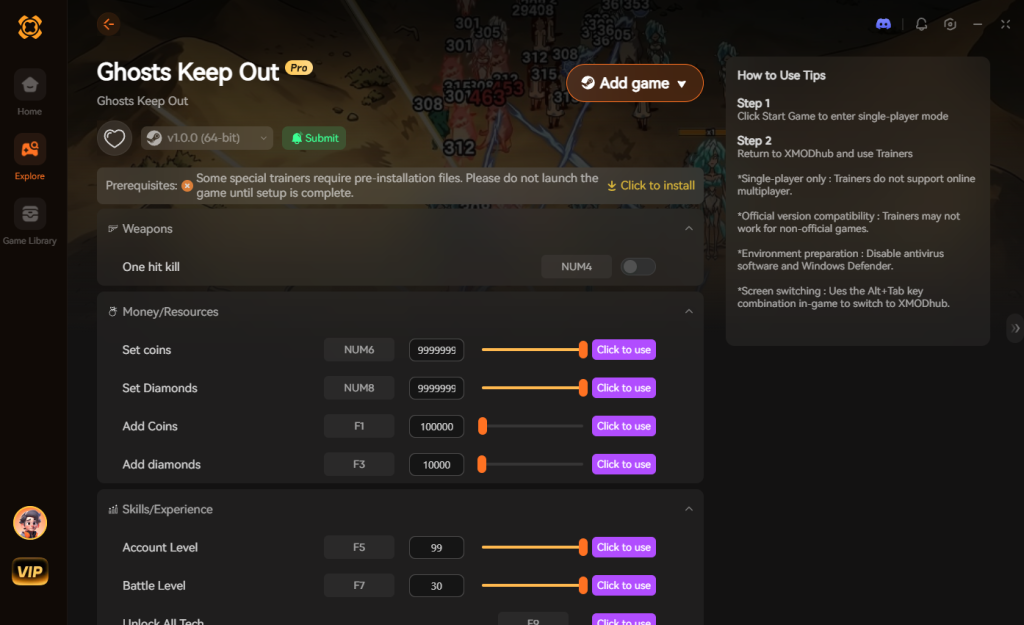
Download Ghosts Keep OutTrainer Now
4. Where to Find Safe Ghosts Keep Out Cheat Tables (.CT)?
If you absolutely insist on using CE and want to search for a “Ghosts Keep Out cheat engine table,” you will likely end up on various modding forums, Discord servers, or obscure Reddit threads. You’ll want a pre-made Cheat Table (.CT file) created by another user who has already done the exhausting pointer scanning for you.
However, you must exercise extreme caution. Downloading random .CT files from unverified sources poses a severe cybersecurity risk to your PC. Cheat Engine tables are not just simple text files containing memory addresses; they can contain highly complex Lua scripts. Because Cheat Engine requires Administrator privileges to hook into games, any Lua script executed inside a .CT file also runs with full Administrator rights.
Malicious actors frequently upload fake cheat tables for popular or trending games like Ghosts Keep Out. These tables can contain hidden scripts that execute background commands via os.execute(). We have seen countless instances where players download a table to get infinite Ectoplasm, only to have a background script silently download and install a Remote Access Trojan (RAT) or a crypto-miner like XMRig onto their system. Your game might run fine, but your GPU will be hijacked to mine cryptocurrency for a hacker in the background.
This is exactly why relying on a verified, digitally signed application like XMODhub is the safe choice. XMODhub’s development team rigorously tests and safely compiles all trainers in-house. You never have to worry about executing arbitrary, user-generated code on your machine just to get past a difficult level.
5. Essential Features to Look For in a Reliable .CT File
When hunting down a community-made Ghosts Keep Out cheat engine table, you will quickly realize that not all .CT files are created equal. A basic script might just freeze your health, but a premium table created by veteran reverse-engineers will hook directly into the game’s core logic loops. If you are downloading a table from a modding forum, you want to ensure it includes advanced capabilities to truly dominate the higher-tier Cellar and Attic levels.
Here is a breakdown of the most sought-after cheat table scripts and exactly how they manipulate the game engine:
| Cheat Feature / Script | Engine Mechanic Altered | Strategic Advantage | Ban/Crash Risk |
|---|---|---|---|
| Infinite Sanity Lock | Nullifies the SanityDrain() float function. | Prevents screen-blur and instant death from Poltergeist encounters. | Low |
| Instant Trap Construction | Forces BuildTimer variable to 0.00. | Allows panic-building of Iron Wards during active ghost waves. | Medium |
| Ghost AI Freeze | Halts the Pathfinding.NavMesh updates. | Stops all hostile entities in their tracks for easy banishing. | High |
| Loot Multiplier (x100) | Modifies the OnDrop_ItemYield array. | One Pure Salt Crystal drop instantly fills your entire inventory. | Medium |
| No Clip / Fly Mode | Overwrites the Z-Axis_Collision checks. | Float above the haunted house, completely ignoring ground traps. | Very High |
6. Advanced Memory Editing: Updating Broken Pointers
If you find a brilliant .CT file from last year, chances are it no longer works on the current patch of Ghosts Keep Out. When the developers update the game, the base address shifts. To salvage an outdated cheat engine table, you can manually update the Array of Bytes (AOB) signatures.
AOB scanning is much more resilient than static pointer scanning because it looks for a unique pattern of machine code (for example, 8B 45 E8 8B 40 10) rather than a hardcoded memory location. By right-clicking a broken script in your Cheat Engine table and selecting “Change Script,” you can often replace the broken static address with an AOBScan command.
However, if the developers completely rewrote the damage calculation logic or migrated to a newer version of their game engine, even AOB scans will fail, bringing you right back to the drawing board. This endless cycle of manual maintenance is exactly why cloud-updated trainers like XMODhub are rapidly replacing traditional .CT files for modern gamers.
7. Frequently Asked Questions (FAQ)
| Platform / Store | Cheat Engine Compatibility | XMODhub Compatibility | Ban Risk (Singleplayer) |
|---|---|---|---|
| Steam | Yes (Requires manual pointer updates) | Yes (Fully Supported) | None (0%) |
| Epic Games Store | Yes (Offsets may differ from Steam) | Yes (Fully Supported) | None (0%) |
| Xbox Game Pass (PC) | No (Blocked by UWP encryption) | Yes (Bypasses UWP natively) | None (0%) |
| Multiplayer / Co-op | Highly Dangerous (Will trigger Anti-Cheat) | Disabled for safety | High (Account Ban) |
A: Usually, no. Game Pass uses strict UWP (Universal Windows Platform) file encryption and restricted folder permissions that actively block standard debuggers like Cheat Engine from accessing the game’s memory space. Even if you manage to dump the process, the memory structure is often heavily obfuscated compared to the Steam version. However, XMODhub is specifically engineered to bypass these UWP restrictions seamlessly, allowing you to cheat on the Game Pass version without any extra configuration.
A: Modifying data on your own PC for a single-player experience like Ghosts Keep Out is completely legal. There are no laws against altering the memory of software running locally on your hardware for personal enjoyment. Just never bring memory editors into a multiplayer server, as that violates the game’s Terms of Service and will result in an immediate hardware ID ban.
A: Yes, particularly during the scanning phases. When you perform a “First Scan” on a game like Ghosts Keep Out, Cheat Engine is actively reading gigabytes of raw RAM data. This immense read operation floods your CPU cache and memory controllers, which can cause severe game stuttering, FPS drops, or temporary freezing. If you have “Active Freezing” enabled on multiple addresses (where CE writes a value to memory every few milliseconds to keep your health infinite), it creates constant CPU interrupts. XMODhub avoids this by directly injecting optimized dynamic link libraries (DLLs) that modify the game’s internal functions (like bypassing the damage calculation entirely) rather than brute-force freezing memory addresses, resulting in zero FPS loss.
Conclusion: Work Smarter, Not Harder
Learning how memory manipulation works in Cheat Engine is a cool flex. Understanding pointers, offsets, and hexadecimal conversions gives you a great peek under the hood of game development and reverse engineering. But let’s be real—when you come home from a long day at work, you just want to spawn in that legendary Absolute Zero Ward, trap some high-level spirits, and wreck some enemies without taking a computer science class.
Why spend 45 minutes digging through hex codes, risking game crashes, and fighting dynamic memory allocation when you can click one button and instantly get God Mode? And the best part? XMODhub supports over 5,000+ PC games. Once you install the app, you can ditch the complicated cheat tables for good and focus on actually enjoying Ghosts Keep Out.


I am a passionate gamer and writer at XMODhub, dedicated to bringing you the latest gaming news, tips, and insights.
Connect with me:
LinkedIn Profile ↗


 Nancy Miller