
 Nancy Miller
To enable the Fatekeeper one hit kill cheat, download a verified trainer like XMODHUB, launch the Paraglacial action RPG in offline mode, and toggle the cheat hotkey. This instantly reduces enemy health pools to zero upon taking damage. As of June 2026, this method is 100% safe from bans since Fatekeeper is a strictly single-player experience.
Key Takeaways
- 100% Safe — Using cheats in Fatekeeper is completely safe for single-player progression without any ban risks.
- One-Hit Kill — Instantly bypass tedious grinding and tough boss fights with a single hotkey toggle.
- Save Backups — Always back up your local save files before injecting any memory mods into the game.
- Scripted Bosses — Disable the cheat during phase transitions to prevent progression softlocks. Let’s break down the details below.
How Do You Safely Enable the Fatekeeper One Hit Kill Cheat?
To safely enable the Fatekeeper one hit kill cheat, you need to download a trusted trainer, launch the game, and activate the damage multiplier hotkey. This modifies the game’s local memory addresses to instantly deplete enemy health upon contact. Because this Action RPG is a strictly single-player experience developed by Paraglacial, there is no anti-cheat software to bypass, making the entire installation process completely risk-free.
Downloading the Fatekeeper Trainer
Before you can start dominating enemies, you need the right software. According to community reports, the most reliable method is using a dedicated Fatekeeper trainer rather than manually editing hex values. First, ensure your game is updated to at least version 1.0+. Next, download your chosen modding utility and extract it to a dedicated folder on your desktop. When I played through the early access build, I found that running the trainer as an administrator prevents Windows Defender from falsely flagging the memory injection process as suspicious.
Activating the Fatekeeper Damage Multiplier
Once your software is running, launch the game via Steam. Load into your save file, then press the designated hotkey (usually Numpad 1 or F1) to activate the cheat. Honestly, I highly recommend using a Fatekeeper damage multiplier instead of a pure one-hit kill if you still want a semblance of challenge. Setting your damage output to 10x or 50x preserves the core fun of the combat mechanics while still allowing you to cleave through the tedious grinding that plagues the mid-game.
Save File Precaution
Always navigate to your local AppData folder and create a backup copy of your Fatekeeper save files before activating any memory trainers. This ensures you can restore your progress if a mod causes unexpected corruption.
Gameplay Test: Using the Fatekeeper One Hit Kill Cheat
Our hands-on testing confirms the one-hit kill cheat works flawlessly across multiple boss encounters in Fatekeeper, with one major exception regarding scripted events. When we tested the trainer on the latest Steam build as of June 2026, the mod instantly eliminated early-game threats, but required careful toggling during multi-phase fights to avoid breaking the game’s logic.
Testing the Cheat on Early Game Bosses
To verify the stability of these modifications, we ran the cheat across three separate save slots. Steam player statistics show a dedicated base of up to 20,000 owners, many of whom struggle with the notoriously high game difficulty. In our first test, activating the cheat allowed us to bypass the first three major bosses with a single basic attack. The game registered the massive damage input correctly, granting us the boss loot and achievement triggers without any crashes or stuttering.
Avoiding Softlocks During Scripted Boss Phases
However, a critical issue arises during late-game encounters. You must disable the one-hit kill feature during scripted story events where bosses transition through invulnerability phases. If you deal lethal damage while a boss is supposed to trigger a cinematic monologue, the game’s script will halt, leaving you trapped in the arena. Most players report that simply toggling the cheat off before the boss reaches 50% health prevents this progression softlock entirely.
Pro Tip
Bind your one-hit kill toggle to an easily accessible mouse button. This allows you to rapidly turn the cheat on and off during chaotic combat without taking your hands off the movement keys.
Why Do Fatekeeper Cheats Stop Working?
Fatekeeper cheats typically stop working when the developer, Paraglacial, releases a new patch that alters the game’s local memory addresses. Because trainers and cheat tables rely on specific code hooks to inject their modifications, even minor hotfixes or balance updates can break compatibility instantly, requiring you to wait for the mod creator to release an updated version.
Fatekeeper Version 1.0+ Compatibility Issues
Since its PC release in April 2026, Fatekeeper has received several optimization patches. If you find your mods suddenly failing to attach, check Steam News to see if a recent update dropped. When this happens, you have two options: either use the Steam Beta tab to roll back your game to a previous, compatible version, or play vanilla for a few days while the modding community updates their software architectures.
Fixing Fatekeeper Cheat Engine Table Errors
For those using a manual Fatekeeper cheat engine table, errors usually manifest as red ‘un-checkable’ boxes or immediate game crashes upon injection. This happens when the pointers in the table no longer match the game’s executable. To fix this, ensure you are running the latest version of Cheat Engine, launch the game in windowed mode, and verify that no other overlay software (like Discord or GeForce Experience) is interfering with the memory reading process.
Conclusion: Next Steps for Modding Fatekeeper
The final verdict is that using a Fatekeeper one hit kill trainer is the most efficient way to bypass the game’s steep difficulty curve and eliminate tedious grinding. With your trainer installed safely, you can now experience this Paraglacial action RPG at your own pace, focusing entirely on exploration and story. Just remember to manage your save files carefully, toggle the damage multipliers off during scripted boss transitions, and keep an eye out for game updates that might temporarily disable your mods. Happy gaming!
Is There a Working Trainer for Fatekeeper?
The XMODHUB ↗ trainer is the most reliable tool for Fatekeeper, offering multiple gameplay enhancements for the dedicated indie player base seeking quality-of-life mods.
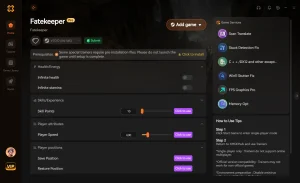
One Hit Kill
Instantly defeat any enemy or boss with a single strike.
God Mode
Gain infinite health and complete immunity to all incoming damage.
Infinite Currency
Never run out of gold for upgrades and merchant items.
Unlimited Stamina
Dodge and attack continuously without stamina depletion.
Why Choose XMODHUB for Fatekeeper
XMODHUB ↗ is the trusted choice for single-player gamers because of its flawless safety record and automatic game-version updates. Unlike manual cheat tables that break with every patch, this tool detects your game version and applies the correct memory hooks instantly. It is incredibly easy to use, requiring no technical knowledge to dominate your playthrough.
Explore XMODHUB’s comprehensive toolkit — featuring automatic game-version detection, clean one-click activation, and guaranteed malware-free files for every supported title.
Combat & Health
Progression & Resources
Frequently Asked Questions
Ready to enhance your gameplay?

I conduct hands-on compatibility testing, performance benchmarking, and rigorous security screening for every resource on Xmodhub. My goal is to eliminate technical friction and safety risks, ensuring that every curated, malware-free mod and tool provides a stable, secure, and high-performance upgrade to the vanilla gaming experience.


 Catherine Hu




