
 Catherine Hu
Quick Answer: How do you cheat in Dinoblade?
To cheat in Dinoblade, you can manually attach Cheat Engine to the game’s executable and scan for changing numeric values like your Spinosaurus’s current Health (usually stored as a Float value) or your total count of Cataclysmic Bone Shards (typically a 4-Byte Integer). However, because game updates frequently break Cheat Engine tables (.CT files) and shift memory addresses, the safest and easiest alternative is using an auto-updating mod manager like XMODhub, which provides 1-click cheats without requiring any complex memory scanning or hex editing.
Editor’s Note
Look, I get it. We all start Dinoblade thinking we’re going to play it completely legit. But after dying to the Dual-Wielding Triceratops Vanguard for the 15th time, or spending hours grinding for Meteoric Iron Ingots just to upgrade your giant sword, the fun stops. The SeClaude-inspired posture system is brilliant, but those unpredictable damage spikes from rival dinosaurs can be brutal. I’ve been messing with Cheat Engine for years, and trying to isolate the exact memory values for this game’s current patch almost drove me insane. Today, I’m going to show you how to manually hack the values if you want the technical challenge—but I’ll also share the 1-click shortcut I actually use to save my sanity.
You may also like: Dinoblade Item IDs List & Console Spawn Codes (Complete Guide 2026)
1. How to Use Cheat Engine for Dinoblade (The Manual Way)
If you want to go the old-school route and find the memory addresses yourself, here is the basic “First Scan/Next Scan” method tailored specifically for this game. Because Dinoblade is a fast-paced action RPG with a heavy emphasis on Souls-like combat mechanics, the two most common things players want to modify are their Spinosaurus’s Vitality (Health) and the Posture Meter.
Since Posture regenerates quickly and is handled dynamically, it is notoriously difficult to scan for beginners. Instead, we are going to walk through the exact process of isolating and freezing your Health value so you can survive those punishing imperfect parries.
Dinoblade-Win64-Shipping.exe (or similar, depending on the current July 2026 build architecture) and click “Open”.| In-Game Stat / Mechanic | Most Common CE Value Type | Memory Volatility | Description & Scanning Difficulty |
|---|---|---|---|
| Spinosaurus Vitality (HP) | Float | High | Tracks player health. Difficult to scan if health regenerates. Requires exact Float scanning or Unknown Initial Value methods. |
| Cataclysmic Bone Shards | 4 Bytes | Low | Inventory upgrade material. Very easy to scan using exact values. Drop or spend items to filter addresses. |
| Posture Meter (Stamina) | Float | Extremely High | Rapidly depletes and regenerates during SeClaude-style parry combat. Best manipulated via AOB (Array of Bytes) injection rather than static scanning. |
| Weapon Attack Power | 4 Bytes / Float | Medium | Modifies the base damage of your giant sword. Often encrypted or tied to server-side checks if leaderboards are active. |
| Perfect Parry Window | Float | Static (Engine Level) | Controls the frame window for posture-breaking parries. Requires advanced assembly knowledge to find and expand the hitbox frames. |
2. Common CE Errors: Pointers Breaking & Not Attaching
If you are pulling your hair out because CE isn’t working for Dinoblade, you aren’t alone. As an intense action RPG that gained massive traction with over 460,000 wishlists before its release, the developers implemented several standard anti-tamper measures to ensure the game’s stability and prevent memory leaks, which inadvertently makes manual cheating a nightmare. Here is what’s probably happening:
Error: “Cannot attach to process” / Game Crashes
Dinoblade might be using specific engine protections or anti-debugging flags that immediately terminate the game client if it detects a memory scanner hooking into its process space. When you try to attach standard Cheat Engine, the game’s watchdog thread flags the OpenProcess API call and forces a crash to desktop to protect the memory integrity. To bypass this, you need to configure Cheat Engine to use the VEH Debugger (Vectored Exception Handling). Go to Cheat Engine’s Settings -> Debugger Options -> and check “Use VEH Debugger”. This method intercepts exceptions at the Windows kernel level, making it much harder for Dinoblade’s user-mode anti-cheat to detect the memory hook. However, even with VEH enabled, scanning massive blocks of Unreal Engine memory can still cause fatal access violations if you aren’t careful.
The Pointer Problem
You finally found the exact memory address for your giant sword’s upgrade materials, you froze it, and you feel like a hacker god. But then you die to a boss, the game reloads, and suddenly your cheat does nothing. Why? Because of Dynamic Memory Allocation (DMA). Every time Dinoblade goes through a loading screen, the game’s engine destroys the old player entity and spawns a brand new one in a completely different sector of your RAM. The static address you found (e.g., 0x1A4B2C00) is now pointing to empty space or garbage data.
To fix this manually, you have to perform a Pointer Scan. This involves finding the base address of Dinoblade-Win64-Shipping.exe and calculating a chain of multi-level offsets (e.g., Base + 0x04A1, + 0x120, + 0x8) that act as a permanent roadmap to your health value, no matter where it moves in the RAM. Writing these assembly scripts (AOB injection) requires legitimate reverse-engineering skills, understanding x64 architecture, and hours of trial and error. For a game focused on fast-paced dinosaur combat, writing assembly code is the ultimate buzzkill.
3. The Better Alternative: 1-Click Cheats with XMODhub
Here is the dirty little secret of the modding community: Nobody actually wants to spend two hours updating Cheat Engine tables every time a patch drops. The moment Dinoblade updates on Steam—which happens frequently as the devs tweak the AI patterns and parry timings—your hard-earned memory addresses shift, your carefully crafted pointers break, and your game crashes to the desktop.
| Feature / Metric | Manual Cheat Engine (.CT) | XMODhub Auto-Trainer |
|---|---|---|
| Setup Time | 30 – 60+ Minutes (Requires scanning & pointer mapping) | Instant (1-Click toggle via UI) |
| Update Reliability | Breaks instantly on every minor Steam patch | Auto-updates via Cloud within hours of a patch |
| Crash Risk | Very High (Access violations, bad pointers cause CTDs) | Zero (Safely hooks via proprietary engine bypass) |
| Ease of Use | Hardcore (Requires knowledge of Hex, Floats, and Pointers) | Effortless (Clean UI, hotkey support, no coding needed) |
| Feature Access | Limited to what you can manually find and script | Pre-loaded with God Mode, Infinite Posture, 1-Hit Kills |
Why XMODhub beats manual CE for Dinoblade:
Premium Features Instant Access:
How to Use XMODhub for Dinoblade?

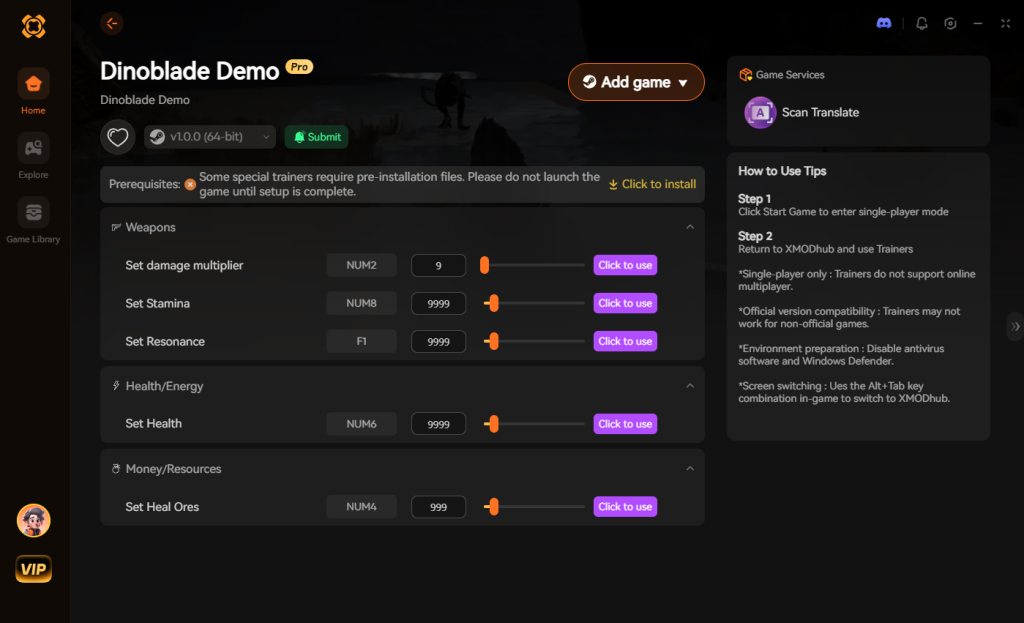
4. Where to Find Safe Dinoblade Cheat Tables (.CT)?
If you absolutely insist on using CE, you’ll want a pre-made Cheat Table (.CT file) created by a veteran reverse engineer. These tables contain pre-written Lua scripts and pointer maps so you don’t have to scan for values yourself. However, you need to exercise extreme caution.
The cybersecurity risks of downloading random .CT files from unverified forums, sketchy Reddit threads, or random Discord servers cannot be overstated. Cheat Engine tables are not just harmless text files; they can contain embedded Lua scripts that execute the moment you open them in Cheat Engine. Malicious actors frequently prey on gamers looking for cheats in highly anticipated games like Dinoblade. They will inject shellcode into the .CT file that quietly downloads and installs remote access trojans (RATs), keyloggers, or background crypto-miners on your PC. Because Cheat Engine naturally requires administrative privileges to read and write to system memory, you are essentially handing over the keys to your entire operating system to whoever wrote that script.
If you must download a .CT file, only use highly reputable, heavily moderated communities where files are manually vetted by administrators. Never download a table that requires you to disable your antivirus to “make it work.” This is exactly why a verified, digitally signed application like XMODhub is the safe choice. XMODhub is backed by a registered corporate entity, undergoes rigorous security audits, and guarantees that your PC remains completely free of malware, adware, and crypto-miners.
5. Essential Features of a Top-Tier Dinoblade Cheat Table
When hunting for the perfect Dinoblade cheat engine table on modding forums, you want to ensure the creator has included scripts that actually address the game’s most brutal mechanics. A basic table might just freeze your health, but a mastercrafted .CT file will include complex Lua scripts to manipulate the SeClaude-style combat system at the engine level.
Here is a breakdown of the most sought-after cheat scripts and how they impact your prehistoric playthrough:
| Cheat Script / Feature | In-Game Effect & Utility | Execution Method | Risk of Game Crash |
|---|---|---|---|
| Infinite Posture (Stamina) | Prevents your Spinosaurus from being staggered during heavy attacks. | AOB Injection | Medium |
| 100% Drop Rate Multiplier | Forces elite dinosaurs to drop rare crafting materials every kill. | Pointer Scan | Low |
| Perfect Parry Auto-Trigger | Automatically hits the exact parry frame when attacked. | Lua Scripting | High |
| Damage Multiplier (x10) | Scales your base giant sword damage to one-shot most bosses. | Float Modification | Low |
| No Crafting Requirements | Allows upgrading weapons without Meteoric Iron Ingots. | Memory Hook | Medium |
6. Advanced CE Tactics: Spawning Items & Editing Inventory
Beyond just surviving combat, many players look for a Dinoblade cheat engine table specifically to bypass the massive grinding required for weapon upgrades. If you want to manually edit your inventory, you will need to find the specific item ID for the material you want (e.g., Cataclysmic Bone Shards) and swap it with a basic item (like a Common Fern).
This requires changing a 4-Byte integer value that corresponds to the item’s hex ID. However, Unreal Engine 5 handles inventory arrays dynamically. If you input the wrong item ID, or if the cheat table’s inventory pointer is outdated, you will instantly corrupt your save file. Advanced tables found on reputable modding sites often include a drop-down list of verified item IDs, allowing you to safely swap items without calculating the hexadecimal values yourself.
If you are experimenting with manual item swapping, always back up your SaveGames folder located in %LOCALAPPDATA%\Dinoblade\Saved\ before attempting to use an inventory editor script. Even a single misplaced digit in the memory address can cause the game to crash on startup and render your 40-hour save completely unplayable. Alternatively, you can rely on XMODhub to safely inject these items directly into your inventory with guaranteed valid IDs, completely eliminating the risk of save corruption.
7. Frequently Asked Questions (FAQ)
| Platform / Storefront | Cheat Compatibility | Ban Risk Level | Notes & Workarounds |
|---|---|---|---|
| Steam (PC) | 100% Compatible (CE & XMODhub) | Zero (Singleplayer Only) | The optimal version for modding. Standard executable structure. |
| Epic Games Store | 100% Compatible (XMODhub) | Zero (Singleplayer Only) | CE tables may require offset adjustments due to different DRM wrappers. |
| Xbox Game Pass (PC) | Very Low (Manual CE) / High (XMODhub) | Zero (Singleplayer Only) | UWP file encryption blocks standard memory hooks. XMODhub bypasses this automatically. |
| Multiplayer / Co-Op | NOT SUPPORTED | Extremely High | Do not inject memory editors if the developers add online matchmaking. |
A: Usually, no. Game Pass uses strict UWP (Universal Windows Platform) file encryption and restricted folder permissions that actively block Cheat Engine from attaching to the process. Trying to force it usually results in “Access Denied” errors. However, XMODhub is specifically engineered to bypass these UWP restrictions seamlessly, allowing you to cheat on Game Pass versions just as easily as Steam versions.
A: Modifying data on your own PC for a single-player experience like Dinoblade is completely legal. You own your hardware and you can alter the local memory in your RAM as you see fit. Just never bring memory editors into a multiplayer server, as that violates Terms of Service and will result in permanent account bans.
A: Yes, it absolutely can, especially during the “First Scan” phase. When you tell Cheat Engine to scan “Unknown Initial Values” across the entire memory space of an Unreal Engine 5 game, it forces your CPU to rapidly read gigabytes of RAM, causing massive memory paging and CPU load spikes. This will severely tank your FPS and can even cause the game to stutter or crash. Furthermore, actively freezing multiple values (forcing Cheat Engine to overwrite a memory address every few milliseconds to keep your health full) consumes CPU cycles. XMODhub optimizes this tick rate at the engine level, ensuring zero FPS drops while you play.
Conclusion: Work Smarter, Not Harder
Learning how memory manipulation works in Cheat Engine is a cool flex. Understanding pointers, offsets, and hexadecimal values gives you a fantastic peek under the hood of how PC games function. But let’s be real—when you come home from a long day at work, you just want to spawn in the Apex Obsidian Greatsword, effortlessly perfect-parry a T-Rex, and wreck some enemies without taking a computer science class.
Why spend 45 minutes digging through hex codes, fighting engine crashes, and pulling your hair out over dynamic memory allocation when you can click one button and instantly get God Mode? And the best part? XMODhub supports over 5,000+ PC games. Once you install the app, you can ditch the complicated, malware-ridden cheat tables for good and focus entirely on preventing prehistoric extinction.


I am a passionate gamer and writer at XMODhub, dedicated to bringing you the latest gaming news, tips, and insights.
Connect with me:
LinkedIn Profile ↗


 Nancy Miller



