
 Catherine Hu
Want to test out the endgame Master Lockpick early? Are you tired of grinding for Shiny Pebbles to afford basic gear, or perhaps you accidentally dropped a critical heist tool and now your midnight run is soft-locked?
Using developer console commands to spawn items is a beloved staple of PC gaming freedom. Because Burglin’ Gnomes is built on the Unity engine, the process of spawning items involves utilizing internal asset paths. Below is the most comprehensive, categorized, and up-to-date list of Item IDs, spawn codes, and perk IDs for Burglin’ Gnomes, verified for the latest patch.
Quick Reference: Top 10 Most Wanted Burglin’ Gnomes IDs
If you don’t want to scroll through thousands of rows of code, here are the exact spawn codes for the most essential and frequently searched items in the game (including currency, top-tier loot, and bypass tools).
Command Format: Instantiate(Resources.Load("[Item ID]"))
| Item Name | Item ID (Unity Prefab Path) | Effect / Description |
|---|---|---|
| Shiny Pebbles (Max Stack) | Items/Currency_ShinyPebble_Max |
Spawns a stack of 10,000 currency. |
| Master Lockpick | Tools/Tool_MasterLockpick |
Unbreakable lockpick for instant access. |
| Golden Gnome Artifact | Loot/Loot_GoldenGnomeArtifact |
Highest value black-market item. |
| Sleep Dart Gun | Weapons/Wpn_SleepDartGun |
Instantly knocks out Garden Hounds. |
| EMP Grenade | Tools/Tool_EMPGrenade |
Disables security cameras for 60 seconds. |
| Sneak Sneakers | Gear/Gear_SneakSneakers |
Completely silences your footsteps. |
| Max Health Potion | Consumables/Cons_HealthVial |
Restores full HP after a dog bite. |
| Invisibility Cloak | Gear/Gear_InvisCloak |
Grants 30 seconds of pure stealth. |
| Vault Keycard | Items/Key_MansionVault |
Bypasses the final mansion security door. |
| Decoy Gnome | Tools/Tool_DecoyGnome |
Distracts homeowners indefinitely. |
How to Enable the Console & Use Spawn Commands
Before you can use the ID codes listed below, you must understand how the engine handles developer commands. Burglin’ Gnomes does not have a native console enabled by default. Because it is a Unity game, the developers locked the interface before launch.
To use these manual IDs, you must install a Unity injector (like BepInEx) alongside a plugin like UnityExplorer.
Step-by-Step Manual Method:
Instantiate(Resources.Load("Prefabs/[Item ID]"))Instantiate(Resources.Load("Prefabs/Tools/Tool_MasterLockpick")) and press Execute.Editor’s Note:
“Typing C# scripts just to get a few extra Shiny Pebbles is fine if you only need to do it once. But if you are planning massive heists and experimenting with different stealth builds, manually typing case-sensitive Unity prefab paths becomes incredibly repetitive. One wrong capitalized letter results in a ‘NullReferenceException’ and crashes your heist. While the lists below are meticulously verified, I personally switched to a visual UI injector months ago. Seeing the item icon and just clicking ‘Add to Inventory’ is how modern PC modding should feel.”
The Easy Way: XMODhub Visual Spawner (No Typing Required)
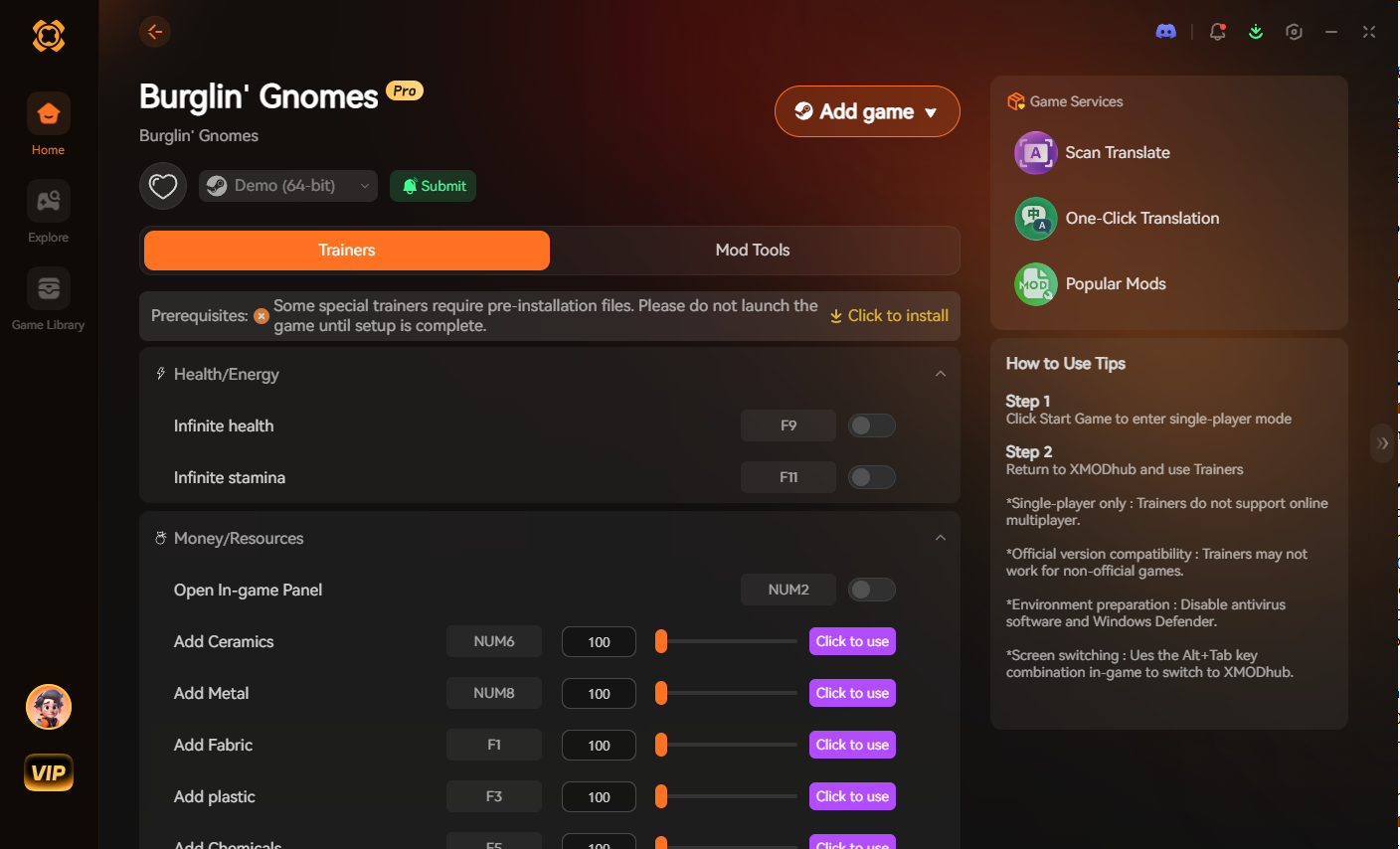
Stop Alt-Tabbing to check massive spreadsheets. Typing long, case-sensitive ID codes breaks your immersion and wastes your limited night-time hours in-game. The XMODhub PC Client includes a dedicated “Visual Item Spawner” feature specifically engineered to bypass the locked Unity console in Burglin’ Gnomes.
Tool & Gadget IDs List
Use these codes to instantly equip yourself with the best heist arsenal to bypass alarms and guards.
Command Format: Instantiate(Resources.Load("Prefabs/[Item ID]"))
| Tool Name | Item ID |
|---|---|
| Basic Lockpick | Tools/Tool_BasicLockpick |
| Advanced Hacksaw | Tools/Tool_Hacksaw_T2 |
| EMP Grenade | Tools/Tool_EMPGrenade |
| Sleep Dart Gun | Weapons/Wpn_SleepDartGun |
| Window Glass Cutter | Tools/Tool_GlassCutter |
| Smoke Bomb | Tools/Tool_SmokeBomb |
Gear & Clothing IDs List
Equip top-tier clothing to maximize your carrying capacity and minimize your noise level.
Command Format: Instantiate(Resources.Load("Prefabs/[Item ID]"))
| Gear Name | Item ID |
|---|---|
| Sneak Sneakers | Gear/Gear_SneakSneakers |
| Midnight Beanie | Gear/Gear_MidnightBeanie |
| Expanded Loot Bag | Gear/Gear_LootBag_Large |
| Thermal Goggles | Gear/Gear_ThermalGoggles |
| Utility Belt | Gear/Gear_UtilityBelt_T3 |
Consumables & Loot IDs List
Never run out of stamina or distraction items during a close encounter again.
Command Format: Instantiate(Resources.Load("Prefabs/[Item ID]"))
| Item Name | Item ID |
|---|---|
| Health Vial | Consumables/Cons_HealthVial |
| Energy Drink (Stamina) | Consumables/Cons_EnergyDrink |
| Dog Treats (Distraction) | Consumables/Cons_DogTreats |
| Silver Cutlery (Loot) | Loot/Loot_SilverCutlery |
| Diamond Ring (Loot) | Loot/Loot_DiamondRing |
Skills, Perks & Traits IDs
You do not just have to spawn physical items. If you are using a modified console, you can call the player script to instantly unlock stealth magic or add permanent character traits.
Command Format: PlayerManager.Instance.UnlockPerk("[Perk ID]")
| Perk Name | Perk ID |
|---|---|
| Ghost Step (Silent Running) | Perk_GhostStep |
| Fast Hands (Instant Looting) | Perk_FastHands |
| Hound Whisperer | Perk_HoundWhisperer |
| Shadow Meld (Stand still to hide) | Perk_ShadowMeld |
| Master Appraiser | Perk_MasterAppraiser |
Troubleshooting: Why Are My Commands Failing?
If you are typing the IDs correctly but the game is throwing errors, check these common issues:
tools/tool_masterlockpick instead of Tools/Tool_MasterLockpick will crash the script.Frequently Asked Questions (FAQ)
A: Yes, absolutely. Because Burglin’ Gnomes runs on Unity, calling an item ID means you are pulling a specific file path from the engine’s memory. Spacing, capitalization, and underscores are strictly enforced.
A: No. Burglin’ Gnomes is primarily a single-player experience. If you are using community multiplayer mods, console commands and injections are executed client-side and will cause severe desync issues or instant kicks from the host server.
A: Finding custom load-order paths manually requires digging through Unity asset bundles, which is extremely difficult. We highly recommend using the XMODhub Item Browser, which automatically scans your active mods, detects the custom items, and lets you spawn them with a single click without knowing the exact C# path.
Conclusion
Having access to the complete Burglin’ Gnomes Item IDs list is the fastest way to experiment with different stealth builds, test the value of high-tier black-market loot, or simply recover from a frustrating inventory bug. Bookmark this page so you can quickly reference the codes whenever you need a midnight resupply.
However, if you want a significantly smoother, crash-free experience where you don’t need to memorize strings of C# code or deal with unstable Unity injectors, the XMODhub Visual Spawner is the superior modern choice. Browse items visually. Spawn them instantly. Keep your achievements active.
XMODhub is your ultimate all-in-one toolkit for PC single-player gaming. Whether you need powerful Trainers, real-time Translation Tools, or Interactive Maps, our engine supports over 5,000+ games—including Burglin’ Gnomes and similar hits like Thief Simulator and Hello Neighbor.

I am a passionate gamer and writer at XMODhub, dedicated to bringing you the latest gaming news, tips, and insights.
Connect with me:
LinkedIn Profile ↗







 Nancy Miller