Catherine Hu
Quick Answer: Does Beholder: Conductor Have Console Commands?
No, Beholder: Conductor does not have a built-in developer console or native text-based cheat codes. Because the developers designed this spin-off to be a highly oppressive, choice-driven management simulation set aboard the Determination Bringer train, they intentionally removed access to the developer command line to preserve the heavy moral weight of your decisions. You cannot simply press the tilde (~) key to spawn items or type commands to gain infinite currency.
However, you are not entirely out of luck. The only reliable and safe way to cheat in this game is by using a third-party memory trainer like XMODhub. This dedicated software offers seamless 1-click alternatives, allowing you to activate God Mode, acquire Infinite Ministry Credits, and instantly reveal passenger contraband without ever needing to type a single line of code.
Editor’s Note
This guide was last verified against the newest Beholder: Conductor patch. Whether you are using native engine tools or a dedicated trainer, please back up your save files before modifying game memory to prevent unexpected bugs.
We have all been there. You have just spent hours dying to the same boss in Beholder: Conductor, or maybe you simply do not have the time to grind for Ministry Credits and rare surveillance equipment after a long day. Managing the Determination Bringer train, monitoring unruly passengers, and reporting incidents to the totalitarian state can quickly become a stressful second job rather than an entertaining escape. Single-player games are meant to be enjoyed on your own terms. Let us get your character powered up.
You may also like: The Ultimate Beholder: Conductor Cheat Engine Guide (And A Much Easier Alternative)
1. How to Enable Cheats in Beholder: Conductor
Because Beholder: Conductor lacks a traditional developer console, players cannot modify configuration files (.ini) or press a specific keyboard shortcut to bring up a text input box. In many modern indie titles, especially immersive sims that rely heavily on resource scarcity and narrative tension, developers actively strip out the debugging console before the final retail release. This prevents players from accidentally breaking complex quest triggers or bypassing the intended difficulty curve of managing the train.
Since you cannot type in codes, you must rely on external memory injection. This is where modern game trainers step in. Instead of forcing you to learn hexadecimal editing or hex-editing your save files manually, you can use a streamlined application. Here is the simple three-step process to download and attach XMODhub to the game to enable cheats:
2. The Complete List of Beholder: Conductor Cheats
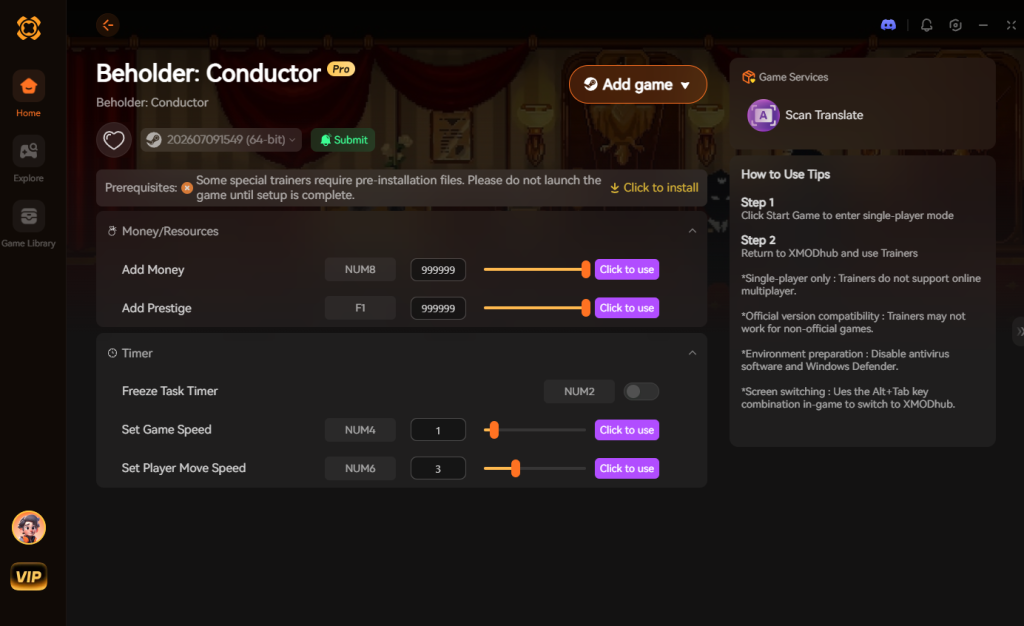
Because Beholder: Conductor does not feature a developer console, there are no text-based cheat codes to input. You will not find any commands like add_money 999 or godmode 1 hidden in the game files. However, you can achieve the exact same effects—and often much more stable results—using the XMODhub app.
Below is a comprehensive list of the trainer features available in XMODhub specifically tailored for the mechanics of Beholder: Conductor.
3. Item IDs and Spawning Guide
In games that feature a developer console, players can usually type a command followed by a specific alphanumeric string (an Item ID) to spawn objects directly into their inventory. However, because Beholder: Conductor does not have a native console, manually spawning items via text input is completely impossible without native engine tools.
You cannot look up a spreadsheet of hex codes to spawn hidden cameras, prohibited books, or specialized Ministry forms. Attempting to force these items into your game using outdated memory editors often results in corrupted inventory slots or items that lack proper textures, ultimately breaking your save file.
XMODhub bypasses this archaic method entirely by allowing players to instantly maximize their inventory or add essential currencies with a single click. Instead of alt-tabbing to look up complex hex codes for every single piece of contraband or surveillance equipment, the trainer identifies the memory addresses for your inventory quantities and locks them. If you need more lockpicks or evidence tags, you simply toggle the “Infinite Items” feature. This eliminates the tedious process of manual item spawning and lets you focus entirely on the immersive sim elements and moral decisions that make Beholder: Conductor so engaging.
4. Do Cheats Disable Achievements?
One of the most common concerns for PC gamers is whether modifying their game will lock them out of earning Steam or Epic Games Store achievements. In many modern titles, if you manage to unlock a developer console and input a command, the game’s internal logic will instantly flag your save file. This flag permanently disables all achievement progression for that specific playthrough, forcing you to start a brand-new game if you care about your completionist profile.
Fortunately, using XMODhub handles this problem completely differently. Because XMODhub operates by temporarily modifying the game’s active RAM rather than altering the core installation files or triggering the native cheat-detection flags, Beholder: Conductor cannot detect that you are using cheats.
This means you can utilize Infinite Ministry Credits, freeze the mission timers, and max out your reputation while still unlocking every single story and gameplay achievement. XMODhub safely bypasses achievement locks, allowing you to experience the full narrative of the totalitarian state without sacrificing your profile progression.
5. Why Native Cheats Can Break Your Save Files
Beyond the achievement lock, native developer tools and memory editors are notoriously unstable. These commands were originally built for developers to test bugs during production, not for everyday gameplay.
Forcing a quest to complete or bypassing intended story triggers can cause crucial NPCs to completely disappear from your map. Memory leaks, corrupted assets, and sudden crashes to the desktop are incredibly common when you spawn too many items at once. In a highly systemic game like Beholder: Conductor, where the schedules of the passengers and the status of the Determination Bringer train are deeply intertwined, forcefully changing a quest state via an unpolished developer command can cause a chain reaction.
For instance, if you manually force a passenger to be arrested using a raw debug command, the game might fail to update the Ministry’s logbook. This creates a logic paradox within the game’s code, permanently halting your progression and forcing you to abandon dozens of hours of gameplay.
6. The Safer Alternative: 1-Click Cheats with XMODhub
If you want the benefits of cheats—like infinite health or skipping the heavy grind—without risking your save files or locking your achievements, you need a dedicated game modification tool.
Instead of typing risky code that might corrupt your game world, the XMODhub app hooks into Beholder: Conductor safely and cleanly. It is specifically programmed to understand the unique memory architecture of the game, ensuring that every modification is injected with precision.
How to Use XMODhub for Beholder: Conductor

Download Beholder: ConductorTrainer Now
7. Troubleshooting: Cheats Not Working
Even with the most advanced trainer software, PC gaming environments can sometimes cause conflicts. If you find that your hotkeys are unresponsive or the cheats are not reflecting in Beholder: Conductor, check the following hardcore troubleshooting steps:
8. Top Train Upgrades and Contraband to Target (Cheat Priority List)
When using the XMODhub trainer to bypass the grueling economic grind, you might wonder which upgrades and items yield the highest return on investment for your playthrough. In Beholder: Conductor, managing the Determination Bringer requires delicately balancing surveillance capabilities, passenger control, and your own survival under the Ministry’s watchful eye. If you are utilizing the Infinite Ministry Credits cheat, here is a strategic breakdown of what you should prioritize purchasing or upgrading first.
9. Beholder: Conductor Save File Location & Backup Guide
As mentioned in our editor’s note, modifying your game—even with a highly secure memory trainer like XMODhub—warrants basic PC gaming precautions. Before you activate God Mode or freeze your critical mission timers, it is highly recommended to back up your vanilla save file. If you ever want to revert to a completely unmodded state, or if you simply want to experiment with radically different moral choices aboard the Determination Bringer without permanent consequences, having a manual backup is an absolute lifesaver.
How to Locate Your Save Data
For Windows PC users, Beholder: Conductor stores its local save data deep within the AppData directory. Follow these quick steps to secure your progression:
%USERPROFILE%\AppData\LocalLow\ and press Enter.If you are utilizing Steam Cloud saves, remember that Steam might attempt to overwrite your local files with the synchronized cloud version. To ensure your manual backup remains untouched during your modded playthrough, you can temporarily disable Steam Cloud synchronization for Beholder: Conductor by right-clicking the game in your library, selecting Properties, and toggling the cloud feature off.
10. Frequently Asked Questions (FAQ)
A: No. Modifying game memory or accessing developer consoles for Beholder: Conductor is strictly limited to the PC version. Console ecosystems are heavily encrypted and locked down, making real-time memory injection impossible without physically modifying the hardware.
A: There is no account ban or official penalty for cheating in a single-player environment. The developers do not monitor your offline train management. The only downsides are the potential for corrupted save files and disabled achievements, which can be entirely avoided by using a secure trainer like XMODhub.
A: Yes. XMODhub is platform-agnostic. Whether you are running the Steam version, the Epic Games Store version, or a DRM-free GOG copy of Beholder: Conductor, the trainer identifies the core executable file and injects the modifications flawlessly.
A: Absolutely. Because XMODhub only alters values in your computer’s RAM, simply saving your game, closing the trainer, and restarting Beholder: Conductor will return all mechanics to their default, vanilla state. Items you acquired will remain, but infinite toggles will be disabled.
A: Currently, XMODhub is optimized for Windows operating systems. Using it on Steam Deck requires specific compatibility layers like Proton or running a dual-boot Windows setup on your handheld device.
Conclusion
Whether Beholder: Conductor provides a built-in console or not, taking control of your single-player experience is easier than ever. While tweaking raw engine code can be a fun technical experiment, it comes with significant risks to your save files and achievements. For a flawless, risk-free experience, using a dedicated modification tool is always the smarter choice.
With secure support for over 5,000+ single-player PC games, you can easily customize your gameplay, skip the tedious grind, and play exactly the way you want.


I am a passionate gamer and writer at XMODhub, dedicated to bringing you the latest gaming news, tips, and insights.
Connect with me:
LinkedIn Profile ↗


 Nancy Miller