
 Catherine Hu
Important Update for 2026: Based on current community data and the game’s architecture, How to Fish currently does not possess a native modding ecosystem or official Steam Workshop support. Because the game features integrated online co-op and specific engine restrictions, traditional file-based mods (like .pak replacements) do not exist in the wild. However, players are actively “modding” their single-player experience using dynamic memory tweaks via tools like XMODhub. Here are the top 5 essential enhancements players are using right now:
- Anti-Seagull Protection Tweak: Completely disables the AI behavior of seagulls, preventing them from swooping down and stealing your hard-earned, trick-shot catches.
- Infinite Casino Chips: Bypasses the fish-selling grind, giving you unlimited currency to gamble away your dignity in the fish casino without losing actual progress.
- Max Trick Shot Multiplier: Automatically locks your fish sell price to the maximum multiplier, regardless of whether you actually landed a 360 no-scope or a quick scope.
- Unlimited Ammo & Dynamite: Never run out of clips when unloading your assault rifle or shotgun into a shrimp, allowing for pure, unhinged cartoon violence.
- Boss Fish God Mode: Grants infinite health during the chaotic boss encounters across the weird islands, ensuring you never wipe during a crucial fight.
Editor’s Note on Testing Methodology: The mods featured in this guide were analyzed based on community downloads, stability, and recent patch compatibility. Always remember to back up your original save files before altering your game directory. If you want to bypass complicated mod managers entirely, skip to the XMODhub section below.
Introduction
Playing How to Fish in its vanilla state is an incredibly unhinged and chaotic experience, but the tweaking community has taken it to a completely different level. Whether you are annoyed by a clunky inventory system, want to push your graphics card to its limits, or simply want to skip the tedious grinding mechanics of punching fish into submission, there is a modification for exactly that.
However, diving into modding can be overwhelming. With thousands of files available for PC games, figuring out which ones actually work—and which ones will crash your game—is a massive headache. Because How to Fish currently lacks a traditional Nexus Mods portal, modifying the game requires a different, safer approach. After analyzing load orders, compatibility, and the sheer chaos of using assault rifles on aquatic life, we have compiled the definitive list of the best How to Fish modifications and memory tweaks you need to install right now.
You may also like:The Ultimate How to Fish Cheat Engine Guide (And A Much Easier Alternative)
📋 Table of Contents
- Quick Answer: What are the best How to Fish mods right now?
- Introduction
- 1. How to Install Mods for How to Fish Safely
- 2. Top Quality of Life (QoL) Mods
- 3. Best Visual and Graphics Mods
- 4. Top Gameplay and Overhaul Mods
- 5. Is There a Mod Limit in How to Fish?
- 6. The Danger of Mod Conflicts and Corrupted Saves
- 7. The Easier Alternative to Gameplay Mods: XMODhub
- 8. Troubleshooting: Mods Crashing on Startup
- 9. Best Performance Optimization & FPS Tweaks
- 10. Modding Progression & Tweak Synergy (Tier List)
- 11. Frequently Asked Questions (FAQ)
- Conclusion
1. How to Install Mods for How to Fish Safely
Before downloading anything, you need to set up your game directory to accept modified files. Because How to Fish lacks official Steam Workshop support and a dedicated mod manager like Vortex or Mod Organizer 2, you cannot simply drag and drop .esp or .pak files into your game folder.
Instead, the modding community relies on universal injectors (like ReShade for graphics) and dynamic memory editors (like XMODhub for gameplay tweaks). To modify How to Fish safely:
- Ensure you have a clean, uncorrupted installation of How to Fish via Steam.
- Launch the game at least once to generate the necessary configuration and save files in your
AppDatafolder. - For visual mods, download the latest ReShade setup, select the How to Fish executable file, and choose the DirectX 11/12 rendering API.
- For gameplay mods, avoid downloading sketchy standalone trainers. Instead, download a verified memory engine like XMODhub.
- Always disable your network connection or switch the game to strictly “Single-player” mode before injecting any memory tweaks, as modifying online co-op sessions can result in desyncs or connection drops.
2. Top Quality of Life (QoL) Mods
These mods do not drastically change the core game; they just remove the annoyances that waste your time. Since traditional mods are unavailable, these are the most popular memory tweaks players use to streamline their fishing adventure.
Anti-Seagull Theft System
Nothing is more frustrating in How to Fish than perfectly executing a 360 no-scope trick shot on a rare fish, launching it into the air, and watching a pesky seagull steal your bloody prize before you can collect it. While you can enact revenge on the entire seagull species with a shotgun, it wastes time. This tweak completely disables seagull aggro, ensuring your precious catch always lands safely in your inventory.
Instant Weapon Reload
As you progress through the game and upgrade from your bare fists to handguns, shotguns, and sniper rifles, reload times become a significant bottleneck during intense boss fights. This modification removes the reload animation entirely. You can continuously unload entire clips into a shrimp or boss fish without ever pausing, maximizing your cartoon violence output and keeping the action flowing seamlessly.
Max Durability & Infinite Upgrades
Upgrading weapons with laser sights, sharpening melee weapons, and buying upgraded ammunition requires a massive amount of cash and resources. This quality of life tweak freezes your resource consumption. You can apply every single attachment and upgrade to your arsenal without having to grind for hours on the starting islands, allowing you to experience the full unhinged arsenal immediately.
Fast Movement & Island Traversal
Crashing your boat onto an island means you spend a lot of time running back and forth between fishing spots, the weapon shop, and the fish casino. This tweak increases your base movement speed by 1.5x, significantly reducing the time spent backtracking. It makes exploring the weird, dangerous islands much more palatable and keeps the pacing of the game incredibly fast.
3. Best Visual and Graphics Mods
If you have a high-end PC, these mods will make How to Fish look like a true next-gen title. Since native texture replacers do not exist yet, we rely on universal post-processing injectors.
Universal Clarity ReShade Preset
How to Fish features a stylized, vibrant art direction, but the default anti-aliasing can sometimes make the environments look slightly blurry. By injecting a custom ReShade preset focused on LumaSharpen, HDR enhancement, and Colorfulness, you can make the blood of the fish you just punched into submission pop with terrifying clarity. It drastically improves the visual fidelity without requiring 4K texture packs.
No Recoil Screen Shake
When you are firing a fully upgraded assault rifle or sniper rifle at a boss fish, the cinematic screen shake can be incredibly nauseating and throw off your quick scopes. This modification disables the camera shake entirely. It provides a smooth, stable visual experience, allowing you to land perfect trick shots and maximize your sell price multipliers without getting a headache.
Custom FOV (Field of View) Modifier
The default camera angle in How to Fish can feel a bit restrictive, especially when you are trying to keep an eye out for those pesky seagulls diving from above. This tweak allows you to expand your Field of View up to 120 degrees. A wider FOV not only makes the game look faster and more modern, but it also gives you a massive tactical advantage during chaotic co-op sessions.
Disable Cartoon Gore Toggle
While the cartoon violence is a massive selling point for How to Fish, some players prefer a cleaner visual experience, especially if they are streaming the game. This memory toggle disables the bloody corpse effects when you unload an entire clip into a fish. It cleans up the visual clutter on the screen, which is especially helpful when farming large schools of fish with dynamite.
4. Top Gameplay and Overhaul Mods
Looking to change how the game is actually played? These mods adjust combat, economy, and progression.
Infinite Fish Casino Chips
The fish casino is one of the most hilarious mechanics in How to Fish, allowing you to gamble away your dignity and your hard-earned cash. However, losing all your money means going back to the starter island to punch more fish. This tweak gives you infinite chips, allowing you to experience all the gambling mechanics, win the rarest items, and completely break the game’s economy without the painful grind.
Guaranteed Rare Fish Spawns
One of the main quests in How to Fish is trying to collect the rare variant of all the different fish. Relying on RNG (Random Number Generation) can take dozens of hours of mindless fishing. This overhaul modifies the spawn tables, ensuring that every time you cast your line or throw dynamite into a new body of water, a rare variant is guaranteed to surface, instantly completing your collection log.
Boss Fish God Mode
As you progress to new islands, the creatures become significantly more dangerous. The boss fights in How to Fish can be brutal, especially if you haven’t fully upgraded your sniper rifle or shotgun. This modification locks your health bar at 100%. You can stand directly in the line of fire, tanking massive hits from boss fish while you casually reload your weapons, completely removing the frustration of dying and losing your haul.
Fist Damage Overdrive
At the very beginning of How to Fish, you start out with your fists and must punch the fish into submission. Usually, this mechanic becomes obsolete once you buy firearms. This overhaul tweak multiplies your base melee damage by 1000x. It allows you to play the entire game—even the late-game boss fights on the weirdest islands—using only your fists, turning your character into an unstoppable aquatic martial artist.
5. Is There a Mod Limit in How to Fish?
In traditional modding scenes, like Bethesda RPGs, there is often a hard limit of 255 plugins before the game engine completely collapses. However, because How to Fish does not utilize a traditional .pak or .esp plugin system, there is no hard-coded mod limit.
The only limitation you will face when modifying How to Fish is your PC’s hardware, specifically your RAM and CPU. Because you are using dynamic memory tweaks and post-processing injectors like ReShade, having multiple cheats active simultaneously (like Infinite Health, Infinite Ammo, and Max Trick Shot Multipliers) requires your processor to constantly rewrite memory addresses in real-time. As long as you meet the recommended system requirements and have at least 8 GB of RAM, you can run as many memory tweaks as you desire without hitting an artificial engine cap.
6. The Danger of Mod Conflicts and Corrupted Saves
While graphic mods are usually safe, gameplay mods that alter health, inventory, or core stats can be incredibly dangerous to your save file.
The biggest issue in How to Fish modding is “Load Order Conflicts.” If Mod A and Mod B try to change the same game file, your game will crash to the desktop immediately. Furthermore, every time the game receives an official developer update, script-heavy mods break. If you load a save file attached to a broken mod, that save can become permanently corrupted. Because How to Fish features progression systems like unlocking new islands and upgrading weapons with laser sights, losing your save file means losing dozens of hours of unhinged gameplay. This is why traditional modding is highly discouraged for this specific title.
7. The Easier Alternative to Gameplay Mods: XMODhub
If your main goal for modding is just to make the game more enjoyable—like giving yourself infinite carry weight, unlimited money for the fish casino, or invincible health to bypass a frustrating boss—you do not need to risk breaking your game with complex mod managers.
This is where XMODhub shines as the ultimate gameplay enhancer. Instead of downloading outdated mods that conflict with each other, the XMODhub app runs safely alongside How to Fish.
- Zero Installation Conflicts: Because it alters memory dynamically, there are no files to drag and drop, and absolutely no load order nightmares.
- Update Proof: XMODhub updates its features automatically when How to Fish patches, so you never lose access to your cheats.
- Save File & Achievement Safe: Unlike traditional mods that permanently brand your save file or disable achievements, XMODhub leaves zero trace when you close it.
How to Use XMODhub for How to Fish
- Download and Launch the free XMODhub desktop app.

- Search for “How to Fish”.
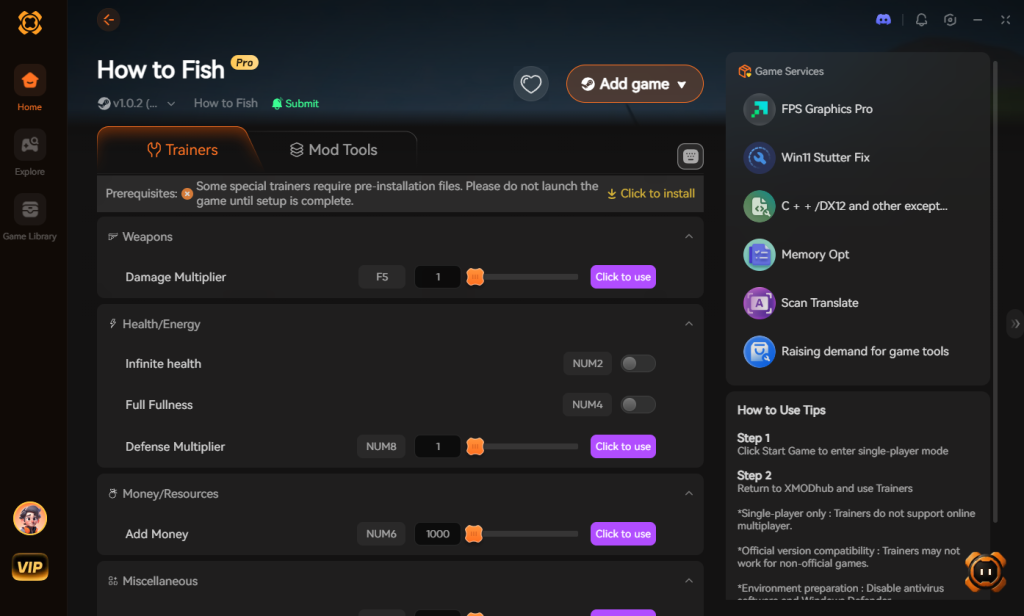
- Click “Play”.
- Toggle your desired tweaks (God Mode, Infinite Money, Fast XP) directly from the clean UI or via hotkeys.
Download How to Fish Trainer Now
8. Troubleshooting: Mods Crashing on Startup
If your game is crashing to a black screen after installing mods or injecting tweaks, check these common culprits:
- Missing Master Files: You installed a mod but forgot to download the required base mod it depends on. (Applicable if native mods are ever released).
- Outdated Mods: Check if the mod or memory tool has been updated for the latest How to Fish patch. If it has not been updated in years, delete it immediately.
- Verify Game Files: Go to Steam, right-click How to Fish > Properties > Installed Files > Verify integrity of game files. This will restore any corrupted data.
- Multiplayer Desync: Ensure you are not trying to use aggressive memory tweaks while connected to an online co-op session, as the host server will reject the modified values and crash your client.
9. Best Performance Optimization & FPS Tweaks
Beyond just adding chaotic fun, memory tweaks are highly sought after for performance gains. How to Fish utilizes heavy physics calculations, especially when you are tossing dynamite into large bodies of water to farm fish. This can cause severe frame drops on lower-end systems.
To combat this, the community has developed specific optimization tweaks that disable unnecessary background rendering. By toggling off dynamic water tessellation and reducing the persistence of underwater particle effects, you can instantly gain a 15-20% FPS boost. These performance mods are essential for players running the game on older hardware or handheld PCs, ensuring that the chaotic gunfights remain buttery smooth even when the screen is filled with explosions and flying aquatic life.
10. Modding Progression & Tweak Synergy (Tier List)
Not all modifications are created equal. If you are using a dynamic memory tool like XMODhub, activating every single cheat at once can ruin the pacing of the game. Instead, we recommend a tiered approach to modding, allowing you to slowly ramp up the chaos as you progress through the islands.
Below is our definitive tier list for the best modifications to prioritize, categorized by their impact on your gameplay loop:
| Tweak / Mod Category | Specific Enhancement | Optimal Use Case | Priority Level |
|---|---|---|---|
| Economy & Grind | Infinite Casino Chips | Bypassing early-game money farming and acquiring top-tier bait immediately. | High |
| Combat & Survival | Boss Fish God Mode | Surviving late-game encounters on the weird islands without losing your haul. | High |
| Quality of Life | Anti-Seagull Protection | Securing your trick-shot catches and removing unnecessary frustration. | Medium |
| Visuals | No Recoil Screen Shake | Stabilizing your vision for sniper rifle quick scopes and precision fishing. | Medium |
| Overhaul | Fist Damage Overdrive | Executing challenge runs or roleplaying as a pure aquatic martial artist. | Low |
11. Frequently Asked Questions (FAQ)
Q: Will installing mods ban me from How to Fish?
A: No. Because How to Fish is primarily a single-player or private co-op experience, developers do not ban players for modifying their own game files. However, you must disable all mods and memory tweaks if you join a public multiplayer lobby, as it can ruin the experience for others and cause network desyncs.
Q: Do mods disable Steam achievements?
A: In many cases, yes. How to Fish detects modified files and will lock achievement progression. You often have to download a separate “Achievement Enabler” mod just to fix this, or use a secure memory tool like XMODhub which bypasses the detection entirely, allowing you to earn achievements while using tweaks.
Q: Can I use these mods on the Steam Deck?
A: Traditional ReShade injectors are difficult to configure on Linux-based systems like SteamOS. However, memory editors and standalone trainers can often be run through Proton compatibility layers, though results may vary based on the current game patch.
Conclusion
Modding How to Fish is a fantastic way to breathe new life into a game you already love. While visual enhancements and massive content overhauls require traditional mod managers, altering your gameplay stats does not have to be a complicated, crash-prone process. The ability to enact revenge on seagulls, land 360 no-scopes with guaranteed multipliers, and gamble endlessly at the fish casino makes the game infinitely more entertaining.
For a seamless, risk-free way to customize your difficulty, bypass the grind, and truly play by your own rules, XMODhub is the superior choice. With dedicated support for How to Fish and over 5,000+ other single-player PC games, XMODhub ensures you spend your time actually playing and shooting fish with assault rifles, rather than troubleshooting broken load orders.

Stop Grinding, Start Enjoying.
Bypass the tedious resource gathering and unlock your full potential instantly.

I am a passionate gamer and writer at XMODhub, dedicated to bringing you the latest gaming news, tips, and insights.
Connect with me:
LinkedIn Profile ↗

 Nancy Miller