
 Catherine Hu
No, Ruins of Dawn does not have a built-in developer console or native text-based cheat codes. While many classic PC games allow players to press the tilde (~) key to open a command prompt and type in god mode or item spawning codes, the developers of Ruins of Dawn have entirely stripped the debug console from the final retail build of the game. This means that no matter what configuration files you edit or what launch parameters you set in Steam or the Epic Games Store, you cannot forcefully enable a native text command interface.
However, this does not mean you are out of luck. The only reliable and safe way to cheat in Ruins of Dawn is by using a third-party memory trainer like XMODhub. Instead of typing out complex, easily misspelled text commands, XMODhub provides a seamless overlay that offers 1-click alternatives. With a single press of a hotkey, you can instantly activate God Mode, Infinite Stamina, and Infinite Items, completely bypassing the need for a developer console while keeping your save files perfectly safe from corruption.
Editor’s Note: This guide was last verified against the newest Ruins of Dawn patch. Whether you are using native engine tools or a dedicated trainer, please back up your save files before modifying game memory to prevent unexpected bugs.
We have all been there. You have just spent hours dying to the same boss in Ruins of Dawn, or maybe you simply do not have the time to grind for Astral Relics and Pristine Dawnstones after a long day of work or school. Modern gaming often demands dozens of hours of repetitive resource gathering just to upgrade your basic gear to a usable level. Single-player games are meant to be enjoyed on your own terms, at your own pace, and without unnecessary frustration. Let us get your character powered up so you can focus on the story, exploration, and the parts of the game you actually enjoy.
You may also like: The Ultimate Ruins of Dawn Cheat Engine Guide (And A Much Easier Alternative)
📋 Table of Contents
- Quick Answer: Does Ruins of Dawn Have Console Commands?
- 1. How to Enable Cheats in Ruins of Dawn
- 2. The Complete List of Ruins of Dawn Cheats
- 3. Item IDs and Spawning Guide
- 4. Do Cheats Disable Achievements?
- 5. Why Native Cheats Can Break Your Save Files
- 6. The Safer Alternative: 1-Click Cheats with XMODhub
- 7. Troubleshooting: Cheats Not Working
- 8. Best Upgrades and Items to Prioritize Using Cheats
- 9. Bypassing the Grind: Traditional Farming vs. Modding
- 10. Frequently Asked Questions (FAQ)
- Conclusion
1. How to Enable Cheats in Ruins of Dawn
Because the development team decided to remove the debug console prior to the official launch, traditional methods of enabling cheats—such as editing the engine.ini files, modifying the game’s executable shortcut properties with -console or -developer tags, or downloading unverified script extenders—will simply not work for Ruins of Dawn. Modern game engines often lock down these features to prevent players from accidentally breaking quest triggers or corrupting their world states, which historically leads to an influx of negative reviews and unnecessary customer support tickets.
Since players cannot type in codes manually, the modern standard for modifying single-player games is through safe, external memory injection. Here is the foolproof, three-step process to download and attach XMODhub to Ruins of Dawn to enable your cheats safely:
Step 1: Download and Install the Engine
Navigate to the official XMODhub website and download the latest version of the desktop client. The software is lightweight and designed to run silently in the background without consuming heavy CPU or RAM resources, ensuring your game maintains a high frame rate. Install the application and create a free account to access the library of over 5,000 supported titles.
Step 2: Locate Ruins of Dawn in the Library
Open the XMODhub application. The software will automatically scan your installed PC games across platforms like Steam, Epic Games, GOG, and Xbox Game Pass. If Ruins of Dawn is installed, it will appear on your main dashboard. Click on the game’s artwork to open the dedicated trainer panel, which will display all available modifications specifically coded for the current patch of the game.
Step 3: Launch and Inject
Click the prominent “Play” button directly inside the XMODhub interface. This action will launch Ruins of Dawn while simultaneously and securely hooking the trainer into the game’s active memory processes. Once you are loaded into your save file and standing in the game world, you can begin toggling features on and off using the designated keyboard hotkeys or by interacting with the overlay via your second monitor or smartphone companion app.
2. The Complete List of Ruins of Dawn Cheats
Because Ruins of Dawn does not feature a developer console, there are no text-based cheat codes to input. You will not find any commands like player.additem or godmode 1 floating around in the game’s source code. However, you can achieve the exact same effects—and often much more powerful ones—using the XMODhub app.
The dedicated development team at XMODhub constantly maps the dynamic memory addresses of Ruins of Dawn to ensure that every feature works flawlessly, even after major game updates. Below is the comprehensive list of Trainer Features available in XMODhub for Ruins of Dawn, detailing exactly how they alter your gameplay experience.
| Feature | Effect | How to Activate |
|---|---|---|
| God Mode (Invincibility) | Completely nullifies all incoming damage from enemies, environmental hazards, and fall damage. Your health bar will never deplete. | Numpad 1 |
| Infinite Health | Automatically and instantly heals you to maximum health the moment you take damage, preventing death in combat. | Numpad 2 |
| Infinite Stamina | Allows you to sprint, dodge, and execute heavy attacks indefinitely without ever needing to pause and catch your breath. | Numpad 3 |
| Unlimited Mana / Energy | Cast your most powerful spells and use special abilities continuously without waiting for your resource pool to regenerate. | Numpad 4 |
| Stealth Mode (Invisibility) | Enemies will completely ignore you. You can walk right past hostile mobs, loot their camps, and leave without triggering combat. | Numpad 5 |
| One-Hit Kills | Multiply your base damage output exponentially. Every strike, regardless of the weapon equipped, will instantly destroy regular enemies and bosses. | Numpad 6 |
| Infinite Items & Consumables | Using an item (like a health potion or crafting material) will not decrease its quantity in your inventory. | Numpad 7 |
| Set Custom Movement Speed | Increase your movement speed by 2x, 5x, or 10x to traverse the massive open world of Ruins of Dawn in seconds. | Numpad 8 |
| Freeze Time / Game Speed | Slow down or completely freeze the game world while you continue moving at normal speed, giving you a massive tactical advantage. | Numpad 9 |
| Add 10,000 Gold / Currency | Instantly injects massive amounts of the primary in-game currency into your wallet, allowing you to buy out every merchant in the game. | CTRL + F1 |
| Max Skill Points | Grants you unlimited skill points, allowing you to unlock every single node on the character progression tree instantly. | CTRL + F2 |
| No Cooldowns | Bypasses the internal timers on your abilities. You can spam your ultimate attacks back-to-back with zero waiting period. | CTRL + F3 |
| Infinite Durability | Your weapons and armor will never degrade, break, or require tedious repair materials ever again. | CTRL + F4 |
| Super Jump | Modifies the gravity physics applied to your character, allowing you to leap over massive walls and reach hidden areas easily. | CTRL + F5 |
| Always Critical Hit | Forces the game’s random number generator to guarantee that every single attack you land is a maximum-damage critical strike. | CTRL + F6 |
3. Item IDs and Spawning Guide
In games that feature built-in developer consoles, players often spend hours scouring wikis and forums for specific hexadecimal codes known as Item IDs. These codes are required to manually spawn weapons, armor, and quest items using complex text strings. However, because Ruins of Dawn lacks native engine tools, manually spawning items via text input is completely impossible. There is simply no interface in the game that can receive, parse, and execute a command like spawn_item 0x00A4F9.
Without a console, players are usually forced to grind for hours to acquire rare drops. XMODhub bypasses this tedious limitation entirely. By utilizing advanced memory scanning and pointer logic, the trainer allows you to instantly maximize your existing inventory or add specific currencies with a single click. This completely eliminates the need to look up complex hex codes, worry about typos, or accidentally crash your game by spawning an item that the current zone cannot render. If you need 999 crafting materials, you simply toggle the “Infinite Items” feature on, drop one material on the ground, and pick it back up to see your stack instantly maxed out.
4. Do Cheats Disable Achievements?
One of the most common concerns for PC gamers is whether modifying their game will ruin their profile on platforms like Steam or the Epic Games Store. In many titles that officially support console commands, the moment you press the tilde key and type a cheat, the game engine permanently flags your save file. This flag communicates with the platform’s API, permanently locking you out of earning any achievements on that specific playthrough. To earn achievements again, you would have to delete your progress and start a completely new game from scratch.
This is where Ruins of Dawn players utilizing XMODhub have a massive advantage. Because XMODhub operates externally by temporarily adjusting values directly in your system’s Random Access Memory (RAM), it completely bypasses the game’s internal cheat-flagging system. The game engine is entirely unaware that you have infinite health or unlimited currency; it simply reads the values as legitimate gameplay data. Therefore, you can use every single cheat available in the trainer, breeze through the hardest difficulties, and still unlock every single Steam or Epic achievement without any issues.
5. Why Native Cheats Can Break Your Save Files
Beyond the achievement lock, native developer tools and memory editors are notoriously unstable. These commands were originally built for developers to test bugs during production, not for everyday gameplay.
When a developer uses a console to teleport across a map or force a quest to complete, they are doing so in an isolated testing environment. When a regular player attempts to do the same thing on their primary save file, the results can be catastrophic. Forcing a quest to complete or bypassing intended story triggers can cause crucial NPCs to completely disappear from your map, rendering the rest of the storyline unplayable. Memory leaks, corrupted graphical assets, and sudden crashes to the desktop are incredibly common when you spawn too many items at once using raw engine commands.
Furthermore, native console commands often bloat your save file size. Every time you spawn an entity that was not meant to exist in that specific cell, the game has to write new data to remember its location. Over time, this leads to immense loading screen times, severe frame rate drops, and eventually, a completely corrupted save file that refuses to load.
6. The Safer Alternative: 1-Click Cheats with XMODhub
If you want the benefits of cheats—like infinite health or skipping the heavy grind—without risking your save files or locking your achievements, you need a dedicated game modification tool.
Instead of typing risky code that might corrupt your game world, the XMODhub app hooks into Ruins of Dawn safely and cleanly. The software acts as a protective buffer between your desires and the game’s fragile code structure.
- Achievement Safe: It bypasses the game’s internal cheat-flagging system. Because no native commands are executed, the platform API remains completely intact and functional.
- Save File Protection: It alters values temporarily in your system’s RAM rather than writing permanent changes to your hard drive. Once you close the game and the trainer, your save file remains uncorrupted and structurally sound.
- One-Click Toggles: No more memorizing long item IDs, researching complex syntax, or worrying about capitalization. Just hit a hotkey to turn God Mode on instantly, and press it again to turn it off when you want a fair challenge.
How to Use XMODhub for Ruins of Dawn
- Download and Launch the free XMODhub desktop app from the official website.

- Search for “Ruins of Dawn” in the library search bar.
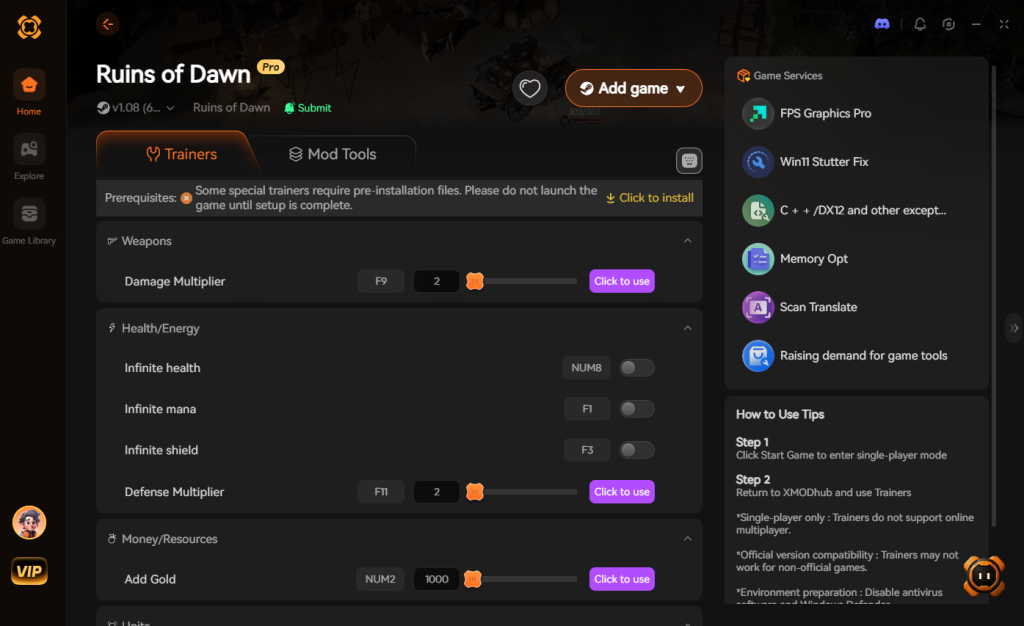
- Click “Play” to launch the game securely.
- Toggle your desired cheats directly from the clean UI or via your customized keyboard hotkeys.
Download Ruins of Dawn Trainer Now
7. Troubleshooting: Cheats Not Working
Even with the most advanced tools, PC gaming can sometimes present technical hurdles. If you find that your Ruins of Dawn cheats are not activating properly, it is rarely a broken code, but rather a system conflict. Here are the most common issues and how to resolve them immediately:
- Game Version Mismatches (Steam Auto-Updates): Ruins of Dawn, like all modern titles, receives frequent patches. When the developers update the game to fix bugs, the memory addresses shift. If your game just updated, the trainer might not hook correctly. XMODhub usually pushes an update within 24 hours of a major game patch. Ensure you are selecting the correct game version in the XMODhub UI before clicking Play.
- Antivirus False Positives: Because trainers modify the memory of another active program (which is exactly how malware operates, albeit for malicious reasons), overzealous security software like Windows Defender, Norton, or Bitdefender will often block the injection process silently. To fix this, you must add the XMODhub installation folder to your antivirus exclusion/whitelist settings.
- Lack of Administrator Privileges: Windows operating systems strictly control which programs can interact with others. If Ruins of Dawn is running with elevated permissions but your trainer is not, the cheats will fail to activate. Always right-click the XMODhub shortcut and select “Run as Administrator” to ensure it has the necessary permissions to read and write to the game’s memory structure.
8. Best Upgrades and Items to Prioritize Using Cheats
When you use the XMODhub trainer to grant yourself infinite skill points or unlimited currency, the sheer volume of choices in Ruins of Dawn can be overwhelming. If you want to optimize your character for the endgame without completely breaking the natural flow of combat, focusing on specific progression nodes is highly recommended.
By strategically unlocking early-game utilities and core defense mechanisms, you can enhance your exploration experience while still keeping boss fights somewhat engaging. Here are the top upgrades and abilities you should prioritize once you bypass the resource grind:
| Upgrade Classification | Specific Ability / Node | Optimal Use Case | Priority Level |
|---|---|---|---|
| Mobility | Phantom Dash T3 | Rapidly escaping dense enemy AoE attacks and repositioning during chaotic boss fights. | High |
| Defense | Aegis Shield Capacity | Absorbing stray projectile hits while exploring high-level zones earlier than intended. | High |
| Offense | Dawnblade Mastery | Maximizing your base melee DPS to quickly clear out lower-level farming camps and weak mobs. | Medium |
| Utility | Expanded Inventory Slots | Carrying more diverse weapon types and quest items without needing to constantly return to town. | High |
| Economy | Relic Hunter’s Eye | Passively increasing the drop rate of rare crafting materials if you prefer not to use the ‘Infinite Items’ cheat. | Low |
9. Bypassing the Grind: Traditional Farming vs. Modding
In a standard, unmodded playthrough, acquiring enough Astral Relics and Pristine Dawnstones to reach the maximum level requires running the same procedurally generated dungeons repeatedly. Players often report spending upwards of 30 to 40 hours just mining resource nodes and waiting for enemy camps to respawn. While some purists enjoy this repetitive loop, many adults with limited gaming time find it exhausting and disrespectful of their schedule.
Modding your game with a memory trainer allows you to skip this artificial padding entirely. By injecting the exact amount of currency or crafting materials you need, you instantly reclaim dozens of hours. This lets you focus entirely on the game’s rich lore, intricate side quests, and challenging boss mechanics without ever feeling under-leveled or under-equipped. You get to experience the premium content the developers worked so hard to create, rather than being stuck hitting rocks with a pickaxe for hours on end.
10. Frequently Asked Questions (FAQ)
Q: Can I use these cheats on PlayStation or Xbox?
A: No. Modifying game memory or accessing developer consoles for Ruins of Dawn is strictly limited to the PC version. Console ecosystems are heavily encrypted and closed off by Sony and Microsoft, making third-party trainers impossible to run natively on those devices.
Q: Is there a penalty for using cheats in single-player?
A: There is no account ban or official penalty for cheating in a single-player environment. The only downsides are the potential for corrupted save files and disabled achievements, which can be entirely avoided by using a secure trainer like XMODhub instead of attempting risky manual memory edits.
Q: Will running XMODhub cause performance drops or lag in Ruins of Dawn?
A: Not at all. The software is optimized to have a near-zero footprint on your CPU and RAM. Because it simply freezes specific memory addresses rather than running complex background scripts, your frame rates and loading times in Ruins of Dawn will remain completely unaffected.
Q: Do I need an active internet connection to use these cheats?
A: While you need an internet connection to initially download the trainer and authenticate your account, XMODhub offers an offline mode. Once the specific trainer module for Ruins of Dawn is downloaded to your local machine, you can play and cheat entirely offline, perfect for traveling or dealing with internet outages.
Conclusion
Whether Ruins of Dawn provides a built-in console or not, taking control of your single-player experience is easier than ever. While tweaking raw engine code can be a fun technical experiment, it comes with significant risks to your save files and achievements. For a flawless, risk-free experience, using a dedicated modification tool is always the smarter choice.
With secure support for over 5,000+ single-player PC games, you can easily customize your gameplay, skip the tedious grind, and play exactly the way you want. Your time is valuable; spend it enjoying the best parts of the game rather than endlessly farming for basic resources.

Stop Grinding, Start Enjoying.
Bypass the tedious resource gathering and unlock your full potential instantly.

I am a passionate gamer and writer at XMODhub, dedicated to bringing you the latest gaming news, tips, and insights.
Connect with me:
LinkedIn Profile ↗
 Nancy Miller