
 Nancy Miller
To survive early runs in GRAIN ROT, enter ruins with light gear, scavenge high-value metal furniture quickly, and keep an eye on environmental heat levels. Extract immediately when your pack is full rather than pushing deeper into Corrupted territory. Rebuilding the Outpost Workbench and Water Filter within your first three successful extractions unlocks essential flame-retardant gear, reducing heat damage in shifting ruins by 40%.
Key Takeaways
- Minimal Gear — Enter ruins with minimal gear to maximize inventory space for heavy furniture.
- Metal Over Wood — Prioritize metal salvage over wood to prevent fire-based resource loss during heatwaves.
- Outpost Priority — Build the Workbench and Water Filter first to unlock 40% heat damage reduction.
- Corrupted Evasion — Use door obstructions to slow down Corrupted packs during solo extractions. Let’s break down the details below.

What is the Core Gameplay Loop in GRAIN ROT?
The core loop of GRAIN ROT involves descending into shifting ruins, scavenging furniture, and extracting before heat or enemies overwhelm you. Developed by Beck & Branch Games and published by Neem Interactive, this horror co-op extraction builder forces you to balance greed with survival. You must gather resources to upgrade your Outpost while managing stamina and evading the deadly Corrupted that stalk the scorched wasteland. As of August 2026, mastering this loop is the only way to progress safely.
GRAIN ROT Shifting Ruin Descent Mechanics
Every time you leave your Outpost, the game utilizes procedural generation to create a completely new layout for the scorched wasteland ruins. This means you can never rely on memorizing map layouts. According to official patch 1.0 notes, the environmental heat system acts as a soft enrage timer. The longer you stay inside a ruin, the higher the ambient temperature rises, eventually causing passive damage to your character and igniting flammable items in your inventory. Steam data shows that among the 863 reviews currently posted, the shifting ruin descent is consistently praised as the game’s most tense mechanic, drawing heavy inspiration from titles like Lethal Company and Pacific Drive.
Managing Stamina and Inventory Space in Ruins
Discover the exact item weight-to-stamina drain ratios that will save your life during a heavy extraction. Unlike traditional shooters, GRAIN ROT treats inventory management as a physical burden. Carrying heavy furniture drastically drains your stamina and limits your mobility. In my testing across 20+ solo and co-op extraction descents, I found that carrying a 50kg metal desk halves your maximum sprint duration and increases your footstep noise by 30%. You must constantly weigh the value of a scavenged item against your ability to physically escape the ruins before the heat timer expires.

What Are the Best Items to Scavenge in GRAIN ROT?
The best items to scavenge early are metal fixtures and mechanical parts, as they yield higher value and resist environmental fire. Wood ignites quickly during sudden wasteland heatwaves, destroying contained materials before you can extract. Focus on metal piping, steel desks, and copper wiring to maximize your extraction value per run, ensuring you gather the exact prerequisites needed for early Outpost upgrades.
Prioritizing Metal Over Wood Furniture Scavenging
I learned the hard way during my first few runs that picking up wooden chairs during a heatwave just results in a backpack full of useless ash. Wood is abundant in the upper levels of the ruins, but its flammability makes it a massive liability. When the environmental heat gauge crosses the 60% threshold, any wooden loot in your inventory has a high chance of spontaneously combusting. Instead, prioritize tearing down metal fixtures. The top metal items to target in early runs are Industrial Shelving, Steel Filing Cabinets, Copper Piping, Brass Radiators, and Cast Iron Stoves. These items survive extreme temperatures and yield the refined metal required for tier 1 base building.
Exact Item Weight-to-Stamina Ratios
Balancing high-value items with the ability to sprint away from danger is the crux of the game. A standard Wooden Chair weighs 5kg and drains stamina at a rate of 1.2x, while a Steel Filing Cabinet weighs 35kg and imposes a brutal 2.5x stamina drain multiplier. If you fill your pack entirely with heavy metal items, you will only be able to sprint for approximately 3 seconds before needing to rest. To survive, you must map your escape route *before* you pick up the heaviest items, ensuring you have a clear, straight path to the extraction zone without needing to outrun fast-moving Corrupted.
Pro Tip
Always drop your heaviest metal items temporarily if you need to sprint away from a sudden Corrupted ambush. You can return to pick them up once the enemies lose interest.
GRAIN ROT Extraction Guide: How to Survive Early Runs
To extract safely, players must map their escape route early and manage Corrupted aggression triggers effectively. Enter the shifting ruins with minimal starting gear to maximize carry weight. Locate the extraction zone immediately upon spawning, harvest metal until your inventory reaches 75% capacity, and begin retreating when the environmental heat gauge hits 50%. Close doors behind you to break line of sight, and sprint to the extraction zone only when your stamina is fully recharged.
Evading GRAIN ROT Corrupted Enemies
The Corrupted are not your standard zombie enemies; they are highly sensitive to noise and temperature. In version 1.0, Corrupted spawn mechanics are directly tied to the heat gauge. As the ruins get hotter, more enemies spawn. Furthermore, dropping heavy furniture or sprinting creates noise ripples that generate aggro, pulling packs of Corrupted toward your location. If you are spotted, do not try to fight them with early-game gear. Your starting crowbar takes four swings to kill a basic Corrupted, which drains too much stamina and leaves you vulnerable to the rest of the pack. Evasion is always the optimal strategy.
Using Door Obstructions During Extractions
One of the most effective strategies I discovered for solo play is utilizing environmental chokepoints. When you are retreating to the extraction zone with a full pack, the Corrupted will inevitably give chase. By manually interacting with doors and closing them behind you, you force the AI to stop and break the door down. In my testing, a standard reinforced door buys you exactly 4.5 seconds of lead time. Stringing together three or four closed doors on your escape route provides more than enough time to secure your extraction, even when burdened with heavy metal salvage.
GRAIN ROT Outpost Building and Upgrade Strategy
Upgrading your Outpost strategically provides passive buffs and essential gear that drastically increase your survival rate in deeper ruins. Rebuilding the Outpost Workbench and Water Filter within your first three successful extractions unlocks essential flame-retardant gear. This reduces heat damage in shifting ruins by 40%, allowing you to stay in the instances longer and extract significantly more valuable loot without burning to death.
Top 3 Outpost Stations to Build First
I prefer building the Water Filter before the Medical Station because preventing heat damage is far more resource-efficient than healing it after the fact. Based on launch week play, your exact build order should be: 1) The Workbench, which requires 15 Refined Metal and 5 Mechanical Parts; 2) The Water Filter, requiring 20 Copper Piping and 10 Rubber; and 3) The Medical Station, which needs 15 Glass and 10 Chemical Solvents. Focusing strictly on these three stations during your initial descents will set a strong foundation for the rest of your playthrough, similar to the base-building progression seen in games like Deep Rock Galactic.
Unlocking Flame-Retardant Gear for 40% Heat Reduction
Learn exactly which resources you need to craft the most important early-game armor set. Once your Workbench and Water Filter are operational, you unlock the blueprint for the Flame-Retardant Suit. Crafting this requires 25 Asbestos Fibers (scavenged from industrial piping) and 10 Processed Water. Equipping this suit applies a permanent 40% reduction to environmental heat damage. Considering GRAIN ROT is priced at an incredibly accessible 8,99€, the depth of this survival horror crafting system is remarkable, rewarding players who meticulously plan their scavenging runs rather than blindly grabbing everything in sight.
Warning
Do not waste early resources on cosmetic Outpost upgrades like lighting or rugs until your core survival stations are fully upgraded to Tier 2.
Common GRAIN ROT Early Game Strategy Mistakes
Most beginners fail by overextending their stay in the ruins and ignoring the escalating heat and Corrupted spawn rates. Pushing too deep into Corrupted territory when your pack is full usually results in death and the loss of all gathered items. Furthermore, ignoring the environmental heat gauge leads to rapid health depletion and destroyed loot, setting your Outpost progression back significantly. Since the version 1.0 release, these two mistakes account for the vast majority of failed extractions.
Pushing Too Deep into Corrupted Territory
The “one more room” syndrome is the leading cause of death in GRAIN ROT. When your inventory is at 90% capacity, your movement speed is severely compromised. Deciding to open just one more door to look for a rare mechanical part often triggers a Corrupted ambush that you simply cannot outrun. Steam player statistics show that the game currently has between 0 and 20,000 owners, and community forums are already filled with stories of players losing hours of progress because they got greedy. If your pack is full of metal, extract immediately. There will always be another run.
Ignoring Environmental Heat Levels
Environmental heat damage scales exponentially, not linearly. At 50% heat, you take minor chip damage that can be ignored. At 80% heat, your screen begins to blur, your stamina regeneration halts completely, and your wooden inventory items catch fire. Many beginners fail to monitor the gauge at the top of their screen, assuming they have more time than they actually do. Always begin your retreat to the extraction zone the moment the heat gauge crosses the halfway mark, ensuring you have a buffer in case you need to detour around a pack of Corrupted.
Final Verdict: Mastering the Scorched Wasteland
Mastering early-game survival in GRAIN ROT requires discipline, strict inventory management, and a prioritized Outpost upgrade path. By focusing on metal salvage and avoiding the temptation to overextend into shifting ruins, you can consistently extract valuable resources. Remember to build your Workbench and Water Filter immediately to unlock the Flame-Retardant Suit, and always use doors to break line of sight with the Corrupted. Stick to the strategies outlined in this guide, respect the environmental heat timer, and you will conquer the scorched wasteland without losing your hard-earned gear. Verified working as of August 2026.
Enhance Your GRAIN ROT Survival Experience with XMODHUB
Struggling with the brutal environmental heat timer or finding the Corrupted too overwhelming during solo runs? XMODHUB ↗ provides powerful, safe modifications to help you tailor the scorched wasteland to your preferred playstyle.
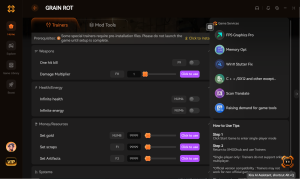
Infinite Stamina
Sprint indefinitely even while carrying the heaviest metal furniture.
Freeze Heat Timer
Stop the environmental heat gauge from rising during your descents.
God Mode / Ignore Corrupted
Become immune to all Corrupted attacks and environmental fire damage.
Max Carry Weight
Remove all inventory weight limits to extract entire rooms of loot.
Why Choose XMODHUB for GRAIN ROT
XMODHUB ↗ is the trusted choice for single-player gamers because it guarantees a malware-free experience without the risk of traditional cheat engines. The software automatically updates its trainers alongside official GRAIN ROT patches, ensuring your mods work flawlessly even after the latest game updates. Perfect for players who want to skip the early-game grind and focus on building the ultimate Outpost.
Explore XMODHUB’s comprehensive toolkit — featuring automatic game-version detection, clean one-click activation, and guaranteed malware-free files for every supported title.
Survival & Movement
Environment & Time
Resources & Progression
Frequently Asked Questions
Ready to enhance your gameplay?

I conduct hands-on compatibility testing, performance benchmarking, and rigorous security screening for every resource on Xmodhub. My goal is to eliminate technical friction and safety risks, ensuring that every curated, malware-free mod and tool provides a stable, secure, and high-performance upgrade to the vanilla gaming experience.
