
 Catherine Hu
How do you cheat in Tom Clancy’s Ghost Recon® Breakpoint? To cheat in Tom Clancy’s Ghost Recon® Breakpoint, you can manually attach Cheat Engine to the game’s executable and scan for changing numeric values like your total Skell Credits, current ammunition count, or the exact Float value of your stamina gauge. However, because game updates frequently break Cheat Engine tables (.CT files), the safest and easiest alternative is using an auto-updating mod manager like XMODhub, which provides 1-click cheats without requiring any memory scanning or complex hex editing.
[Editor’s Note] Look, I get it. We all start Tom Clancy’s Ghost Recon® Breakpoint thinking we’re going to play it completely legit. But after dying to Cole D. Walker or a Level 250 Behemoth Drone for the 15th time, or spending hours grinding for Advanced Weapon Parts and Skell Credits, the fun stops. I’ve been messing with Cheat Engine for years, and trying to isolate the exact memory values for this game’s current patch almost drove me insane. Today, I’m going to show you how to manually hack the values if you want the technical challenge—but I’ll also share the 1-click shortcut I actually use to save my sanity.
You may also like: Tom Clancy’s Ghost Recon® Breakpoint Cheats & Console Commands: Full List and How to Enable (2026)
📋 Table of Contents
- Quick Answer
- 1. How to Use Cheat Engine for Tom Clancy’s Ghost Recon® Breakpoint (The Manual Way)
- 2. Common CE Errors: Pointers Breaking & Not Attaching
- 3. The Better Alternative: 1-Click Cheats with XMODhub
- 4. Where to Find Safe Tom Clancy’s Ghost Recon® Breakpoint Cheat Tables (.CT)?
- 5. Essential Features in a Tom Clancy’s Ghost Recon® Breakpoint Cheat Table (.CT)
- 6. Advanced Gear Score Manipulation & Inventory Editing
- 7. Frequently Asked Questions (FAQ)
- Conclusion: Work Smarter, Not Harder
1. How to Use Cheat Engine for Tom Clancy’s Ghost Recon® Breakpoint (The Manual Way)
If you want to go the old-school route and find the memory addresses yourself, here is the basic “First Scan/Next Scan” method tailored specifically for this tactical shooter.
Before you even begin, you must understand that Tom Clancy’s Ghost Recon® Breakpoint utilizes a persistent online connection and a kernel-level anti-cheat system (BattlEye) by default. To use Cheat Engine safely and effectively, you must launch the game with BattlEye disabled (usually by adding launch arguments like -belaunch -be in your Ubisoft Connect or Steam launcher properties) and play strictly in offline or single-player mode. Attempting to attach Cheat Engine while connected to the official multiplayer servers will result in an immediate crash or a permanent account ban. Once you have properly isolated your game instance, you can proceed with scanning for specific in-game values.
Here is a highly detailed, step-by-step guide on how to manually isolate and modify your Skell Credits and Skill Points in Tom Clancy’s Ghost Recon® Breakpoint:
- Attach Cheat Engine to the Correct Executable: Launch Tom Clancy’s Ghost Recon® Breakpoint and wait until you have loaded into the Archipelago of Aurora, specifically at a safe zone like Erewhon. Alt-tab out of the game, open Cheat Engine, and click the glowing PC icon in the top-left corner. Look through your process list and select either
GRB.exeorGRB_vulkan.exedepending on which rendering API you chose at launch. Click “Open” to attach the memory editor to your active game session. - Perform the First Scan for Skell Credits: Open your in-game menu and navigate to your inventory to check your exact number of Skell Credits. Let us assume you have exactly 14,520 Skell Credits. In Cheat Engine, ensure the “Value Type” is set to “4 Bytes” (which is the standard data type for standard integer currencies in the AnvilNext 2.0 engine). Type
14520into the “Value” input box and click “First Scan”. Cheat Engine will search through the gigabytes of allocated RAM and likely return hundreds, if not thousands, of addresses that currently share that exact number. - Alter the In-Game Value: You now need to force the game to change that specific memory value so you can filter out the junk addresses. Tab back into Tom Clancy’s Ghost Recon® Breakpoint. Walk over to Maria’s shop in Erewhon and either purchase a cheap consumable (like a syringe or a basic weapon attachment) or sell a piece of low-tier gear you looted from a random Wolf soldier. Check your new Skell Credit balance. Let us say it has now dropped to 14,200.
- Execute the Next Scan: Tab back into Cheat Engine. Do not click “New Scan.” Instead, replace the old number in the “Value” box with your new balance of
14200. Click “Next Scan”. This tells Cheat Engine to look only at the addresses from the previous list and find the ones that have updated to this new number. Your list of addresses in the left pane should now drop to just one or two static addresses. - Modify and Freeze the Memory Address: Double-click the remaining addresses in the left pane to bring them down to the active code list at the bottom of the Cheat Engine window. Double-click the number under the “Value” column and change it to
9999999. Hit Enter. Finally, click the small checkbox next to the address to “Freeze” it. This forces the memory address to constantly overwrite itself with your new value. Tab back into Tom Clancy’s Ghost Recon® Breakpoint, back out of Maria’s shop, and re-enter it. You should now see your Skell Credits maxed out, allowing you to buy every single blueprint, vehicle, and cosmetic item available in the store without having to grind faction missions.
| In-Game Statistic / Resource | Optimal CE Value Type | Scan Difficulty | Notes / Tips for Scanning in Tom Clancy’s Ghost Recon® Breakpoint |
|---|---|---|---|
| Skell Credits | 4 Bytes | Easy | Changes easily by buying/selling at Maria’s shop in Erewhon. |
| Skill Points | 4 Bytes | Easy | Scan before and after unlocking a node in the skill tree. |
| Stamina Gauge | Float | Hard | Requires “Unknown Initial Value” scan, followed by “Decreased Value” while sprinting away from Wolves. |
| Current Ammunition | 4 Bytes | Medium | Scan clip size, shoot one bullet, scan again. Disable automatic reloads. |
| Player Health | Float | Hard | Nomad’s injury system complicates this. Scan for “Decreased Value” after taking fall damage or getting shot by drones. |
2. Common CE Errors: Pointers Breaking & Not Attaching
If you are pulling your hair out because CE isn’t working for Tom Clancy’s Ghost Recon® Breakpoint, you aren’t alone. Here is what’s probably happening:
Error: “Cannot attach to process” / Game Crashes:
Tom Clancy’s Ghost Recon® Breakpoint might be using specific engine protections. Modern AAA tactical shooters are heavily fortified against memory injection, primarily through kernel-level anti-cheat software like BattlEye, which actively monitors the game’s executable for unauthorized hooks. If you attempt to attach a standard instance of Cheat Engine to the game while BattlEye is running, the anti-cheat service will immediately terminate the game process, resulting in a sudden crash to your desktop. To bypass this, you must launch the game with the anti-cheat disabled. Furthermore, even with the anti-cheat off, the game’s engine may employ anti-debugging techniques. You will often need to dive into Cheat Engine’s settings, navigate to the “Debugger Options,” and change the debugger method from the default Windows debugger to the “VEH Debugger” (Vectored Exception Handling). The VEH Debugger hooks into the game at a different level, catching memory exceptions before the game’s internal anti-tamper mechanisms can flag your software, drastically reducing the chances of random crashes when you freeze a value.
The Pointer Problem:
You finally found the exact memory address for your stamina gauge in Tom Clancy’s Ghost Recon® Breakpoint. You freeze it, enjoy infinite sprinting across the snowy peaks of Aurora, and feel like an absolute tactical god. Then, you fast-travel to a different bivouac, and suddenly your stamina drains again, or worse, your game completely freezes. This is due to dynamic memory allocation. The AnvilNext 2.0 engine, which powers Tom Clancy’s Ghost Recon® Breakpoint, does not keep variables in the same physical RAM location forever. Every time you hit a loading screen, fast travel, or trigger a major cutscene, the engine dumps the old memory blocks and reallocates everything to optimize performance. The address you found earlier is now pointing to a completely random piece of data—perhaps the texture of a rock or the AI pathing of a hostile drone. To solve this manually, you have to find the “Pointer” (the master address that tells the game where the variable currently lives). Finding multi-level pointers requires writing complex Assembly (ASM) scripts, injecting custom code, and spending hours debugging memory offsets. For the average gamer who just wants to relax after work, fighting with Assembly scripts is an absolute nightmare that ruins the gaming experience.
3. The Better Alternative: 1-Click Cheats with XMODhub
Here is the dirty little secret of the modding community: Nobody actually wants to spend two hours updating Cheat Engine tables every time a patch drops. The moment Tom Clancy’s Ghost Recon® Breakpoint updates on Steam, your hard-earned memory addresses shift, and your game crashes to the desktop.
| Feature / Metric | Manual Cheat Engine (.CT) | XMODhub Auto-Trainer |
|---|---|---|
| Setup Time | 30 – 60 Minutes (Requires finding pointers) | < 1 Minute (Instant Injection) |
| Update Reliability | Poor (Breaks permanently on every game patch) | Excellent (Cloud-based auto-updates) |
| Crash Risk | High (Freezing wrong addresses causes fatal errors) | Zero (Professionally coded memory hooks) |
| Ease of Use | Complex (Requires understanding Hex, Floats, Bytes) | Seamless (Simple UI toggles and hotkeys) |
| Feature Access | Limited to basic numbers (Ammo, Credits) | Advanced (God Mode, Invisibility, Teleportation) |
Why XMODhub beats manual CE for Tom Clancy’s Ghost Recon® Breakpoint:
- Zero Hex Codes Needed: Just toggle a beautiful switch on our UI. You never have to look at a wall of hexadecimal garbage again.
- Auto-Updating Cloud Tech: When the game patches, XMODhub updates its trainer automatically. No more broken scripts. Our team monitors Ubisoft updates and pushes real-time fixes to the client.
- Premium Features Instant Access:
- Undetected God Mode / Infinite Health (Completely bypasses Nomad’s annoying injury mechanics).
- Unlimited Advanced Weapon Parts and High-End Gear Components.
- Super Speed & Custom Jump Height for traversing the massive map of Aurora instantly.
- One-Hit Kills for annoying bosses, allowing you to instantly destroy heavily armored Behemoth drones and Walker’s elite Wolves.
How to Use XMODhub for Tom Clancy’s Ghost Recon® Breakpoint?
- Download and Launch the free XMODhub desktop app.

- Search for “Tom Clancy’s Ghost Recon® Breakpoint” in the library.
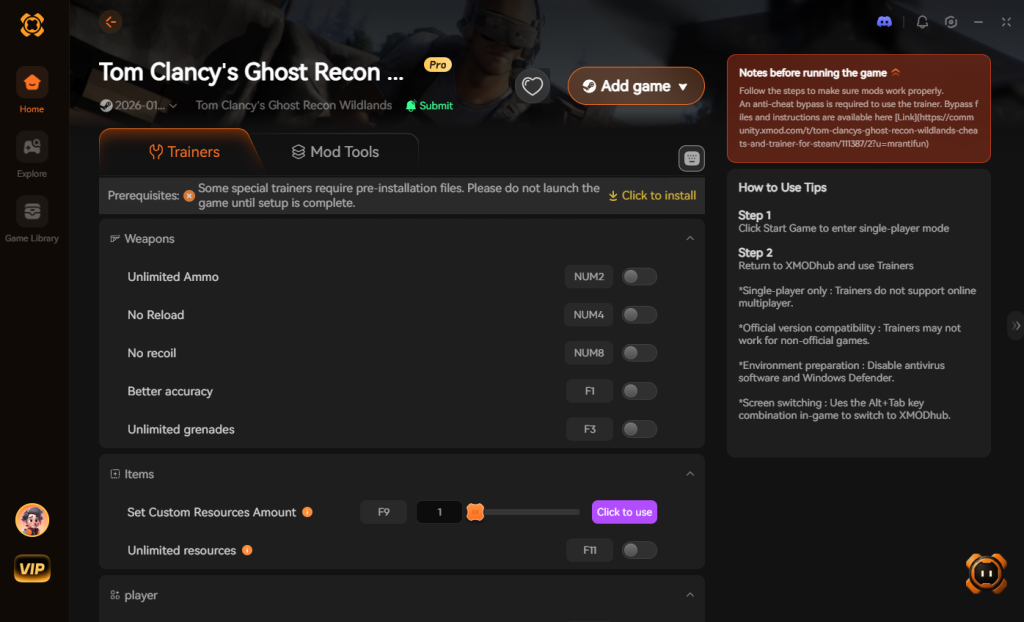
- Click “Play” to auto-hook the game safely.
- Toggle your desired cheats directly from the clean UI or via hotkeys.
Download Tom Clancy’s Ghost Recon® Breakpoint Trainer Now
4. Where to Find Safe Tom Clancy’s Ghost Recon® Breakpoint Cheat Tables (.CT)?
If you absolutely insist on using CE, you’ll want a pre-made Cheat Table (.CT file). However, navigating the internet to find a functional Tom Clancy’s Ghost Recon® Breakpoint cheat engine table is a massive cybersecurity minefield.
When you search for these files on popular modding boards, obscure forums, or unverified Discord servers, you are taking a massive gamble with your PC’s security. Cheat Engine utilizes a built-in Lua scripting engine to execute complex memory modifications. While this is a powerful tool for legitimate modders, it is also a massive vulnerability. Malicious actors frequently upload fake .CT files that contain hidden, obfuscated Lua scripts designed to execute arbitrary code on your machine the moment you click the “enable” box in Cheat Engine.
These malicious scripts can silently download and install remote access trojans (RATs), keyloggers, or stealthy crypto-miners that hijack your GPU hardware in the background, severely degrading your PC’s performance and compromising your personal data. Because Cheat Engine often requires administrative privileges to hook into games, you are essentially handing over full control of your operating system to an anonymous user on a forum. Furthermore, even if the file is not malicious, 90% of the tables you find online are outdated. A table made for the 2020 version of Tom Clancy’s Ghost Recon® Breakpoint will instantly crash the 2026 version of the game.
This is exactly why a verified, professionally developed application like XMODhub is the safer, smarter choice. Our developers rigorously test and digitally sign every single trainer, ensuring 100% clean code with zero malware risk, protecting both your hardware and your privacy.
5. Essential Features in a Tom Clancy’s Ghost Recon® Breakpoint Cheat Table (.CT)
If you manage to secure a safe and updated Tom Clancy’s Ghost Recon® Breakpoint cheat engine table, you need to know exactly what scripts to look for. A basic table that only edits Skell Credits is practically useless in the endgame. The most highly sought-after .CT files are built by veteran reverse-engineers who write custom Assembly injections to manipulate the game’s core logic.
When evaluating a cheat table for your playthrough, ensure it contains features that actively respect the game’s dual-mode system (Immersive Mode vs. Regular Gear Score Mode). Here is a breakdown of the most valuable scripts you should look for in a premium cheat table, and how they impact your tactical experience:
| Cheat Table Feature | In-Game Impact & Functionality | Risk of Game Crash | XMODhub Alternative |
|---|---|---|---|
| Drone Invisibility | Prevents Azraël patrols and Behemoth optical sensors from detecting Nomad’s heat signature. | Medium (Requires complex AI logic hooks) | Ghost Mode / Undetected |
| Infinite Gadget Usage | Keeps your sync-shot drones, C4, and EMP grenades fully stocked without crafting. | Low (Simple Float/Byte value freeze) | Unlimited Consumables |
| Instant Blueprint Unlocks | Bypasses the need to raid heavily fortified Wolf camps to find specific weapon attachments. | High (Can corrupt save files if synced improperly) | Unlock All Blueprints |
| No Reload / Infinite Ammo | Removes the animation for reloading and bypasses the need to scavenge for specific caliber bullets. | Low (Basic memory freeze) | Bottomless Clip Toggle |
| No Recoil / No Spread | Forces the crosshair to remain perfectly static, turning LMGs into laser pointers. | Medium (Modifies dynamic weapon physics) | Perfect Accuracy Mode |
6. Advanced Gear Score Manipulation & Inventory Editing
One of the most frequent reasons players search for a Tom Clancy’s Ghost Recon® Breakpoint cheat engine table is to bypass the controversial “looter-shooter” mechanics introduced at launch. If you are playing in Regular Mode (where weapons and armor have a Gear Score attached to them), grinding to the maximum Level 250 (or 300 in Raids) can take dozens of hours of repetitive faction missions.
Manually editing your Gear Score via Cheat Engine is exceptionally difficult because the game calculates your overall Gear Score dynamically based on the average of your currently equipped items. You cannot simply scan for your total Gear Score and freeze it. Instead, you must isolate the memory addresses for the individual stats of a specific weapon in your inventory.
How to Isolate Weapon Stats (Expert Level)
To modify weapon damage or individual gear levels, you must drop an item on the ground, scan its stats, pick it up, equip it, and scan again using “Changed Value” or “Unchanged Value” parameters. Because the AnvilNext 2.0 engine heavily encrypts localized item IDs to prevent save-scumming, freezing the wrong weapon pointer will instantly cause a fatal exception error, sending you straight to your desktop.
Furthermore, if you attempt to push a weapon’s individual Gear Score beyond the game’s hard-coded limit of 300, the server sync (even in offline-emulated modes) will often recognize the anomaly and delete the item from your inventory entirely upon your next login. This is why attempting to edit localized inventory arrays manually is generally discouraged unless you have a deep understanding of hexadecimal structures. For players who simply want to dominate the endgame content without the headache of corrupted save files, utilizing a trusted memory injector that handles these array bypasses automatically is highly recommended.
7. Frequently Asked Questions (FAQ)
| Platform / Storefront | Cheat Engine Compatibility | XMODhub Compatibility | Ban Risk (Singleplayer) |
|---|---|---|---|
| Steam | Yes (Requires manual bypass) | Yes (1-Click Native Support) | Low |
| Ubisoft Connect | Yes (Requires manual bypass) | Yes (1-Click Native Support) | Low |
| Epic Games Store | Yes (Requires manual bypass) | Yes (1-Click Native Support) | Low |
| Xbox Game Pass (PC) | No (Blocked by UWP Encryption) | Yes (Custom UWP Bypass) | Low |
Q: Can I use Cheat Engine on the Xbox Game Pass version of Tom Clancy’s Ghost Recon® Breakpoint?
A: Usually, no. Game Pass uses strict UWP file encryption that actively blocks Cheat Engine from accessing the memory space of the executable. However, XMODhub is specifically engineered to bypass these restrictions seamlessly, granting you full access to cheats regardless of where you purchased the game.
Q: Is it illegal to use Cheat Engine?
A: Modifying data on your own PC for a single-player experience like Tom Clancy’s Ghost Recon® Breakpoint is completely legal. There are no laws against altering code running locally on your hardware. Just never bring memory editors into a multiplayer server or PvP modes like Ghost War, as that violates the Terms of Service and will result in an immediate account ban.
Q: Will using Cheat Engine drop my FPS or slow down my PC?
A: It depends heavily on how you are using it. When you perform a “First Scan” for an “Unknown Initial Value” (like trying to find your stamina gauge or health bar), Cheat Engine forces your CPU to scan gigabytes of active RAM simultaneously. This massive data dump will consume a significant amount of CPU threads and memory bandwidth, causing severe stuttering and massive FPS drops in Tom Clancy’s Ghost Recon® Breakpoint while the scan is active. However, once you have isolated the specific address and simply checked the “Freeze” box, the performance impact drops to virtually zero. Active freezing only requires a tiny background loop that writes a few bytes of data every millisecond, which modern processors can handle without breaking a sweat.
Conclusion: Work Smarter, Not Harder
Learning how memory manipulation works in Cheat Engine is a cool flex. Understanding the difference between 4 Byte integers and Float values, and successfully bypassing anti-cheat protections manually, can make you feel like a master hacker. But let’s be real—when you come home from a long day at work, you just want to spawn in that legendary Zastava M93 sniper rifle, max out your gear score, and wreck some hostile Wolf encampments without taking a computer science class.
Why spend 45 minutes digging through hex codes, writing assembly scripts, and crashing your game over and over when you can click one button and instantly get God Mode in Tom Clancy’s Ghost Recon® Breakpoint? And the best part? XMODhub supports over 5,000+ PC games. Once you install the app, you can ditch the complicated cheat tables for good and focus entirely on enjoying your games on your own terms.
Stop Grinding, Start Enjoying.
Bypass the tedious resource gathering and unlock your full potential instantly.

I am a passionate gamer and writer at XMODhub, dedicated to bringing you the latest gaming news, tips, and insights.
Connect with me:
LinkedIn Profile ↗
 Nancy Miller