Catherine Hu
Are you looking at your sprawling pirate haven in Corsair Cove and realizing you have completely run out of flat beach space? You try to place a rum distillery or a cannon foundry on the rising terrain behind your port, only to be met with the dreaded “Invalid Placement” red footprint. Expanding upward into the rocky elevations of Devil’s Basin or Ship Graveyard is one of the most frustrating progression walls for aspiring pirate captains.
Editor’s Note: When I first reached the mid-game production chains requiring flintlock pistols and advanced rigging, my starter island was completely choked. I spent hours wrestling with the terrain grid, trying to force buildings onto slopes. The secret isn’t forcing flat buildings onto steep angles; it is understanding how Corsair Cove handles terrain manipulation and specialized vertical foundations.
TL;DR: The Short Answer
To successfully build on cliffs and mountains in Corsair Cove, you must unlock and utilize specific terrain-altering technologies and structural foundations. Here is the exact process:
- Unlock the Tech: Advance your pirate Tech Tree to unlock “Terraced Engineering” and “Cliffside Scaffolding.”
- Flatten Terrain: Use the Terrace Tool (found in the landscaping menu) to carve flat, stepped plateaus into mountain slopes.
- Use Scaffolding: For steep cliffs where terracing is impossible, snap Wooden Scaffolding Foundations against the rock face to create artificial flat surfaces.
- Connect Verticality: Connect these elevated zones using Pulley Elevators and Switchback Ramps to ensure your scallywags can transport resources to and from the mountain facilities.
Table of Contents
- TL;DR: The Short Answer
- The Vertical Expansion Progression Wall
- Unlocking Vertical Building Technologies
- How to Use the Terrace Tool Effectively
- Mastering Cliffside Scaffolding Foundations
- Connecting Your Mountain Base to the Port
- Best Buildings to Place on Elevations
- The Ultimate Shortcut: Skip the Grind with XMODhub
- Resource Costs for Vertical Foundations
- Defending Your Vertical Fortress: Artillery Placement
- Frequently Asked Questions
- Final Verdict: Dominating the High Ground
The Vertical Expansion Progression Wall
Corsair Cove is a unique blend of naval exploration and intense city-building resource management. In the early game, you are comfortably laying out taverns, lumber camps, and basic docks along the sandy shorelines. However, as your pirate haven grows to accommodate more complex production chains—like crafting flintlock pistols or advanced ship hulls—you will inevitably hit a spatial bottleneck.
The islands in Corsair Cove, particularly challenging environments like Devil’s Basin, are characterized by severe topographical changes. You are not meant to stay on the beach forever. The game’s engine physically restricts you from placing standard buildings on slopes exceeding a specific gradient. If you try to force a structure, the footprint remains stubbornly red. Understanding how to conquer this vertical progression wall is the difference between a thriving pirate empire and a congested, inefficient camp.
Unlocking Vertical Building Technologies
You cannot simply build a pirate mansion on a sheer cliff face from day one. Vertical expansion in Corsair Cove is gated behind the game’s progression system, which is tied to your Tech Tree and your fleet’s exploration efforts.
To begin building on cliffs and mountains, you need to prioritize the following research nodes:
- Basic Landscaping: Usually unlocked in Tier 2 of the Tech Tree. This grants you minor terrain leveling tools, useful for smoothing out bumpy hills, but not sufficient for true mountain building.
- Terraced Engineering: This is the crucial Tier 3 tech. You will need to have explored sufficiently with your fleet to gather the rare materials (often found via Points of Interest events on the high seas) required to fund this research. This unlocks the Terrace Tool.
- Cliffside Scaffolding: Found in the later stages of Tier 3 or early Tier 4. This requires a strong lumber industry and unlocks the ability to build artificial platforms directly onto vertical rock faces.
- Advanced Logistics: To make mountain bases functional, you must unlock Pulley Elevators and Switchback Ramps so your crew can actually transport goods up and down.
Focus your fleet on raiding and exploring specific POIs that yield research points and unique blueprints to accelerate unlocking these vital technologies.
How to Use the Terrace Tool Effectively
The Terrace Tool is your primary method for building on sloping mountainsides in Corsair Cove. It allows you to carve step-like flat areas out of the terrain.
Step-by-Step Terracing
- Select the Tool: Open your construction menu, navigate to the Landscaping tab, and select the Terrace Tool.
- Identify the Slope: Look for a mountainside that has a gradual to moderate incline. The Terrace Tool cannot cut into 90-degree sheer cliffs.
- Click and Drag: Click on the slope where you want the bottom of your terrace to begin, and drag upward or horizontally. The game will display a holographic grid showing how much earth will be moved.
- Check the Cost: Terraforming is not free. It costs significant amounts of gold and labor (representing your crew digging). Ensure your treasury can handle the excavation cost before confirming.
- Confirm the Cut: Once confirmed, your crew will begin carving the mountain, creating a flat plateau.
Rules of Terracing
- Retaining Walls: When you cut a terrace, the game automatically generates retaining walls to prevent the terrain above from collapsing. You cannot build directly on these retaining walls.
- Grid Alignment: Pay close attention to the grid alignment when terracing. It is best to align your terrace cuts with your existing street grids below to ensure smooth road connections later.
- Step Size: Do not try to create one massive terrace. The engine often struggles with massive single cuts and the cost is astronomical. It is much more efficient to create a series of smaller, stepped terraces ascending the mountain.
If you are looking for specific blueprints on how to arrange buildings on these newly flattened areas, check out our guide on the Best Vertical City Layouts in Corsair Cove (Beginner Guide).
Mastering Cliffside Scaffolding Foundations
While terracing handles slopes, Cliffside Scaffolding is how you conquer the sheer, dramatic cliffs of islands like Ship Graveyard. This technique allows you to build out over empty space.
Deploying Scaffolding
- Select Scaffolding: Go to the Foundations tab in your build menu and select Wooden Scaffolding.
- Snap to the Rock Face: Hover your cursor over a vertical cliff face. The scaffolding foundation will attempt to snap to the rock.
- Adjust Height: You can often adjust the height of the platform by moving the cursor up and down the cliff face before placing it.
- Expand the Platform: Once the initial scaffolding piece is attached to the cliff, you can snap additional scaffolding pieces to it, extending the artificial platform horizontally out over the abyss.
Structural Integrity Warnings
Corsair Cove implements a basic structural integrity system for scaffolding.
- Support Limits: You cannot extend a platform indefinitely out from the cliff face without support. After a certain distance (usually 3-4 tiles), the platform will turn red, indicating it will collapse.
- Pillars: To extend further, you must drop support pillars down from the scaffolding to a solid surface below (either a terrace, the beach, or the ocean floor).
- Weight Capacity: Scaffolding cannot hold infinitely heavy buildings. While perfect for housing, lookouts, and light manufacturing, attempting to place a massive Cannon Foundry on a poorly supported scaffolding platform may cause it to break.
Connecting Your Mountain Base to the Port
Building a massive rum production facility on a mountain terrace is useless if your rowdy crew cannot transport the barrels down to your ships. Logistics are the lifeblood of Corsair Cove.
Switchback Ramps
For terraced mountainsides, Switchback Ramps are your standard road connection.
- Because regular dirt paths cannot traverse steep inclines, you must construct these specialized ramps.
- They zig-zag up the mountain face. They are cheap to build but slow down transport times significantly as your crew has to walk the long, winding path.
Pulley Elevators
For sheer cliffs and highly elevated terraces, Pulley Elevators are essential.
- These function as vertical roads. You place the top station on your cliffside platform or terrace, and the bottom station directly below it on lower ground.
- They cost significant wood and rope to construct but allow for rapid vertical transport of goods.
- Always ensure you have warehouse storage near the top and bottom of your elevator systems to act as buffers, preventing traffic jams.
Best Buildings to Place on Elevations
Not all buildings in Corsair Cove belong on a mountain. You should strategically choose what goes up and what stays down by the harbor.
Ideal for Mountain and Cliff Placement:
- Housing (Scallywags and Swashbucklers): Keeping your crew housing elevated frees up premium shoreline space for docks and heavy industry.
- Lookout Towers and Defenses: Elevation grants increased range for your defensive cannons, crucial for fending off attacks from the Crown.
- Light Manufacturing: Distilleries, sailmakers, and clothing workshops are excellent candidates for terraced platforms.
- Treasury: Placing your main hoard high on a cliff makes it significantly harder for enemy raiders to reach during base defense events.
Keep on the Shoreline:
- Shipyards and Drydocks: These physically require access to deep water.
- Heavy Foundries: Cannon foundries are heavy and require massive amounts of raw iron, making them difficult to support on scaffolding and inefficient to supply via elevators.
- Main Warehouses: The bulk of your storage should remain near the docks for rapid loading and unloading of your fleet.
The Ultimate Shortcut: Skip the Grind with XMODhub
Let’s be honest. Navigating the complex terrain grid, managing the massive costs of terraforming, and waiting for your fleet to bring back the exact research points needed for Cliffside Scaffolding can take dozens of hours. If you are tired of wrestling with “Invalid Placement” errors and just want to build the ultimate pirate fortress right now, there is a better way.
Instead of grinding out the tech tree and fighting the terrain engine, you can use XMODhub. It is the premier tool for single-player PC gamers who want to dictate their own experience.
With XMODhub, you can bypass the building restrictions in Corsair Cove entirely.
How to bypass terrain limits in 3 steps:
- Download and Install: Grab the secure desktop app from XMODhub.

- Auto-Detect: Launch XMODhub, and it will instantly recognize Corsair Cove running on your system.
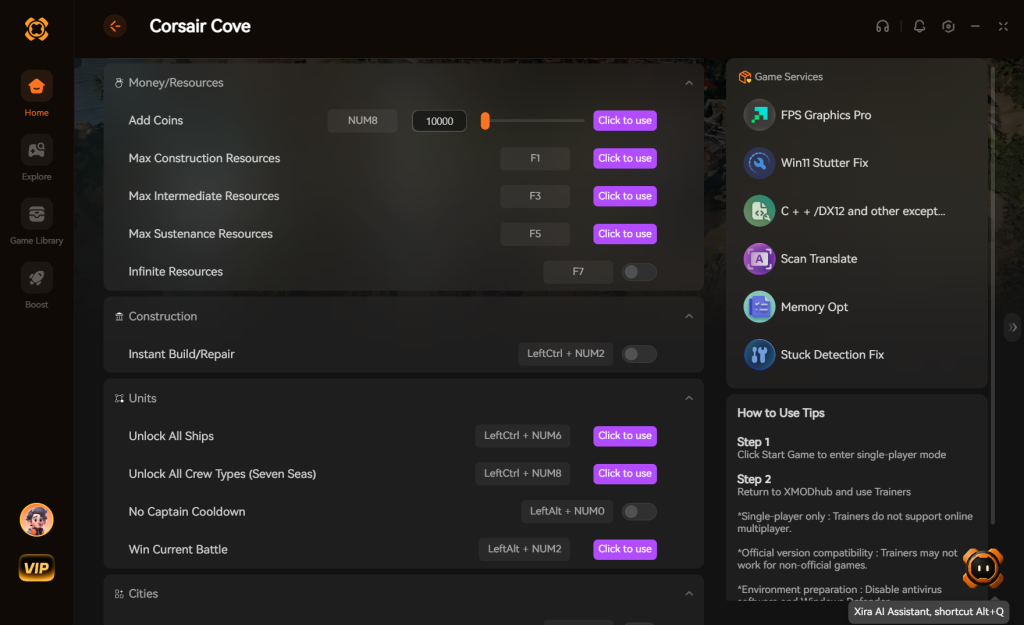
- Toggle Cheats: Activate the “Ignore Placement Restrictions” and “Infinite Resources” toggles.
Instantly, you can place any building, anywhere, regardless of slope or tech unlocks, allowing you to design the most magnificent, gravity-defying pirate haven without the frustrating grind.
Download Corsair Cove Trainer Now
Resource Costs for Vertical Foundations
One of the most overlooked aspects of building a vertical city in Corsair Cove is the sheer economic toll it takes on your pirate empire. Expanding upward is significantly more resource-intensive than building on the beach. Before you start carving up Devil’s Basin, you need to ensure your economy can handle the continuous drain of materials, especially Timber and Iron Nails.
Below is a breakdown of the structural costs associated with mountain building so you can plan your production chains accordingly:
| Structure Type | Base Resource Cost | Upkeep Cost | Best Use Case |
|---|---|---|---|
| Terrace Cut (Per Tile) | 50 Gold, 10 Labor | None | Heavy Industry, Large Housing Blocks, Treasuries |
| Wooden Scaffolding | 15 Timber, 5 Iron Nails | 2 Timber / Cycle | Light Manufacturing, Taverns, Lookouts |
| Support Pillar | 20 Timber, 10 Stone | None | Extending Scaffolding Integrity outward |
| Pulley Elevator | 100 Timber, 50 Rope, 20 Iron | 5 Gold / Cycle | Rapid Vertical Logistics between terraces |
| Switchback Ramp | 10 Timber, 5 Gravel | None | Low-cost, slow-speed mountain traversal |
Pro Tip: Because Wooden Scaffolding requires a continuous upkeep of Timber to prevent rot and structural failure, ensure you have upgraded Lumber Camps operating at maximum efficiency before you commit to large cliffside expansions.
Defending Your Vertical Fortress: Artillery Placement
Elevation in Corsair Cove isn’t just about saving space; it provides a massive tactical advantage during base defense events. When the Crown’s armada sails into your harbor, having your artillery positioned on cliffsides drastically increases their line of sight and firing range.
To maximize your defensive grid:
- Heavy Culverins: Place these long-range cannons on protruding Wooden Scaffolding high up on sheer cliffs. This gives them an unobstructed view of the harbor entrance, allowing them to pepper enemy galleons before they can even drop anchor.
- Mortar Batteries: Because mortars fire in a high arc and deal massive area-of-effect damage, they are best placed on recessed Terrace Cuts. The retaining walls of the terrace will protect the fragile mortar crews from direct enemy cannon fire while still allowing them to lob explosives over the cliff edge onto the ships below.
Frequently Asked Questions
Why does the Terrace Tool say “Terrain Too Hard”?
This error occurs when you attempt to terrace into specific rock formations that the game designates as unbreakable. These are usually the very dark, jagged peaks at the highest points of the islands. You must build around them using scaffolding.
Can enemy ships destroy my cliffside scaffolding?
Yes. If enemy ships from the Crown attack your haven, their cannon fire can destroy your scaffolding foundations. If a foundation is destroyed, any building resting on it will instantly collapse. Always build defensive batteries to protect your elevated structures.
Do I need to provide water to mountain buildings?
Yes, production chains on mountains still require inputs. However, unlike flatland where you might use wells, elevated buildings rely heavily on your logistical network (elevators and ramps) to bring water up from reservoirs near the shore.
Is there a height limit to building in Corsair Cove?
Yes, there is a hard engine ceiling, but it is exceptionally high. You will likely run out of island space or structural support long before you hit the skybox limit.
Final Verdict: Dominating the High Ground
Mastering how to build on cliffs and mountains in Corsair Cove transforms the game from a cramped shoreline manager into a sprawling, three-dimensional architectural challenge. By unlocking terracing, mastering scaffolding integrity, and optimizing your vertical logistics with elevators, you can build a pirate haven that is both impenetrable and incredibly efficient. Stop forcing buildings where they don’t belong, and start carving the island to suit your grand design.
And remember, if the intricacies of structural integrity and terraforming costs are ruining your pirate fantasy, XMODhub is always there to remove the barriers. With support for over 5000+ single-player PC games—including other massive strategy and city-builders likeAnno 1800 and Frostpunk 2—XMODhub ensures you spend your time actually enjoying the game, rather than fighting its mechanics. Keep your powder dry and your city growing, Captain.
Stop Grinding, Start Enjoying.
Bypass the tedious resource gathering and unlock your full potential instantly.

I am a passionate gamer and writer at XMODhub, dedicated to bringing you the latest gaming news, tips, and insights.
Connect with me:
LinkedIn Profile ↗