Catherine Hu
You’ve just pulled your fleet out of a grueling naval expedition in Corsair Cove. Your ships are heavily damaged, half the crew is missing, and the sails look like Swiss cheese. The Crown’s navy is already breathing down your neck, and waiting twenty in-game days for standard repairs just isn’t going to cut it. You need those ships back on the water, and you need them now. Understanding the repair mechanics in this 2026 city-builder and strategy hybrid by Limbic Entertainment is the difference between ruling the high seas and watching your empire sink to the bottom of the ocean.
Editor’s Note: During my early playthroughs of Corsair Cove, I lost three massive galleons simply because I bottlenecked my repair queues. I was sending damaged fleets back to a single low-tier dock while my timber reserves sat untouched on the other side of the island. Once I realized how the logistics optimization and naval expedition mechanics intertwined, I overhauled my harbor layout. Now, I can patch up an entire armada in a fraction of the time.
TL;DR: The Short Answer
If you need to get your ships back into fighting shape immediately, follow these core steps:
- Build Multiple Dry Docks: Do not rely on your starting harbor. Construct dedicated Dry Docks specifically for repairs to run simultaneous queues.
- Stockpile Processed Timber and Sailcloth: Ships cannot be repaired with raw wood. Ensure your Sawmills and Weavers are funneling materials directly to the docks.
- Assign Dedicated Shipwrights: Move your population to ensure your repair facilities are fully staffed. Unstaffed docks work at a fraction of their potential speed.
- Use the ‘Emergency Patch’ Card: During the turn-based naval combat phase, play the ‘Emergency Patch’ card to restore minimal hull integrity before returning to port, reducing the overall time needed in the dry dock.
Table of Contents
- TL;DR: The Short Answer
- The Fundamentals of Fleet Damage in Corsair Cove
- How to Optimize Your Ship Repair Infrastructure
- Managing Resources for High-Speed Repairs
- Naval Combat Tactics to Minimize Repair Time
- The Shortcut: Instantly Repair Ships with XMODhub
- Ship Types and Repair Costs Breakdown
- Captain Traits That Boost Repair Efficiency
- Frequently Asked Questions
- Final Verdict: Keeping Your Armada Afloat
The Fundamentals of Fleet Damage in Corsair Cove
Before you can fix your ships quickly, you need to understand how damage is calculated in Corsair Cove. This game isn’t just about lowering a health bar; it simulates the logistics of maintaining a pirate settlement during the Golden Age of Piracy.
How Hull Integrity Works
Your ships have Hull Integrity, which is depleted through hostile encounters, storms during naval exploration, or specific narrative events. When Hull Integrity drops below 30%, the ship suffers a massive speed penalty, making the return trip to your pirate haven painfully slow. If it hits zero, the ship is lost forever, along with any treasure it was carrying.
The Repair Queue System
When a damaged ship returns to your settlement, it doesn’t automatically heal over time. It must be assigned to a repair facility. If you only have your basic starting dock, a heavily damaged ship will occupy that slot for days, blocking the construction of new vessels and stalling your logistics chain.
How to Optimize Your Ship Repair Infrastructure
Speeding up repairs is fundamentally a city-building challenge. You need to design your pirate base with recovery in mind.
Step 1: Decentralize Your Docks
The most common mistake new players make in Corsair Cove is clustering everything around the starting harbor. As you expand across the steep cliffs and rocky islands, you must build specialized maritime zones. Create a “Shipyard District” containing multiple Dry Docks. When a battered fleet returns, you can distribute the damaged vessels across several docks, repairing three or four ships simultaneously instead of waiting in a single-file queue.
Step 2: Upgrade Repair Facilities
As you progress through the tech tree, prioritize upgrades for your maritime buildings. Upgrading a Dry Dock to Level 2 increases the base repair speed by 25%. However, these upgrades require advanced materials like Iron Nails and Pitch, so ensure your production chains are keeping pace with your technological advancements.
Step 3: Manage Your Workforce
Corsair Cove requires you to manage the needs of an expanding population. Repairing ships is labor-intensive. If your Dry Docks are understaffed because all your pirates are working in the Rum Distilleries, your repair times will skyrocket. Open the population management tab and prioritize the Shipwright profession when you have a damaged fleet in port.
Managing Resources for High-Speed Repairs
Infrastructure is useless without the right materials. In Corsair Cove, repairing a ship requires specific processed goods, not just raw resources dragged from a small patch of wood.
The Timber Bottleneck
Early in the game, you will notice that the amount of wood on your starting island is quite limited. You must establish sawmills to convert raw logs into Planks. A Dry Dock will not begin repairs until it has the required number of Planks in its local inventory. To speed up repairs, ensure you have a Warehouse situated immediately next to your Dry Docks, and set its storage priority to Planks and Sailcloth.
Iron and Advanced Materials
Later in the game, larger vessels like Galleons and Man-o’-Wars require Iron Fittings and Cannons to fully repair structural damage. If your logistics optimization is poor and these materials have to be hauled across the island, your ships will sit idle in the dock. Use the game’s logistic route tools to dedicate carts specifically for moving iron from the foundries to the shipyards.
If you are struggling to maintain a happy workforce to keep these production chains moving, you might want to check out our comprehensive guide on How to Stop Crew Mutiny and Keep Pirates Happy in Corsair Cove.
Naval Combat Tactics to Minimize Repair Time
The fastest repair is the one you don’t have to make. Corsair Cove features naval expeditions modeled using a turn-based card game. How you play your cards directly impacts the state of your ships when they return.
Strategic Retreats
Don’t fight to the bitter end unless absolutely necessary. If an encounter against hostile forces or the Crown is going poorly, use evasion cards to disengage. A ship returning with 40% Hull Integrity takes significantly less time and resources to repair than one limping back at 5%.
In-Combat Mitigation
Look for defensive cards in your deck. Cards that generate ‘Evasion’ or ‘Block’ can negate incoming cannon fire entirely. Furthermore, certain Captain abilities allow for mid-combat triage. Using these abilities won’t fix structural damage, but they can prevent negative status effects like ‘Taking on Water,’ which rapidly drains Hull Integrity outside of combat.
The Shortcut: Instantly Repair Ships with XMODhub
Let’s be real for a second. Corsair Cove is an incredible city-builder and strategy game, but managing complex production chains and waiting for resources to trickle into a Dry Dock can grind the pacing to a halt. If you just want to focus on naval exploration and building your sprawling pirate haven without the tedious wait times of ship repairs, there is a much faster way.
Instead of agonizing over logistics optimization, you can bypass the grind entirely with XMODhub. Our tool allows you to take control of the game’s mechanics, giving you the freedom to play on your own terms.
Here is how you can instantly fix your fleet in 3 easy steps:
- Download XMODhub: Install the secure, lightweight client directly from our official website.

- Auto-Detect Corsair Cove: Launch the game. XMODhub will automatically detect Corsair Cove and load the specific, safe-to-use toolkit.
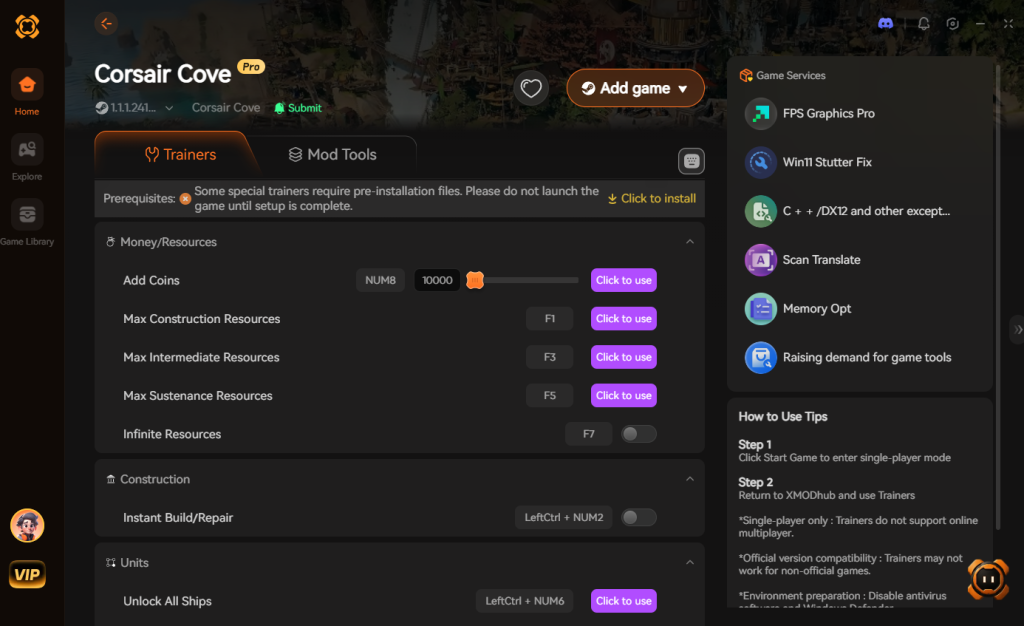
- Toggle Cheats: Activate the “Instant Fleet Repair” or “Infinite Hull Integrity” mods. Your ships will be battle-ready immediately, with zero resource cost.
Download Corsair Cove Trainer Now
No more waiting for Planks to be delivered. No more stressing over understaffed docks. Just pure, unadulterated piracy.
Ship Types and Repair Costs Breakdown
To truly master your fleet’s downtime, you must understand that not all vessels are created equal. The time and resources required to restore a ship scale aggressively based on its class. Below is a definitive data breakdown of the base repair metrics for the primary ship classes in Corsair Cove (assuming 0% to 100% Hull Integrity recovery at a fully staffed Level 1 Dry Dock).
| Ship Class | Base Repair Time | Primary Repair Materials | Minimum Dry Dock Level |
|---|---|---|---|
| Sloop | 3 In-Game Days | Planks, Sailcloth | Level 1 |
| Brigantine | 6 In-Game Days | Planks, Sailcloth, Pitch | Level 1 |
| Frigate | 12 In-Game Days | Hardwood Planks, Iron Fittings | Level 2 |
| Galleon | 18 In-Game Days | Hardwood Planks, Steel Nails, Cannons | Level 3 |
| Man-o’-War | 25 In-Game Days | Reinforced Timber, Steel Nails, Heavy Canvas | Level 3 |
Pro Tip: Never send your Galleons out for minor scouting missions. The resource drain and harbor bottleneck caused by repairing a high-tier vessel can cripple your mid-game economy. Use Sloops for exploration and save your heavy hitters for dedicated naval warfare.
Captain Traits That Boost Repair Efficiency
Beyond city planning and resource stockpiling, your personnel can drastically alter your fleet’s recovery speed. When recruiting leaders at the Tavern, keep an eye out for specific Captain Traits that offer passive buffs to logistics and maintenance.
- Master Shipwright: Assigning a captain with this trait to your active harbor reduces the overall repair time of their specific fleet by 15%.
- Resourceful Scavenger: This trait allows the captain to salvage Planks and Sailcloth from defeated enemy ships, meaning they return to port carrying the exact materials needed to fix their own hull.
- Strict Disciplinarian: While this trait slightly lowers crew morale, it boosts the work speed of all Shipwrights in the assigned “Shipyard District” by 10%.
Stacking these traits with a Level 3 Dry Dock and optimized warehouse logistics is the ultimate legitimate strategy for rapid fleet recovery.
Frequently Asked Questions
Why is my Dry Dock not repairing my ship in Corsair Cove?
Your Dry Dock is likely missing required materials (like Planks or Sailcloth) or lacks the necessary workforce. Check the building’s status panel to see if it is waiting on resources from your logistics network, and ensure you have assigned enough Shipwrights in the population management menu.
Can I repair ships while out on a naval expedition?
You cannot fully repair structural damage while exploring the surrounding seas. However, in the turn-based card combat, you can use specific action cards to perform emergency triage, which restores a small amount of Hull Integrity and prevents the ship from sinking before it reaches port.
Does upgrading ships increase their repair time?
Yes. Larger, upgraded vessels have higher maximum Hull Integrity and require more advanced materials to fix. While they survive longer in combat, heavily damaged high-tier ships will occupy your dry docks for a longer duration compared to early-game sloops.
What happens if a ship sinks during exploration?
If a ship’s Hull Integrity reaches zero during a naval expedition, the ship, its assigned crew, and any recovered treasure or cargo are permanently lost. You will need to construct a brand new vessel from scratch at your shipyard.
Final Verdict: Keeping Your Armada Afloat
Learning how to repair ships quickly in Corsair Cove is an exercise in mastering the game’s intertwined systems. You must balance your city-building layouts, optimize your logistics and production chains, and manage a rowdy crew to ensure your Dry Docks operate at peak efficiency. By decentralizing your maritime infrastructure and keeping a close eye on your timber reserves, you can drastically reduce the downtime of your fleets and keep the Age of Piracy alive.
However, if the intricate resource management becomes too tedious, remember that you don’t have to play by the rules. With XMODhub, you can instantly bypass the grind, keeping your armadas pristine and ready for action at the click of a button. XMODhub supports over 5,000 single-player PC games, meaning you can bring the same level of customization and convenience to other massive strategy and city-building titles like Frostpunk 2 or Manor Lords. Take control of your gaming time and rule the high seas your way.
Stop Grinding, Start Enjoying.
Bypass the tedious resource gathering and unlock your full potential instantly.

I am a passionate gamer and writer at XMODhub, dedicated to bringing you the latest gaming news, tips, and insights.
Connect with me:
LinkedIn Profile ↗

 Nancy Miller