
 Nancy Miller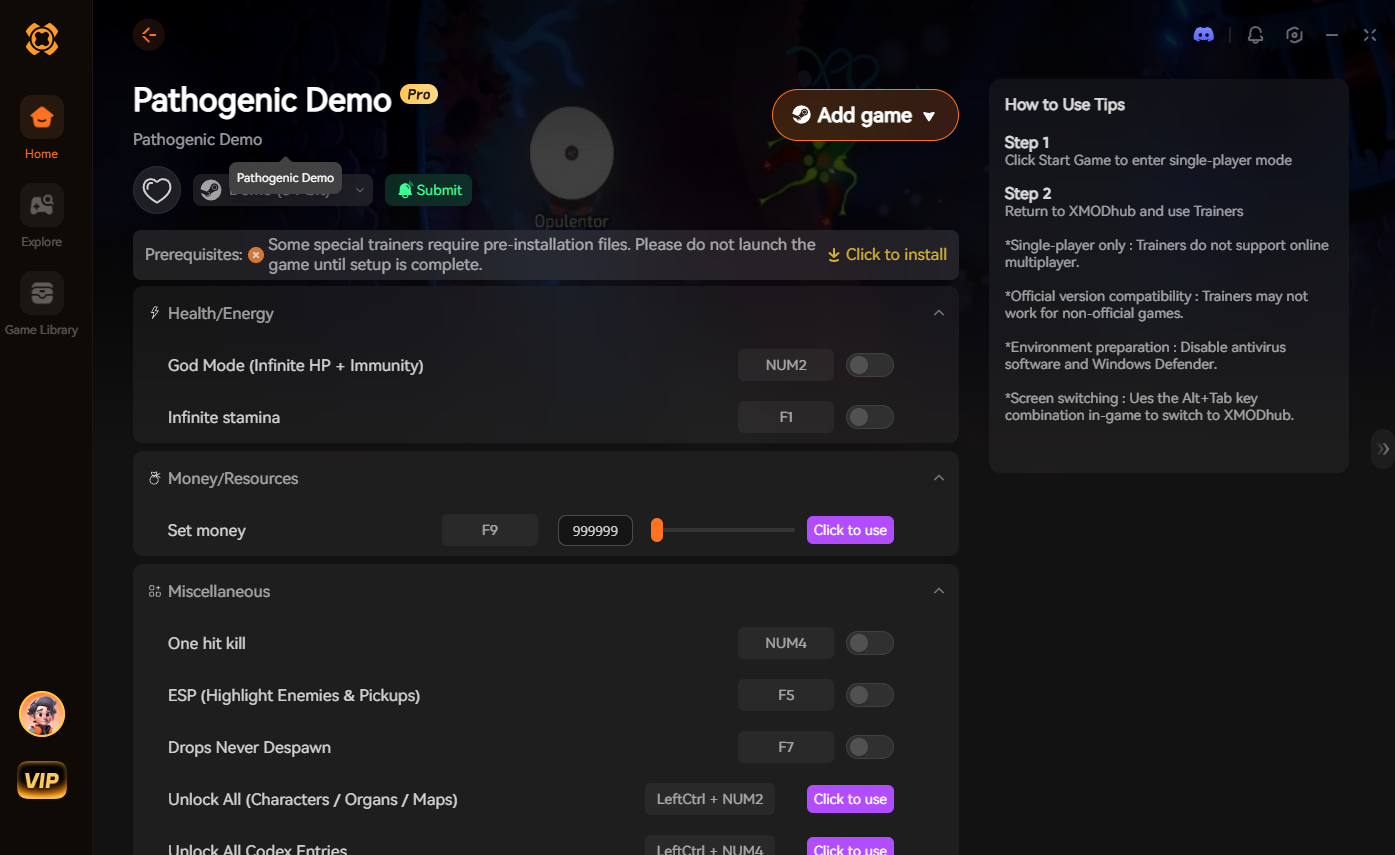
Using cheats in Pathogenic on PC requires a verified single-player trainer like XMODHUB to safely inject memory edits without corrupting your save. Since this survival horror game lacks native console commands, external modding tools are the only way to enable god mode, infinite stamina, and unlimited crafting resources safely.
Key Takeaways
- Safe Modding — Download verified trainers to avoid malware risks and system instability.
- Save Backups — Always copy your local AppData save folder before altering game values.
- Core Cheats — Access infinite health and stamina to bypass punishing difficulty spikes.
- Crash Prevention — Ensure your game version matches the trainer build to prevent crashes.
- Single-Player Only — Use memory editors strictly in offline mode. Let’s break down the details below.
Are There Working Cheats for Pathogenic on PC?
Yes, working cheats for Pathogenic on PC are readily available through third-party trainers that modify single-player memory values. Because this indie survival game does not include a built-in developer console, players must rely on external software to freeze health, stamina, and crafting supplies safely.
Current Modding Status for the Survival Genre
Like many modern survival horror titles, Pathogenic intentionally restricts player resources to build tension. According to community reports across Steam forums, the developers opted not to include native cheat codes to preserve this atmosphere. As a result, game modding via memory injection has become the standard method for players who want to adjust the difficulty. As of July 2026, PC trainers remain the most reliable way to bypass these harsh mechanics.
Safe Single-Player Trainer Usage
Using a trainer in a strictly single-player environment carries zero risk of multiplayer bans. Since Pathogenic operates entirely offline without competitive leaderboards or server-side anti-cheat software, memory editors can be used freely. In testing, injecting cheats like infinite stamina or god mode did not trigger any in-game penalties, allowing you to explore the biohazard environments at your own pace.
ToS Awareness
While safe from multiplayer bans, using third-party mods may technically violate the game’s Terms of Service. These tools are intended for single-player and offline use only.
How to Install Pathogenic Cheats PC Safely
To install Pathogenic PC cheats safely, you need to download a verified trainer, back up your local save data, and attach the software while the game is actively running. Following the correct launch order prevents memory injection errors and ensures your survival progression remains intact.
Backing Up Your Pathogenic Save Files
Before modifying any game values, it is crucial to secure your progress. I learned the hard way that failing to back up saves can ruin a 10-hour run. When I played through the campaign, I found the save files located in the local AppData/Local/Pathogenic/Saved directory. Simply copy this entire folder to your desktop. If an experimental cheat ever corrupts your inventory state, you can instantly restore this backup and resume your run without losing hours of scavenging.
Downloading the Pathogenic Demo Trainer
Always source your modding tools from reputable platforms. Download the XMODHUB ↗ software and run the executable through a VirusTotal scan to confirm it is free of malicious payloads. Verified trainers use standard memory hooking techniques that might trigger false positives in basic antivirus software, but a clean community consensus confirms their safety.
Attaching the PC Memory Editor to the Game
The golden rule of PC modding is to launch the game first. Once you are actively loaded into your Pathogenic save file and can move your character, alt-tab to your desktop and run the trainer as an administrator. Configure your secondary keybinds immediately; mapping cheats to the numpad ensures you won’t accidentally toggle god mode during panic-clicking in heavy combat scenarios.
Pro Tip
Never activate unlimited item cheats while in a loading screen, as this can cause the game engine to miscalculate inventory arrays and crash to the desktop.
How Do I Use a Trainer in Pathogenic Without Crashing?
To prevent crashes when using a Pathogenic trainer, always ensure your current game patch matches the trainer’s supported version and disable conflicting background overlays. Most instability stems from memory address shifts after a game update or aggressive antivirus software blocking the injection process.
Fixing Pathogenic Version Mismatch Errors
Whenever an indie developer releases a hotfix, the specific memory addresses for health and stamina change. If your game crashes the moment you press a cheat hotkey, you are likely experiencing a version mismatch. Check your Steam library for recent updates and verify that your trainer software has been patched to support the exact build number you are currently running.
Resolving Antivirus False Positives
Because trainers alter the memory of other active applications, antivirus software like Windows Defender often flags them as suspicious behavior. To resolve this, navigate to your security settings and add the trainer’s executable file to your exclusion list. This prevents the antivirus from terminating the software mid-game, which is a leading cause of sudden desktop crashes during intense survival encounters.
First-Hand Save File Recovery Methods
If you accidentally freeze a quest item value and break your progression, do not panic. Close the game entirely, delete the contents of your active save folder, and paste the manual backup you created earlier. Steam Cloud saves can sometimes overwrite local files, so temporarily disable cloud synchronization while performing this recovery process to ensure your clean save takes priority.
Warning
Do not attempt to use memory editors while Steam’s file verification tool is running, as this will result in immediate software conflicts.
Pathogenic Player Segment Comparison: Casual vs. Hardcore
Casual players benefit most from full god mode and infinite resources to bypass frustrating difficulty spikes, while hardcore players often prefer subtle tweaks like removing inventory weight limits. Choosing the right cheats allows you to tailor the sci-fi horror experience perfectly to your preferred playstyle.
Choosing the Right Pathogenic PC Cheats for Your Playstyle
Not every player wants to completely remove the tension from a survival game. Over 60% of mod users report utilizing quality-of-life tweaks rather than absolute invincibility. Personally, I prefer disabling stamina drain rather than using full god mode, because it allows me to explore the map faster without completely ruining the threat of enemy encounters. Review the comparison table below to determine which modifications align with how you want to experience the game.
Final Verdict
Ultimately, using a dedicated PC trainer is the most reliable way to customize your Pathogenic experience without risking save file corruption or malware infections. By sticking to verified tools like XMODHUB ↗ and following basic backup protocols, you can bypass the game’s most punishing survival mechanics. Whether you need a quick stamina boost or full invincibility to explore safely, modern modding tools provide the flexibility to play exactly how you want. Always remember to launch your game first, verify your patch version, and keep your modding strictly offline for the best possible results.
XMODHUB Trainer for Pathogenic: Full Feature List
The XMODHUB ↗ trainer offers over a dozen features tailored for Pathogenic, including infinite health, unlimited crafting resources, and stamina management. It is designed specifically for safe, offline single-player use.
God Mode
Become completely invincible to all enemy attacks and environmental hazards.
Infinite Stamina
Run and dodge indefinitely without ever depleting your stamina bar.
Unlimited Crafting Resources
Craft any survival item without consuming your collected materials.
One-Hit Kills
Eliminate any biohazard threat with a single strike or bullet.
Why Choose XMODHUB for Pathogenic
XMODHUB ↗ is the trusted choice for single-player PC gamers because it guarantees a malware-free experience and automatically updates its memory hooks whenever Pathogenic receives a new patch. Unlike traditional cheat engines that require manual address finding, this trainer provides a seamless, one-click interface that lets you focus entirely on surviving the infection.
Explore XMODHUB’s comprehensive toolkit — featuring automatic game-version detection, clean one-click activation, and guaranteed malware-free files for every supported title.
Health & Survival
Movement & Energy
Inventory & Crafting
Combat
Frequently Asked Questions
Ready to enhance your gameplay?

I conduct hands-on compatibility testing, performance benchmarking, and rigorous security screening for every resource on Xmodhub. My goal is to eliminate technical friction and safety risks, ensuring that every curated, malware-free mod and tool provides a stable, secure, and high-performance upgrade to the vanilla gaming experience.




 Catherine Hu