
 Catherine Hu
Quick Answer: Does Tears of Metal Have Console Commands?
No, Tears of Metal does not have a built-in developer console or native text-based cheat codes. Because the game is built as a medieval hack-and-slash co-op roguelike with heavily integrated procedural generation and multiplayer networking, the developers have intentionally disabled the command console for the retail build. Pressing the Tilde (~) key or modifying the configuration files will not open a command prompt.
However, this does not mean you are out of luck. The only reliable and safe way to cheat in the game is by using a specialized third-party trainer like XMODhub. This powerful utility hooks directly into the game process, providing you with 1-click alternatives such as God Mode, Infinite Stamina, and Infinite Battalion Resources without requiring you to type out complicated strings of code.
Editor’s Note
This guide was last verified against the newest Tears of Metal patch. Whether you are using native engine tools or a dedicated trainer, please back up your save files before modifying game memory to prevent unexpected bugs.
We have all been there. You have just spent hours dying to the same boss in Tears of Metal, or maybe you simply do not have the time to grind for Dragon Meteor Shards and Scottish Battalion Upgrades after a long day of work. Single-player games are meant to be enjoyed on your own terms. Let us get your character powered up.
You may also like: The Ultimate Tears of Metal Cheat Engine Guide (And A Much Easier Alternative)
1. How to Enable Cheats in Tears of Metal
Because Tears of Metal lacks a traditional developer console, players cannot simply press a key to bring up a text box and type in codes. In many classic PC games, you would edit an .ini file to change bEnableConsole=0 to 1, but the engine powering Tears of Metal has completely stripped this functionality from the public release to prevent desync issues in co-op mode.
Instead of fighting the game files, the modern approach is to utilize memory injection through a trusted client. Here is the simple three-step process to download and attach XMODhub to Tears of Metal to enable your cheats:
2. The Complete List of Tears of Metal Cheats
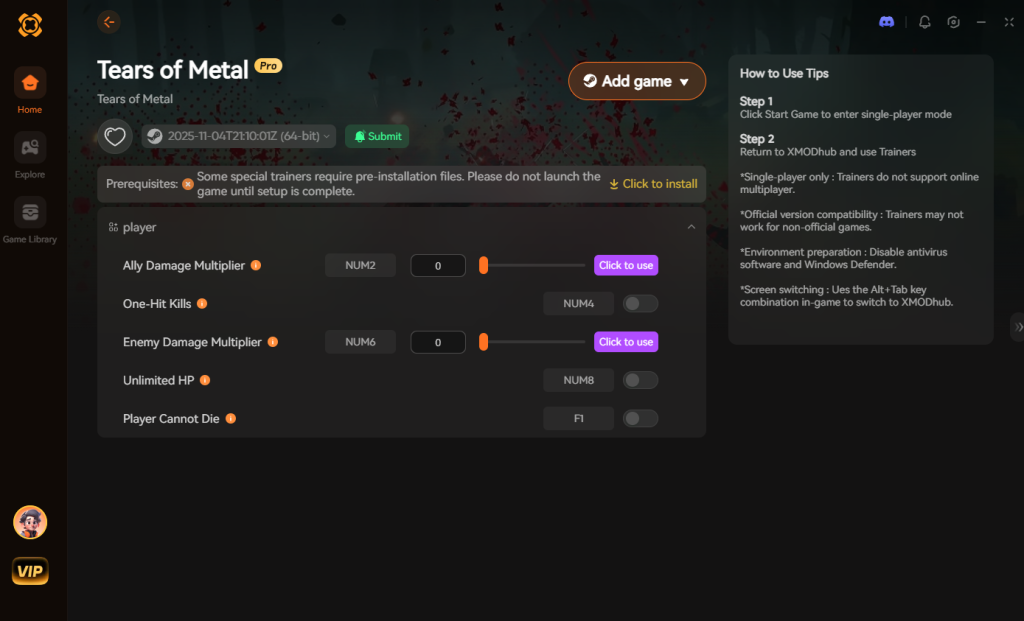
Because Tears of Metal does not feature a developer console, there are no text-based cheat codes to input. You will not find any god, noclip, or giveitem commands buried in the game files. However, you can achieve the exact same effects—and often much more stable ones—using the XMODhub app.
Below is the comprehensive list of trainer features available for Tears of Metal. These modifications are specifically tailored to help you carve through hordes of enemies and reclaim your island with minimal frustration.
3. Item IDs and Spawning Guide
In games that feature built-in developer consoles, players can usually type a command like player.additem [ItemID] [Quantity] to instantly spawn weapons, armor, or quest items.
Because Tears of Metal does not have a native console, manually spawning items via text input is completely impossible without native engine tools. You will not find a master list of hex codes or string IDs because there is nowhere in the game to input them. Searching for “Tears of Metal item IDs” will only lead you to dead ends and outdated forum posts.
However, XMODhub entirely bypasses this limitation. Instead of forcing you to hunt down complex, alphanumeric item codes on third-party wikis and carefully typing them out, the trainer allows you to instantly maximize your inventory with a single click. Whether you need more healing provisions, rare crafting ores tied to the Dragon Meteor, or better gear for your Scottish battalion, the XMODhub inventory editor handles the memory allocation automatically. You get all the benefits of item spawning without the tedious data entry.
4. Do Cheats Disable Achievements?
For achievement hunters, the relationship between cheating and platform rewards is a massive concern. In many modern titles, simply opening a developer console or modifying an .ini file will instantly flag your save file. Once flagged, Steam and Epic Games will permanently lock you out of earning achievements on that specific playthrough, forcing you to start a brand new game if you want to reach 100% completion.
Because Tears of Metal relies heavily on roguelike progression and co-op dynamics, its internal tracking systems are quite strict. If you attempt to use outdated memory editors like Cheat Engine without proper stealth protocols, the game will likely detect the memory anomaly and disable achievement tracking for your current run.
This is where XMODhub shines. XMODhub is engineered with advanced stealth injection technology that safely bypasses the internal cheat-flagging systems of Tears of Metal. Because the trainer alters values dynamically in the system memory rather than permanently rewriting the core save files, the game continues to register your progress as legitimate. You can use God Mode to defeat the hardest bosses and still watch your rare Steam achievements pop up in the corner of your screen.
5. Why Native Cheats Can Break Your Save Files
Beyond the achievement lock, native developer tools and memory editors are notoriously unstable. These commands were originally built for developers to test bugs during production, not for everyday gameplay.
Forcing a quest to complete or bypassing intended story triggers can cause crucial NPCs to completely disappear from your map. Memory leaks, corrupted assets, and sudden crashes to the desktop are incredibly common when you spawn too many items at once.
6. The Safer Alternative: 1-Click Cheats with XMODhub
If you want the benefits of cheats—like infinite health or skipping the heavy grind—without risking your save files or locking your achievements, you need a dedicated game modification tool.
Instead of typing risky code that might corrupt your game world, the XMODhub app hooks into Tears of Metal safely and cleanly.
How to Use XMODhub for Tears of Metal

Download Tears of Metal Trainer Now
7. Troubleshooting: Cheats Not Working
Even with the most advanced tools, PC gaming can sometimes throw unexpected curveballs. If you are having trouble getting your Tears of Metal cheats to activate, check the following common issues:
8. Optimal Battalion & Hero Upgrades to Target
When you utilize the Infinite Gold and Infinite Battalion Resources cheats in XMODhub, you will suddenly find yourself with the ability to bypass the early-game grind entirely. However, Tears of Metal features a deep, branching skill tree for both your primary hero and your Scottish battalion.
If you want to maximize your damage output and survivability without blindly clicking through menus, you need a strategic approach. Below is a breakdown of the most critical upgrades you should purchase immediately once your resources are maxed out.
By focusing your injected currency on these specific nodes, you can build an unstoppable army that complements your god-like trainer abilities, ensuring that your procedurally generated island runs are as chaotic and entertaining as possible.
9. Multiplayer and Co-Op Cheating: What You Need to Know
Because Tears of Metal is heavily marketed as a co-op hack-and-slash experience, many players naturally wonder if they can bring their modified stats into multiplayer sessions. The short answer is: proceed with extreme caution.
Tears of Metal uses a peer-to-peer networking model combined with strict procedural generation sync checks. If you attempt to use God Mode or One-Hit Kills while connected to a public lobby, the game engine will detect a severe desynchronization between your client and the host. This usually results in an immediate disconnect or a soft-lock where enemies freeze in place for the other players.
If you absolutely want to use XMODhub in a multiplayer setting, you must be the designated host of a private lobby, and your co-op partners must be fully aware that you are running a trainer. Even then, features like “Freeze Run Timer” or “Set Game Speed” will likely crash the session because they manipulate the internal tick rate of the game engine. For the best, most stable experience, we highly recommend keeping your cheats restricted to your solo playthroughs.
10. Frequently Asked Questions (FAQ)
A: No. Modifying game memory or accessing developer consoles for Tears of Metal is strictly limited to the PC version. Console ecosystems are locked down, preventing third-party software injection.
A: There is no account ban or official penalty for cheating in a single-player environment. The only downsides are the potential for corrupted save files and disabled achievements, which can be avoided by using a secure trainer like XMODhub.
A: This is entirely up to the player. Roguelikes are designed around repetition and incremental progression. While some players love the brutal challenge, others simply want to experience the story of the Dragon Meteor and command their Scottish battalion without the frustration of constant deaths. Cheats allow you to tailor the difficulty to your personal preference.
Conclusion
Whether Tears of Metal provides a built-in console or not, taking control of your single-player experience is easier than ever. While tweaking raw engine code can be a fun technical experiment, it comes with significant risks to your save files and achievements. For a flawless, risk-free experience, using a dedicated modification tool is always the smarter choice.
With secure support for over 5,000+ single-player PC games, you can easily customize your gameplay, skip the tedious grind, and play exactly the way you want.


I am a passionate gamer and writer at XMODhub, dedicated to bringing you the latest gaming news, tips, and insights.
Connect with me:
LinkedIn Profile ↗


 Nancy Miller



