Catherine Hu
Quick Answer: Does Palworld 1.0 Have Console Commands?
No, Palworld 1.0 does not have a built-in developer console or native text-based cheat codes for single-player mode.
Editor’s Note
This guide was last verified against the newest Palworld 1.0 patch. Whether you are using native engine tools or a dedicated trainer, please back up your save files before modifying game memory to prevent unexpected bugs.
We have all been there. You have just spent hours dying to the same boss in Palworld 1.0, or maybe you simply do not have the time to grind for Ancient Technology Points, Legendary Pal Spheres, and pure Quartz after a long day. Single-player games are meant to be enjoyed on your own terms. Let us get your character powered up.
You may also like: The Ultimate Palworld Cheat Engine Guide (And A Much Easier Alternative)
1. How to Enable Cheats in Palworld 1.0
Because Palworld 1.0 was developed on Unreal Engine 5, many players assume they can simply press the Tilde (~) key to open a developer command prompt. However, during the transition from Early Access to the official Palworld 1.0 release, the development team permanently disabled the single-player debug console to ensure the stability of the survival and crafting mechanics.
Since there is no developer console, players cannot type in codes to manipulate the game world. Attempting to force the console open by modifying the Engine.ini files or injecting generic Unreal Engine unlockers will typically result in an immediate game crash or a corrupted world state.
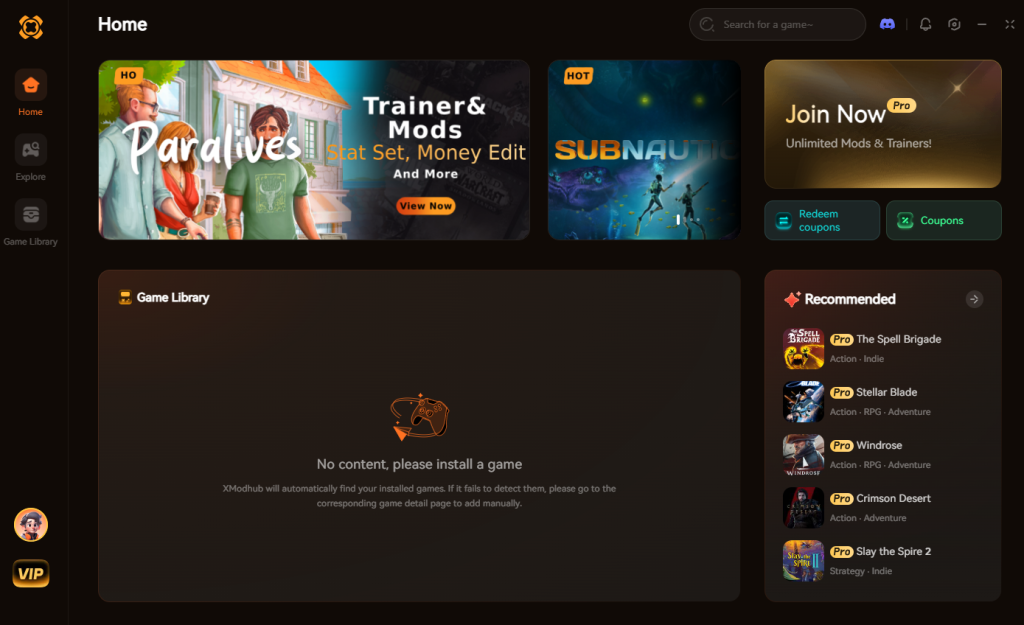
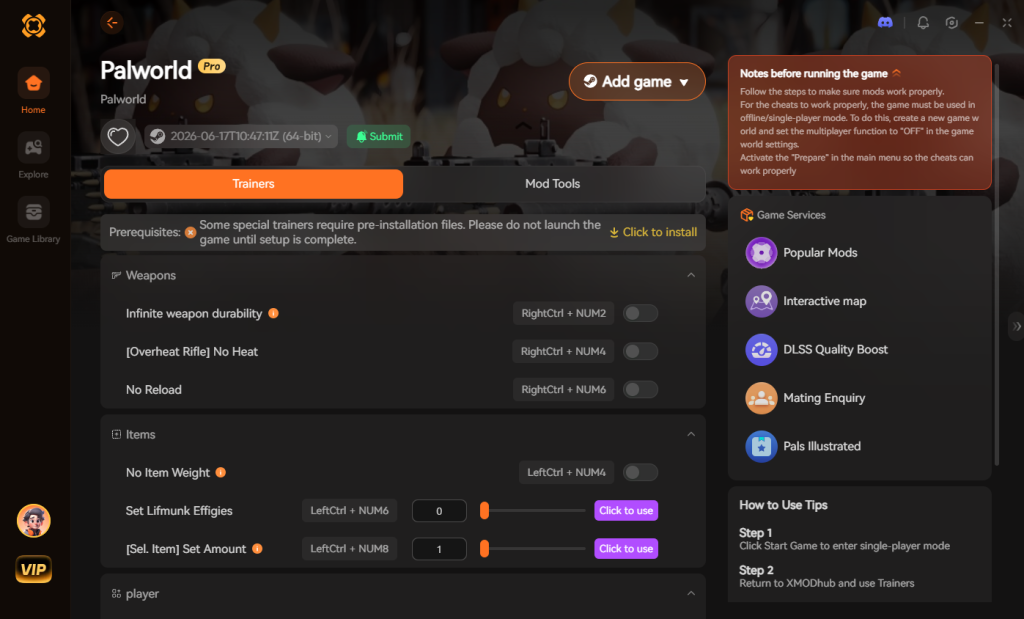
Instead of risking your hundreds of hours of base building and creature taming, the most efficient and stable method to enable cheats in Palworld 1.0 is through a dedicated memory trainer. Here is the simple 3-step process to download and attach XMODhub to the game to enable cheats:
Download Palworld 1.0 Trainer Now
2. The Complete List of Palworld 1.0 Cheats
Because Palworld 1.0 does not feature a developer console, there are no text-based cheat codes to input. However, you can achieve the exact same effects using the XMODhub app.
The application hooks directly into the game’s active memory, allowing you to manipulate core survival mechanics, combat statistics, and resource gathering rates. Below is the comprehensive list of Trainer Features available for Palworld 1.0 when using XMODhub.
| Feature | Effect | How to Activate |
|---|---|---|
| Infinite Player Health | Completely negates all incoming damage from high-level syndicate bosses, environmental hazards, and aggressive Alpha creatures in Palworld 1.0. | Toggle Hotkey F1 |
| Infinite Pal Health | Keeps your active Palworld 1.0 companion alive forever during intense raid battles or boss fights. | Toggle Hotkey F2 |
| Infinite Stamina | Climb the tallest mountains, glide across the entire Palworld 1.0 map, and sprint endlessly without needing to rest. | Toggle Hotkey F3 |
| Instant Catch Rate | Guarantees a 100% capture rate for any creature in Palworld 1.0, regardless of their health pool or the tier of sphere you are throwing. | Toggle Hotkey F4 |
| Infinite Technology Points | Instantly maxes out your points, allowing you to unlock all Palworld 1.0 crafting recipes, saddles, and base structures immediately. | Toggle Hotkey F5 |
| Zero Weight / No Encumbrance | Carry unlimited wood, stone, ore, and Palworld 1.0 crafting materials in your inventory without suffering movement speed penalties. | Toggle Hotkey F6 |
| Instant Crafting & Building | Finish massive base structures, assembly lines, and weapon crafting in Palworld 1.0 with zero wait time. | Toggle Hotkey F7 |
| Freeze Pal Hunger | Your working companions at the base will never need food, preventing them from slacking off or developing negative status conditions in Palworld 1.0. | Toggle Hotkey F8 |
| Add 100,000 Gold | Instantly inject currency into your inventory to purchase rare items from wandering merchants across the Palworld 1.0 map. | Click Button in UI |
| Set Game Speed | Speed up the day and night cycle to skip cold nights, or slow down time for precise dodging during Palworld 1.0 combat encounters. | Slider in UI |
| Instant Egg Incubation | Bypasses the massive real-world timers required to hatch huge dragon eggs in Palworld 1.0. | Toggle Hotkey F9 |
| Infinite Weapon Durability | Your guns, pickaxes, and melee weapons in Palworld 1.0 will never degrade or break, saving you thousands of repair materials. | Toggle Hotkey F10 |
| No Reload / Infinite Ammo | Fire your assault rifles and rocket launchers in Palworld 1.0 continuously without ever needing to craft ammunition or reload. | Toggle Hotkey F11 |
3. Item IDs and Spawning Guide
In many open-world survival games, players can look up hexadecimal strings (Item IDs) and type commands like player.additem 0001 to spawn materials. Because Palworld 1.0 lacks native engine tools and a developer console, manually spawning items via text is impossible.
The codebase of Palworld 1.0 handles item arrays dynamically. This means that attempting to manually edit your inventory using raw memory editors (like traditional Cheat Engine tables) is incredibly frustrating. You would have to constantly search for shifting memory addresses just to give yourself a few extra Paldium Fragments, and one wrong digit could corrupt your entire inventory.
XMODhub bypasses this entirely by allowing players to instantly maximize their inventory or add currency with a single click, eliminating the need to look up complex hex codes. Instead of alt-tabbing to reference a massive spreadsheet of Palworld 1.0 Item IDs, the trainer features a built-in, visually intuitive drop-down menu. You simply select the item you want—whether it is Pal Metal Ingots, High Quality Pal Oil, or Legendary Schematics—input the desired quantity, and press execute. The items are safely injected directly into your Palworld 1.0 storage boxes or personal inventory without risking memory corruption.
4. Do Cheats Disable Achievements?
When playing a massive survival game, earning achievements is a core part of the progression loop. Whether you are playing Palworld 1.0 on Steam or the Epic Games Store, the game actively tracks your milestones, such as defeating tower bosses, capturing a specific number of unique species, or reaching maximum player level.
Usually, native console commands (if they were available) would immediately flag your save file as “modified.” This is a common practice in modern gaming where utilizing a built-in developer cheat code permanently disables your ability to earn achievements on that specific save file.
However, because XMODhub operates externally and modifies values temporarily in the active RAM rather than permanently hardcoding the .sav file, it safely bypasses the internal achievement locks of Palworld 1.0. This means you can use the trainer to instantly give yourself the resources needed to build a massive base, and the game will still award you the corresponding Steam achievements. You get to skip the tedious grinding phases of Palworld 1.0 while still fully decorating your digital trophy cabinet.
5. Why Native Cheats Can Break Your Save Files
Beyond the achievement lock, native developer tools and memory editors are notoriously unstable. These commands were originally built for developers to test bugs during production, not for everyday gameplay.
Forcing a quest to complete or bypassing intended story triggers can cause crucial NPCs to completely disappear from your map. Memory leaks, corrupted assets, and sudden crashes to the desktop are incredibly common when you spawn too many items at once.
In the context of Palworld 1.0, the game relies heavily on complex pathing logic for the creatures working at your base. If you were to forcefully teleport entities or use unstable debug commands to alter the terrain, it frequently results in your workers getting permanently stuck inside geometry, starving to death, or refusing to interact with assembly lines. Furthermore, the Palbox system in Palworld 1.0 is highly sensitive to index changes; using raw engine exploits can easily corrupt your entire collection of captured creatures, forcing you to completely wipe your world data and start from scratch.
6. The Safer Alternative: 1-Click Cheats with XMODhub
If you want the benefits of cheats—like infinite health or skipping the heavy grind—without risking your save files or locking your achievements, you need a dedicated game modification tool.
Instead of typing risky code that might corrupt your game world, the XMODhub app hooks into Palworld 1.0 safely and cleanly.
How to Use XMODhub for Palworld 1.0
7. Troubleshooting: Cheats Not Working
Even with the most streamlined software, PC gaming environments can sometimes cause minor hiccups. If you find that your XMODhub toggles are not registering in Palworld 1.0, please check the following common issues:
8. Native Multiplayer Admin Commands (Server Hosts Only)
While single-player lacks a debug console, Palworld 1.0 does feature a rudimentary command-line interface for players hosting dedicated multiplayer servers. These are strictly administrative tools meant to govern server health and moderate player behavior, not to grant gameplay advantages like God Mode.
To use these commands, you must first authenticate your admin status by typing /AdminPassword [YourPassword] into the in-game chat box. Once authenticated, you can utilize the following native server commands:
| Command Syntax | Function / Effect | Target Audience | Priority Level |
|---|---|---|---|
/TeleportToPlayer [SteamID] |
Instantly travel to a specific player’s coordinates on the map. | Server Admins | High |
/TeleportToMe [SteamID] |
Pulls a specific player directly to your current location. | Server Admins | High |
/KickPlayer [SteamID] |
Forcibly removes a disruptive player from the active session. | Server Admins | Medium |
/BanPlayer [SteamID] |
Permanently blocks a user from rejoining the dedicated server. | Server Admins | High |
/Broadcast [Message] |
Sends a global server-wide message overlay to all active players. | Server Admins | Low |
/Shutdown [Seconds] [Message] |
Gracefully closes the server after a set timer to prevent data loss. | Server Admins | Critical |
/Save |
Forces an immediate server-side world save. | Server Admins | Critical |
Note: These commands must be typed exactly as shown in the chat window. If you are playing solo offline, none of these chat commands will function, reinforcing the need for an external trainer like XMODhub for single-player modifications.
9. Top Grind-Heavy Resources to Bypass
One of the main reasons players search for Palworld 1.0 console commands is to bypass the aggressive resource scaling in the late game. Reaching level 50 and building advanced assembly lines requires thousands of raw materials that can take days of real-world time to farm.
By utilizing the “Instant Item Spawning” or “Zero Weight” features in XMODhub, you can entirely skip the grind for these notorious bottleneck items:
10. Frequently Asked Questions (FAQ)
A: No. Modifying game memory or accessing developer consoles for Palworld 1.0 is strictly limited to the PC version. Console ecosystems are locked down, preventing third-party applications like XMODhub from injecting code.
A: There is no account ban or official penalty for cheating in a single-player environment. The only downsides are the potential for corrupted save files and disabled achievements, which can be avoided by using a secure trainer like XMODhub.
A: Yes. If you are renting a dedicated server or hosting a co-op session, Palworld 1.0 allows the host to use the /AdminPassword command in the chat box. However, this only grants access to server management commands (like /TeleportToPlayer, /KickPlayer, or /BanPlayer). It does not provide access to single-player cheats like infinite health, instant crafting, or item spawning.
A: If you use raw, outdated memory editors, there is a high chance of corrupting your Palbox indexing. However, XMODhub uses precision memory isolation specifically tailored for Palworld 1.0, meaning your captured creatures and base workers remain 100% safe and uncorrupted.
A: While you cannot directly spawn a creature out of thin air, XMODhub provides features like a 100% capture rate and infinite stamina, making the process of hunting down and catching rare lucky variants in Palworld 1.0 completely effortless.
Conclusion
Whether Palworld 1.0 provides a built-in console or not, taking control of your single-player experience is easier than ever. While tweaking raw engine code can be a fun technical experiment, it comes with significant risks to your save files and achievements. For a flawless, risk-free experience, using a dedicated modification tool is always the smarter choice.
With secure support for over 5,000+ single-player PC games, you can easily customize your gameplay, skip the tedious grind, and play exactly the way you want.


I am a passionate gamer and writer at XMODhub, dedicated to bringing you the latest gaming news, tips, and insights.
Connect with me:
LinkedIn Profile ↗


 Nancy Miller