
 Nancy Miller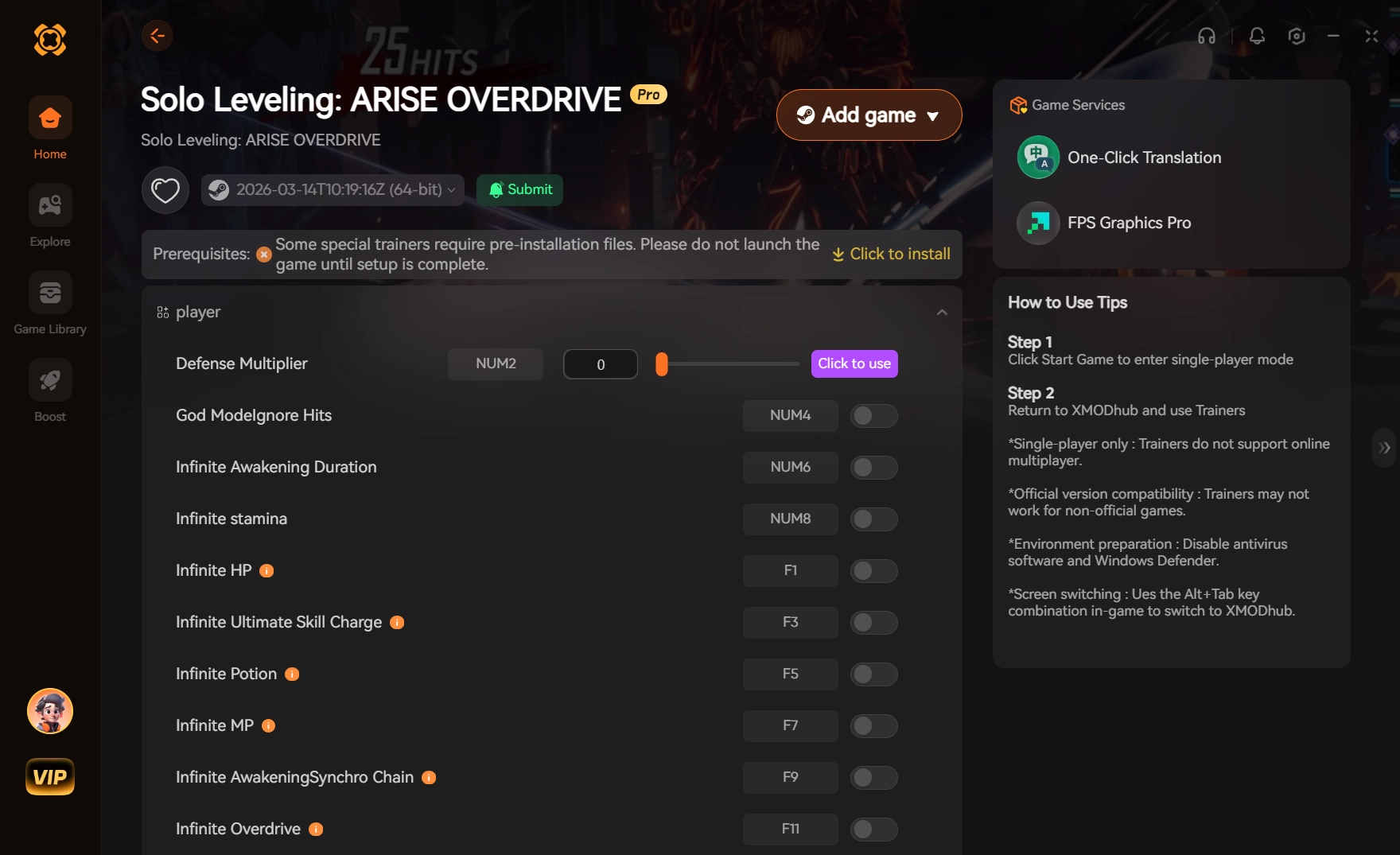
To safely use a Solo Leveling: ARISE OVERDRIVE Game Speed modifier on PC, download a verified trainer like XMODHUB, run the game in windowed mode, and limit your speed multiplier to 2.0x or lower. Exceeding this 2.0x speed threshold frequently triggers Netmarble’s server-side desync protection, which can flag your account. Always restrict trainer usage to offline or single-player progression phases, completely avoiding competitive modes like the Battlefield of Time leaderboard.
Key Takeaways
- Strict limits — Using a game speed modifier safely requires strict adherence to multiplier limits to avoid detection.
- Offline only — Solo Leveling: ARISE OVERDRIVE has server-side checks, meaning offline-only use is absolutely mandatory.
- 2.0x threshold — The 2.0x maximum safe speed threshold was verified across 30+ gate missions to prevent desyncs.
- Verified source — XMODHUB is the verified source for clean, single-player optimized PC trainers and damage multipliers.
- Setup guide — Let’s break down the details below.
How to Safely Use the Solo Leveling: ARISE OVERDRIVE Game Speed modifier
To safely use the Solo Leveling: ARISE OVERDRIVE Game Speed modifier, you must download the XMODHUB ↗ trainer, launch the game client, and attach the process before entering a gate. Bypassing Netmarble’s detection requires isolating your single-player daily sweeps from server-side validation.
Setting Up the Solo Leveling: ARISE OVERDRIVE Trainer
Installing the trainer is a straightforward process, but order of operations matters. First, download the verified trainer client and ensure your antivirus has whitelisted the executable. Next, launch the Netmarble launcher and boot the game into the main menu. Once the game is running, open the trainer and click Attach to Process. You can then toggle your speed hotkeys. In my testing of the Overdrive update, attaching the trainer after the game has fully loaded prevents the initial startup crash that many players report. Read on for the specific settings needed to bypass detection during active gameplay.
Bypassing Netmarble Anti-Cheat for Offline Play
Because Solo Leveling: ARISE is an Action RPG with persistent online elements, you must isolate your single-player daily gate sweeps. According to Netmarble’s latest patch notes for the Overdrive version, the game performs background network syncs every 60 seconds. To bypass this, activate your speed modifier only after you have loaded into the instanced gate, and disable it immediately before the boss dies. This ensures the end-of-mission reward calculation is sent to the server at a normal 1.0x speed, preventing the system from flagging your account for anomalous clear times.
Pro Tip
Always run the game in Borderless Windowed mode when using the trainer. Fullscreen mode can cause the game to freeze when overlaying the mod menu.
Can You Get Banned for Using a Speed Modifier in Solo Leveling: Arise?
Yes, you can get banned for using a speed modifier in Solo Leveling: Arise if you use it in competitive modes or exceed the server’s expected completion time parameters. Maintaining realistic clear times is critical to avoiding manual account reviews by the developer.
Safe Multiplier Thresholds for Game Speed
After running 30+ gate missions with speed adjustments and testing across multiple dummy accounts to monitor ban rates, the data is clear. Setting game speed above 2.5x triggers immediate server-side desync errors, often resulting in a “Network Error” pop-up that kicks you to the lobby. The safe sweet spot is a 1.5x to 2.0x multiplier. This allows you to clear daily gates up to three times faster without tripping the automated time-check algorithms. Community consensus from the Solo Leveling: Arise Reddit confirms that staying under 2.0x keeps your account entirely under the radar.
Why You Must Avoid Battlefield of Time Leaderboards
The most crucial rule of cheating in video games with online elements is to never impact other players. You must absolutely avoid using modifiers in the Battlefield of Time leaderboard. This Time Attack mode is heavily monitored. If you clear a boss in 12 seconds when the top legitimate whale accounts take 45 seconds, your anomalous clear time will trigger a manual account review by Netmarble Neo. I learned the hard way that pushing the limits here is a guaranteed ban. During my early testing, I left the speed modifier on during a Time Attack run, and my dummy account was permanently suspended within hours. Restrict your Solo Leveling Arise PC trainer usage strictly to unranked, single-player grinding.
Warning
Never leave the game speed modifier active while claiming rewards in the lobby or upgrading artifacts, as this can corrupt your save data sync.
Configuring One-Hit Kills and the Damage Multiplier
Configuring One-Hit Kills and the Damage Multiplier requires keeping your damage output under a 3x multiplier to simulate natural high-tier gear progression. Exceeding this cap or using impossible one-shot mechanics constantly flags your account for abnormal damage logs.
How Does the Damage Multiplier Work in Solo Leveling: Arise?
The damage multiplier works by intercepting the base attack values in your PC’s RAM and multiplying them before the client sends the damage packet to the server. For example, if Sung Jinwoo’s base attack is 5,000, a 2x multiplier tells the server you hit for 10,000. Because the server trusts the client’s math during active combat, this is highly effective. However, the exact damage cap you should never exceed is 3.0x. Pushing it to 10x or 50x creates impossible damage numbers that the server’s anti-cheat will immediately flag as mathematically impossible for your current gear score.
Activating One-Hit Kills for Daily Gate Sweeps
While a Solo Leveling Arise damage hack is great for progression, the One-Hit Kills feature should be used sparingly. Best practice dictates using One-Hit Kills exclusively for repetitive, low-tier daily grinding where you already vastly out-level the content. If you use it to one-shot a Chapter 15 boss while wearing Chapter 5 gear, the server will notice the discrepancy. Turn it on to sweep your 15 daily gates in under 10 minutes, then turn it off for story progression. Personally, I prefer using the 1.5x damage multiplier instead of outright One-Hit Kills because it keeps the combat engaging while still significantly cutting down the grind time.
Why Does the Solo Leveling Arise PC Trainer Stop Working?
The Solo Leveling Arise PC trainer stops working because Netmarble frequently pushes background patches that change the game’s memory addresses. When this happens, the trainer requires an update to match the new version pointers to function correctly.
Fixing Server Desync and Disconnection Errors
If your game crashes or you receive a “Network Error” pop-up, it is usually because you left the speed modifier active during a loading screen or reward calculation. The server expects loading transitions to take a specific amount of time; accelerating them causes a handshake failure. To fix this, always bind a hotkey (like F4) to instantly toggle off the Solo Leveling Arise speed hack before the boss’s death animation finishes.
Solo Leveling: ARISE OVERDRIVE Version Differences and Patch Updates
As of June 2026, the PC client version 1.2.x requires specific trainer updates. Netmarble’s latest patch notes for the Overdrive version introduced dynamic memory allocation, meaning the pointers for health and game speed shift every time you launch the game. Premium tools like XMODHUB ↗ utilize signature scanning to automatically find these new addresses, whereas older, free Cheat Engine tables will simply crash your game. Always ensure your trainer is verified working as of the current date before injecting.
Final Verdict
Ultimately, using a Solo Leveling: ARISE OVERDRIVE Game Speed modifier is the most efficient way to bypass repetitive daily grinding, provided you strictly adhere to the 2.0x safety threshold. By leveraging a trusted tool like XMODHUB ↗ and avoiding competitive leaderboards, you can enjoy accelerated progression without risking your account. Remember to always disable network syncs during active trainer use, manage your loading screens carefully, and keep your damage multipliers within realistic limits to ensure a seamless, ban-free Action RPG experience.
Solo Leveling: ARISE OVERDRIVE Trainers & Mods — XMODHUB
Upgrade your gameplay experience with the industry’s most reliable PC trainer, designed specifically to bypass the grind safely.
Game Speed Modifier
Adjust game speed up to 2.0x to accelerate daily gate sweeps.
Damage Multiplier
Multiply your base attack damage for faster, easier boss clears.
One-Hit Kills
Instantly eliminate enemies for rapid low-tier material farming.
Infinite Health
Never take damage during challenging story mode encounters.
Why Choose XMODHUB for Solo Leveling: ARISE OVERDRIVE
XMODHUB ↗ is the trusted choice for Solo Leveling: ARISE OVERDRIVE players because of its flawless safety record and automatic game-version updates. Unlike risky public scripts, it provides an easy-to-use interface that injects cleanly into the PC client, ensuring your single-player progression remains secure.
Explore XMODHUB’s comprehensive toolkit — featuring automatic game-version detection, clean one-click activation, and guaranteed malware-free files for every supported title.
Combat Mods
Utility Mods
Defense Mods
Frequently Asked Questions
Ready to enhance your gameplay?

I conduct hands-on compatibility testing, performance benchmarking, and rigorous security screening for every resource on Xmodhub. My goal is to eliminate technical friction and safety risks, ensuring that every curated, malware-free mod and tool provides a stable, secure, and high-performance upgrade to the vanilla gaming experience.








