Catherine Hu
To fix a lost base beacon Subnautica 2 glitch, first check your PDA’s Beacon Manager tab to ensure the icon wasn’t accidentally toggled off. If the Unreal Engine 5 UI failed to render it, press F3 to open the developer console and type warpme to instantly teleport back to your primary base.
Editor’s Note
This survival guide addresses both spatial disorientation and the Unreal Engine 5 UI rendering bugs verified during the Subnautica 2 launch week. Utilizing native developer commands will permanently disable achievements on your save file. Always back up your SaveGames directory before altering core engine parameters or warping across the map.
We have all experienced this terrifying scenario. You are 1,500 meters deep in the newly introduced Abyssal Trench. Your cargo hold is packed with rare crystalline sulfur and late-game blueprints. Your oxygen is hovering at 15 percent. You spin around to head home, expecting to see that comforting blue house icon on your HUD, but there is absolutely nothing. Just pitch-black, endless ocean.
Dealing with a lost base beacon in Subnautica 2 is a heart-stopping moment. Sometimes it is a simple accidental click in your PDA, but currently, thousands of PC players are encountering a severe Unreal Engine 5 glitch where HUD elements simply vanish. Losing hours of scavenging progress because the game failed to render an icon is incredibly frustrating. As a veteran diver with over a thousand hours in the franchise, I am going to show you exactly how to fix the engine rendering bugs, find your way home, and ensure you never get lost again.
The UE5 Beacon Rendering Bug Explained
Subnautica 2 utilizes the cutting-edge Unreal Engine 5 to create its breathtaking underwater biomes. However, the game’s dynamic UI streaming system currently struggles with memory management.
When you travel several kilometers away from your primary habitat, the engine occasionally attempts to save VRAM on DX12 by culling distant blueprint markers. When you turn back toward home, the engine fails to reload the HUD asset, resulting in a lost base beacon Subnautica 2 bug. The beacon physically exists in the world, but the graphical icon refuses to display on your visor, leaving you completely blind in the dark.
Technical Fix: Stabilizing the Subnautica 2 HUD
If your navigation markers are constantly flickering, disappearing, or causing frame drops when you look in their direction, you must stabilize the engine’s rendering pipeline.
-d3d11 into the Launch Options box. This forces the game into a much more stable rendering API.In-Game Fix: PDA Settings and Console Commands
Before you panic, press Tab to open your PDA and navigate to the Beacon Manager menu. It is incredibly easy to accidentally click the visibility toggle off while organizing your inventory. If the eye icon next to your base is grayed out, simply click it to turn it blue again.
If the UI is completely bugged and you are about to drown, you can forcefully save your own life using the game’s built-in developer backend.
Subnautica 2 natively supports console commands. Press the F3 key, uncheck the “Disable Console” option at the top left, and press the Tilde (~) key to open the text input field.
warpme to instantly teleport your character and your inventory back to the last base or vehicle you entered.item beacon 1 to spawn a brand new beacon in your inventory. You can drop this to mark your current location before you die, so you can easily return for your dropped loot.The Ultimate Navigation Tool: XMODhub
Let us be brutally honest: fumbling to press F3, unchecking a tiny box, and desperately typing case-sensitive console commands while your oxygen is rapidly depleting is a miserable experience. If you make one typo, your character drowns, and your inventory scatters across the unrecoverable sea floor.
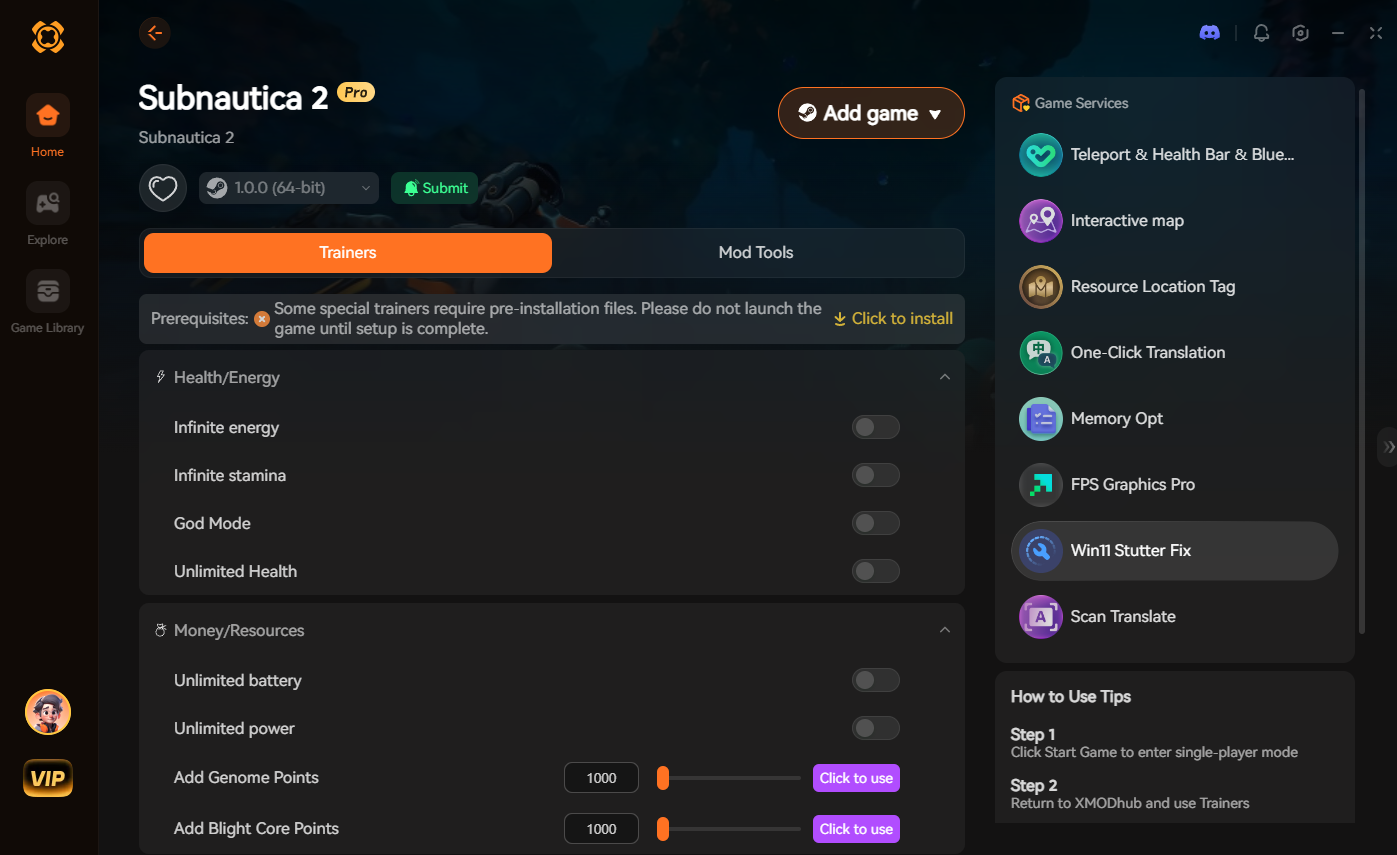
If your primary goal is to enjoy the exploration without the punishing anxiety of a broken navigation system, you need a dedicated modification tool. This is exactly where XMODhub becomes your ultimate deep-sea asset.
Instead of fighting clunky native menus and engine rendering bugs, XMODhub injects safely into Subnautica 2, allowing you to bypass the danger entirely with a single hotkey.
How to Get Started:

Troubleshooting: Dropped Beacons Clipping Through the Floor
Sometimes, when you drop a physical beacon to mark a shipwreck, the game’s collision physics break, causing the beacon to fall straight through the cavern floor and into the void. If your beacon is slowly drifting 5,000 meters below the map, it will clutter your HUD permanently. Open your PDA Beacon Manager and permanently disable its visibility, then use the console command item beacon 1 to replace the lost hardware.
Frequently Asked Questions (FAQ)
A: This is usually caused by two things: accidentally clicking the visibility toggle in your PDA’s Beacon Manager, or an Unreal Engine 5 DX12 rendering glitch where the game unloads the distant HUD marker to save memory.
A: Yes, opening the native developer console and inputting any command will instantly flag your save file and permanently disable Steam achievements for that playthrough. Using a secure memory trainer like XMODhub is the safest way to bypass this detection.
A: Yes, if you happen to have Copper Ore and Titanium in your inventory, you can craft a deployable beacon. However, if you do not have a Fabricator nearby, you will need to rely on console commands like warpme to survive.
Conclusion
Exploring the terrifying, pitch-black depths of Subnautica 2 is an incredible rush, but losing your way home because of a rendering glitch is completely unnecessary. Whether you choose to apply the technical DX11 fixes, use developer commands to teleport to safety, or utilize a dedicated trainer, you have the power to conquer the ocean.
However, for a flawless, risk-free experience where you dictate the rules of your own survival, a dedicated modification tool is always the smarter choice. XMODhub supports over 5,000+ single-player PC games—including massive survival and exploration hits like The Planet Crafter, No Man’s Sky, and Breathedge. Take back your gaming time and explore exactly how you want.

I am a passionate gamer and writer at XMODhub, dedicated to bringing you the latest gaming news, tips, and insights.
Connect with me:
LinkedIn Profile ↗


 Nancy Miller